Why Cleaning Your Clear LCD Display Matters
Even the best LCD panels can lose their edge if the screen is layered with oils, fingerprints, or dust. Here’s why regular, safe cleaning is a must:
- Image Clarity: Dirt and smudges reduce contrast and make visuals dull.
- Sensibilidade ao Toque: For capacitive or resistive touchscreens, grime can interfere with touch accuracy.
- Hygiene: In shared or public-facing devices, cleaning minimizes germ transmission.
- Device Longevity: Using improper cleaners may erode coatings or damage polarizers.
Especially for industrial LCDs, clean screens mean safer operation, more accurate readings, and better user experience.
What You Need Before You Start Cleaning
Before jumping in, avoid the urge to grab glass cleaner or paper towels. Those are big no-nos. Instead, gather these screen-friendly supplies:
✅ Recommended Tools
| Item | Purpose |
|---|---|
| Microfiber cloth | Lifts dirt without scratching |
| Distilled water | Non-conductive, streak-free base liquid |
| 50/50 water + isopropyl alcohol (optional) | Disinfects without damaging coatings |
| Compressed air (optional) | Blows off loose dust, ideal for bezels |
Avoid:
Paper towels, rough cloths, ammonia-based cleaners (like Windex), window spray, or tap water—they can leave scratches or mineral streaks.
Step-by-Step: How to Clean an LCD Display Properly
Cleaning your clear LCD display doesn’t take long—but it must be done right. Here’s a simple, safe routine:
Step 1: Power Off the Device
Unplug it entirely or shut it down. This prevents electric shock, reduces risk of pixel damage, and helps you see dirt clearly.
Step 2: Dust First (Optional)
Use a can of compressed air to gently blow away loose dust or debris—especially around edges and ports.
Step 3: Use a Dry Microfiber Cloth
Gently wipe the screen in circular or vertical motions. Don’t press hard—light pressure is enough to lift off most dust and prints.
Step 4: Damp Clean with the Right Solution
If dry wiping doesn’t remove smudges:
- Lightly dampen (not soak!) one corner of a microfiber cloth with distilled water or the 50/50 alcohol mix.
- Wipe gently across the screen.
- Use the dry part of the cloth to buff dry and prevent streaks.
Step 5: Let It Dry Before Powering Back On
Give the screen a few minutes to air dry completely before turning the device back on.
What NOT to Do When Cleaning an LCD Screen
Some mistakes can cause irreversible damage. Avoid the following:
- Don’t spray liquid directly on the screen. Always apply to the cloth first.
- Don’t use window cleaner or alcohol above 70%. These can degrade anti-glare or optical bonding layers.
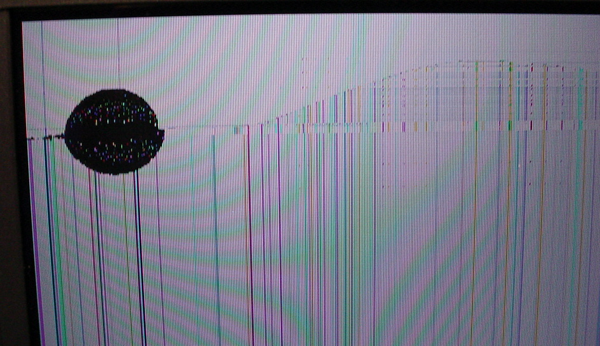
- Don’t rub hard. Excessive pressure may cause pixels to fail or dislodge internal layers.
- Don’t clean while the screen is on. Heat + moisture = risk.
Special Considerations for Industrial and Touch LCDs
For rugged displays in factories, kiosks, or medical devices, you may face grease, dust, or chemical residue. In those cases:
- Use anti-static wipes or professional-grade screen-safe solutions (ask your supplier for recommendations).
- For medical-grade LCDs, check if the display is rated for disinfectant wipes ou alcohol pads.
- Para ecrãs com ligação ótica, tenha cuidado extra — os riscos não podem ser polidos como nos protetores de vidro.
FAQ: Perguntas Frequentes
Q1: Posso usar limpador de óculos no meu ecrã LCD?
Apenas se for livre de álcool e amoníaco. Verifique o rótulo. Caso contrário, use água destilada ou uma mistura de isopropílico 50/50.
Q2: Com que frequência devo limpar o meu ecrã LCD?
Para dispositivos pessoais, a cada 1–2 semanas. Para ecrãs partilhados ou industriais, pode ser necessária uma limpeza diária ou por turno.
Q3: E se o meu ecrã LCD tiver uma película protetora?
Limpe-o como faria com o LCD, mas verifique se é removível ou de uso único — algumas películas não são destinadas a uso prolongado.
Q4: Os kits de limpeza para ecrãs LCD valem a pena?
Muitos são simplesmente panos de microfibra + álcool diluído. São adequados, mas nem sempre melhores que soluções caseiras.
Q5: Posso usar álcool 100% para limpar o meu LCD?
Não. O álcool puro pode remover camadas ou turvar películas óticas. Dilua sempre para 50–70%.
Q6: Como remover resíduos pegajosos de um ecrã?
Use um pano de microfibra humedecido com álcool diluído e deixe atuar no local durante alguns segundos antes de limpar.
Recursos de referência