Facing a bottleneck in your Embedded Display Project?
Don’t let complex integration or supply chain issues slow your time-to-market. Book a free consultation with the RJY expert team for tailored design and manufacturing support.

Android touch and HDMI touch screens can coexist, and they’re already doing so in various industrial, retail, and consumer environments. However, this dual functionality doesn’t come automatically—it depends on hardware support, USB recognition, and driver availability.With the rise of modular displays and touchscreens powered by HDMI + USB, Android systems have evolved to support external touch inputs alongside built-in touch screens. Let’s break down how this actually works.
Fristly, Android touch and HDMI touch can coexist, but only if the system is designed and configured correctly. The key point is that HDMI does not normally carry touch input. In a typical HDMI touch display setup, HDMI sends the video signal to the external display, while USB sends the touch signal back to the Android device.
This distinction is important for Android display projects. Many customers describe an external monitor as an “HDMI touch screen,” but the touch function usually depends on a second connection, most commonly USB. The Android board must support HDMI output, USB Host or OTG input, a compatible touch device driver, and correct input mapping. If any of these conditions are missing, the display may show the Android interface correctly but the touch function may not respond.
For industrial Android displays, smart control panels, kiosks, HMI terminals, and embedded systems, Android touch and HDMI touch coexistence should be evaluated as a system-level integration issue. It is not only a cable question. It involves display output, touch input, driver support, firmware configuration, input routing, power supply, grounding, and final application behavior.
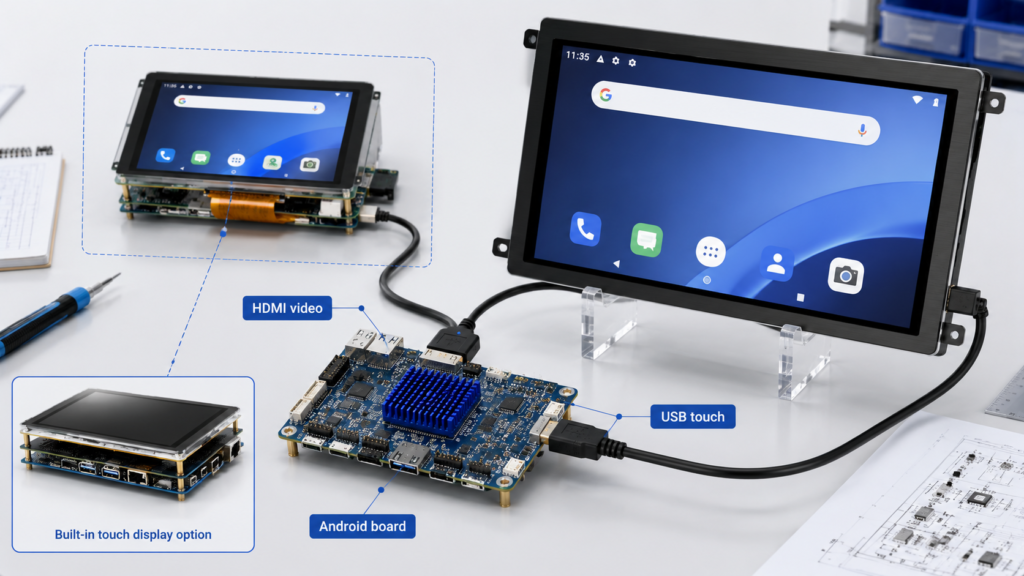
An Android touch screen usually refers to a display and touch panel that are directly integrated with an Android device or Android controller board. In embedded products, the display may connect to the Android board through MIPI, LVDS, eDP, RGB, HDMI, or another display interface, while the touch panel may connect through I2C, USB, SPI, or another touch interface depending on the hardware design.
The Android system receives touch data through its input subsystem. Android documentation explains that touch devices may be internal built-in touch screens or external touch peripherals such as USB or Bluetooth HID touch screens and touch pads.[1] In a custom Android board, built-in touch devices often require device-specific configuration so that the system can interpret the touch area, orientation, calibration, and display association correctly.
In a standard Android panel product, the built-in touch screen is usually matched with the built-in display during firmware development. The user touches the same physical screen that displays the Android interface. This is the simplest case because the display area and touch input area are designed as one system.
An HDMI touch screen is usually an external display that receives image data through HDMI and sends touch data through a separate USB connection. HDMI itself is primarily a digital audio, video, and data interface for connecting displays to source devices.[2] In most touch monitor designs, the touch sensor does not send touch coordinates through the HDMI video signal path.
This means an HDMI touch screen normally requires at least two connections. The HDMI cable carries video from the Android board to the display. The USB cable carries touch input from the display back to the Android board. Some products may also require a separate power input for the external monitor.
In practical terms, an HDMI touch display should be understood as “video by HDMI, touch by USB.” If the HDMI cable is connected but the USB touch cable is not connected, the screen may display the Android interface but will not behave as a touch screen. If the USB cable is connected but Android does not recognize the touch device, the result is the same: video works, touch does not.
Android can support multiple input devices, including built-in touch panels and external USB HID touch devices, but coexistence depends on the Android board, kernel, firmware, input configuration, and display mode. A built-in Android touch screen and an external HDMI USB touch monitor may both generate touch events, but the system must know how to interpret and route those events.
In a simple mirrored-display setup, the Android board outputs the same image to the built-in display and the HDMI display. In that case, an external USB touch monitor may act like another input device controlling the same Android interface. This can work if the USB touch device is recognized as an absolute touch device and the coordinate mapping matches the displayed image.
In a true multi-display setup, the problem becomes more complex. Android documentation explains that multi-display input routing can require routing information for displays and input panels, especially when input panels are associated with specific displays.[3] Without correct routing, touch input from the HDMI touch screen may control the wrong display, map incorrectly, or behave like a mouse pointer instead of a direct touch surface.
Therefore, the correct answer is conditional: Android touch and HDMI touch can coexist, but the integration must be verified on the actual Android board, Android version, kernel configuration, display mode, and touch device.
In an Android HDMI touch setup, the signal path is split into two parts. Video output goes from the Android board to the external display through HDMI. Touch input goes from the touch controller inside the display back to the Android board through USB.
The USB touch device is often presented to the system as a HID-class input device. The USB Implementers Forum describes the HID class specification as a way for HID manufacturers to build USB-compatible devices and for HID class drivers to extract data from USB devices.[4] Many external touch monitors use this approach because it improves compatibility with common operating systems.
On Android, the input subsystem receives the touch events and passes them through the input framework. If the device is recognized correctly, Android can use the touch coordinates as screen input. If the input device is not recognized, is classified incorrectly, or lacks the required configuration, the touch behavior may be wrong even when the USB connection is physically working.
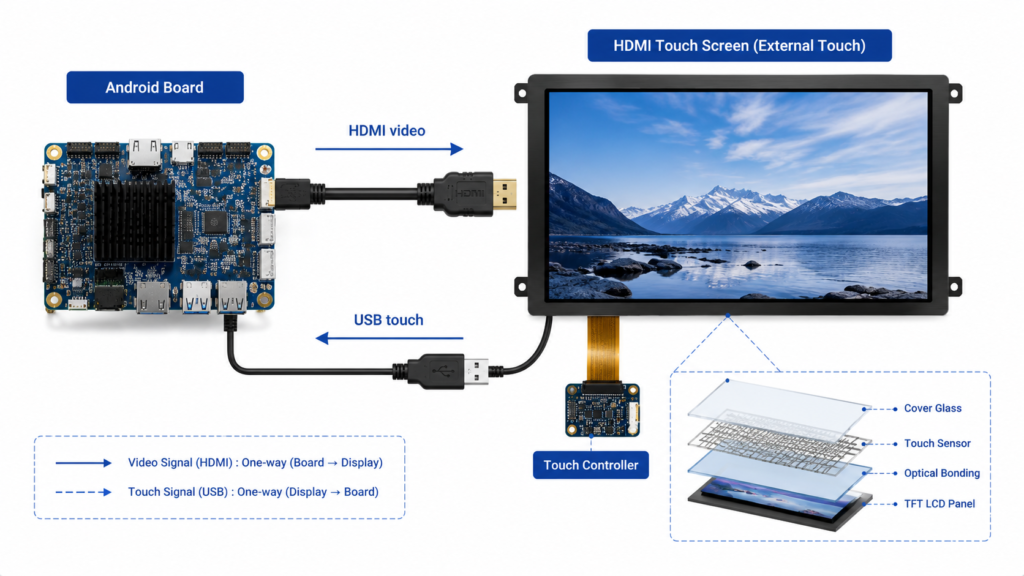
A typical Android HDMI touch display connection uses the following structure:
| Connection | Main Function | Engineering Note |
|---|---|---|
| HDMI | Sends video from the Android board to the display | Check resolution, refresh rate, EDID behavior, and cable quality |
| USB | Sends touch data from the display to the Android board | Requires USB Host or OTG support and compatible input recognition |
| Power | Powers the external display and touch electronics | Some HDMI touch monitors require external power |
| Grounding and shielding | Improves signal stability | Important in industrial or long-cable environments |
For a quick functional test, connect HDMI first and confirm the display output. Then connect the USB touch cable and check whether Android detects a new input device. If the display works but touch does not, the problem is usually on the USB input side, not the HDMI video side.
Before using an HDMI touch screen with an Android board, engineers should review both hardware and software compatibility. A display that works on a Windows PC may not automatically work on every Android board because Android builds vary by chipset, kernel configuration, firmware, USB behavior, and input mapping.
| Item to Check | Why It Matters | Common Risk |
|---|---|---|
| HDMI output support | The Android board must output video to the external screen | No display, wrong resolution, unstable image |
| USB Host or OTG support | The Android board must receive touch data from the USB touch controller | Touch device not detected |
| USB HID touch compatibility | Many external touch screens rely on HID input behavior | Touch appears as mouse, touchpad, or unknown device |
| Input device configuration | Android may need configuration for touch behavior and mapping | Wrong coordinate mapping or incorrect orientation |
| Display mode | Mirroring and multi-display modes behave differently | Touch controls the wrong screen |
| Power supply | The external display and touch controller require stable power | Intermittent touch response or display flicker |
| Cable quality | HDMI and USB cable quality affect video and touch stability | Ghost touch, disconnects, or unstable image |
| Firmware support | Custom Android boards may require firmware adjustment | Display works during testing but fails in production configuration |
The most reliable approach is to test the exact display, Android board, OS image, cable set, and power configuration that will be used in the final product. Compatibility should not be assumed from connector type alone.
When an Android device has a built-in touch screen and an external HDMI touch display, there are several possible behaviors. The external HDMI display may mirror the built-in screen. The system may treat the external USB touch as another input device controlling the same interface. Or, in a more advanced multi-display environment, the external touch input may need to be mapped to a specific display.
If the system is only mirroring the same Android interface, coexistence is usually simpler. Both touch sources may control the same screen content. This can be acceptable for kiosks, test fixtures, smart panels, or development environments where duplicated interaction is enough.
If the product requires separate content on different displays, the integration becomes more difficult. The Android build must support multi-display behavior, and input routing must be configured so the correct touch device controls the correct display. Android’s multi-display documentation defines primary and secondary displays and explains that secondary displays use display IDs other than the default display.[5] This distinction matters when touch input must be associated with a non-primary display.
For industrial products, this should be tested during the development stage. It is risky to assume that any Android HDMI output plus any USB touch monitor will automatically create a stable dual-touch, dual-display system.
The most common issue is that HDMI video works but touch does not. This usually means the display output path is correct, but the USB touch path is not working or is not recognized by Android. The engineer should check the USB cable, USB port, power supply, USB Host mode, and whether the touch controller appears as an input device.
Another common issue is incorrect touch mapping. The user touches one part of the HDMI screen, but the cursor or touch response appears in another location. This can happen when the touch area, orientation, or display association is wrong. Android input device configuration files can affect input device behavior, and Android documentation notes that built-in touch devices generally require correct device-specific configuration.[1]
Ghost touch or unstable touch response may be caused by poor grounding, long USB cables, electrical noise, insufficient power, low-quality touch controllers, or firmware issues. This is especially relevant in industrial environments where motors, relays, power converters, and long cable runs may create interference.
For debugging, engineers may use Android tools and logs to check whether the touch device is detected and which events it generates. On engineering builds, commands such as input inspection, kernel logs, and Android input dumps may help identify whether the device is recognized as a touchscreen, touchpad, mouse, or unknown input source.

HDMI touch screens are useful when the project needs a modular display architecture. Instead of designing a custom MIPI or LVDS display from the beginning, an Android board can output video through HDMI and receive touch input through USB. This can simplify early prototyping and allow the product team to evaluate UI size, resolution, and touch interaction faster.
HDMI touch can also be useful for kiosks, POS terminals, industrial test stations, smart control panels, digital signage with interaction, factory terminals, and equipment interfaces where the display is physically separate from the Android controller board.
However, HDMI touch is not always the best choice for mass production. HDMI connectors and USB cables may take more space than board-level display interfaces. Cable reliability, locking structure, EMC performance, power supply, enclosure design, and long-term availability must be reviewed. For compact embedded products, a direct LCD module with MIPI, LVDS, eDP, or RGB interface may be more suitable.
A native Android display module or display-plus-controller-board solution may be better when the project needs a compact mechanical structure, stable touch mapping, controlled firmware, long-term production consistency, or a cleaner internal assembly. In this structure, the LCD, touch panel, controller board, firmware, and enclosure can be designed as one integrated system.
This approach is often preferred for industrial HMI panels, smart home control panels, medical equipment interfaces, embedded terminals, and other OEM products where the display is not only a monitor but part of the final product design.
The decision between HDMI touch and a native Android display solution should be based on the project stage. HDMI touch can be convenient for prototyping and modular systems. A direct LCD module or integrated Android display solution may be better for production products where size, reliability, firmware control, and mechanical integration matter more.
Before deciding whether Android touch and HDMI touch should coexist in a product, engineers should confirm the real system architecture. Is the HDMI display only mirroring the Android screen, or does the product require independent content on multiple displays? Is the touch input expected to control the primary display or a secondary display? Is the touch monitor recognized as a USB HID touchscreen? Does the Android board support USB Host mode? Does the firmware support the required input routing?
Mechanical and electrical questions are also important. How long are the HDMI and USB cables? Is the display installed inside the same housing as the Android board, or is it mounted remotely? Is the environment exposed to electrical noise, vibration, or frequent cable movement? Does the display need separate power? Are locking connectors required?
These questions should be answered before sample approval. Many touch problems are not caused by the LCD panel itself. They are caused by incomplete system integration.
RJY Display provides TFT LCD products, controller boards, Android controller board support, and customization services for B2B display projects. For Android touch and HDMI touch applications, RJY Display can help review display size, resolution, interface, touch type, controller board requirement, USB touch behavior, firmware needs, enclosure structure, and final product use.
If your project requires an Android display, HDMI touch monitor integration, TFT LCD with controller board, or a custom touch display solution, contact RJY Display with your technical requirements. Useful information includes the Android board model, Android version, display size, resolution, HDMI output requirement, USB touch type, touch controller information, power requirement, enclosure structure, annual demand, and sample target.
Android can recognize the touch input from an HDMI touch screen if the touch signal is sent through USB or another supported input interface and the Android system recognizes the device correctly. HDMI itself normally carries the video signal, not the touch signal.
In typical HDMI touch monitor designs, no. HDMI transmits the display signal, while the touch data is usually sent through a separate USB connection.
Yes, they can work together if the Android board, kernel, firmware, USB input support, and display mapping are configured correctly. In more complex multi-display systems, input routing may need additional configuration.
This usually means the HDMI video path is working but the USB touch path is not recognized. Check the USB cable, USB Host support, touch controller compatibility, power supply, and Android input device detection.
Many USB HID touch screens can work with standard input support, but some touch controllers or custom Android boards may require driver, firmware, or input configuration changes.
HDMI touch can be suitable for kiosks, test stations, modular HMI systems, and prototyping. For compact production products, a direct LCD module or integrated Android display solution may offer better mechanical reliability and firmware control.
Share your display size, resolution, interface, brightness, touch requirement, controller board requirement, and application environment.
Continue reading related display technology guides and application references.


Explore product pages related to this article topic.




Talk to RJY’s engineering team for display matching, controller board review, and customization discussion.









