産業用包装機のHMI向けTFT LCDの選定方法

A packaging machine may combine mechanical stations, conveyors, sensors, pneumatic or servo-driven actuators, PLC logic, motion control, safety functions, recipe handling, and an operator interface. A TFT LCD can make the operator interface more effective, but it is not the PLC, motion controller, or safety system.

For an equipment OEM, the useful question is not simply “Which touchscreen should we install?” The display must support the actual workflow for normal operation, product changeover, maintenance, fault recovery, and permitted configuration while fitting the selected HMI host, enclosure, and machine architecture.

This guide explains how to select a TFT LCD for an industrial packaging machine HMI without confusing the display layer with machine control, motion control, external video, touch input, or safety functions.

Separate the HMI From the Machine-Control Architecture

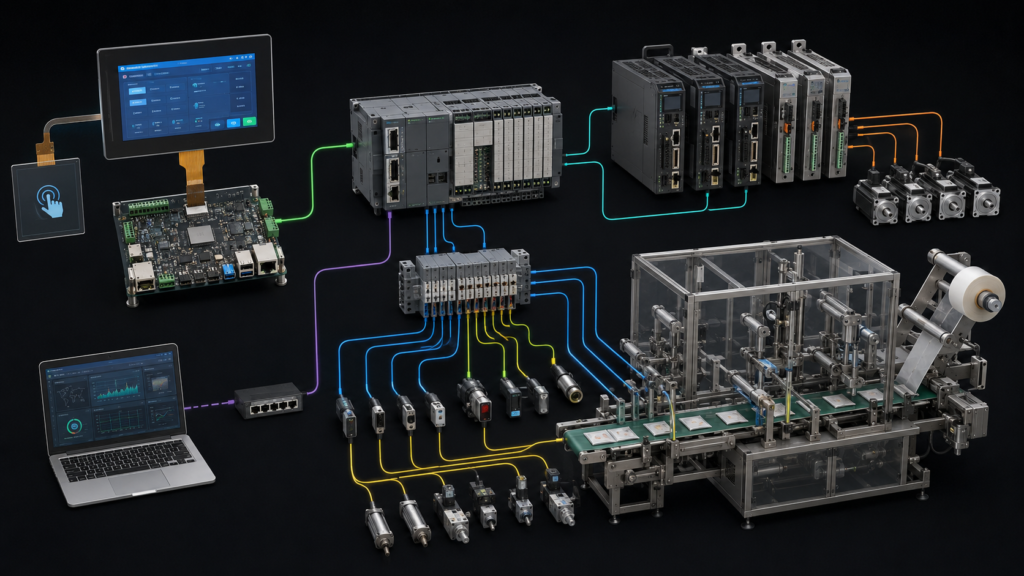
A practical packaging machine has several different layers. The HMI presents machine information and accepts permitted operator requests. The HMI host renders graphics and manages the display and touch software. A PLC or machine-control system coordinates the defined equipment sequence. Motion controllers, drives, sensors, pneumatic hardware, and mechanical stations perform their separate roles within the completed machine design.

These layers may be housed in the same machine enclosure, but they should not be specified as interchangeable. A TFT LCD does not execute PLC logic, establish motion accuracy, determine product quality, or provide a safety function. Touch input is also not a replacement for dedicated emergency or machine-safety controls required by the complete equipment design.

Packaging machine system showing separate TFT HMI, PLC, motion hardware, sensors, actuators, and remote workstation

For packaging equipment, a common state model can help create a more consistent operator experience across a line. OMAC describes PackML as an automation standard intended to support consistent machine states and data exchange across packaging systems.1 An HMI may present machine states and permitted requests, but the display is not the source of the state logic itself.

Start With the Operator Workflow

Panel size and resolution should follow the actual task sequence. A compact form-fill-seal machine may need a clear current state, product selection, alarm priority, setup prompts, and basic maintenance views. A larger cartoner, case packer, or integrated line may need additional recipe information, station-level status, changeover guidance, production counters, user access, and service functions.

Create representative screens before selecting the panel. Include the real navigation depth, expected product variants, recipe names, alarm scenarios, user roles, touch targets, maintenance actions, and operator viewing distance. This prevents a common error: selecting a display by diagonal size before understanding how much information must be handled at the machine.

A useful packaging HMI should make the present mode, active machine state, current operator action, and next permitted step understandable. It should not force the operator to search through detailed diagnostics during ordinary production, nor should it expose configuration actions in a way that conflicts with the completed machine’s access-control strategy.

Use Recipe and Changeover Requirements to Define the Interface

Packaging equipment often changes between product formats, package materials, labeling layouts, or downstream handling requirements. The HMI should help the operator follow the approved changeover workflow, but the display itself does not validate mechanical adjustment, tooling installation, sensor position, product suitability, or the final machine setup.

Define the content required for a changeover: product identification, permitted recipe selection, setup steps, maintenance prompts, machine state, missing prerequisites, and recovery behavior. Determine which information must remain visible while an operator is working beside the machine and which information belongs in a service or engineering view.

PackML concepts can be relevant when a packaging machine must integrate with other line equipment because they encourage a common operational model. Their use should be determined by the project’s automation architecture; an LCD module does not make a machine PackML-compatible by itself.2

表示インターフェースを実際のHMIホストに適合させる

Raw TFT LCD modules normally use a native interface such as RGB, LVDS, MIPI DSI, or eDP. The chosen HMI host must support the exact panel interface, timing, pixel format, power sequence, connector arrangement, display orientation, backlight control, and software configuration.

Verify the panel datasheet and host documentation together before selecting samples. Check pin assignments, timing, voltage levels, FPC routing, display driver availability, startup sequence, power behavior, touch-controller connection, and service access in the final machine.

If the intended host provides HDMI while the panel requires raw MIPI DSI, RGB, LVDS, or eDP, a passive cable cannot make the conversion. The system requires a compatible active controller or bridge that supports the video source and the exact panel. This active hardware becomes part of the electrical, software, thermal, mechanical, and lifecycle design.

Processor display support must also be considered deliberately. NXP’s LCD interface documentation describes a driver for a defined display-interface peripheral; it does not imply universal compatibility between processors, carrier boards, panels, cables, and operating-system images.3

Keep Touch Input Separate From Video and Safety Functions

The touch interface is separate from the TFT video path. A projected-capacitive or resistive touch sensor has its own controller, firmware, connection, grounding considerations, and host software path. The LCD interface drives pixels to the panel, while the touch system reports input back to the host.

Touch selection should reflect the machine environment and user workflow. Consider gloves, cleaning conditions, moisture, packaging dust, target size, cover-lens material, nearby equipment, grounding, and the consequences of unintended input. A generic claim that a display “has capacitive touch” is not enough to establish reliable use in a particular packaging machine.

Critical machine actions and safety functions must be addressed by the complete equipment design. A touchscreen may present machine status or accept approved commands, but it should not be described as a safety device merely because it is installed near packaging machinery.

Integrate the Display With the Machine Enclosure

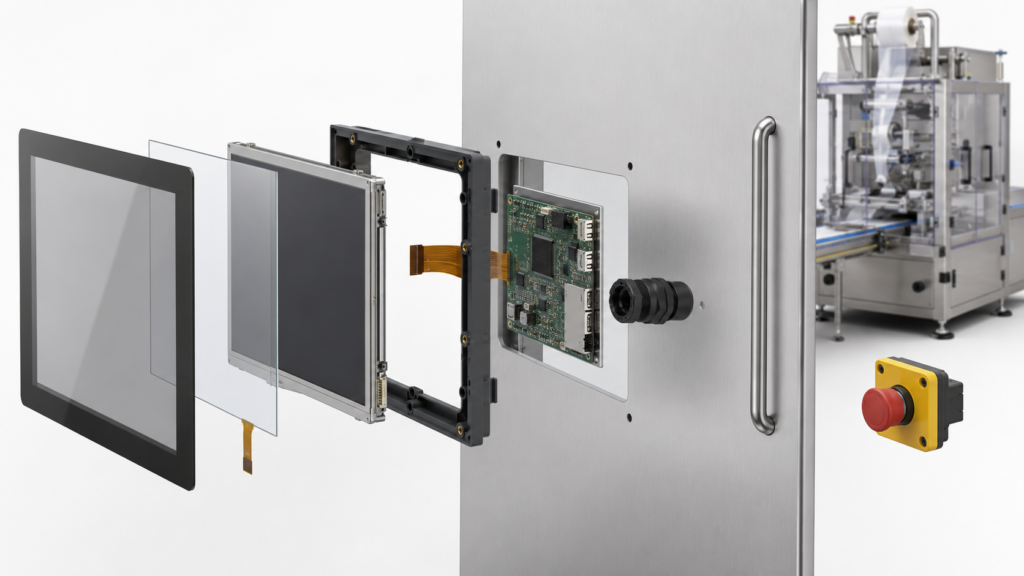
The finished HMI must fit the completed machine, not only operate on an open bench. Review the visible area, enclosure cutout, mounting method, cover lens, viewing angle, connector access, FPC bend limits, cable routing, panel-door movement, service access, internal heat sources, and expected lighting around the final display stack.

Packaging equipment can be installed in environments with frequent cleaning, reflections from factory lighting, changing operator positions, and repeated access to the machine. Evaluate readability using the intended mounting angle, representative interface content, and completed cover assembly rather than relying only on a bare-panel specification.

Exploded TFT touchscreen, touch sensor, HMI board, and machine-door assembly for packaging equipment

Electrical performance, enclosure suitability, hygiene-related design requirements, machine safety, and compliance are properties of the completed machine. Selecting a display module alone does not establish any of these outcomes.

Plan Startup, Fault, and Recovery Behavior

The HMI should communicate whether it is starting, connected, in maintenance, waiting for a machine state, or recovering from a fault. A frozen interface, stale recipe indication, or delayed communications screen can create operator confusion if the application does not identify its condition clearly.

Define display behavior for power-up, host restart, communication loss, recipe loading, mode change, changeover interruption, alarm acknowledgement, and controlled recovery. The machine-control architecture should determine which requests are permitted in each condition; the HMI should present that information clearly.

Do not use the presence of a status screen as evidence that an alarm decision, safety condition, product result, or machine state is valid. Those outcomes belong to the completed control and equipment design.

製品化意図のHMIを検証する

Validation should use the intended display, touch stack, HMI host, enclosure, harness, application software, representative machine configuration, and expected operating conditions. The goal is to confirm that the operator interface works in its intended context; it is not to infer mechanical performance, product quality, or safety compliance from the display selection.

A project-specific validation plan can include representative screen content, viewing positions, touch conditions, cleaning-related workflow, power-up behavior, display availability, touch initialization, recipe navigation, communication interruption, cable retention, panel access, and recovery after expected faults.

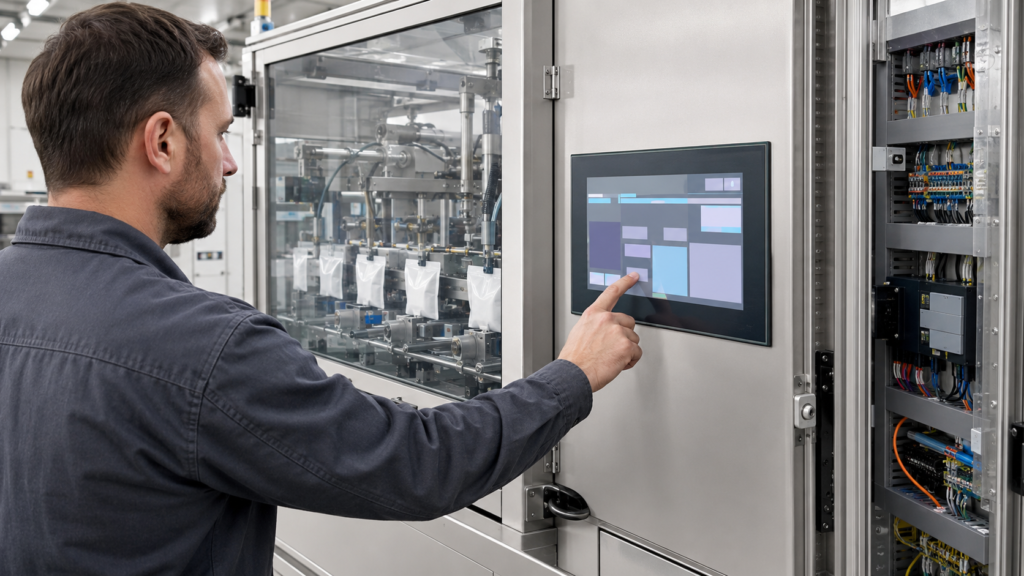
Engineer testing a packaging machine touchscreen HMI during a product changeover workflow

Write acceptance criteria before design freeze. Terms such as “easy to use,” “fast response,” or “readable” need a defined context: the screen content, viewing position, expected action, lighting condition, glove type, target size, and recovery behavior.

ディスプレイレビューのための有用な依頼書を作成する

For a packaging-machine HMI display review, provide the enclosure drawing, target active area, display orientation, representative GUI, host processor or board, available native display interfaces, expected recipe and changeover workflow, touch and cover requirements, cleaning conditions, cable constraints, power sequence, project stage, and estimated demand range.

RJY Display can review applicable existing display platforms and project-specific integration options around touch, cover lenses, backlight, interface, FPC, controller-board coordination, and mechanical fit. Feasibility depends on the confirmed module and application requirements. It should not be interpreted as a commitment to create any arbitrary LCD cell size from zero or to qualify a complete packaging machine.

Request a packaging-machine HMI display compatibility review 実用的な評価に必要なディスプレイ、ホスト、インターフェース、タッチ、光学、機械、およびワークフロー情報を添えて。.

よくある質問

Can a TFT LCD module control the PLC or motion system in a packaging machine?

No. The TFT LCD presents information. PLC logic, motion control, actuator behavior, machine sequencing, and safety functions belong to the completed automation and equipment architecture.

Can a touchscreen make a packaging machine PackML-compatible?

No. PackML compatibility depends on the machine-control implementation and system architecture. An HMI can present PackML-related states and permitted operator actions, but the display module does not implement the control standard by itself.

HDMIは、生のMIPI、RGB、LVDS、またはeDP TFTパネルを直接駆動できますか?

いいえ。パッシブケーブルはHDMIを生のMIPI、RGB、LVDS、またはeDPパネルインターフェースに変換できません。互換性のあるアクティブコントローラまたはブリッジが必要であり、それはソースと正確なパネル要件の両方をサポートしなければなりません。.

タッチスクリーン接続はTFTビデオインターフェースと同じですか?

いいえ。タッチは通常、別個のセンサー、コントローラ、接続、ファームウェア、およびソフトウェア経路を使用します。ディスプレイインターフェースはLCDにピクセルを駆動し、タッチシステムはユーザー入力をホストに報告します。.

What should an OEM provide for a packaging-machine HMI display review?

Provide the enclosure drawing, target active area, representative GUI, host platform, native display interface options, recipe and changeover workflow, touch and cover requirements, cleaning conditions, cable constraints, power sequence, project stage, and expected demand range.

参考文献

  1. OMAC, PackML.
  2. OPC Foundation, OPC UA for PackML Common Object Model.
  3. NXP Semiconductors, LCDIF: LCD Interface Driver Documentation.

ディスプレイプロジェクトを計画中ですか?

ディスプレイサイズ、解像度、インターフェース、輝度、タッチ要件、コントローラーボード要件、およびアプリケーション環境を共有してください。.

互換性レビューのリクエスト
プロジェクトサポート

どのディスプレイがプロジェクトに適しているかまだお決まりでないですか?

RJYのエンジニアリングチームにご相談いただき、ディスプレイマッチング、コントローラーボードの確認、およびカスタマイズについて話し合ってください。.