Enfrentando um gargalo no seu Projeto de Display Incorporado?
Não deixe que a integração complexa ou problemas na cadeia de abastecimento atrasem o seu tempo de colocação no mercado. Marque uma consulta gratuita com a equipa de especialistas da RJY para apoio personalizado em design e fabrico.
Como Selecionar um TFT LCD para uma IHM de Máquina de Embalagem Industrial
Publicado:
Leitura de 8 min
Atualizado:
Uma máquina de embalagem pode combinar estações mecânicas, transportadores, sensores, atuadores pneumáticos ou servoacionados, lógica PLC, controle de movimento, funções de segurança, manipulação de receitas e uma interface de operador. Um display TFT LCD pode tornar a interface do operador mais eficaz, mas não é o PLC, o controlador de movimento ou o sistema de segurança.
Para um OEM de equipamentos, a pergunta útil não é simplesmente “Qual tela de toque devemos instalar?”. O display deve suportar o fluxo de trabalho real para operação normal, troca de produto, manutenção, recuperação de falhas e configuração permitida, ajustando-se ao host IHM, invólucro e arquitetura da máquina selecionados.
Este guia explica como selecionar um TFT LCD para uma IHM de máquina de embalagem industrial sem confundir a camada de display com controle de máquina, controle de movimento, vídeo externo, entrada por toque ou funções de segurança.
Separe a IHM da Arquitetura de Controle da Máquina
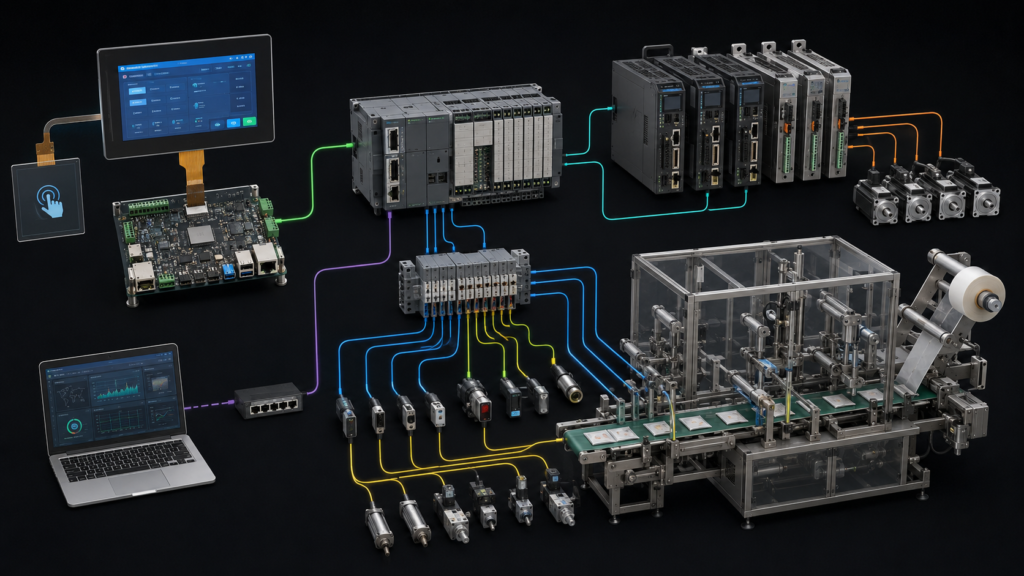
Uma máquina de embalagem prática possui várias camadas diferentes. A IHM apresenta informações da máquina e aceita solicitações permitidas do operador. O host da IHM renderiza gráficos e gerencia o software do display e do toque. Um PLC ou sistema de controle da máquina coordena a sequência de equipamentos definida. Controladores de movimento, drives, sensores, hardware pneumático e estações mecânicas desempenham suas funções separadas dentro do projeto completo da máquina.
Essas camadas podem estar alojadas no mesmo invólucro da máquina, mas não devem ser especificadas como intercambiáveis. Um TFT LCD não executa lógica PLC, não estabelece precisão de movimento, não determina a qualidade do produto nem fornece uma função de segurança. A entrada por toque também não substitui os controles dedicados de emergência ou segurança da máquina exigidos pelo projeto completo do equipamento.
Sistema de máquina de embalagem mostrando TFT IHM separado, PLC, hardware de movimento, sensores, atuadores e estação de trabalho remota
Para equipamentos de embalagem, um modelo de estado comum pode ajudar a criar uma experiência de operador mais consistente em uma linha. A OMAC descreve o PackML como um padrão de automação destinado a apoiar estados de máquina consistentes e troca de dados entre sistemas de embalagem.1 Uma IHM pode apresentar estados da máquina e solicitações permitidas, mas o display não é a fonte da lógica de estado em si.
Comece com o Fluxo de Trabalho do Operador
O tamanho e a resolução do painel devem seguir a sequência real de tarefas. Uma máquina compacta de formar, encher e selar pode precisar de um estado atual claro, seleção de produto, prioridade de alarme, prompts de configuração e visualizações básicas de manutenção. Uma cartonadora, empacotadora de caixas ou linha integrada maior pode precisar de informações adicionais de receita, status no nível da estação, orientação de troca, contadores de produção, acesso de usuário e funções de serviço.
Crie telas representativas antes de selecionar o painel. Inclua a profundidade real de navegação, variantes de produto esperadas, nomes de receitas, cenários de alarme, funções de usuário, alvos de toque, ações de manutenção e distância de visualização do operador. Isso evita um erro comum: selecionar um display pelo tamanho da diagonal antes de entender quanta informação deve ser manipulada na máquina.
Uma IHM de embalagem útil deve tornar o modo presente, o estado ativo da máquina, a ação atual do operador e o próximo passo permitido compreensíveis. Ela não deve forçar o operador a pesquisar através de diagnósticos detalhados durante a produção normal, nem deve expor ações de configuração de uma forma que entre em conflito com a estratégia de controle de acesso da máquina concluída.
Use Requisitos de Receita e Troca de Formato para Definir a Interface
Equipamentos de embalagem frequentemente mudam entre formatos de produto, materiais de embalagem, layouts de etiquetagem ou requisitos de manuseio a jusante. A IHM deve ajudar o operador a seguir o fluxo de trabalho de troca aprovado, mas o display em si não valida ajustes mecânicos, instalação de ferramentas, posição do sensor, adequação do produto ou a configuração final da máquina.
Defina o conteúdo necessário para uma troca: identificação do produto, seleção de receita permitida, etapas de configuração, prompts de manutenção, estado da máquina, pré-requisitos ausentes e comportamento de recuperação. Determine quais informações devem permanecer visíveis enquanto um operador trabalha ao lado da máquina e quais informações pertencem a uma visualização de serviço ou engenharia.
Os conceitos PackML podem ser relevantes quando uma máquina de embalagem deve integrar-se com outros equipamentos de linha, pois encorajam um modelo operacional comum. Seu uso deve ser determinado pela arquitetura de automação do projeto; um módulo LCD não torna uma máquina compatível com PackML por si só.2
Corresponda a Interface do Display ao Host Real da HMI
Módulos TFT LCD brutos normalmente usam uma interface nativa como RGB, LVDS, MIPI DSI ou eDP. O host IHM escolhido deve suportar a interface exata do painel, temporização, formato de pixel, sequência de energia, disposição do conector, orientação do display, controle de retroiluminação e configuração de software.
Verifique a folha de dados do painel e a documentação do host juntos antes de selecionar amostras. Verifique atribuições de pinos, temporização, níveis de tensão, roteamento FPC, disponibilidade do driver de display, sequência de inicialização, comportamento de energia, conexão do controlador de toque e acesso para serviço na máquina final.
Se o host pretendido fornecer HDMI enquanto o painel requer MIPI DSI, RGB, LVDS ou eDP brutos, um cabo passivo não pode fazer a conversão. O sistema requer um controlador ativo ou bridge compatível que suporte a fonte de vídeo e o painel exato. Este hardware ativo torna-se parte do projeto elétrico, de software, térmico, mecânico e de ciclo de vida.
O suporte de display do processador também deve ser considerado deliberadamente. A documentação da interface LCD da NXP descreve um driver para um periférico de interface de display definido; não implica compatibilidade universal entre processadores, placas portadoras, painéis, cabos e imagens de sistema operacional.3
Mantenha a Entrada por Toque Separada das Funções de Vídeo e Segurança
A interface de toque é separada do caminho de vídeo TFT. Um sensor de toque capacitivo projetado ou resistivo tem seu próprio controlador, firmware, conexão, considerações de aterramento e caminho de software do host. A interface LCD aciona pixels para o painel, enquanto o sistema de toque reporta a entrada de volta ao host.
A seleção do toque deve refletir o ambiente da máquina e o fluxo de trabalho do usuário. Considere luvas, condições de limpeza, umidade, poeira de embalagem, tamanho do alvo, material da lente de cobertura, equipamentos próximos, aterramento e as consequências de entrada não intencional. Uma afirmação genérica de que um display “tem toque capacitivo” não é suficiente para estabelecer uso confiável em uma máquina de embalagem específica.
Ações críticas da máquina e funções de segurança devem ser tratadas pelo projeto completo do equipamento. Uma tela de toque pode apresentar o status da máquina ou aceitar comandos aprovados, mas não deve ser descrita como um dispositivo de segurança meramente por estar instalada perto de máquinas de embalagem.
Integre o Display ao Invólucro da Máquina
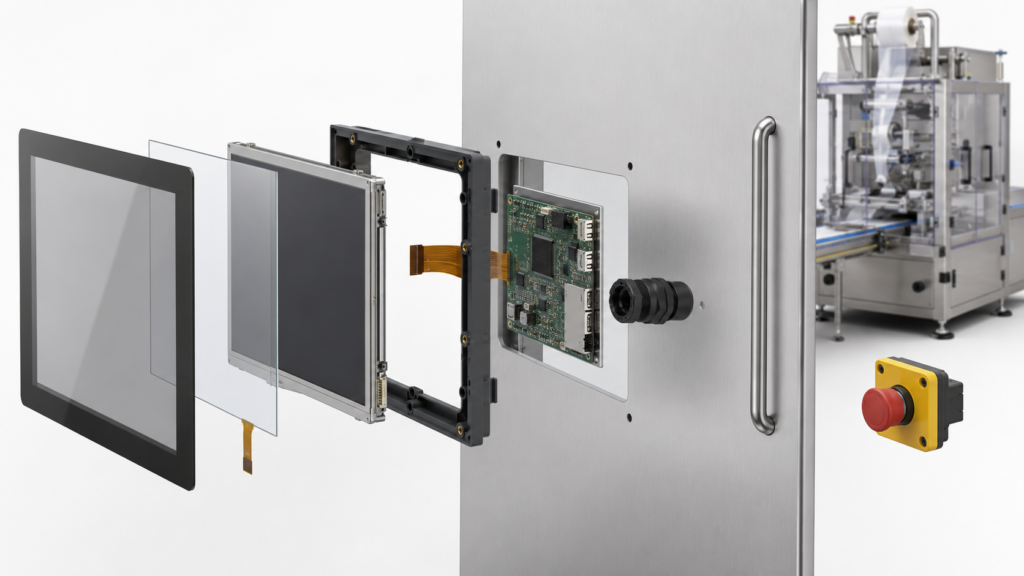
A IHM finalizada deve caber na máquina concluída, não apenas operar em uma bancada aberta. Revise a área visível, o recorte do invólucro, o método de montagem, a lente de cobertura, o ângulo de visão, o acesso ao conector, os limites de curvatura do FPC, o roteamento de cabos, o movimento do painel da porta, o acesso para serviço, as fontes de calor internas e a iluminação esperada ao redor do conjunto final do display.
Equipamentos de embalagem podem ser instalados em ambientes com limpeza frequente, reflexos da iluminação da fábrica, posições variáveis do operador e acesso repetido à máquina. Avalie a legibilidade usando o ângulo de montagem pretendido, o conteúdo representativo da interface e o conjunto de cobertura concluído, em vez de confiar apenas em uma especificação de painel nu.
Conjunto explodido de tela de toque TFT, sensor de toque, placa IHM e porta da máquina para equipamentos de embalagem
Desempenho elétrico, adequação do invólucro, requisitos de projeto relacionados à higiene, segurança da máquina e conformidade são propriedades da máquina concluída. Selecionar um módulo de display sozinho não estabelece nenhum desses resultados.
Planeje o Comportamento de Inicialização, Falha e Recuperação
A IHM deve comunicar se está iniciando, conectada, em manutenção, aguardando um estado da máquina ou recuperando-se de uma falha. Uma interface congelada, indicação de receita desatualizada ou tela de comunicação atrasada pode criar confusão no operador se a aplicação não identificar sua condição claramente.
Defina o comportamento do display para inicialização, reinicialização do host, perda de comunicação, carregamento de receita, mudança de modo, interrupção de troca, reconhecimento de alarme e recuperação controlada. A arquitetura de controle da máquina deve determinar quais solicitações são permitidas em cada condição; a IHM deve apresentar essa informação claramente.
Não use a presença de uma tela de status como evidência de que uma decisão de alarme, condição de segurança, resultado de produto ou estado da máquina é válido. Esses resultados pertencem ao projeto completo de controle e equipamento.
Valide a IHM com Intenção de Produção
A validação deve usar o display pretendido, a pilha de toque, o host IHM, o invólucro, o chicote, o software de aplicação, a configuração representativa da máquina e as condições operacionais esperadas. O objetivo é confirmar que a interface do operador funciona em seu contexto pretendido; não é inferir desempenho mecânico, qualidade do produto ou conformidade de segurança a partir da seleção do display.
Um plano de validação específico do projeto pode incluir conteúdo de tela representativo, posições de visualização, condições de toque, fluxo de trabalho relacionado à limpeza, comportamento de inicialização, disponibilidade do display, inicialização do toque, navegação de receitas, interrupção de comunicação, retenção de cabos, acesso ao painel e recuperação após falhas esperadas.
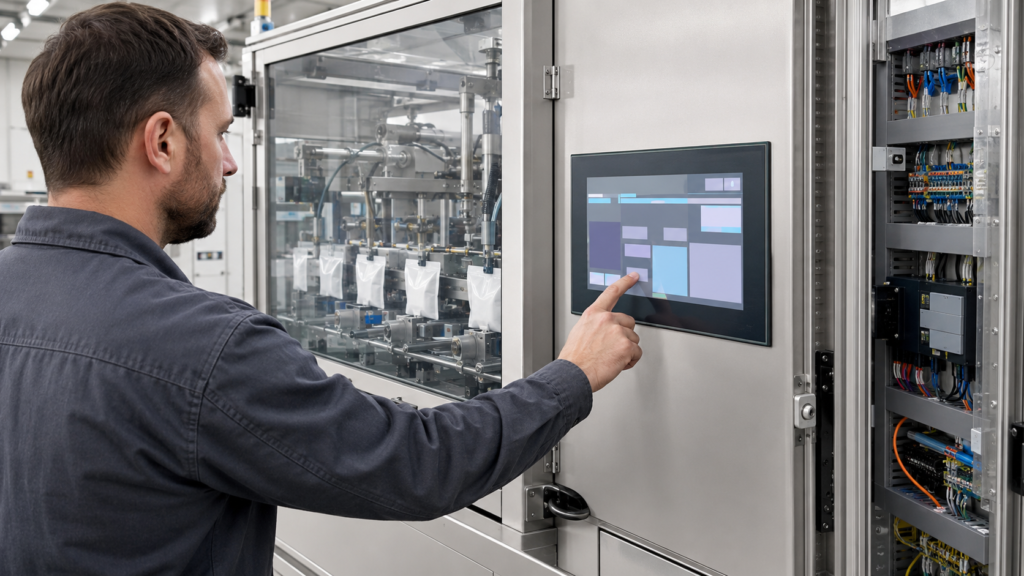
Engenheiro testando uma IHM de tela de toque de máquina de embalagem durante um fluxo de trabalho de troca de produto
Escreva critérios de aceitação antes da congelamento do projeto. Termos como “fácil de usar”, “resposta rápida” ou “legível” precisam de um contexto definido: o conteúdo da tela, a posição de visualização, a ação esperada, a condição de iluminação, o tipo de luva, o tamanho do alvo e o comportamento de recuperação.
Prepare uma Solicitação Útil para Revisão da Tela
Para uma revisão de display IHM de máquina de embalagem, forneça o desenho do invólucro, a área ativa alvo, a orientação do display, a GUI representativa, o processador ou placa host, as interfaces de display nativas disponíveis, o fluxo de trabalho esperado de receita e troca, os requisitos de toque e cobertura, as condições de limpeza, as restrições de cabo, a sequência de energia, a etapa do projeto e a faixa de demanda estimada.
A RJY Display pode revisar plataformas de display existentes aplicáveis e opções de integração específicas do projeto em torno de toque, lentes de cobertura, retroiluminação, interface, FPC, coordenação da placa controladora e ajuste mecânico. A viabilidade depende do módulo confirmado e dos requisitos da aplicação. Não deve ser interpretado como um compromisso de criar qualquer tamanho de célula LCD arbitrário do zero ou de qualificar uma máquina de embalagem completa.
Um módulo TFT LCD pode controlar o PLC ou o sistema de movimento em uma máquina de embalagem?
Não. O TFT LCD apresenta informações. A lógica PLC, o controle de movimento, o comportamento do atuador, o sequenciamento da máquina e as funções de segurança pertencem à arquitetura completa de automação e equipamento.
Uma tela de toque pode tornar uma máquina de embalagem compatível com PackML?
Não. A compatibilidade com PackML depende da implementação do controle da máquina e da arquitetura do sistema. Uma IHM pode apresentar estados relacionados ao PackML e ações de operador permitidas, mas o módulo de display não implementa o padrão de controle por si só.
O HDMI pode acionar diretamente um painel TFT MIPI, RGB, LVDS ou eDP bruto?
Não. Um cabo passivo não pode converter HDMI em uma interface de painel MIPI, RGB, LVDS ou eDP bruta. Um controlador ativo ou bridge compatível é necessário e deve suportar tanto a fonte quanto os requisitos exatos do painel.
A conexão da tela sensível ao toque é a mesma da interface de vídeo TFT?
Não. O toque normalmente usa um sensor, controlador, conexão, firmware e caminho de software separados. A interface do display aciona pixels para o LCD, enquanto o sistema de toque reporta a entrada do usuário ao host.
O que um OEM deve fornecer para uma revisão de display IHM de máquina de embalagem?
Forneça o desenho do invólucro, a área ativa alvo, a GUI representativa, a plataforma host, as opções de interface de display nativas, o fluxo de trabalho de receita e troca, os requisitos de toque e cobertura, as condições de limpeza, as restrições de cabo, a sequência de energia, a etapa do projeto e a faixa de demanda esperada.