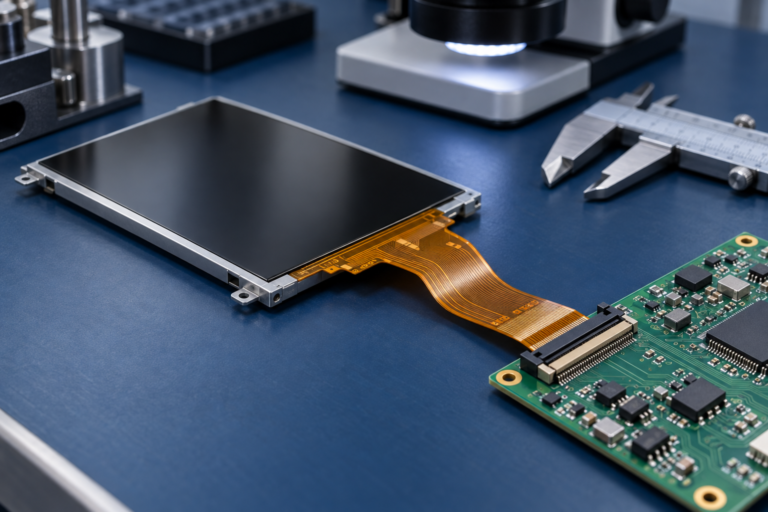
Vous rencontrez un goulot d'étranglement dans votre projet d'affichage embarqué ?
Ne laissez pas l'intégration complexe ou les problèmes de chaîne d'approvisionnement ralentir votre mise sur le marché. Réservez une consultation gratuite avec l'équipe d'experts RJY pour un accompagnement sur mesure en conception et fabrication.
Écran tactile capacitif vs résistif : lequel choisir ?
Si vous concevez une interface pour une solution d'affichage personnalisée, le choix entre un écran tactile capacitif et un écran tactile résistif est une décision qui peut impacter tous les aspects, de l'expérience utilisateur à la résistance environnementale.
Publié :
Lecture de 13 minutes
Mis à jour :
Écran tactile capacitif vs résistif est l'une des décisions les plus importantes dans un projet d'affichage tactile. Les deux technologies peuvent transformer un module LCD en une interface interactive, mais elles détectent le toucher de différentes manières et s'adaptent à différents environnements d'exploitation.
Un écran tactile capacitif détecte les variations d'un champ électrique lorsqu'un doigt ou un stylet conducteur touche l'écran. Un écran tactile résistif détecte la pression physique lorsque deux couches conductrices entrent en contact. Cette différence fondamentale affecte la sensibilité tactile, l'utilisation avec des gants, la prise en charge du multi-touch, la clarté d'affichage, la durabilité, le coût et l'adéquation aux produits industriels ou grand public.
Le choix approprié dépend de l'application. Un panneau de commande pour maison intelligente, un IHM industriel, un dispositif médical, un affichage embarqué dans un véhicule, un terminal portable, un kiosque extérieur ou une interface d'équipement intégré peuvent chacun nécessiter une solution tactile différente.
Qu'est-ce qu'un écran tactile capacitif ?
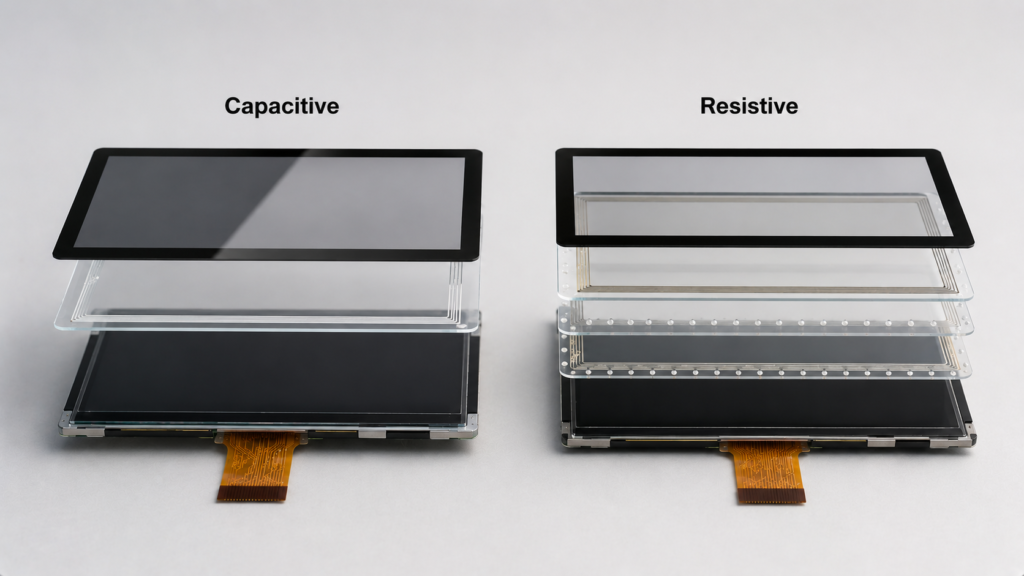
Un écran tactile capacitif détecte le toucher en mesurant les variations de capacité. Le capteur tactile contient un motif conducteur, généralement situé derrière une surface en verre ou un revêtement. Lorsqu'un objet conducteur tel qu'un doigt humain touche ou s'approche de la surface, le champ électrique change. Le contrôleur tactile détecte cette variation et la convertit en coordonnées tactiles.
Le type le plus courant dans les écrans tactiles modernes est le tactile capacitif projeté, souvent appelé PCAP ou PCT. Les écrans tactiles PCAP sont largement utilisés dans les smartphones, tablettes, panneaux de maison intelligente, IHM industriels, kiosques de vente au détail et produits embarqués modernes.
Les écrans tactiles capacitifs sont généralement choisis lorsque le produit nécessite une expérience utilisateur fluide, une opération par toucher léger, des gestes multi-touch, une bonne clarté optique et un aspect moderne avec façade en verre.
Qu'est-ce qu'un écran tactile résistif ?
Un écran tactile résistif détecte le toucher par pression. Un panneau tactile résistif typique contient deux couches conductrices séparées par de petits points d'espacement. Lorsque l'utilisateur appuie sur la surface, les couches entrent en contact au point de toucher, permettant au contrôleur de calculer la position.
Étant donné que le tactile résistif dépend de la pression plutôt que de la conductivité cutanée, il fonctionne généralement avec un doigt, un gant, un stylet en plastique, un stylo ou tout autre objet exerçant une pression. Cela le rend utile dans certains environnements industriels, médicaux, extérieurs et de contrôle robuste.
Les écrans tactiles résistifs sont généralement choisis lorsque le produit nécessite une saisie simple à un seul point, une utilisation avec des gants, une saisie par stylet, un coût réduit ou une utilisation fiable dans des environnements où le tactile capacitif pourrait nécessiter davantage de réglages.
Écran tactile capacitif vs résistif : différence fondamentale
La différence fondamentale réside dans la méthode de détection. Les écrans tactiles capacitifs détectent les variations électriques. Les écrans tactiles résistifs détectent la pression.
Facteur
Écran tactile capacitif
Écran tactile résistif
Principe tactile
Détecte la variation de capacité
Détecte la pression physique
Nom courant
PCAP / PCT
RTP
Méthode de saisie
Doigt ou stylet capacitif
Doigt, gant, stylet, stylo ou autre objet exerçant une pression
Sensation tactile
Léger et réactif
Nécessite une pression
Multi-touch
Généralement pris en charge
Généralement limité ou non pris en charge dans les conceptions standard
Clarté optique
Généralement meilleure
Peut être inférieure en raison des couches flexibles supplémentaires
Coût
Souvent plus élevée
Souvent inférieure
Utilisation typique
Panneaux intelligents, appareils grand public, IHM modernes
Commandes industrielles, saisie avec gants, saisie par stylet, terminaux robustes
Structure d'écran tactile capacitif vs résistif montrant la couche de capteur en verre et les couches de pression
Fonctionnement des écrans tactiles capacitifs
Dans un écran tactile capacitif, le motif du capteur crée un champ électrique. Lorsqu'un doigt touche la surface en verre, cela modifie la capacité locale. Le contrôleur tactile mesure cette variation et calcule la position du toucher.
Le tactile capacitif projeté peut prendre en charge des gestes multi-touch tels que pincer, zoomer, balayer et faire pivoter, selon le contrôleur, la conception du capteur, le firmware et le support logiciel. Cela rend le tactile capacitif adapté aux interfaces graphiques modernes.
Le tactile capacitif fonctionne également bien avec une vitre de protection, car le capteur peut détecter le toucher à travers une surface non conductrice appropriée. Cela permet un design de façade propre pour les panneaux de maison intelligente, les écrans de contrôle industriels, les terminaux publics et les produits embarqués.
Fonctionnement des écrans tactiles résistifs
Dans un écran tactile résistif, la couche flexible supérieure et la couche conductrice inférieure sont séparées par de petits points d'espacement. Lorsqu'une pression est appliquée, les couches entrent en contact. Le contrôleur lit le changement électrique et détermine la position du toucher.
Cette structure basée sur la pression rend le tactile résistif compatible avec de nombreux outils de saisie. L'utilisateur peut l'utiliser avec des gants, un stylet, un ongle ou d'autres objets exerçant une pression. Cela est utile lorsque les utilisateurs travaillent dans des usines, des laboratoires, des environnements extérieurs, des contextes médicaux ou des scénarios de maintenance d'équipements.
Le compromis est que le tactile résistif nécessite généralement plus de force que le tactile capacitif et n'offre pas la même expérience multi-touch fluide. La couche flexible supérieure peut également affecter la clarté optique et peut s'user avec le temps selon les conditions d'utilisation.
Avantages des écrans tactiles capacitifs
Les écrans tactiles capacitifs sont courants dans les appareils modernes car ils offrent une expérience utilisateur fluide et réactive.
Opération par toucher léger
Prise en charge des gestes multi-touch dans de nombreuses conceptions
Bonne clarté optique
Apparence propre avec façade en verre
Bonne adaptation aux interfaces utilisateur graphiques
Adapté aux panneaux intelligents et aux produits IHM modernes
Surface durable lorsqu'elle est conçue avec une vitre de protection appropriée
Le tactile capacitif est souvent le meilleur choix lorsque le produit utilise des icônes, des menus, des gestes, des interfaces basées sur Android ou une interaction utilisateur similaire à celle des smartphones et tablettes.
Limitations des écrans tactiles capacitifs
Les écrans tactiles capacitifs ne sont pas idéaux pour tous les environnements. Étant donné qu'ils dépendent des variations de capacité, les performances peuvent être affectées par les gants, l'eau, le bruit électrique, la mise à la terre, l'épaisseur de la vitre de protection et le réglage du contrôleur.
Les gants standard peuvent ne pas fonctionner à moins que le panneau ne soit réglé ou que les gants ne soient conducteurs
L'eau ou l'humidité peut provoquer des faux touchers si elle n'est pas correctement gérée
Les problèmes d'EMI et de mise à la terre peuvent affecter la stabilité tactile
Coût plus élevé que de nombreuses options résistives
Nécessite une correspondance entre le contrôleur tactile et le firmware
Peut nécessiter un réglage pour une utilisation industrielle ou extérieure
Pour les projets industriels, le tactile capacitif doit être évalué dans des conditions d'exploitation réelles, y compris l'utilisation de gants, l'exposition à l'humidité, la mise à la terre du boîtier, l'environnement EMI et la conception de la vitre de protection.
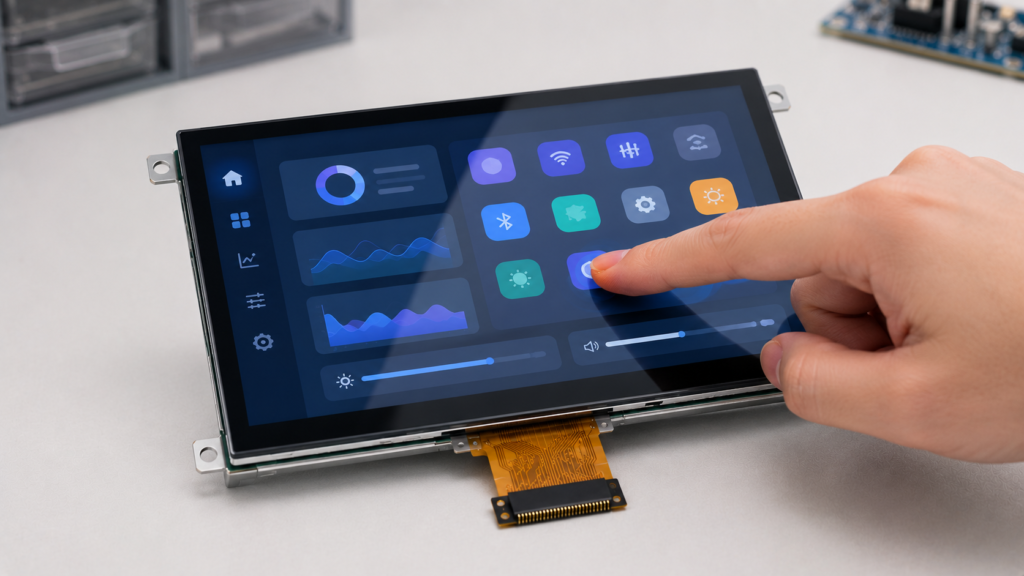
Interaction tactile légère sur un module LCD TFT avec écran tactile capacitif
Avantages des écrans tactiles résistifs
Les écrans tactiles résistifs restent utiles car ils sont simples, pratiques et compatibles avec une saisie par pression.
Fonctionne avec des gants
Fonctionne avec un stylet, un stylo, un ongle ou toute autre saisie par pression
Utile pour une saisie de précision à un seul point
Souvent d’un coût inférieur
Peut convenir aux environnements poussiéreux ou difficiles avec une étanchéité appropriée
Pratique pour les interfaces de contrôle industriel et d’équipement
Intégration simple pour de nombreuses applications d’interface utilisateur de base
Le tactile résistif est souvent une bonne orientation lorsque l’utilisateur doit opérer l’écran avec des gants, des outils ou un stylet, et lorsque les gestes multi-touch ne sont pas requis.
Limites des écrans tactiles résistifs
Les écrans tactiles résistifs présentent également des compromis. La structure basée sur la pression peut affecter l’expérience utilisateur, les performances optiques et l’usure à long terme.
Nécessite une pression physique
Ne prend généralement pas en charge les gestes multi-touch modernes
Peut réduire la luminosité et la clarté de l’écran
La couche supérieure flexible peut s’user avec une utilisation répétée
Moins adapté aux designs premium avec façade en verre
Peut sembler moins réactif que le tactile capacitif
Peut ne pas correspondre aux attentes modernes des interfaces utilisateur de type smartphone
Pour les produits nécessitant un contrôle gestuel fluide, un aspect premium ou une clarté optique élevée, le tactile capacitif est généralement plus adapté.
Clarté de l’écran et performances optiques
La technologie tactile affecte l’apparence de l’écran. Les écrans tactiles capacitifs offrent généralement une meilleure clarté optique car ils peuvent être construits avec une surface en verre et moins de couches flexibles. Cela aide à maintenir la luminosité, le contraste et la netteté de l’image.
Les panneaux tactiles résistifs incluent des couches conductrices flexibles qui peuvent réduire la transmission de la lumière et légèrement adoucir l’image. Pour les textes simples et les contrôles d’équipement, cela peut être acceptable. Pour les interfaces graphiques de haute qualité, les tableaux de bord de produits ou les écrans destinés aux consommateurs, cela peut être un inconvénient.
Si la qualité visuelle est importante, les acheteurs doivent évaluer l’ensemble complet : panneau LCD, capteur tactile, verre de couverture, méthode de collage, traitement de surface, luminosité et angle de vision.
Fonctionnement avec gants, stylet et mains mouillées
La méthode de saisie est l’une des différences les plus pratiques entre les écrans tactiles capacitifs et résistifs.
Les écrans tactiles résistifs sont naturellement compatibles avec le fonctionnement avec gants et stylet car ils répondent à la pression. Cela les rend utiles pour les équipements industriels, les interfaces liées au médical, les terminaux extérieurs et les environnements d’usine.
Les écrans tactiles capacitifs nécessitent normalement un objet de saisie conducteur. Les gants standard peuvent ne pas fonctionner à moins que le contrôleur tactile ne soit réglé pour le mode gant ou que l’utilisateur porte des gants compatibles capacitifs. Le fonctionnement avec mains mouillées nécessite également une conception minutieuse du capteur, du contrôleur, du firmware, de la mise à la terre et du verre de couverture.
Pour les projets nécessitant un fonctionnement avec gants ou mains mouillées, ne vous fiez pas uniquement à l’étiquette technologique. Testez le panneau tactile réel dans les conditions d’utilisation réelles.
Durabilité et conception de surface
La durabilité dépend de la conception complète, pas seulement de la technologie tactile. Les panneaux tactiles capacitifs utilisent souvent du verre de couverture comme surface utilisateur. Cela peut offrir une bonne résistance aux rayures et un design propre lorsque le verre est spécifié correctement.
Les panneaux tactiles résistifs utilisent une couche supérieure flexible. Cela peut être pratique pour la saisie par pression, mais la surface peut s’user avec le temps en raison de pressions répétées, d’outils tranchants ou d’un nettoyage agressif. La conception protectrice et les attentes d’utilisation correctes sont importantes.
Dans les environnements difficiles, les deux technologies nécessitent une conception mécanique appropriée. L’étanchéité, le matériau de couverture, la méthode de nettoyage, la pression de montage, le cheminement des câbles et la protection du contrôleur doivent tous être examinés.
Différence de coût
Les écrans tactiles résistifs sont souvent d’un coût inférieur à celui des écrans tactiles capacitifs, en particulier pour les applications simples à un seul point. Cela les rend attractifs pour les équipements sensibles aux coûts, les IHM simples et les interfaces de contrôle de base.
Les écrans tactiles capacitifs peuvent coûter plus cher car ils nécessitent un capteur tactile, un circuit intégré de contrôleur, un verre de couverture, un réglage du firmware et une conception électrique plus minutieuse. Cependant, ils peuvent offrir une meilleure expérience utilisateur et un aspect produit plus moderne.
Pour les acheteurs B2B, le coût ne doit pas être jugé uniquement sur le prix du panneau tactile. Le coût total peut inclure le contrôleur tactile, le verre de couverture, le collage, le réglage du firmware, la conception mécanique, les coûts de test, la maintenance et l’impact sur l’expérience utilisateur.
Écran tactile capacitif vs résistif pour IHM industrielle
Les projets d’IHM industrielle nécessitent souvent un fonctionnement fiable, une interface utilisateur claire, un support des gants, une réponse tactile stable et un service à long terme. Les deux technologies tactiles, capacitive et résistive, peuvent être utilisées, mais le bon choix dépend de l’environnement.
Choisissez le tactile capacitif lorsque l’IHM nécessite une surface en verre moderne, des gestes multi-touch, une interaction utilisateur fluide et une bonne clarté optique. Choisissez le tactile résistif lorsque l’IHM est principalement utilisée avec des gants, une saisie par stylet ou des commandes fermes à un seul point dans un environnement difficile.
Pour les projets industriels, les acheteurs doivent également évaluer les exigences en matière de CEM, de mise à la terre, d’humidité, de température, de produits chimiques de nettoyage, d’étanchéité du boîtier, de verre de couverture, de carte contrôleur et de firmware.
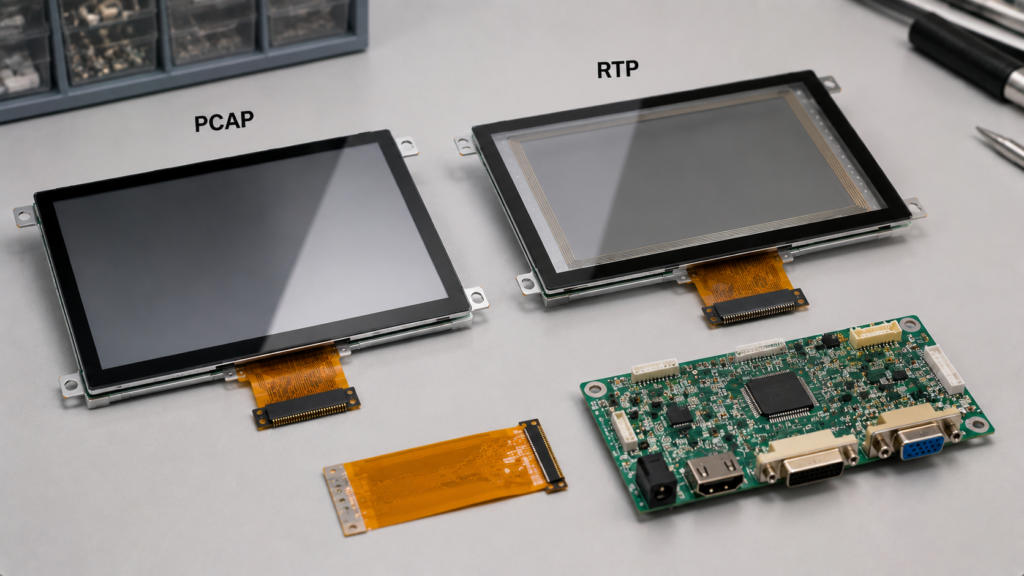
Sélection d’écran tactile industriel avec modules TFT LCD PCAP et RTP et carte contrôleur
Écran tactile capacitif vs résistif pour les dispositifs liés au médical
Les dispositifs liés au médical peuvent nécessiter une saisie précise, un nettoyage facile, un fonctionnement avec gants, un contenu d’écran lisible et une utilisation stable à long terme. Le tactile capacitif peut offrir une surface en verre scellée et une interaction moderne. Le tactile résistif peut prendre en charge la saisie par stylet ou gants et un contrôle simple à un seul point.
Le bon choix dépend de la manière dont le dispositif est utilisé. Un terminal de chevet, un appareil portable, un outil de diagnostic et une interface de contrôle peuvent avoir des exigences différentes. Les acheteurs doivent éviter de supposer qu’un type tactile est automatiquement meilleur pour toutes les applications liées au médical.
Pour les projets liés au médical, la sélection de l’écran doit également prendre en compte la méthode de nettoyage, la conception du boîtier, les exigences de documentation, la précision tactile et les attentes de conformité applicables.
Écran tactile capacitif vs résistif pour usage extérieur et robuste
L’usage extérieur et robuste crée des exigences supplémentaires. Le panneau tactile peut être confronté à l’eau, à la poussière, aux changements de température, aux gants, à la lumière directe du soleil, aux impacts et au bruit électrique.
Le tactile résistif peut être utile lorsque le fonctionnement avec gants ou stylet est requis et que l’interface est simple. Le tactile capacitif peut également être utilisé en extérieur, mais il nécessite généralement un réglage approprié du contrôleur, une conception du verre de couverture, une gestion de l’humidité, une mise à la terre et une étanchéité mécanique.
La lisibilité en extérieur dépend également de l’écran lui-même, pas seulement du panneau tactile. Les acheteurs doivent vérifier la luminosité du LCD, la réflexion du verre de couverture, les exigences anti-éblouissement, la structure de collage, la puissance du rétroéclairage et la conception thermique.
Comment choisir entre un écran tactile capacitif et résistif
Commencez par l’utilisateur et l’environnement. La meilleure technologie tactile est celle qui correspond à la manière dont le produit sera réellement utilisé.
Exigence du projet
Orientation recommandée
Raison
Interaction de type smartphone
Capacitif
Toucher léger et support des gestes multi-touch
Fonctionnement avec gants requis
Résistif ou capacitif réglé
Le résistif fonctionne par pression ; le capacitif nécessite une conception spéciale
Saisie par stylet ou stylo
Résistif
La saisie par pression prend en charge de nombreux objets non conducteurs
Haute clarté d’affichage
Capacitif
Généralement meilleure transmission optique et design avec façade en verre
IHM simple à un seul point
Le résistif peut suffire
Rentable et pratique pour les contrôles de base
Panneau intelligent moderne
Capacitif
Meilleure sensation tactile et expérience utilisateur
Environnement poussiéreux ou difficile
Dépendant du projet
Examiner l’étanchéité, la méthode de saisie, l’usure de la surface et la conception du boîtier
Opération avec mains humides
Dépendant du projet
Nécessite des tests réels et une évaluation du contrôleur tactile
Ce que les acheteurs doivent confirmer avant de choisir un écran tactile
La sélection du panneau tactile doit être examinée conjointement avec le module d’affichage et la conception finale du produit. Avant de choisir entre tactile capacitif ou résistif, préparez les informations suivantes :
Taille d'affichage
Résolution LCD
Préférence de type tactile
Méthode de saisie : doigt, gant, stylet, main humide ou outil
Exigence de toucher simple ou multi-touch
Exigence de verre de protection
Environnement d’exploitation
Exposition à l’humidité, à la poussière ou aux produits chimiques
Exigences de luminosité et optiques
Interface tactile, telle que I2C ou USB
Exigence de carte de contrôle
Exigence de firmware ou de pilote
Structure mécanique et méthode de montage
Volume de production prévu
Ces informations aident le fournisseur à déterminer si le tactile capacitif, le tactile résistif ou une solution d’affichage tactile personnalisée est la meilleure direction.
Erreurs courantes lors de la comparaison des écrans tactiles capacitifs et résistifs
Une erreur courante consiste à supposer que le tactile capacitif est toujours meilleur car il semble plus moderne. Le tactile capacitif est souvent meilleur pour une interface utilisateur fluide, mais peut nécessiter un réglage pour les gants, l’eau ou le bruit industriel.
Une autre erreur consiste à supposer que le tactile résistif est obsolète. Le tactile résistif conserve une valeur pratique lorsque le produit nécessite une saisie avec gants, un stylet, un contrôle simple ou une opération sensible aux coûts.
Une troisième erreur consiste à ignorer les performances optiques. La couche tactile affecte la luminosité et la clarté de l’affichage, surtout lorsqu’elle est combinée avec du verre de protection, un collage et un traitement de surface.
Une quatrième erreur consiste à sélectionner le panneau tactile sans vérifier la carte contrôleur et le firmware. Le mappage des coordonnées tactiles, le support du pilote, l’interface, la mise à la terre et le bruit système peuvent tous affecter les performances tactiles finales.
Support de RJY Display pour les projets d’affichage tactile
RJY Display prend en charge les modules TFT LCD, les écrans tactiles, les cartes contrôleurs et solution d'affichage personnalisée les discussions de solutions pour les projets B2B axés sur l’ingénierie. La sélection du panneau tactile peut être examinée conjointement avec la taille de l’affichage, la résolution, la luminosité, le verre de protection, le FPC, l’interface, la carte contrôleur, le firmware et la structure mécanique.
Pour de nombreux projets modernes d’IHM, de maison intelligente et d’affichage embarqué, le tactile capacitif est un choix solide lorsque le produit nécessite un fonctionnement fluide, un multi-touch et une conception en verre à l’avant. Le tactile résistif peut encore convenir lorsque le projet nécessite une saisie avec gants, un contrôle par stylet, une opération basée sur la pression ou une interface tactile simple et économique.
Si votre projet nécessite un module TFT LCD avec panneau tactile, verre de protection, affichage haute luminosité, carte contrôleur, support firmware ou intégration personnalisée, préparez vos exigences tactiles et d’affichage avant la demande.
Les écrans tactiles capacitifs et résistifs utilisent des principes de détection différents. Les écrans tactiles capacitifs détectent les changements de capacité et sont généralement meilleurs pour un toucher léger, les gestes multi-touch, un aspect d’affichage clair et les interfaces utilisateur modernes. Les écrans tactiles résistifs détectent la pression physique et restent utiles pour l’opération avec gants, la saisie par stylet, les contrôles simples et les applications robustes ou sensibles aux coûts.
Le bon choix dépend de l’environnement du produit, du comportement de l’utilisateur, de l’exigence de clarté de l’affichage, de la méthode de saisie tactile, de l’objectif de coût, de la carte contrôleur, du firmware et de la conception mécanique. Il n’y a pas de gagnant universel.
Pour les projets d’affichage B2B, la technologie tactile doit être sélectionnée dans le cadre du système d’affichage complet. Le module LCD, le panneau tactile, le verre de protection, le FPC, la carte contrôleur, le logiciel, le boîtier et l’environnement d’exploitation doivent tous être examinés ensemble.
FAQ
Quelle est la principale différence entre les écrans tactiles capacitifs et résistifs ?
Les écrans tactiles capacitifs détectent les changements de capacité causés par un objet conducteur tel qu’un doigt. Les écrans tactiles résistifs détectent la pression physique lorsque deux couches conductrices entrent en contact.
Quel est le meilleur, écran tactile capacitif ou résistif ?
Cela dépend de l’application. Le tactile capacitif est généralement meilleur pour une interface utilisateur moderne, le multi-touch et un aspect d’affichage clair. Le tactile résistif est souvent meilleur pour l’opération avec gants, la saisie par stylet et les contrôles robustes simples.
Les écrans tactiles capacitifs fonctionnent-ils avec des gants ?
Les écrans tactiles capacitifs standard peuvent ne pas fonctionner avec des gants normaux. L’opération avec gants peut nécessiter des gants conducteurs, un réglage du contrôleur, une conception de capteur spéciale ou une solution tactile capacitive spécifique au projet.
Les écrans tactiles résistifs peuvent-ils prendre en charge le multi-touch ?
Les écrans tactiles résistifs standard sont généralement conçus pour une saisie par pression à un seul point. Le tactile capacitif est normalement le meilleur choix lorsque des gestes multi-touch sont requis.
Quel écran tactile offre une meilleure clarté d’affichage ?
Les écrans tactiles capacitifs offrent généralement une meilleure clarté optique car ils peuvent utiliser une structure en verre à l’avant et moins de couches flexibles. Les panneaux tactiles résistifs peuvent réduire la luminosité et la clarté en raison de leur structure multicouche sensible à la pression.
Le tactile résistif est-il obsolète ?
Non. Les écrans tactiles résistifs sont toujours utiles pour les applications nécessitant une saisie avec gants, une saisie par stylet, une opération basée sur la pression, des contrôles simples ou des interfaces industrielles sensibles aux coûts.
Quel écran tactile est meilleur pour l’IHM industrielle ?
Le tactile capacitif est souvent meilleur pour les IHM modernes avec une interface utilisateur fluide et un multi-touch. Le tactile résistif peut être meilleur lorsque les opérateurs utilisent des gants, des stylets ou une saisie par pression dans des environnements difficiles.
Quelles informations dois-je fournir pour un projet d’affichage tactile personnalisé ?
Fournissez la taille de l’affichage, la résolution, le type tactile, la méthode de saisie, l’exigence de verre de protection, l’environnement d’exploitation, l’exigence de luminosité, l’interface tactile, l’exigence de carte contrôleur, les besoins en firmware, le dessin mécanique et le volume de production prévu.
Partagez la taille de votre écran, sa résolution, son interface, sa luminosité, ses exigences tactiles, les besoins en carte contrôleur et l'environnement d'application.