Facing a bottleneck in your Embedded Display Project?
Don’t let complex integration or supply chain issues slow your time-to-market. Book a free consultation with the RJY expert team for tailored design and manufacturing support.

If you're designing an interface for a custom display solution, selecting between a capacitive vs resistive touchscreen is a decision that can impact everything from user experience to environmental resilience.Both technologies detect touch—but how they do so, and the environments they thrive in, are fundamentally different. Here's what you need to know before you choose.
Capacitive vs resistive touchscreen is one of the most important decisions in a touch display project. Both technologies can turn an LCD module into an interactive interface, but they detect touch in different ways and fit different operating environments.
A capacitive touchscreen detects changes in an electric field when a finger or conductive stylus touches the screen. A resistive touchscreen detects physical pressure when two conductive layers make contact. This basic difference affects touch sensitivity, glove operation, multi-touch support, display clarity, durability, cost, and suitability for industrial or consumer products.
The right choice depends on the application. A smart home control panel, industrial HMI, medical-related device, vehicle-related display, handheld terminal, outdoor kiosk, or embedded equipment interface may each require a different touch solution.
A capacitive touchscreen senses touch by detecting changes in capacitance. The touch sensor contains a conductive pattern, usually behind a glass or cover surface. When a conductive object such as a human finger touches or approaches the surface, the electric field changes. The touch controller detects this change and converts it into touch coordinates.
The most common type used in modern touch displays is projected capacitive touch, often called PCAP or PCT. PCAP touchscreens are widely used in smartphones, tablets, smart home panels, industrial HMIs, retail kiosks, and modern embedded products.
Capacitive touchscreens are usually selected when the product needs a smooth user experience, light-touch operation, multi-touch gestures, good optical clarity, and a modern glass-front appearance.
A resistive touchscreen detects touch through pressure. A typical resistive touch panel contains two conductive layers separated by small spacer dots. When the user presses the surface, the layers contact each other at the touch point, allowing the controller to calculate the position.
Because resistive touch depends on pressure rather than skin conductivity, it can usually work with a finger, glove, plastic stylus, pen, or other pressure input object. This makes it useful in some industrial, medical-related, outdoor, and rugged control environments.
Resistive touchscreens are usually selected when the product needs simple single-point input, glove operation, stylus input, lower cost, or reliable use in environments where capacitive touch may require more tuning.
The core difference is the sensing method. Capacitive touchscreens detect electrical changes. Resistive touchscreens detect pressure.
| Factor | Capacitive Touchscreen | Resistive Touchscreen |
|---|---|---|
| Touch principle | Detects capacitance change | Detects physical pressure |
| Common name | PCAP / PCT | RTP |
| Input method | Finger or capacitive stylus | Finger, glove, stylus, pen, or other pressure object |
| Touch feel | Light and responsive | Requires pressure |
| Multi-touch | Usually supported | Usually limited or not supported in standard designs |
| Optical clarity | Usually better | Can be lower because of extra flexible layers |
| Cost | Often higher | Often lower |
| Typical use | Smart panels, consumer devices, modern HMIs | Industrial controls, glove input, stylus input, rugged terminals |
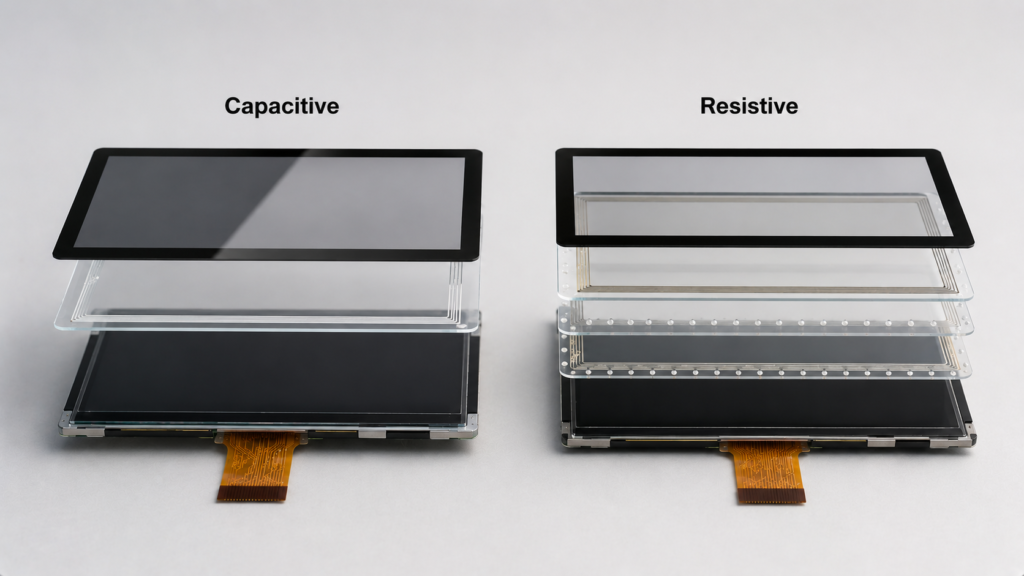
In a capacitive touchscreen, the sensor pattern creates an electric field. When a finger touches the glass surface, it changes the local capacitance. The touch controller measures this change and calculates the touch position.
Projected capacitive touch can support multi-touch gestures such as pinch, zoom, swipe, and rotate, depending on the controller, sensor design, firmware, and software support. This makes capacitive touch suitable for modern graphical interfaces.
Capacitive touch also works well with cover glass because the sensor can detect touch through a suitable non-conductive surface. This allows a clean front design for smart home panels, industrial control screens, public terminals, and embedded products.
In a resistive touchscreen, the top flexible layer and lower conductive layer are separated by small spacer dots. When pressure is applied, the layers touch. The controller reads the electrical change and determines the touch position.
This pressure-based structure makes resistive touch compatible with many input tools. The user can operate it with gloves, a stylus, a fingernail, or other pressure objects. This is useful when users work in factories, laboratories, outdoor environments, medical-related settings, or equipment service scenarios.
The trade-off is that resistive touch usually requires more force than capacitive touch and does not provide the same smooth multi-touch experience. The flexible top layer can also affect optical clarity and may wear over time depending on use conditions.
Capacitive touchscreens are common in modern devices because they provide a smooth and responsive user experience.
Capacitive touch is often the better choice when the product uses icons, menus, gestures, Android-based interfaces, or user interaction similar to smartphones and tablets.
Capacitive touchscreens are not ideal for every environment. Since they depend on capacitance change, performance can be affected by gloves, water, electrical noise, grounding, cover glass thickness, and controller tuning.
For industrial projects, capacitive touch should be evaluated under real operating conditions, including glove use, moisture exposure, enclosure grounding, EMI environment, and cover glass design.
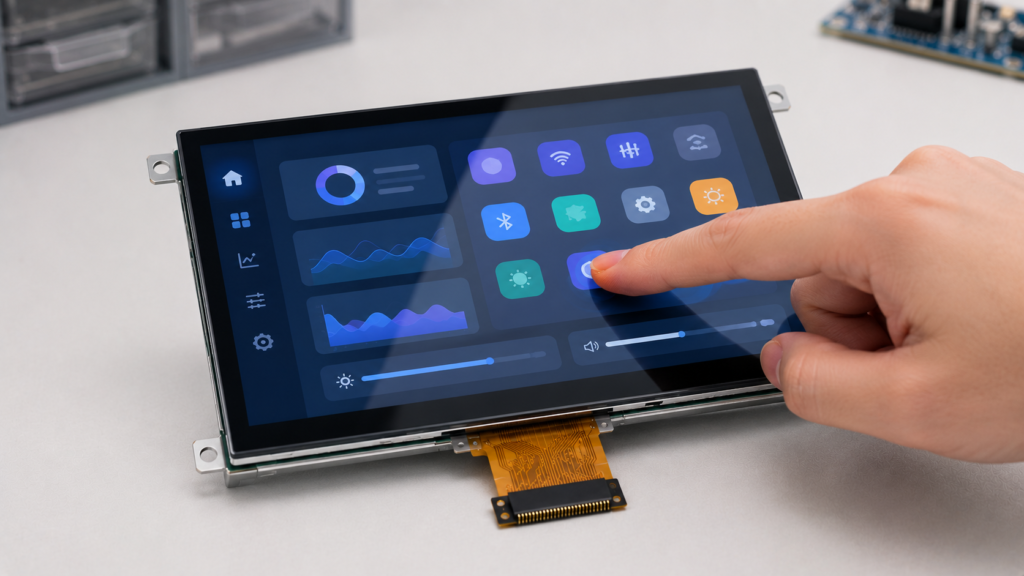
Resistive touchscreens remain useful because they are simple, practical, and compatible with pressure input.
Resistive touch is often a good direction when the user must operate the display with gloves, tools, or a stylus, and when multi-touch gestures are not required.
Resistive touchscreens also have trade-offs. The pressure-based structure can affect user experience, optical performance, and long-term wear.
For products that require smooth gesture control, premium appearance, or high optical clarity, capacitive touch is usually more suitable.
Touch technology affects how the display looks. Capacitive touchscreens usually provide better optical clarity because they can be built with a glass surface and fewer flexible layers. This helps maintain brightness, contrast, and image sharpness.
Resistive touch panels include flexible conductive layers that can reduce light transmission and slightly soften the image. For simple text and equipment controls, this may be acceptable. For high-quality graphical interfaces, product dashboards, or consumer-facing displays, it may be a disadvantage.
If visual quality is important, buyers should evaluate the full stack: LCD panel, touch sensor, cover glass, bonding method, surface treatment, brightness, and viewing angle.
Input method is one of the most practical differences between capacitive and resistive touchscreens.
Resistive touchscreens are naturally compatible with glove and stylus operation because they respond to pressure. This makes them useful for industrial equipment, medical-related interfaces, outdoor terminals, and factory environments.
Capacitive touchscreens normally require a conductive input object. Standard gloves may not work unless the touch controller is tuned for glove mode or the user wears capacitive-compatible gloves. Wet-hand operation also requires careful sensor, controller, firmware, grounding, and cover glass design.
For projects that require glove or wet-hand operation, do not rely only on the technology label. Test the actual touch panel under the real operating condition.
Durability depends on the full design, not only the touch technology. Capacitive touch panels often use cover glass as the user-facing surface. This can provide good scratch resistance and a clean design when the glass is specified correctly.
Resistive touch panels use a flexible top layer. This can be practical for pressure input, but the surface may wear over time with repeated pressing, sharp tools, or harsh cleaning. Protective design and correct usage expectations matter.
In harsh environments, both technologies require proper mechanical design. Sealing, cover material, cleaning method, mounting pressure, cable routing, and controller protection should all be reviewed.
Resistive touchscreens are often lower cost than capacitive touchscreens, especially for simple single-touch applications. This makes them attractive for cost-sensitive equipment, simple HMIs, and basic control interfaces.
Capacitive touchscreens may cost more because they require a touch sensor, controller IC, cover glass, firmware tuning, and more careful electrical design. However, they can provide a better user experience and a more modern product appearance.
For B2B buyers, cost should not be judged only by touch panel price. The full cost may include touch controller, cover glass, bonding, firmware tuning, mechanical design, test cost, maintenance, and user experience impact.
Industrial HMI projects often need reliable operation, clear UI, glove support, stable touch response, and long-term service. Both capacitive and resistive touch can be used, but the right choice depends on the environment.
Choose capacitive touch when the HMI needs a modern glass surface, multi-touch gestures, smooth UI interaction, and good optical clarity. Choose resistive touch when the HMI is mainly operated with gloves, stylus input, or firm single-point commands in a rugged environment.
For industrial projects, buyers should also evaluate EMI, grounding, moisture, temperature, cleaning chemicals, enclosure sealing, cover glass, controller board, and firmware requirements.
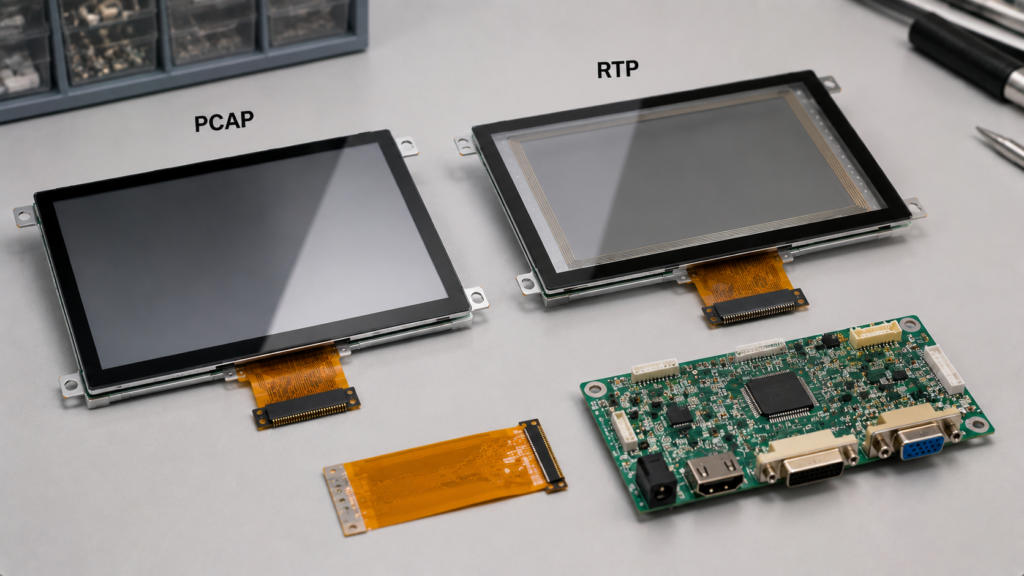
Medical-related devices may require precise input, easy cleaning, glove operation, readable display content, and stable long-term use. Capacitive touch can provide a sealed glass surface and modern interaction. Resistive touch can support stylus or glove input and simple single-point control.
The right choice depends on how the device is used. A bedside terminal, handheld device, diagnostic tool, and control interface may have different requirements. Buyers should avoid assuming one touch type is automatically better for all medical-related applications.
For medical-related projects, display selection should also consider cleaning method, enclosure design, documentation requirements, touch accuracy, and applicable compliance expectations.
Outdoor and rugged use creates additional requirements. The touch panel may face water, dust, temperature changes, gloves, direct sunlight, impact, and electrical noise.
Resistive touch can be useful when glove or stylus operation is required and the interface is simple. Capacitive touch can also be used outdoors, but it usually requires proper controller tuning, cover glass design, moisture handling, grounding, and mechanical sealing.
Outdoor readability also depends on the display itself, not only the touch panel. Buyers should check LCD brightness, cover glass reflection, anti-glare requirements, bonding structure, backlight power, and thermal design.
Start from the user and environment. The best touch technology is the one that matches how the product will actually be operated.
| Project Requirement | Recommended Direction | Reason |
|---|---|---|
| Smartphone-like interaction | Capacitive | Light touch and multi-touch gesture support |
| Glove operation required | Resistive or tuned capacitive | Resistive works by pressure; capacitive requires special design |
| Stylus or pen input | Resistive | Pressure input supports many non-conductive objects |
| High display clarity | Capacitive | Usually better optical transmission and glass-front design |
| Simple single-point HMI | Resistive may be enough | Cost-effective and practical for basic controls |
| Modern smart panel | Capacitive | Better touch feel and user experience |
| Dusty or rugged environment | Project-dependent | Review sealing, input method, surface wear, and enclosure design |
| Wet-hand operation | Project-dependent | Requires real testing and touch controller review |
Touch panel selection should be reviewed together with the display module and final product design. Before choosing capacitive or resistive touch, prepare the following information:
This information helps the supplier review whether capacitive touch, resistive touch, or a customized touch display solution is the better direction.
One common mistake is assuming capacitive touch is always better because it feels more modern. Capacitive touch is often better for smooth UI, but it may require tuning for gloves, water, or industrial noise.
Another mistake is assuming resistive touch is outdated. Resistive touch still has practical value when the product needs glove input, stylus input, simple control, or cost-sensitive operation.
A third mistake is ignoring optical performance. The touch layer affects display brightness and clarity, especially when combined with cover glass, bonding, and surface treatment.
A fourth mistake is selecting the touch panel without checking the controller board and firmware. Touch coordinate mapping, driver support, interface, grounding, and system noise can all affect final touch performance.
RJY Display supports TFT LCD modules, touch displays, controller boards, and custom display solution discussions for engineering-driven B2B projects. Touch panel selection can be reviewed together with display size, resolution, brightness, cover glass, FPC, interface, controller board, firmware, and mechanical structure.
For many modern HMI, smart home, and embedded display projects, capacitive touch is a strong choice when the product needs smooth operation, multi-touch, and a glass-front design. Resistive touch may still be suitable when the project needs glove input, stylus control, pressure-based operation, or a cost-effective single-touch interface.
If your project requires a TFT LCD module with touch panel, cover glass, high-brightness display, controller board, firmware support, or custom integration, prepare your touch and display requirements before inquiry.
Send Your Touch Display Requirements
Capacitive and resistive touchscreens use different sensing principles. Capacitive touchscreens detect capacitance changes and are usually better for light touch, multi-touch gestures, clear display appearance, and modern user interfaces. Resistive touchscreens detect physical pressure and remain useful for glove operation, stylus input, simple controls, and rugged or cost-sensitive applications.
The right choice depends on the product environment, user behavior, display clarity requirement, touch input method, cost target, controller board, firmware, and mechanical design. There is no universal winner.
For B2B display projects, touch technology should be selected as part of the complete display system. The LCD module, touch panel, cover glass, FPC, controller board, software, enclosure, and operating environment should all be reviewed together.
Capacitive touchscreens detect changes in capacitance caused by a conductive object such as a finger. Resistive touchscreens detect physical pressure when two conductive layers make contact.
It depends on the application. Capacitive touch is usually better for modern UI, multi-touch, and clear display appearance. Resistive touch is often better for glove operation, stylus input, and simple rugged controls.
Standard capacitive touchscreens may not work with normal gloves. Glove operation may require conductive gloves, controller tuning, special sensor design, or a project-specific capacitive touch solution.
Standard resistive touchscreens are usually designed for single-point pressure input. Capacitive touch is normally the better choice when multi-touch gestures are required.
Capacitive touchscreens usually provide better optical clarity because they can use a glass-front structure and fewer flexible layers. Resistive touch panels may reduce brightness and clarity because of their layered pressure-sensitive structure.
No. Resistive touchscreens are still useful for applications that need glove input, stylus input, pressure-based operation, simple controls, or cost-sensitive industrial interfaces.
Capacitive touch is often better for modern HMI with smooth UI and multi-touch. Resistive touch may be better when operators use gloves, styluses, or pressure input in rugged environments.
Provide display size, resolution, touch type, input method, cover glass requirement, operating environment, brightness requirement, touch interface, controller board requirement, firmware needs, mechanical drawing, and expected production volume.
Share your display size, resolution, interface, brightness, touch requirement, controller board requirement, and application environment.
Continue reading related display technology guides and application references.
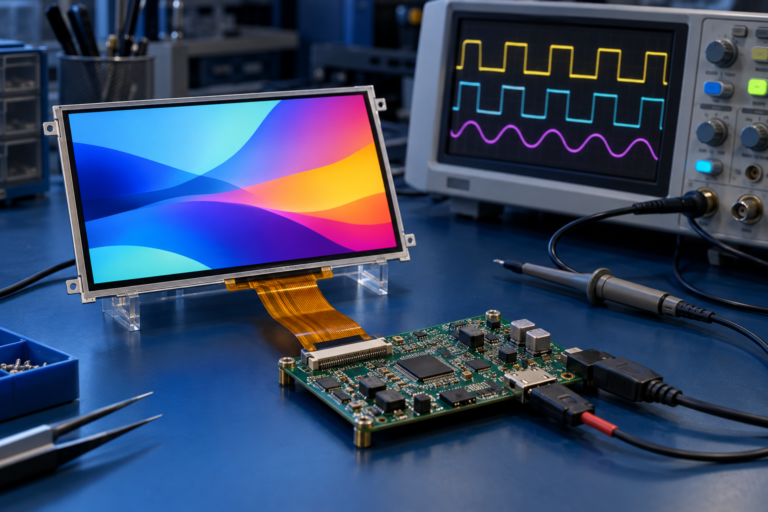


Explore product pages related to this article topic.




Talk to RJY’s engineering team for display matching, controller board review, and customization discussion.









