- 1. Introduction: The Interface of Modern Innovation
- 2. Understanding the Core: LCD Meaning and Definition
- 3. The Science of Sight: How a Color LCD Display Works
- 4. The Taxonomy of Displays: Types of LCD Display
- 5. The Intelligence Factor: The Programmable LCD Display
- 6. Engineering Excellence: Custom LCD Panel Solutions
- 7. Strategic Sourcing: Finding the Right LCD Screen Suppliers
- 8. Industry-Specific Applications: Case Studies
- 9. Conclusion: Partnering for Visual Excellence
- 10. Advanced Optical Enhancements: Perfecting the Visual Experience
- 11. Backlight Architecture and Thermal Management
- 12. Signal Integrity and Driving Interfaces
- 13. Quality Assurance: The B2B Reliability Framework
- 14. The Evolution of Touch: PCAP for Professional Environments
1. Introduction: The Interface of Modern Innovation
In the global landscape of B2B electronics, the color LCD display is no longer just a peripheral; it is the critical bridge between human intelligence and machine performance. From the bridge of an ocean-going vessel to the control panel of a high-end smart home ecosystem, the clarity, durability, and reliability of a display can define the success of a product.
For procurement managers, hardware engineers, and product designers in specialized sectors like marine electronics, commercial signage, and IoT devices, choosing a display isn’t just about “buying a screen.” It is about sourcing a solution that meets stringent environmental requirements, long-term availability, and precise technical specifications.
This guide serves as a definitive resource for professionals looking to master the complexities of Liquid Crystal Display (LCD) technology. We will explore the fundamental physics, the diverse types of panels available today, and the intricate process of sourcing custom LCD screens from global suppliers to ensure your project’s success in a competitive global market.
2. Understanding the Core: LCD Meaning and Definition
To navigate the world of high-end display procurement, one must first master the technical terminology that defines the industry.
2.1 The LCD Meaning
What is the true LCD meaning? At its simplest, LCD stands for 액정 디스플레이(Liquid Crystal Display). However, in a professional B2B context, it refers to a sophisticated flat-panel display system that utilizes the light-modulating properties of liquid crystals combined with polarizers. Unlike older CRT monitors that generated their own light through vacuum tubes, or OLEDs that are self-emissive, an LCD is a “non-emissive” technology. It acts as a shutter, controlling a background light source (the backlight) to create images.
2.2 The Professional LCD Display Definition
A formal LCD display definition describes it as an electronically modulated optical device shaped into a thin, flat panel made up of any number of color or monochrome pixels arrayed in front of a light source or reflector.

Each pixel consists of a layer of liquid crystal molecules aligned between two transparent electrodes and two polarizing filters. The orientation of these molecules—and thus the passage of light—is controlled by an electric field. For a color LCD display, this process is further refined through the use of sub-pixels and color filters.
3. The Science of Sight: How a Color LCD Display Works
Understanding the “how” is essential for engineers who need to troubleshoot integration issues or specify requirements to an LCD display supplier.
3.1 The Role of Liquid Crystals
Liquid crystals are unique substances that exist in a state between a conventional liquid and a solid crystal. In a display, we primarily use nematic liquid crystals. When no electric current is applied, these molecules are arranged in a specific, twisted pattern. When an electric charge is introduced, they “untwist” or align with the field.
3.2 The Layered Architecture
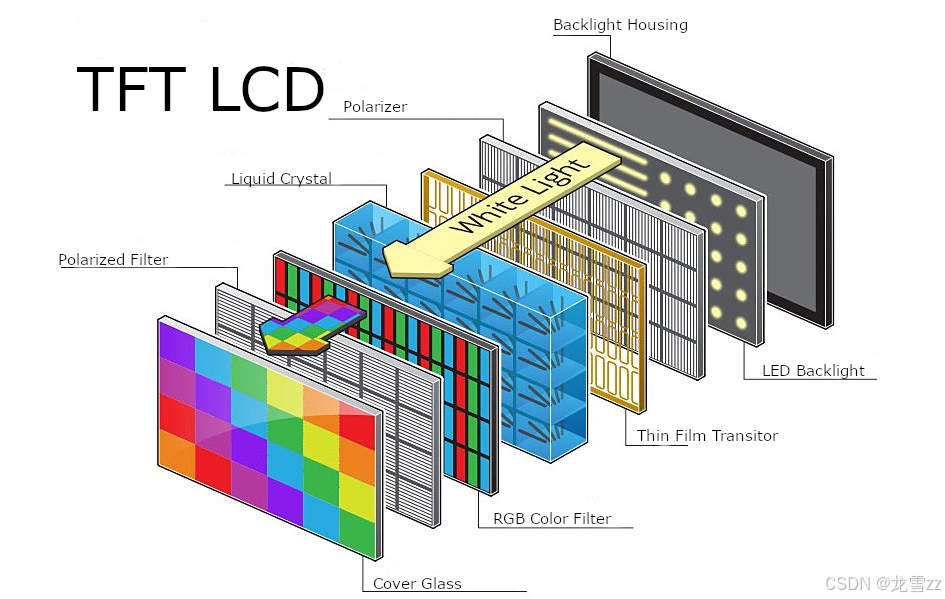
A modern color LCD display is a “sandwich” of several critical components:
- The Backlight Unit (BLU): Usually composed of LEDs, this provides the raw white light.
- The Rear Polarizer: A film that only allows light waves vibrating in a specific direction to pass through.
- TFT Glass Substrate: The Thin Film Transistor layer, which acts as the “control center,” delivering precise voltages to each individual pixel.
- Liquid Crystal Layer: The gatekeeper that twists or blocks light based on the TFT’s command.
- Color Filter Array (CFA): This is where the magic happens. Each pixel is divided into three sub-pixels: 빨강, 녹색 및 파랑(RGB). By varying the intensity of light passing through these three filters, the display can create millions of distinct colors.
- Front Polarizer: Works in tandem with the rear polarizer to either allow the light to exit the screen or block it entirely (creating “black”).

3.3 Active Matrix vs. Passive Matrix
In your search for custom LCD panel solutions, you will encounter these two terms:
- Passive Matrix (STN/CSTN): Older technology, slower response times, and lower contrast. Rarely used in modern high-end commercial apps.
- Active Matrix (TFT – Thin Film Transistor): The industry standard for a color LCD display. Every pixel has its own dedicated transistor, allowing for the fast refresh rates and high resolutions required for complex GUIs in marine and medical equipment.
4. The Taxonomy of Displays: Types of LCD Display
Not all screens are created equal. Depending on whether you are designing a sunlight-readable marine GPS or a sleek smart home hub, the types of LCD display you choose will vary significantly.
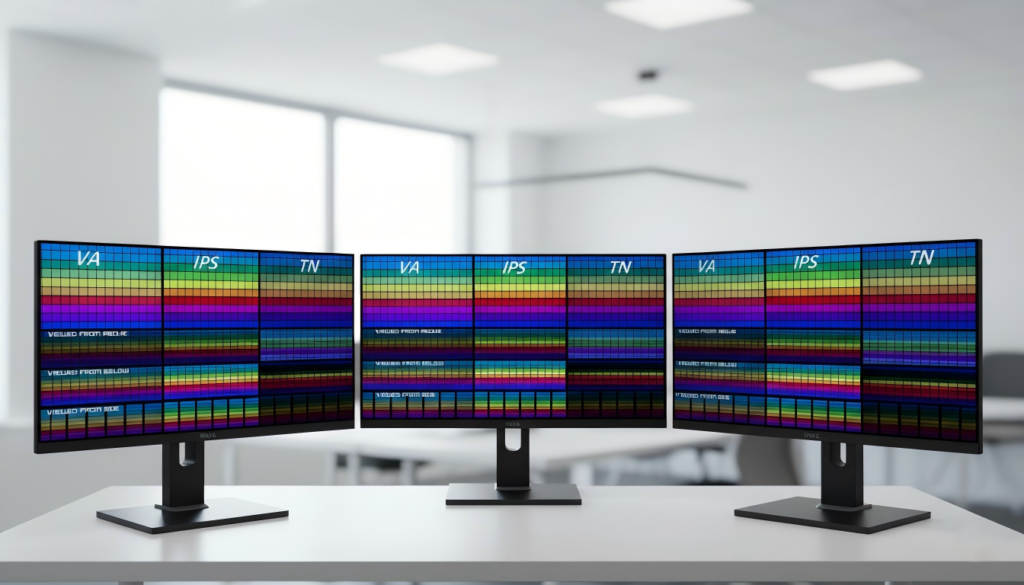
4.1 Twisted Nematic (TN)
- Characteristics: Fast response times, low manufacturing cost.
- Downside: Poor viewing angles and color reproduction.
- B2B Use Case: Simple industrial readouts where the user is always looking directly at the screen.
4.2 In-Plane Switching (IPS)
- Characteristics: Superb color accuracy and near-180-degree viewing angles.
- B2B Use Case: High-end commercial display devices and medical monitors where accuracy and multiple-viewer visibility are paramount.
4.3 Vertical Alignment (VA)
- Characteristics: Superior contrast ratios and deep blacks.
- B2B Use Case: Digital signage in low-light environments or smart home security interfaces.

5. The Intelligence Factor: The Programmable LCD Display
For engineers in the IoT and Smart Home sectors, a screen is only as good as its ease of integration. This is where the programmable LCD display comes into play, shifting the focus from “displaying an image” to “interfacing with a system.”
5.1 Defining the Programmable LCD
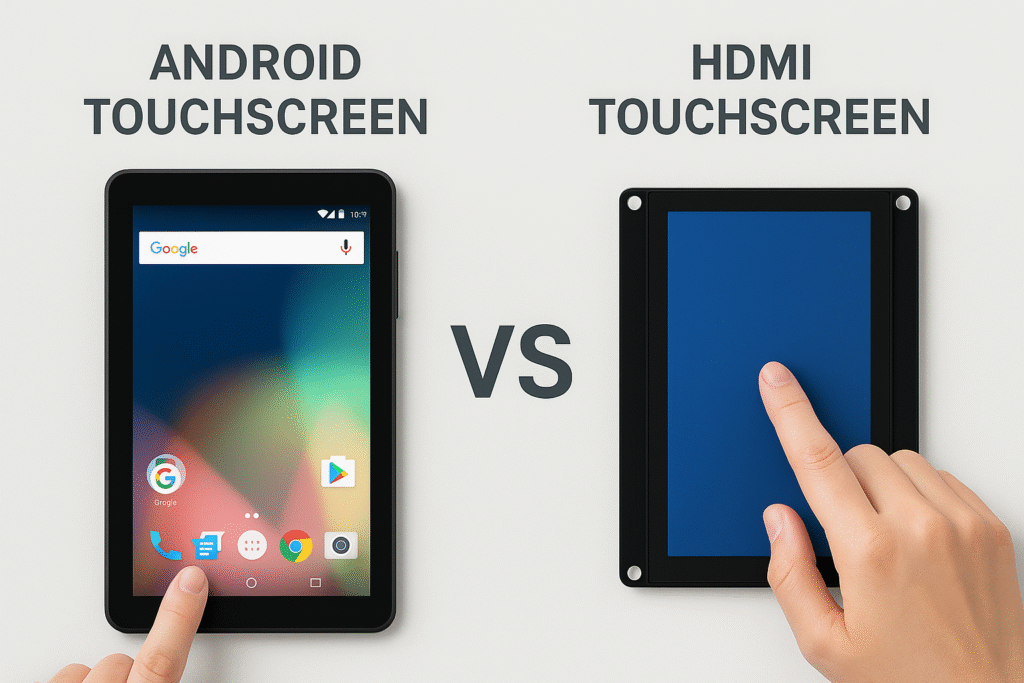
A programmable LCD display typically refers to an LCD module that includes an integrated controller or processor, allowing developers to define the user interface (UI), touch responses, and data visualization using high-level programming languages or dedicated GUI software.
5.2 Key Interfaces for Modern Integration
When sourcing from an LCD display supplier, the interface dictates your hardware compatibility:
- SPI/I2C: Common for low-power smart home sensors and small wearable tech.
- UART/RS232: Often found in industrial “Smart Displays” where the screen handles the graphics processing, and the host MCU simply sends data commands.
- RGB/MIPI DSI: The standard for high-resolution, high-speed video data, commonly used in commercial tablets and sophisticated marine navigation systems.
5.3 The HMI (Human-Machine Interface) Advantage
In the smart home market, the ability to rapidly prototype a UI is a competitive advantage. Programmable modules often come with software suites (like Nextion, DWIN, or Stone) that allow for drag-and-drop UI design, significantly reducing the “Time-to-Market” for new device manufacturers.

6. Engineering Excellence: Custom LCD Panel Solutions
In B2B procurement, off-the-shelf products often fail to meet the rigorous demands of specialized environments. Whether it’s salt-spray resistance for a yacht’s dashboard or ultra-high brightness for an outdoor digital kiosk, custom lcd screens are frequently the only viable path.
6.1 The Customization Spectrum
Designing a custom LCD panel involves more than just changing the size. Key customization vectors include:
- Brightness & Sunlight Readability: Standard screens offer 250-300 nits. Marine and outdoor commercial displays often require 1,000 to 2,500 nits. This requires custom high-efficiency LED backlights and thermal management.
- Cover Lens & Durability: For industrial use, we specify chemically strengthened glass (like Gorilla Glass), anti-glare (AG), anti-reflective (AR), and anti-fingerprint (AF) coatings.
- 터치 통합: Choosing between PCAP (Projected Capacitive) for multi-touch smart home feel or Resistive touch for environments where users wear heavy gloves (industrial/marine).
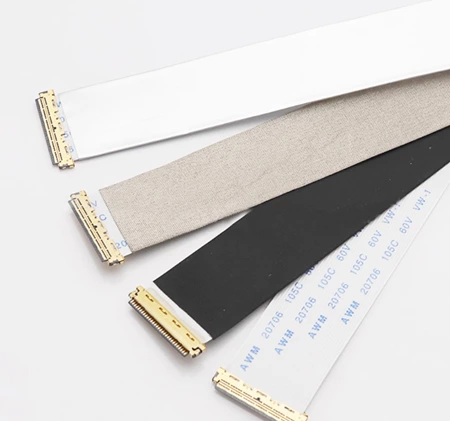
- FPC Design: Customizing the Flexible Printed Circuit (FPC) shape and length to fit into a pre-existing mechanical housing.
6.2 The Prototyping Workflow
A reputable custom lcd screens project typically follows this lifecycle:
- Requirement Analysis: Defining the electrical, optical, and mechanical constraints.
- Counter-Drawing Approval: The supplier provides a technical drawing for the client’s engineering team to verify.
- Tooling/Sample Phase: Creation of the custom glass or FPC (involves NRE—Non-Recurring Engineering fees).
- Pilot Run & Reliability Testing: Testing for vibration, humidity, and temperature cycles.
7. Strategic Sourcing: Finding the Right LCD Screen Suppliers
The global market is flooded with options, but for B2B manufacturers, the cheapest option is rarely the most cost-effective. Reliability and “Longevity of Supply” are the true metrics of success.
7.1 Evaluating an LCD Display Supplier
When vetting lcd display supplier candidates, your procurement checklist should include:
- Quality Management Systems: Are they ISO9001 and IATF16949 (automotive grade) certified?
- Cleanroom Standards: High-end displays must be assembled in Class 100 or Class 1000 cleanrooms to prevent dust specks under the glass.
- EOL (End of Life) Policy: In sectors like marine and medical, products may have a 10-year lifecycle. Does the supplier guarantee component availability for that duration?
7.2 The Logistics of Global Procurement
Working with lcd screen suppliers often involves navigating international trade. Ensure your supplier provides:
- Full Technical Documentation: Datasheets, initialization codes, and 3D CAD models.
- Compliance Certification: RoHS, REACH, and CE/FCC compliance for international market entry.
8. Industry-Specific Applications: Case Studies
8.1 Marine Navigation: Surviving the Elements
Marine displays face the harshest conditions: salt air, direct UV, and high vibration.
- 해결책: An IPS color LCD display 와 함께 광학 본딩. This process fills the air gap between the LCD and the cover glass with a clear resin, eliminating internal reflection and preventing moisture condensation (fogging).
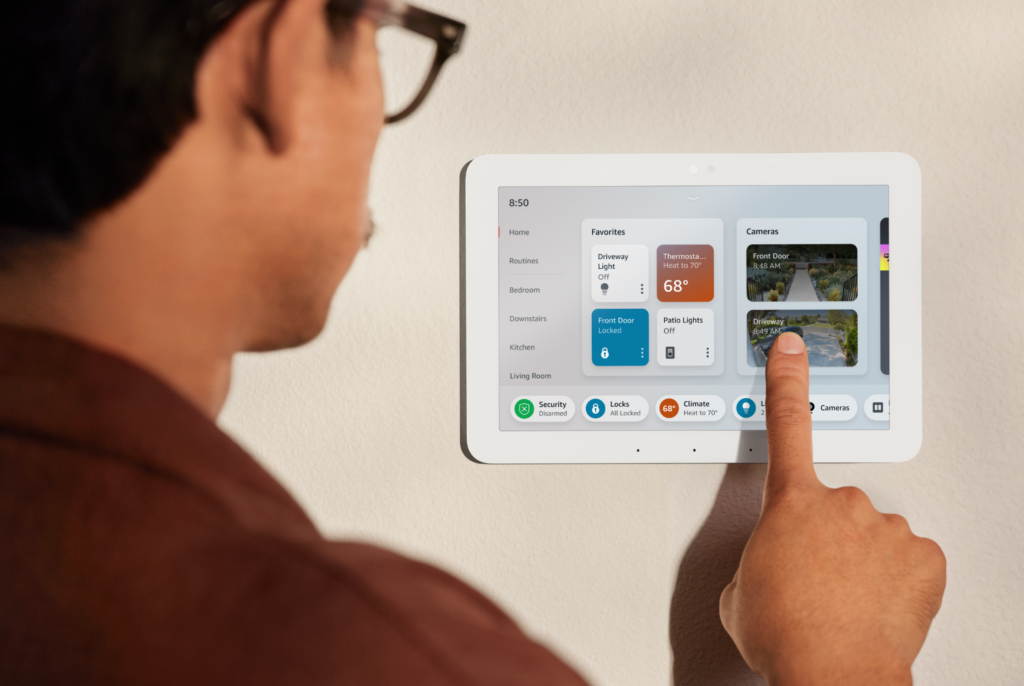
8.2 Smart Home Hubs: Aesthetics Meets Function
In the smart home, the display is the centerpiece of the interior design.
- 해결책: A custom LCD panel with a “Dead Front” effect—where the screen is completely invisible when off—paired with a high-resolution MIPI interface for fluid animations.

8.3 Commercial Digital Signage: 24/7 Reliability
Commercial displays are “Always On,” leading to concerns about “Image Sticking” or backlight burnout.
- 해결책: Utilizing commercial-grade types of LCD display specifically designed with advanced cooling and high-reliability LED drivers to ensure a lifespan of 50,000+ hours.
9. Conclusion: Partnering for Visual Excellence
Selecting the right color lcd display is a multi-dimensional decision that balances physics, engineering, and supply chain strategy. Whether you are building the next generation of smart home controllers or ruggedizing a vessel’s navigation bridge, understanding the nuances of types of LCD display and the capabilities of your lcd screen suppliers is paramount.
By focusing on customization and quality over mere price points, manufacturers can ensure their devices not only perform brilliantly on day one but continue to deliver value for years to come.
10. Advanced Optical Enhancements: Perfecting the Visual Experience
In B2B applications, especially for marine navigation 그리고 outdoor digital signage, the standard “out of the box” performance of a color LCD display is often insufficient. To make a screen truly professional-grade, we must look at optical bonding and surface treatments.
10.1 The Science of Optical Bonding (LOCA vs. OCR)
Standard displays often have an air gap between the LCD panel and the protective cover glass. This gap causes “internal reflection,” where light bounces between the layers, reducing contrast and making the screen appear washed out in bright sunlight.
광학 본딩 is the process of filling this air gap with a clear adhesive (Liquid Optically Clear Adhesive – LOCA, or Optically Clear Resin – OCR).
- Benefits for Marine Use: It eliminates internal reflection, making the screen “Sunlight Readable.” More importantly, it prevents moisture and fog from forming inside the display in humid maritime environments.
- Mechanical Integrity: It makes the entire display assembly significantly more resistant to shock and vibration, which is critical for industrial machinery.
10.2 Surface Treatments: AG, AR, and AF
When ordering custom lcd screens, the “feel” and “clarity” of the glass are determined by three major treatments:
- Anti-Glare (AG): This involves etching the glass surface to diffuse reflected light. It’s essential for indoor commercial display devices where overhead fluorescent lights might create distracting “hot spots.”
- Anti-Reflection (AR): Unlike AG, which scatters light, AR uses vacuum-deposited thin-film coatings to cancel out reflections through destructive interference. This is the “gold standard” for high-end marine GPS.
- Anti-Fingerprint (AF/Plasma Coating): 초박형 및 고급형 스마트 홈 디바이스 with touchscreens, an oleophobic (oil-repellent) coating is applied to reduce smudges and make the glass easier to clean.

11. Backlight Architecture and Thermal Management
The “engine” of any color LCD display is its backlight unit (BLU). For B2B manufacturers, the backlight is often the first component to fail or degrade, making its engineering a top priority.
11.1 LED String Configuration and High-Brightness Logic
To achieve the 1,000+ nits required for outdoor readability, lcd screen suppliers must increase the density of the LED strings. However, more LEDs mean more heat.
- Edge-Lit vs. Direct-Lit: Edge-lit displays allow for thinner profiles (ideal for smart home hubs), while direct-lit (Full Array) provides more uniform brightness and better thermal distribution for large-scale commercial displays.
11.2 Thermal Dissipation in Industrial Displays
Heat is the enemy of liquid crystals. If an LCD gets too hot (usually above 80°C to 100°C), the liquid crystals can undergo a “clearing point” transition, where the screen turns black (isotropic state).
- Heat Sinks & Thermal Pads: Professional custom lcd panel designs incorporate aluminum backplates and high-conductivity thermal interface materials (TIM) to pull heat away from the LEDs and the driver ICs.
- Wide Temperature Liquid Crystals: For marine or automotive use, we specify “Wide-Temp” fluids that can operate from -30°C to +85°C without losing response speed or clarity.
12. Signal Integrity and Driving Interfaces
For a hardware engineer, the most complex part of integrating a programmable LCD display is the electronic interface. Selecting the wrong interface can lead to Electromagnetic Interference (EMI) issues or “ghosting” on the display.
12.1 Comparing B2B Interface Standards
- LVDS (Low-Voltage Differential Signaling): The workhorse of the industrial world. It is highly resistant to noise and can carry high-resolution data over longer cables—perfect for large commercial signs.
- MIPI DSI (Mobile Industry Processor Interface): The standard for the smart home and handheld market. It offers high bandwidth and very low power consumption but is limited in terms of cable length.
- eDP (Embedded DisplayPort): Increasingly common in high-resolution panels (4K and above). It supports higher refresh rates and is the successor to LVDS in many modern industrial PC (IPC) architectures.

12.2 EMI/EMC Compliance
In B2B sectors, your device must pass strict regulatory testing (CE, FCC, etc.). A color LCD display can be a major source of “noise.”
- Shielding: Custom FPC (Flexible Printed Circuit) designs often include a “Silver Foil” or “Copper Foil” shield to prevent the display’s high-speed data signals from interfering with sensitive wireless components (like Wi-Fi or Marine Radar).
13. Quality Assurance: The B2B Reliability Framework
To maintain E-E-A-T, we must emphasize that a custom lcd panel is only as good as its testing protocol. In the B2B world, “Quality” isn’t an abstract concept; it is defined by specific certifications.
13.1 IATF 16949 and ISO 9001
While ISO 9001 is a general quality standard, IATF 16949 is the automotive standard. If your LCD display supplier is IATF certified, it means they have the rigorous process control required for “zero-defect” manufacturing—a huge plus for marine and medical clients.
13.2 Common Industrial Reliability Tests
When vetting lcd screen suppliers, ask for their test reports on:
- High/Low Temperature Storage: Ensuring the materials don’t degrade over time.
- Constant Humidity/Temperature (60°C/90% RH): Testing for delamination or “polarizer bubbling.”
- Salt Spray Testing: Essential for marine equipment to ensure the FPC and connectors don’t corrode.
- Vibration and Drop Testing: Ensuring the glass and backlight don’t separate during transport or heavy industrial use.
14. The Evolution of Touch: PCAP for Professional Environments
While we touched on touchscreens earlier, the B2B market has shifted almost entirely to Projected Capacitive (PCAP) technology, but with specific industrial modifications.
- Glove and Water Support: For marine and industrial use, the touch controller firmware must be tuned to ignore “false touches” from water droplets while still detecting a user wearing heavy work gloves.
- Thick Cover Glass: Some commercial display devices in public spaces require “Vandal-Proof” glass up to 6mm or 10mm thick. Standard touch controllers cannot “see” through this; it requires high-voltage touch ICs and specialized sensor patterns.