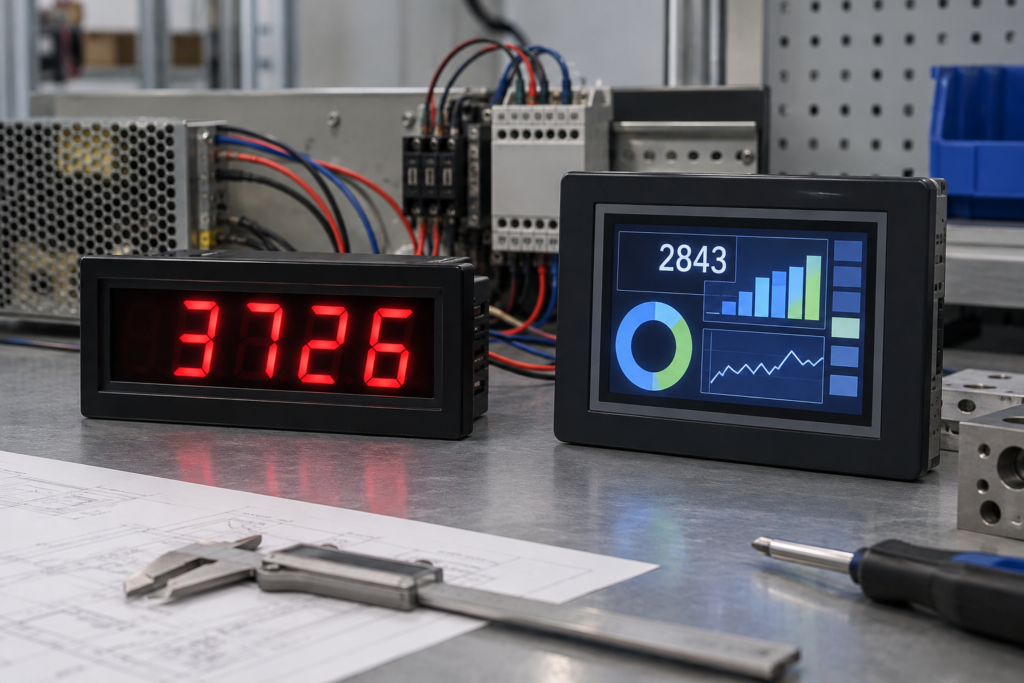
A seven segment indicator is one of the most recognizable electronic displays. It can show temperatures, speeds, counts, voltages, prices, timer values and machine parameters with very little visual complexity.
Despite the growth of color TFT screens, seven-segment displays remain useful in meters, timers, appliances, control panels and industrial equipment. They can provide large, direct numeric information without requiring a graphical operating system or complex user interface.
However, a seven-segment indicator becomes restrictive when the product needs multiple data fields, detailed alarms, multilingual instructions, trends, icons, configuration menus or touch interaction. At that point, a TFT LCD may offer a more adaptable interface.
The right decision is not “old display versus new display.” It is a choice between two different information architectures.
What Is a Seven Segment Indicator?
A seven-segment indicator creates numbers using seven individually controlled bars arranged in a figure-eight pattern. The segments are conventionally identified from A to G, although those labels are part of the circuit documentation and are not normally visible to the user.
By illuminating different combinations, the display can form the decimal digits:
- The number 1 uses two segments.
- The number 4 uses four segments.
- The number 7 uses three segments.
- The number 8 uses all seven segments.
Many packages also include a decimal point. Multi-digit assemblies place several seven-segment characters next to one another so the equipment can display values such as time, temperature, quantity or measurement results.
The term can refer to different underlying technologies. Common implementations include:
- LED seven-segment indicators
- Segmented LCDs
- Vacuum fluorescent displays in legacy equipment
- Graphical screens that simulate a seven-segment appearance
These technologies may look similar from the front but require different drive circuits, power arrangements and optical designs.
How a Seven Segment Indicator Works
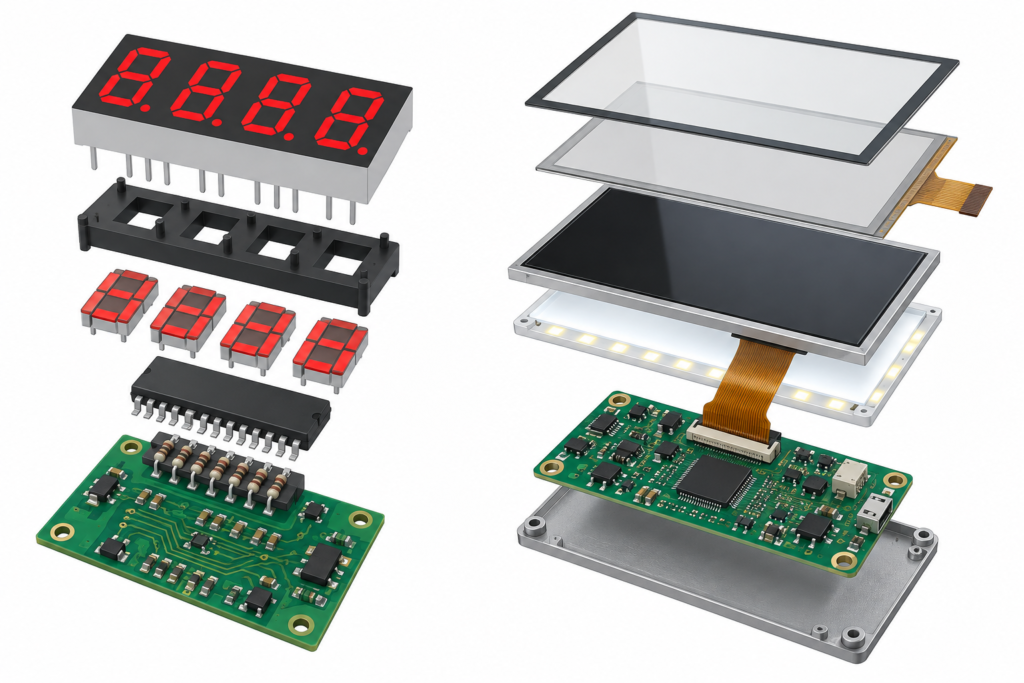
Direct drive
In a simple single-digit circuit, a processor or driver controls each segment individually. The required segments are switched on to create the intended number.
The drive stage must respect the electrical requirements of the selected display. An LED segment is current-driven and normally requires suitable current control. A segmented LCD needs an alternating drive waveform and should not be treated like an LED package.
Common-anode and common-cathode LED packages
LED seven-segment displays are commonly available in common-anode and common-cathode configurations.
In a common-anode arrangement, the positive sides of the LED segments share a connection. The driver activates a segment through the appropriate current path on the other side. In a common-cathode arrangement, the negative sides share a connection and the drive logic is arranged accordingly.
The package type must match the driver circuit. Two modules can have the same size and appearance while using different pin definitions or common connections.
Multiplexed multi-digit displays
Driving every segment of every digit with an independent connection can require many processor pins. Multi-digit displays therefore often use multiplexing.
In a multiplexed system, the controller activates one digit at a time while applying the appropriate segment pattern. It cycles between digits quickly enough that the user perceives a stable complete value.
Multiplexing reduces the number of connections, but the design must manage:
- Refresh frequency
- Segment current
- Digit-to-digit brightness consistency
- Driver capacity
- Ghost segments during switching
- Processor timing
- Electromagnetic and power behavior
If the refresh is too slow, users may notice flicker. If switching and blanking are not controlled correctly, faint unintended segments may appear.
What Can a Seven Segment Display Show?
Seven segments are optimized for decimal numbers. Some letters can be approximated, but the results are limited and can be ambiguous.
The format works well for:
- Integer and decimal values
- Time and countdown displays
- Basic error codes
- Channel numbers
- Temperature and process values
- Quantity, weight or price values
- Simple operating states combined with separate indicator lamps
It is less suitable for:
- Complete words and sentences
- Multilingual instructions
- Charts and trends
- Several changing parameters at once
- Menu hierarchies
- Images and video
- Detailed diagnostic information
- Context-sensitive touch controls
A product can add separate icons, indicator LEDs and printed labels around the numeric display. This works until the number of possible states makes the front panel difficult to understand.
Why Seven Segment Indicators Remain Useful
Immediate numeric readability
A large numerical value can often be recognized quickly. The user does not need to interpret a menu, locate a data field or wait for an application to load.
Focused interface
A limited display can be an advantage when the product performs one clear task. A timer may only need minutes and seconds. A counter may only need a quantity. Additional graphical functions would not necessarily improve the product.
Simple software model
The controller usually sends segment patterns or numeric values rather than rendering a complete graphical interface. This can reduce application-software complexity.
Suitable for physical-button products
Seven-segment indicators work naturally with buttons, knobs and switches. The user changes one parameter and sees the corresponding numerical result.
Scalable character size
Large individual digits can be readable from a distance. This makes the format practical for counters, production information and equipment that must present one important value clearly.
Predictable information hierarchy
Because the display has a fixed structure, the location of each value remains consistent. Operators do not need to navigate changing page layouts.
Limitations of a Seven Segment Indicator
Restricted character set
The principal limitation is the segment geometry. Seven bars cannot reproduce normal typography. Letters are incomplete, similar-looking or impossible to display clearly.
Limited context
A value such as “25.4” is only useful when the user knows what it represents. The unit, parameter and operating condition often need to be printed on the front panel or communicated with separate icons.
Difficult multilingual support
Products sold in Spain and other European markets may need Spanish, English and additional languages. A seven-segment indicator cannot present normal translated instructions. Printed overlays or manuals must carry much of that information.
Fixed front-panel design
Printed labels and dedicated indicators tie the enclosure to a specific function. If firmware adds a mode or the product is adapted for another market, the exterior artwork may also need to change.
Limited diagnostics
Basic error numbers can be displayed, but the user may need a manual to understand them. A graphical screen can describe the affected function, show corrective steps or present several diagnostic values together.
Increasing circuit complexity at larger scale
A small numeric display can be simple. Adding more digits, colors, icons and status lamps increases the number of driver channels, connections, test points and front-panel components.
Seven Segment Indicator vs. TFT LCD
| Selection factor | Seven segment indicator | TFT LCD |
|---|---|---|
| Primary content | Numbers and limited codes | Text, graphics, values, menus and images |
| Layout | Fixed by the physical segments | Defined mainly through software |
| Multilingual content | Very limited | Possible when supported by the application |
| Interaction | Usually buttons, switches or knobs | Buttons, knobs or touchscreen |
| System complexity | Can be low for simple numeric functions | Requires graphics, interface and display control |
| Interface flexibility | Limited after the front panel is defined | Layouts and functions can be changed in software |
| Diagnostic capability | Numbers and short codes | Detailed alarms, diagrams, trends and instructions |
| Product differentiation | Shape, color and enclosure treatment | UI design, cover glass, touch and display format |
A TFT LCD is more capable, but capability has a cost. The system may need a graphics-capable processor, framebuffer memory, display interface, backlight driver, firmware, operating system or graphical framework.
The display must be matched by model, resolution, interface, pin definition, timing, driver IC, power and backlight requirements. If touch is added, the sensor, touch controller, host interface and software driver also need to be considered.
For a broader explanation of terminology, see the difference between LCD and TFT displays.
When a Seven Segment Indicator Is the Better Choice
Retaining a segment-based display is reasonable when:
- The equipment shows one or two numerical values.
- The user already understands the printed units and labels.
- The interface rarely changes.
- Physical buttons or knobs provide all required input.
- There is no requirement for full-text instructions.
- The processor does not need a graphical display system.
- Large digits must be viewed quickly from a distance.
- A full graphical interface would add cost without improving usability.
A simple temperature controller, counter or timer does not automatically become better because it receives a color touchscreen. Additional interface capability should solve a real user or product-management problem.
When a TFT LCD Becomes More Appropriate
A graphical TFT display becomes more valuable when the product needs:
- Several parameters on one screen
- Normal words and complete instructions
- Spanish, English or other interface languages
- Graphs, trends or historical information
- Images, diagrams or equipment status maps
- Context-sensitive controls
- Configuration menus
- Detailed warnings and troubleshooting guidance
- Different interfaces for different product variants
- A branded cover-glass and UI experience
The strongest reason to upgrade is not that TFT is newer. It is that the equipment’s information and interaction requirements have exceeded what a fixed segmented interface can communicate clearly.
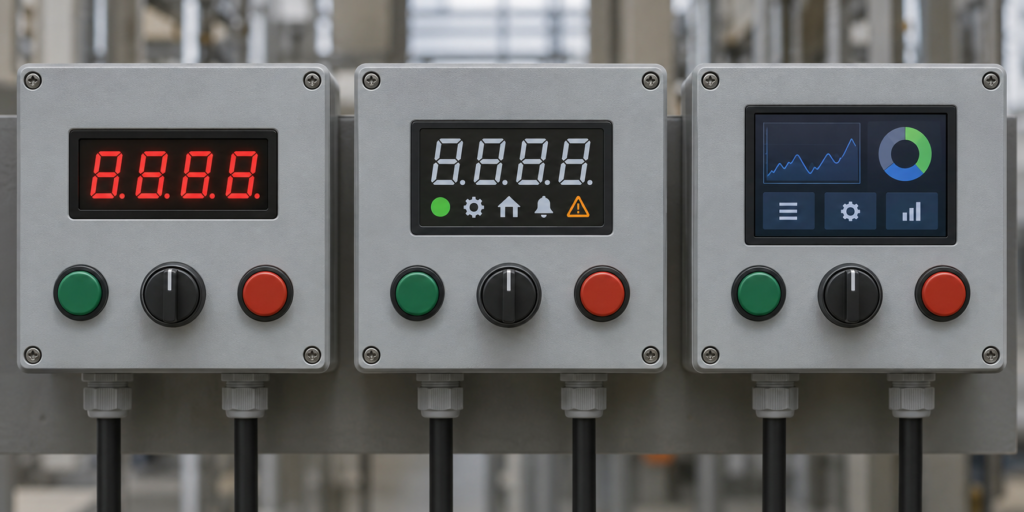
A Hybrid Interface Can Be the Right Answer
The choice does not always need to be all-or-nothing. Some products combine:
- A large numeric indicator for the most important real-time value
- Dedicated warning lamps for immediate states
- Physical emergency or high-frequency controls
- A smaller graphical screen for settings and diagnostics
This approach can preserve direct visibility while adding detailed information when it is needed. It may also keep essential control functions separate from the graphical interface.
However, a hybrid design can increase the number of components and front-panel openings. The additional value should justify the mechanical, electrical and assembly complexity.
LED Seven Segment vs. Segmented LCD
The phrase “seven segment indicator” does not always mean an LED display. Segmented LCDs can use the same digit geometry.
LED seven-segment indicator
An LED version emits its own light. It can provide bright colored digits and strong visual emphasis. The driver must control LED current, and multiplexed implementations must maintain acceptable brightness and refresh behavior.
Segmented LCD
A segmented LCD controls external or reflected light rather than emitting light from each segment. Depending on its construction, it may be reflective, transflective or use a backlight.
Its drive waveform is different from that of an LED display. Applying an unsuitable DC drive can damage or degrade a segmented LCD. A dedicated LCD driver or appropriate alternating drive method is normally required.
Technology should therefore be confirmed before designing the electronics. Similar-looking digits do not imply compatible driving requirements.
Can a TFT LCD Simulate a Seven Segment Display?
Yes. A TFT interface can render a seven-segment-style font or graphic while also providing units, icons, trends and menus.
This can preserve familiar numeric presentation while allowing the interface to expand. For example, the default page may show one large measurement, while additional pages provide settings and diagnostics.
However, a simulated seven-segment display has the system requirements of a TFT LCD. It still needs:
- A compatible graphics source
- The correct display interface and timing
- A backlight and power system
- UI rendering
- Firmware or application software
- Touch support if interaction is required
It should not be selected solely to imitate a display that could have been implemented more efficiently with physical segments.
Controller and Firmware Differences
Seven-segment control
A segment-based controller manages digit selection, segment patterns, current control and refresh. Its data model may be as simple as a numerical value plus decimal-point and status settings.
TFT LCD control
A TFT system must generate a complete image. Depending on the architecture, it may require:
- Framebuffer or graphics memory
- Pixel data and display timing
- RGB, LVDS, MIPI, eDP, SPI or another panel interface
- Panel initialization
- Backlight control
- Graphics libraries or an operating system
- Touch input and coordinate processing
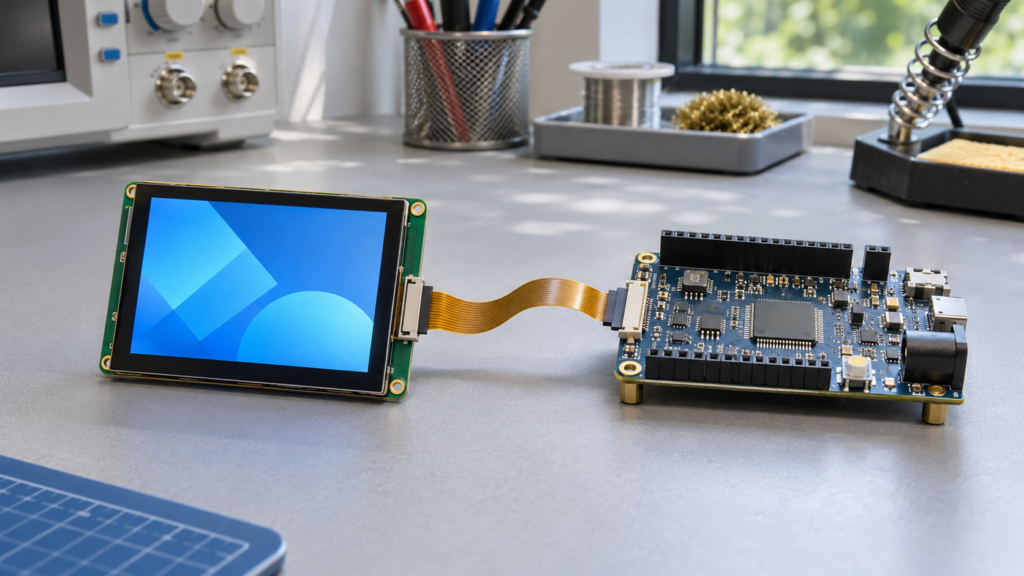
An HDMI or Android controller board may simplify some applications, but compatibility remains dependent on the exact panel and system. A controller board should not be selected from connector appearance alone.
RJY’s LCD display interface guide explains the principal interfaces encountered in embedded display projects.
Front-Panel and Mechanical Differences
A seven-segment package normally requires a defined window aligned with the digits. Printed units, status labels and button legends may surround it.
A TFT assembly introduces a different mechanical stack:
- LCD module
- Optional touch sensor
- Cover glass
- Adhesive or bonding structure
- FPC and connector
- Controller or host board
- Backlight power connection
- Mounting frame or enclosure support
A customized cover glass can integrate the visible display area, printed border and product appearance. Touch buttons may move into the software interface, although critical or frequently used functions may still justify physical controls.
Do Not Compare Component Price Alone
A seven-segment package may have a lower component price than a TFT assembly, but the complete design cost includes more than the display.
For a segment-based interface, include:
- Driver circuitry
- Resistors or current-control components
- PCB space
- Indicator lamps and printed legends
- Buttons and switches
- Wiring and assembly
- Different overlays for product or language variants
For a TFT interface, include:
- LCD module and backlight
- Touchscreen and cover glass, if required
- Graphics-capable host or controller board
- Firmware and UI development
- Mechanical integration
- Software maintenance and validation
The correct comparison is the total interface cost over the product’s expected variants and lifecycle.
A Practical Upgrade Decision Process
1. Inventory the current information
List every value, unit, status lamp, printed instruction, button and error code on the existing front panel.
2. Identify future requirements
Determine whether planned product versions need more parameters, languages, diagnostics, connectivity or user settings.
3. Test whether a segmented solution still fits
If the new requirements only add one icon or one digit, a revised segmented interface may remain practical. Do not introduce a graphical system without a defined benefit.
4. Define the TFT interface before selecting the panel
If a graphical screen is justified, create representative UI layouts. Use them to determine the active area, resolution, aspect ratio, orientation and touch-target requirements.
5. Select the display architecture
Review the host processor, panel interface, controller board, backlight, touch path, firmware and enclosure together.
6. Build and compare prototypes
Evaluate both interface concepts under real viewing distance, lighting, temperature and operator conditions. Include startup behavior and common error scenarios.
7. Validate the complete product
Confirm readability, touch operation, physical controls, power behavior, cable routing, assembly and software recovery before production.
Questions to Answer Before Changing Display Technology
- How many values must be visible simultaneously?
- Does the user need text or only numbers?
- Are multiple interface languages required?
- Are trends, icons or diagrams valuable?
- Will the interface change between product variants?
- Is touch interaction necessary?
- Which controls should remain physical?
- What is the viewing distance and ambient light?
- What host processor and display interface are available?
- How much enclosure space is available?
- What software resources can the project support?
- What is the expected project quantity and lifecycle?
Keep the Interface as Simple as the Product Allows
A seven-segment indicator remains an effective solution when equipment needs to present a small number of clear numeric values. Its limitations become important when the user needs context, instructions, multiple languages, detailed alarms or flexible navigation.
A TFT LCD can consolidate many front-panel functions into a graphical interface, but it introduces additional display, controller, backlight, touch, firmware and mechanical requirements. It should be selected because those capabilities improve the product—not simply because a color screen appears more modern.
RJY Display focuses on TFT LCD modules and display-related integration rather than manufacturing conventional seven-segment packages. If an existing numeric product is moving toward a graphical HMI, RJY can review suitable existing LCD platforms, cover glass, touch, backlight, FPC, interface and controller-board requirements.
Explore RJY custom display solutions or contact RJY with the current front-panel design, required information, host platform, enclosure and project volume for an engineering review.
Frequently Asked Questions
What is a seven segment indicator?
A seven segment indicator forms numbers by controlling seven bar-shaped segments arranged like a figure eight. Many versions also include a decimal point and can be combined into multi-digit numeric displays.
What is the difference between a seven segment indicator and a TFT LCD?
A seven segment indicator has a fixed physical pattern optimized for numbers and limited codes. A TFT LCD controls a pixel matrix and can display text, graphics, menus, images and changing layouts, but requires a more capable display and software system.
Is a seven segment display always an LED display?
No. Seven-segment geometry can be implemented with LEDs, segmented LCDs and other display technologies. The electrical driving method must match the actual technology and package.
When should equipment be upgraded from seven segment to TFT?
An upgrade becomes useful when the product needs several data fields, multilingual text, detailed alarms, trends, menus, graphical instructions, touch interaction or interfaces that change between product variants.
Can a TFT LCD show a seven-segment-style number?
Yes. A TFT LCD can render seven-segment-style graphics while also showing units, icons and additional information. It still requires a compatible controller, display interface, backlight and software environment.