La différence fondamentale entre HD et Full HD réside dans le nombre de pixels. Dans la terminologie courante 16:9, HD désigne généralement une résolution de 1280 × 720 pixels, tandis que Full HD désigne 1920 × 1080 pixels. Le Full HD offre donc 2,25 fois plus de pixels que le HD 1280 × 720.
Pour un écran embarqué, cependant, un plus grand nombre de pixels ne crée pas automatiquement un meilleur produit. Le bénéfice visible dépend de la taille de l'écran, de la distance d'observation, de la complexité de l'interface, du contenu source et de la capacité du processeur hôte à piloter correctement le panneau.
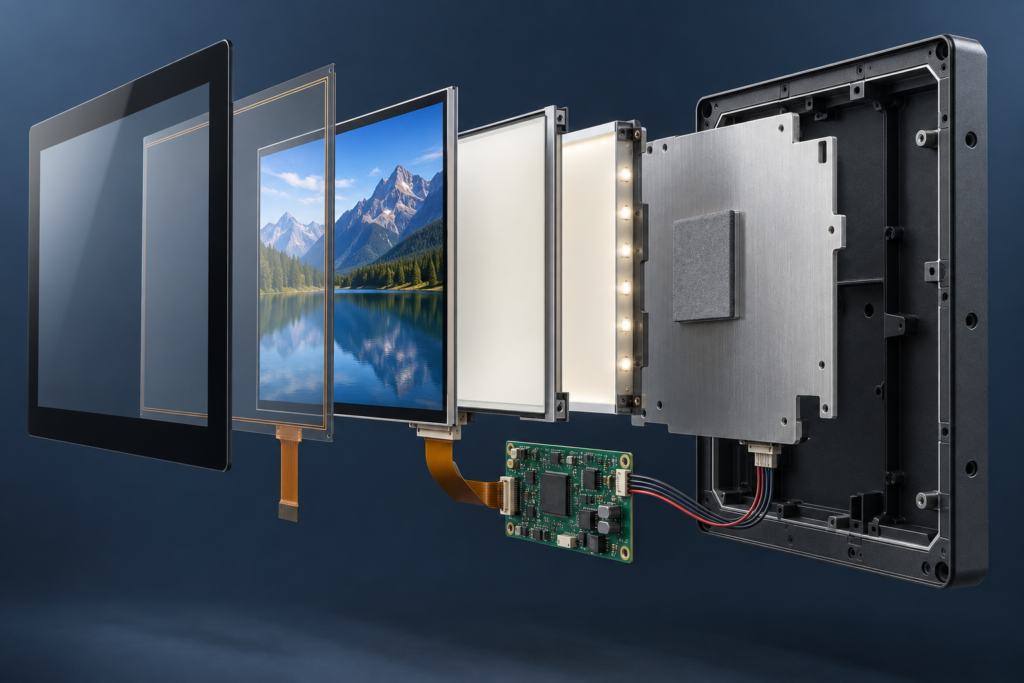
Les fabricants d'équipements d'origine (OEM) comparant HD et Full HD doivent évaluer le système d'affichage complet plutôt que de traiter la résolution comme une spécification isolée. L'écran LCD TFT, la carte contrôleur, l'interface, la charge graphique, l'interface tactile, le boîtier et le logiciel doivent fonctionner ensemble.
Quelle est la différence entre HD et Full HD ?
| Terme d'affichage | Résolution courante | Nombre total de pixels | Rôle typique dans un écran embarqué |
|---|---|---|---|
| HD | 1280 × 720 | 921,600 | Interfaces compactes, IHM simples, vidéo de base et commandes de grande taille |
| Panneau de classe HD | Peut inclure 1366 × 768 et formats associés | Dépend du panneau exact | Terminaux embarqués, petits moniteurs et interfaces d'équipement |
| Full HD | 1920 × 1080 | 2,073,600 | Tableaux de bord détaillés, imagerie, texte fin, vidéo et interfaces multi-panneaux |
Ces appellations proviennent de formats vidéo normalisés, mais les catalogues d'écrans embarqués incluent de nombreuses résolutions et rapports d'aspect qui ne correspondent pas à la terminologie des téléviseurs grand public. Les LCD TFT carrés, ronds, portrait et de type barre peuvent avoir un nombre de pixels élevé sans être décrits avec précision comme HD ou Full HD.
Pour le travail d'ingénierie, la résolution horizontale et verticale exacte est plus utile que l'appellation marketing. Un panneau rond de 1080 × 1080, par exemple, n'est pas un écran Full HD conventionnel de 1920 × 1080, même si l'une des dimensions contient 1080 pixels.
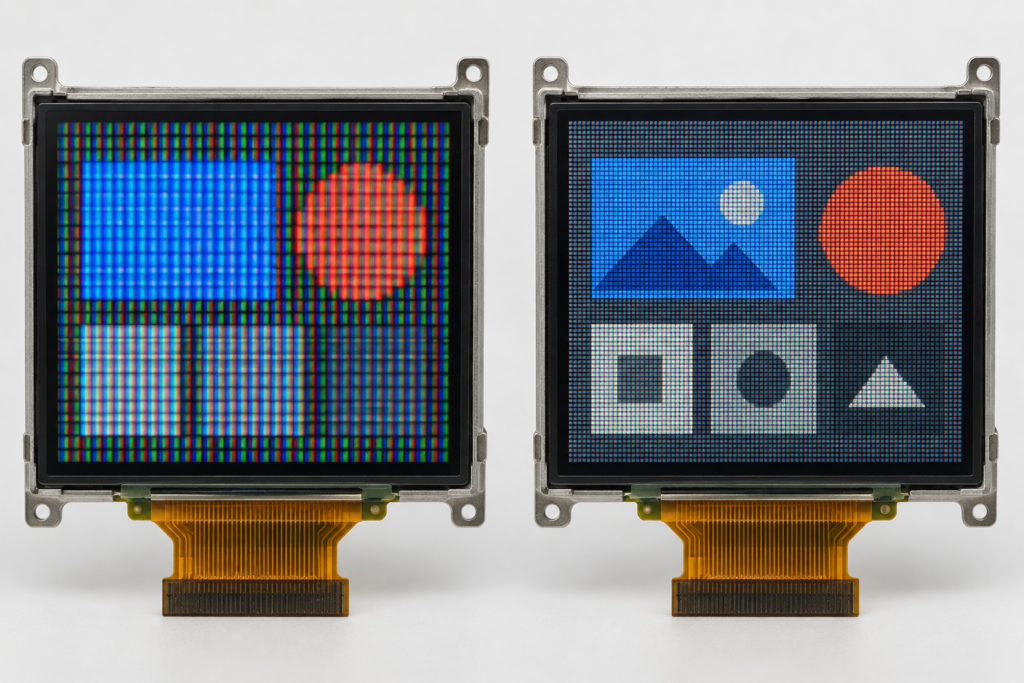
La même prudence s'applique aux panneaux en orientation portrait. Un écran répertorié comme 1080 × 1920 peut offrir le même nombre total de pixels que le Full HD mais utiliser une orientation verticale. Le système hôte, la disposition de l'interface utilisateur et la synchronisation de l'affichage doivent toujours correspondre à la configuration réelle du panneau.
La résolution n'est pas synonyme de qualité d'image
La résolution décrit le nombre de pixels adressables. Elle ne définit pas en soi la luminosité, le contraste, l'angle de vision, le comportement des couleurs, le temps de réponse, la réflexion de surface ou la visibilité en extérieur.
Un panneau Full HD peut afficher des détails plus fins qu'un panneau HD de même taille physique, mais cet avantage peut être réduit si l'écran complet présente un contraste médiocre, une réflexion excessive, des angles de vision inadaptés ou une interface qui met à l'échelle le contenu de manière incorrecte.
De même, un écran HD doté d'une interface utilisateur bien conçue peut être plus facile à utiliser qu'un écran Full HD rempli de petits textes et de commandes encombrées.
La qualité d'image dans un produit embarqué doit donc être évaluée à travers plusieurs facteurs liés :
- Résolution native du panneau
- Surface active physique
- Densité de pixels et pas de pixel
- Distance d'observation normale
- Direction d'observation et orientation du panneau
- Luminosité et conditions de lumière ambiante
- Réflexion du verre de couverture et traitement de surface
- Qualité de l'image source
- Rendu graphique et mise à l'échelle
- Intégrité du signal d'interface et synchronisation
Pourquoi la taille de l'écran modifie la décision HD vs Full HD
La même résolution peut produire des résultats très différents sur des tailles d'écran différentes. Lorsque 1920 × 1080 pixels sont placés dans une surface active plus petite, les pixels sont plus densément regroupés. Lorsque la même résolution est utilisée sur un écran plus grand, chaque pixel occupe plus d'espace physique.
Cette relation est couramment décrite par la densité de pixels ou le pas de pixel. Une densité de pixels plus élevée peut produire un texte plus fluide, des lignes plus fines et des icônes plus détaillées lorsque l'utilisateur est suffisamment proche pour voir la différence.
Dans un appareil portable ou de bureau compact, les utilisateurs peuvent observer l'écran à courte distance. Le texte fin et les commandes détaillées peuvent donc bénéficier d'une densité de pixels plus élevée. Sur un équipement observé de plus loin, l'interface peut utiliser de grandes valeurs et de grands boutons quelle que soit la résolution du panneau. Dans ce cas, le Full HD peut offrir peu d'avantage opérationnel.
Avant de sélectionner un module, affichez des écrans représentatifs à la taille physique finale. Tester une interface utilisateur sur un moniteur d'ordinateur à une échelle différente peut donner une impression trompeuse de la taille du texte, de l'espacement et de la netteté.
Quand le Full HD offre un réel bénéfice d'ingénierie
Tableaux de bord détaillés et dispositions multi-panneaux
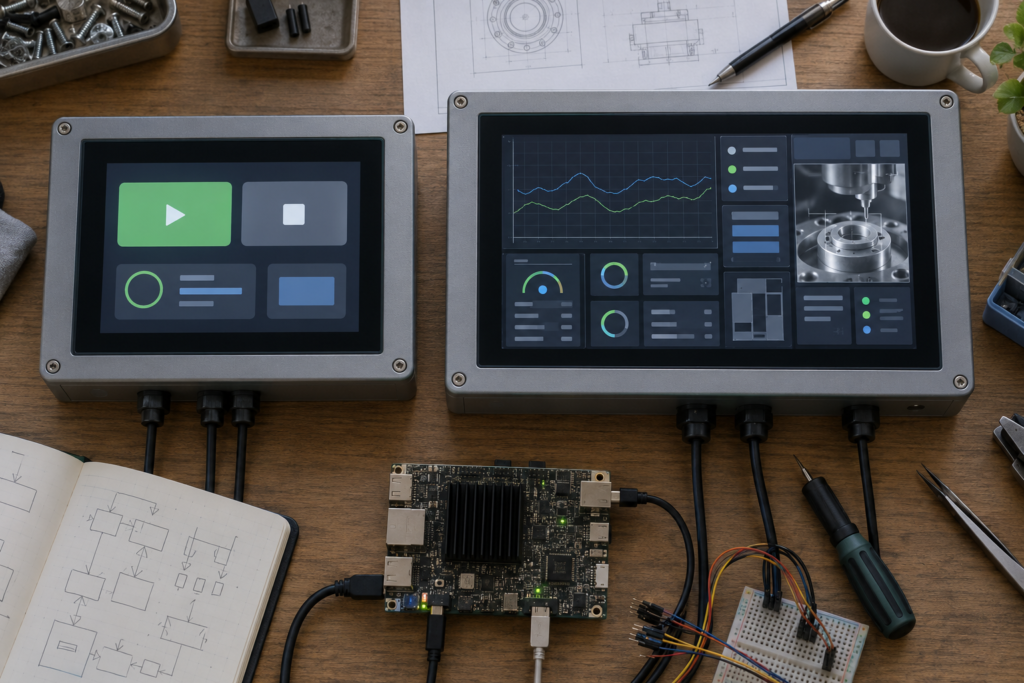
Le Full HD offre plus d'espace pour les graphiques, les cartes d'état, la navigation, les vues caméra et les zones de commande. Il peut être utile lorsque plusieurs groupes d'informations doivent rester visibles sans changements de page fréquents.
L'avantage dépend de la taille physique de l'écran, qui doit être suffisante pour que les utilisateurs puissent lire ces éléments d'interface. Un plus grand nombre de pixels ne justifie pas de rendre les commandes essentielles trop petites.
Texte fin et interfaces multilingues
Une densité de pixels plus élevée peut améliorer le rendu des petits caractères, des formes de lettres courbes et des symboles complexes. Cela peut être utile lorsque l'interface nécessite une terminologie technique, de longs mots composés allemands, des caractères de langues asiatiques ou plusieurs langues sur la même plateforme matérielle.
La localisation doit toujours être testée avec de vraies traductions. Le Full HD donne aux concepteurs plus de pixels, mais il n'empêche pas automatiquement la troncature, les retours à la ligne médiocres ou des dimensions de boutons inadéquates.
Imagerie et équipements à base de caméras
Les équipements d'inspection, les terminaux à caméra et les systèmes de contrôle basés sur l'image peuvent bénéficier du Full HD lorsque le matériel source contient des détails fins utiles. La chaîne d'imagerie complète compte : la résolution du capteur, l'encodage, le traitement, la mise à l'échelle et la résolution d'affichage influent tous sur le résultat final.
A Full HD panel cannot restore information that is absent from the source image. Conversely, reducing a detailed source to a lower-resolution panel may remove information that the operator needs to see.
Desktop-style embedded applications
Some embedded products run browser interfaces, Linux desktops, Android applications or multi-window software originally designed for larger screens. Full HD may provide a more practical workspace for these environments.
The software should still be designed for the actual screen. Simply shrinking a desktop interface onto a compact high-resolution panel can produce text and touch targets that are technically sharp but physically difficult to use.
Products requiring a refined visual appearance
Fine icons, smooth curves and detailed product graphics can benefit from higher pixel density. This may matter for premium control panels, smart appliances and customer-facing terminals where the interface contributes to perceived product quality.
Resolution should still be balanced with brightness, cover glass, viewing angle and graphical performance. A premium-looking interface is a system result, not a resolution label.
When HD May Be the Better Choice
Simple control interfaces
If an interface contains a few large buttons, status icons and numerical values, HD may already provide sufficient detail. Full HD will not necessarily make large controls easier to understand.
Long viewing distances
Operators standing away from a machine normally need larger interface elements. At that distance, the additional pixels may be difficult to distinguish, particularly when the content consists mainly of large text and simple shapes.
Resource-constrained host systems
A Full HD framebuffer contains more than twice as many pixels as a 1280 × 720 framebuffer. Depending on color depth, buffering strategy and graphics architecture, this can increase memory usage and the work required to render, transfer and update the interface.
If the processor or graphics engine cannot maintain the intended performance, a lower-resolution display with a responsive interface may provide a better user experience.
Products with tight thermal or power limits
Resolution is not the only factor affecting power consumption, and panel power cannot be calculated from resolution alone. However, driving and processing more pixels can increase the workload elsewhere in the system.
Battery-powered and passively cooled products should evaluate the complete host, display interface, memory, graphics and backlight power budget rather than assuming that resolution has no system-level cost.
Interfaces built around native HD content
If the graphics, video or application output is designed for 1280 × 720, displaying it on a native HD panel can avoid unnecessary scaling. Moving to Full HD without redesigning the content may provide little benefit and can introduce softness or inconsistent element sizes if scaling is not handled correctly.
The System Cost of Moving from HD to Full HD
The cost of higher resolution is not limited to the LCD panel. It can affect multiple parts of the product architecture.
| System area | Possible Full HD impact | Ce qu'il faut vérifier |
|---|---|---|
| Processor and GPU | More pixels must be rendered and composited | Graphics capability, UI workload and target update behavior |
| Mémoire | Larger framebuffers and graphical assets may be required | Available memory, color depth and buffering strategy |
| Interface d'affichage | Higher pixel data rate may be needed | Interface type, lane configuration, clocking and panel timing |
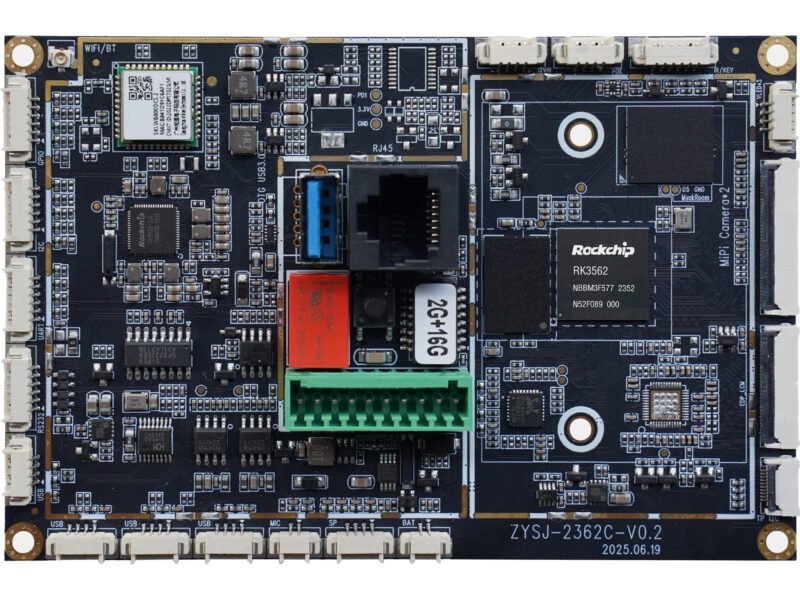
| Carte contrôleur | Board and firmware must support the exact panel | Resolution, timing, pin definition, driver IC and firmware |
| Logiciels | Layouts and assets may require adaptation | Native rendering, scaling, fonts, touch targets and boot behavior |
| Power and thermal design | Host processing and signal activity may change | Complete operating modes rather than resolution alone |
| Validation | More system combinations must be tested | Image stability, scaling, touch mapping and operating environment |
A panel and controller board should never be matched only because both are advertised as Full HD. Compatibility depends on the exact panel model, interface, timing, pin definition, driver IC, backlight requirements, touch interface, firmware, operating system and application environment.
For further technical context, review the common LCD module interface guide et le Guide d'appariement écran LCD TFT et carte de contrôle Android.
Native Resolution and Scaling Matter
TFT LCD panels have a fixed physical pixel matrix. They normally produce the clearest result when the source is rendered for the panel’s native resolution.
If a 1280 × 720 interface is sent to a 1920 × 1080 panel, the image must be scaled. Because the horizontal and vertical dimensions increase by a factor of 1.5, source pixels do not map directly to whole groups of physical pixels. The scaler must interpolate the image, which can soften fine text and one-pixel lines.
Scaling can be handled by the host processor, graphics system, bridge device or controller board, depending on the architecture. The engineering team should define where scaling occurs and validate the result using real interface screens.
Common problems include:
- Blurred small text
- Uneven line thickness
- Incorrect aspect ratio
- Black borders or cropped content
- Touch coordinates that do not align with the visible interface
- Boot screens that use a different resolution from the application
- Inconsistent scaling between operating-system and application layers
If a product moves from HD to Full HD, the interface should ideally be reviewed and rendered for the new native resolution rather than merely enlarged.
Do Not Ignore Aspect Ratio and Orientation
HD and Full HD usually imply a 16:9 format, but many embedded TFT LCDs use other shapes. A product may require a portrait display, square panel, round display or wide bar screen because of its enclosure and information layout.
In these cases, selecting a screen based on the term “Full HD” can direct attention away from more important questions:
- Does the active area fit the enclosure?
- Does the aspect ratio suit the UI?
- Can the host output the panel’s native resolution?
- Does the interface support the required pixel clock and timing?
- Will portrait rotation be handled by hardware or software?
- Does rotation affect graphics performance or touch mapping?
For additional background, see RJY Display’s guide to LCD pixels, resolution and aspect ratio.
How to Choose Between HD and Full HD
Use the following sequence rather than selecting the largest resolution available:
- Define the screen’s job. List the text, controls, images, charts and status information that must appear simultaneously.
- Confirm the physical active area. Determine the maximum display opening, viewing distance and required orientation.
- Create representative UI screens. Include the smallest text, densest page, longest translation and most detailed image.
- Evaluate pixel density. Compare the actual physical size of interface elements on candidate HD and Full HD modules.
- Check the host architecture. Confirm that the processor, GPU, memory and software can support the native resolution.
- Verify the signal path. Review the display interface, timing, pin definition, backlight and controller-board requirements.
- Review power and thermal conditions. Test complete operating modes rather than estimating from resolution alone.
- Prototype at native resolution. Validate text, graphics, video, boot behavior, touch alignment and viewing conditions on the real display assembly.
Choose Full HD when its additional detail supports a defined user or product requirement. Choose HD when it already communicates the required information clearly and provides a better match for the host, interface, power budget and cost structure.
Information Needed for an HD or Full HD Display Review
Before requesting a display or controller-board recommendation, prepare:
- Target application and user workflow
- Required active area and enclosure dimensions
- Preferred orientation and aspect ratio
- Representative UI screenshots or wireframes
- Smallest required text and most detailed content
- Host processor, operating system and graphics output
- Preferred or available panel interface
- Exigences relatives à l'écran tactile et à la vitre de protection
- Backlight and viewing-environment requirements
- Available power and thermal constraints
- Prototype quantity and estimated production demand
RJY Display can review TFT LCD modules, touch integration, cover glass, backlight, FPC, controller boards, firmware and display-related mechanical requirements based mainly on existing display platforms.
Explorer les solutions d'affichage personnalisées RJY ou contactez RJY Display with your screen size, resolution, UI, host platform, interface and enclosure requirements for an engineering review.
Questions fréquemment posées
What is the main difference between HD and Full HD?
HD commonly refers to 1280 × 720 pixels, while Full HD refers to 1920 × 1080 pixels. Full HD contains 2.25 times as many pixels, but the visible benefit depends on screen size, viewing distance, content and system design.
Is Full HD always better than HD for an embedded display?
No. Full HD is useful when the product needs fine text, detailed images, dense dashboards or a larger workspace. HD may be more suitable for simple interfaces, long viewing distances or host systems with tighter processing, power or cost limits.
Will a Full HD display make every image sharper?
Not necessarily. The source content, scaling method, physical screen size, viewing distance and optical characteristics also affect sharpness. Low-resolution content may still look soft on a Full HD panel.
Can an HD controller board drive any Full HD LCD?
No. Compatibility must be checked against the exact panel model, resolution, interface, timing, pin definition, driver IC, backlight, firmware, touch requirements, operating system and application environment.
Is a 1080 × 1080 round display Full HD?
It has 1080 pixels in both directions, but it is not the conventional 1920 × 1080 Full HD format. For nonstandard shapes, engineers should use the exact native resolution and interface requirements rather than relying on an HD label.
Can RJY help evaluate HD and Full HD TFT options?
RJY can review available TFT LCD platforms and project-specific requirements including resolution, interface, touch, cover glass, backlight, controller board, firmware and mechanical coordination. Compatibility and customization scope must be confirmed for the selected module.