Facing a bottleneck in your Embedded Display Project?
Don’t let complex integration or supply chain issues slow your time-to-market. Book a free consultation with the RJY expert team for tailored design and manufacturing support.

When building a custom TFT LCD display—whether for medical monitors, wearable devices, or factory automation—understanding core concepts like display pixel, resolution, and aspect ratio is critical. These elements directly affect image clarity, content compatibility, battery efficiency, and the overall user experience.
Pixels, resolution, pixel density, and aspect ratio are basic display terms, but they are often misunderstood during LCD module selection. A screen with a high resolution is not automatically the best choice. A display with the same resolution can look sharp on a small screen and less sharp on a larger screen. A display with the wrong aspect ratio can make the user interface feel stretched, crowded, or poorly matched to the product enclosure.
A pixel, short for picture element, is the smallest addressable image unit on a digital display. When millions of pixels are arranged across a screen, they form text, icons, images, videos, and user interfaces.
In a color LCD, each pixel is usually made from red, green, and blue subpixels. By controlling the brightness of these subpixels, the display creates different colors. The exact pixel structure depends on the panel design, color filter arrangement, driving method, and display technology.
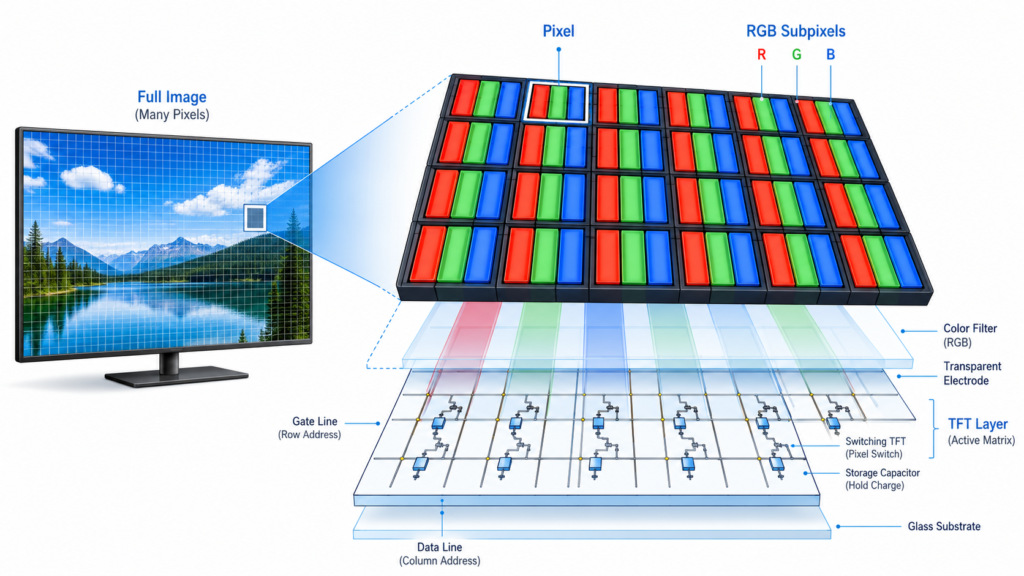
In a TFT LCD, each pixel is controlled by thin-film transistor circuitry. This active-matrix control allows the display to address pixels more precisely than older passive-matrix LCD structures.
Pixels affect how much visual information a screen can show. More pixels allow more detail, but the result also depends on screen size, viewing distance, optical quality, UI design, and display driving performance.
For example, 800 × 480 pixels may be enough for a small industrial control panel with simple buttons and status indicators. A larger HMI, smart terminal, or image-based interface may need a higher resolution to display more data, clearer icons, or finer text.
Pixels matter because they influence:
A display should not be selected by pixel count alone. The question is whether the pixel structure, resolution, physical size, interface, and viewing distance fit the product application.
Display resolution describes the number of pixels arranged horizontally and vertically on a screen. It is usually written as width × height.
For example:
The total pixel count can be calculated by multiplying width by height. A 1920 × 1080 display has 2,073,600 pixels. This is often called Full HD.

Higher resolution can show more detail, but it also increases the amount of data that must be transmitted and processed. In embedded systems, this can affect the processor, memory, graphics performance, interface selection, firmware configuration, and power budget.
| Resolution | Common Name or Format | Typical Use Case |
|---|---|---|
| 480 × 272 | WQVGA class | Small control panels, basic HMI interfaces, compact embedded devices |
| 800 × 480 | WVGA | Industrial touch panels, smart home panels, embedded control interfaces |
| 1024 × 600 | WSVGA | 7-inch class displays, HMI terminals, equipment interfaces |
| 1280 × 720 | HD | Multimedia interfaces, smart control panels, dashboard-style displays |
| 1280 × 800 | WXGA | Industrial panels, medical device interfaces, tablet-style embedded displays |
| 1920 × 1080 | Full HD | High-detail interfaces, imaging systems, larger embedded displays |
| 1080 × 1080 | Square format | Square displays, dashboards, custom UI layouts, special embedded products |
| 1920 × 720 or similar | Bar or stretched format | Bar LCD displays, signage, vehicle-related interfaces, panoramic control panels |
The best resolution depends on the application. A simple control interface may not need Full HD. A product that displays images, maps, charts, camera feeds, or dense data may need a higher-resolution panel.
Resolution tells you how many pixels the screen has. Screen size tells you the physical size of the display, usually measured by diagonal length. These are related, but they are not the same.
For example, a 5-inch display and a 15.6-inch display can both have 1920 × 1080 resolution. The smaller display will have more pixels packed into each inch, so it will usually appear sharper at close viewing distance. The larger display spreads the same number of pixels over a bigger area, so each pixel is physically larger.
This is why engineers should check resolution together with physical size and viewing distance.
Pixel density describes how tightly pixels are packed into a display area. It is commonly measured in PPI, or pixels per inch.
The basic formula is:
PPI = diagonal pixel count / diagonal screen size in inches
The diagonal pixel count can be calculated from the horizontal and vertical resolution:
Diagonal pixels = √(horizontal pixels² + vertical pixels²)
For example, a 1920 × 1080 display has a diagonal pixel count of about 2203 pixels. If the display size is 10.1 inches, the pixel density is about 218 PPI.
Pixel density matters because it affects perceived sharpness. A high-PPI display can make text, icons, curves, and images look smoother, especially at short viewing distances. However, very high pixel density may also require more graphics processing power and higher interface bandwidth.
If you want to estimate display diagonal size or compare width, height, and aspect ratio, you can use RJY Display’s calculator as a quick reference tool.
Use the Display Parameter Calculator
Aspect ratio is the proportional relationship between the width and height of a display. It is usually written as width:height.
For example:
Aspect ratio affects how content fits on the screen. It influences UI layout, video playback, dashboard design, button placement, chart display, camera feed layout, and enclosure design.

A mismatch between content and aspect ratio can cause letterboxing, cropping, stretching, or inefficient use of screen area. For embedded products, the wrong aspect ratio can also make the front panel look unbalanced or make touch controls harder to use.
| Aspect Ratio | Typical Display Style | Common Application |
|---|---|---|
| 16:9 | Widescreen | Multimedia interfaces, smart control panels, vehicle displays, modern HMI layouts |
| 16:10 | Slightly taller widescreen | Tablet-style interfaces, equipment panels, productivity-focused layouts |
| 4:3 | Traditional rectangular display | Legacy equipment, industrial control panels, compact data interfaces |
| 1:1 | Square display | Square dashboards, special UI layouts, compact embedded products |
| Bar format | Ultrawide or stretched display | Digital signage, shelf displays, vehicle-related displays, narrow control areas |
| Round display | Circular display area | Wearables, smart knobs, special dashboards, custom device interfaces |
Aspect ratio should be selected early in the product design process. Changing aspect ratio later may require major changes to the UI, enclosure, cover glass, touch panel, and display module.
Resolution and aspect ratio are connected. A display with 1920 × 1080 resolution has a 16:9 aspect ratio because 1920 divided by 1080 simplifies to 16:9. A display with 1080 × 1080 resolution has a 1:1 aspect ratio because the width and height are equal.
However, the same aspect ratio can have different resolutions. For example, 800 × 450, 1280 × 720, and 1920 × 1080 are all 16:9 formats, but they provide different levels of detail.
This means aspect ratio defines the shape of the screen, while resolution defines the pixel structure inside that shape.
| Resolution | Aspect Ratio | Design Meaning |
|---|---|---|
| 800 × 480 | 5:3 | Common embedded widescreen format for compact HMI |
| 1024 × 600 | Approximately 17:10 | Widescreen format often used in 7-inch class displays |
| 1280 × 720 | 16:9 | HD widescreen format for multimedia and modern UI layouts |
| 1280 × 800 | 16:10 | Slightly taller layout for data and control interfaces |
| 1920 × 1080 | 16:9 | Full HD format for high-detail interfaces |
| 1080 × 1080 | 1:1 | Square format for special UI and dashboard designs |
Pixels, resolution, pixel density, and aspect ratio directly affect product design. They influence how much information can be shown, how readable the screen is, how the UI should be designed, and how demanding the display is for the host system.
A high-resolution display may look sharp, but it may also require a more capable processor or controller board. A wide aspect ratio may be good for dashboards or video, but it may not fit a small square enclosure. A high pixel density may improve close-range readability, but it may not be necessary for a display viewed from several meters away.
Good display selection is a balance between visual quality, mechanical fit, power budget, software performance, interface compatibility, and cost.
Pixel density should be evaluated together with viewing distance. A handheld device, wearable display, or close-range medical device interface usually benefits from higher PPI because users view the screen from a short distance.
A wall-mounted industrial panel, signage display, or equipment monitor may not require the same PPI because the user views it from farther away. In that case, brightness, contrast, viewing angle, and durability may matter more than extremely high pixel density.
This is why a lower-PPI display is not automatically poor quality. It may be suitable if the viewing distance and application requirements are correct.
Higher resolution means more pixel data must be transferred to the display. This affects interface selection. A small SPI display may work for simple low-resolution graphics, but higher-resolution TFT LCD modules often require interfaces such as RGB, LVDS, MIPI DSI, HDMI, or eDP depending on the system architecture.
For controller board projects, resolution must match the board’s supported output, timing configuration, firmware, and LCD panel requirements. A mismatch can cause no image, unstable image, incorrect scaling, or poor visual performance.
Before choosing a high-resolution display, buyers should confirm whether the host processor, controller board, interface, memory, and software stack can support it reliably.
Aspect ratio has a strong effect on user interface design. A 16:9 screen is useful for horizontal layouts, video content, dashboards, and modern touch interfaces. A 4:3 screen may be better for traditional control panels or data-heavy layouts. A square screen can work well for symmetrical dashboards, smart devices, and special embedded products. A bar display is useful when the product has a long and narrow display area.
UI design should not be forced onto an unsuitable aspect ratio. If the layout contains many vertical controls, a very wide screen may waste space. If the product needs a wide dashboard, a narrow or square screen may limit content visibility.
The display shape should match the product’s real user workflow.
Higher resolution can increase power consumption because more pixels must be driven and more image data must be processed. The backlight is often a major power consumer in LCD systems, but resolution still affects processor workload, memory bandwidth, graphics rendering, and interface activity.
For battery-powered devices, it may not be practical to choose the highest available resolution. A balanced resolution can provide enough visual clarity while reducing power demand and system cost.
For industrial equipment powered by mains electricity, power consumption may be less restrictive, but heat, reliability, and controller board compatibility still matter.
One common mistake is assuming that higher resolution is always better. Higher resolution can improve detail, but it can also increase cost, power use, data bandwidth, and system complexity.
Another mistake is comparing resolution without considering screen size. A 1280 × 800 resolution may look sharp on a small display but less sharp on a much larger display.
A third mistake is ignoring aspect ratio. A display may have enough pixels, but if its shape does not fit the UI or enclosure, the final product may still feel poorly designed.
A fourth mistake is assuming that the display module alone determines image quality. Image quality also depends on backlight, panel type, viewing angle, contrast, cover glass, touch stack, interface, controller board, and software rendering.
To choose the right LCD display, start with the product’s actual use case. Ask what the user needs to see, how close they are to the screen, how much space is available, and what kind of system will drive the display.
For a simple embedded device, a moderate resolution may be enough. For an image-based interface, a higher resolution may be required. For a dashboard, aspect ratio may be just as important as pixel count. For a battery-powered device, power consumption and interface bandwidth should be checked before increasing resolution.
Before final selection, review these points:
RJY Display supports TFT LCD modules, controller boards, and custom display solution discussions for engineering-driven projects. Display size, resolution, aspect ratio, interface, touch panel, cover glass, backlight, controller board, and firmware requirements can be reviewed together based on the target product.
For many projects, the best choice is not the highest resolution. It is the display configuration that fits the product structure, user interface, operating environment, development cost, and production plan.
If your project requires a standard TFT LCD module, square display, round display, bar LCD, high-brightness display, touch display, controller board, or custom display solution, prepare your project requirements before inquiry.
Send Your LCD Display Requirements
Pixels are the smallest addressable image units on a display. Resolution describes how many pixels the display has horizontally and vertically. Pixel density describes how tightly those pixels are packed into the screen area. Aspect ratio describes the proportional shape of the display.
These terms work together. Resolution affects detail. Pixel density affects perceived sharpness. Aspect ratio affects layout and content fit. Screen size and viewing distance determine whether a resolution is appropriate. Interface and controller board support determine whether the display can be driven correctly.
For LCD display projects, the right decision is not simply choosing the highest resolution. The better approach is to match pixels, resolution, pixel density, aspect ratio, brightness, touch, interface, controller board, and mechanical design to the real product application.
A pixel is the smallest addressable image unit on a display. In a color LCD, each pixel is usually made from red, green, and blue subpixels that work together to create different colors.
LCD display resolution is the number of pixels arranged horizontally and vertically on the screen. For example, 1920 × 1080 means 1920 pixels across the width and 1080 pixels across the height.
Resolution is the total pixel arrangement on the screen. Pixel density, usually measured in PPI, describes how tightly those pixels are packed into the physical screen size.
No. Higher resolution can improve detail, but it may also increase cost, power consumption, graphics workload, and interface bandwidth. The right resolution depends on screen size, viewing distance, application, and system capability.
Aspect ratio is the proportional relationship between display width and height. Common examples include 16:9, 16:10, 4:3, 1:1, and ultrawide formats.
Aspect ratio affects UI layout, content fit, touch control placement, enclosure design, and user experience. A display with the wrong aspect ratio may cause stretching, cropping, wasted space, or poor usability.
Choose resolution based on screen size, viewing distance, UI complexity, image detail, power budget, processor capability, interface bandwidth, and controller board support.
Display customization depends on the available LCD module platform and project requirements. In many projects, customization is more practical around existing modules, including touch panel, cover glass, backlight, FPC, interface, controller board, firmware, and mechanical coordination.
Share your display size, resolution, interface, brightness, touch requirement, controller board requirement, and application environment.
Continue reading related display technology guides and application references.


Explore product pages related to this article topic.




Talk to RJY’s engineering team for display matching, controller board review, and customization discussion.









