Facing a bottleneck in your Embedded Display Project?
Don’t let complex integration or supply chain issues slow your time-to-market. Book a free consultation with the RJY expert team for tailored design and manufacturing support.

Industrial environments demand reliable, high-performance displays to ensure seamless operation, safety, and productivity. However, even the most rugged LCD modules can suffer from issues like LCD spot damage, flickering, or touch malfunctions over time.This guide walks you through the most common industrial display screen defects, how to identify them quickly, what causes them, and how to fix and prevent them effectively.
Industrial displays are expected to work in environments that are more demanding than ordinary office or consumer display applications. They may face vibration, temperature changes, dust, moisture, electrical noise, long operating hours, fixed user interfaces, unstable power, and repeated touch input.
When a display fails, the visible symptom is often easy to describe: dots on the screen, flickering, blurry text, dim backlight, no touch response, or color distortion. The harder task is identifying whether the defect comes from the LCD panel, backlight, power supply, controller board, cable, firmware, touch sensor, operating system, or installation environment.
This guide explains how to identify common industrial display defects, what can realistically be repaired, when replacement is safer, and how to prevent repeat failures in B2B equipment and embedded display projects.
Before replacing parts, start with a structured diagnosis. Many display issues are misdiagnosed because the visible symptom appears on the screen, even when the root cause is outside the LCD panel.
For example, flickering may come from unstable power, a loose cable, display driver conflict, electromagnetic interference, or a failing backlight circuit. A blurry screen may be caused by a non-native resolution setting rather than panel damage. A non-responsive touchscreen may be caused by calibration, driver failure, surface contamination, poor grounding, or physical damage.
Use the following sequence before deciding that the display panel itself has failed:
A good maintenance process reduces unnecessary panel replacement and helps the engineering team identify whether the problem is electrical, mechanical, optical, software-related, or environmental.
| Visible Symptom | Likely Area | Typical First Check | Repair Direction |
|---|---|---|---|
| Black or colored dots | Pixel circuit or panel | Full-screen color test | Stuck pixel recovery attempt or panel replacement |
| Screen flickering | Power, signal, driver, backlight, or EMI | Cables, power supply, refresh rate, driver | Stabilize input, replace cable, update driver, inspect backlight circuit |
| Blurry text or pixelated image | Resolution, scaling, signal, or panel alignment | Native resolution and scaling settings | Correct output setting or inspect controller and cable |
| Very dim image or black screen with faint image | Backlight or backlight driver | Flashlight test and backlight power | Replace backlight, driver board, or full module |
| Touch not responding | Touch sensor, controller, driver, cable, grounding | Surface condition, calibration, touch cable, driver | Clean, recalibrate, update driver, replace touch panel or controller |
| Color distortion | Backlight, panel, cable, settings, environment | Color settings, signal cable, temperature, uniformity | Calibrate, replace cable, inspect backlight or panel aging |
| Lines, bands, or partial image loss | FPC, driver IC, timing, panel bond, controller | Connector seating and signal source | Re-seat cable, replace controller board, or replace panel |
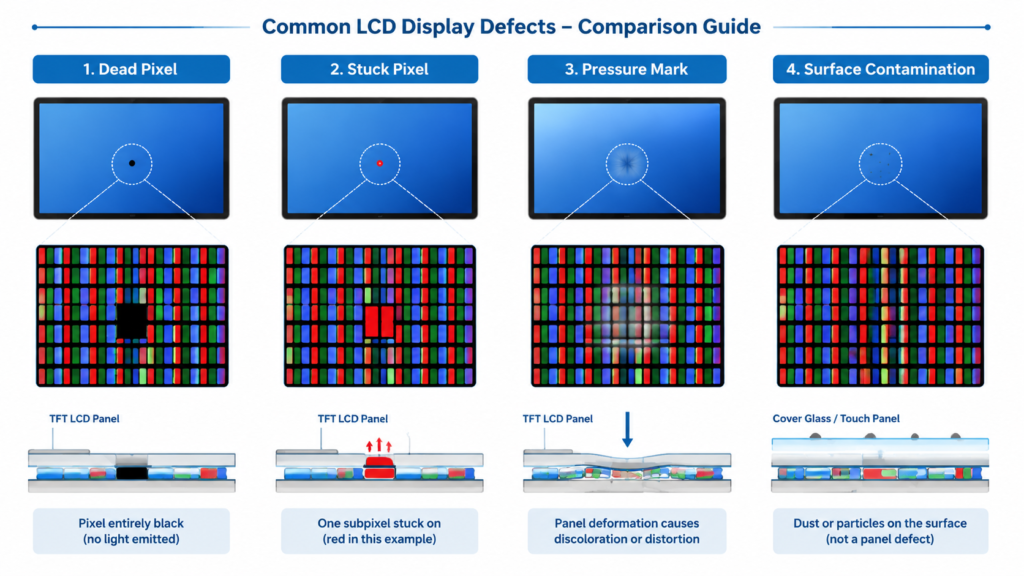
Dead and stuck pixels are among the easiest defects to notice. They appear as small dots that do not change normally when the image changes.
A dead pixel usually appears black because the pixel no longer lights or responds correctly. A stuck pixel usually stays red, green, blue, white, or another fixed color because one or more subpixels are stuck in an active state.
Display solid full-screen colors such as black, white, red, green, blue, and gray. A pixel that remains black on bright test screens may be dead. A pixel that remains bright or colored when it should change may be stuck.
Make sure the dot is not dirt, dust, surface damage, pressure damage, or a problem in the image source. Clean the screen carefully and test again with a known-good input signal.
A true dead pixel is usually a hardware defect and cannot normally be repaired at the field level. A stuck pixel may sometimes recover through full-screen color cycling or pixel-refresh software, but this is not guaranteed.
Do not press hard on the display surface to “fix” a pixel. Pressure can damage the LCD cell, polarizer, touch panel, or cover glass. For industrial equipment, the safer decision is to document the defect, compare it with the applicable acceptance criteria, and replace the panel if the defect affects usability or quality requirements.
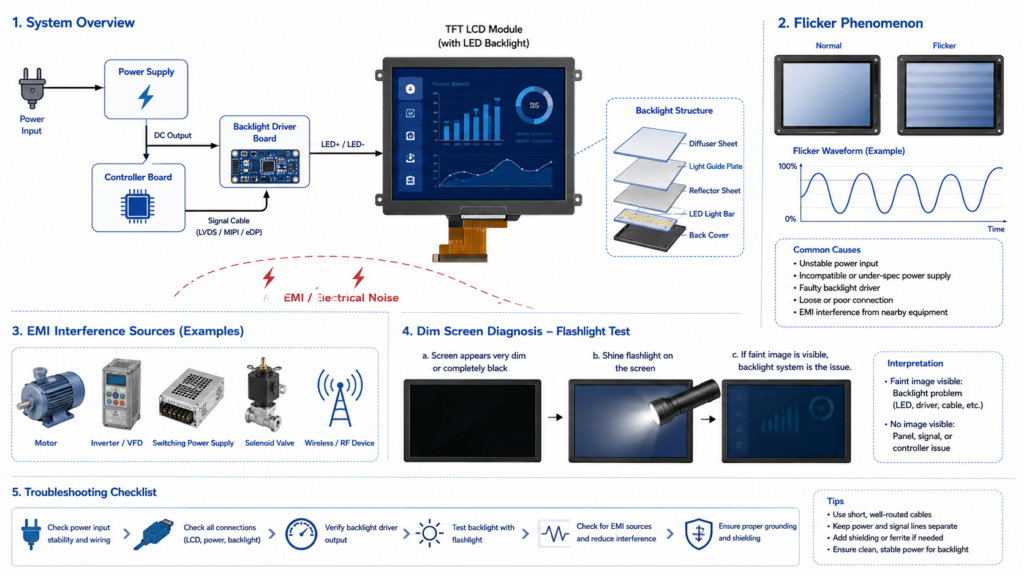
Flickering is a repeated change in brightness, image stability, or screen visibility. In industrial environments, it can make HMI data difficult to read and may indicate power, signal, backlight, driver, or interference problems.
Flickering should not be treated as one single defect. The first question is whether the entire screen flickers, only part of the screen flickers, the backlight flickers, or the image signal flickers.
If flicker disappears after changing the cable, power supply, refresh rate, or driver, the LCD panel is probably not the root cause. If flicker remains after testing with a stable power source and known-good signal, inspect the backlight circuit, controller board, and panel interface.
For high-noise industrial sites, cable shielding, grounding, cable routing, and power filtering may be more important than replacing the display module.
A blurry display is not always a panel defect. In many cases, the display is being driven at the wrong resolution or scaling setting.
LCD panels have a native resolution. When the host system outputs a different resolution, the image may be scaled. Scaling can make text soft, icons unclear, and fine lines look uneven.
If the blur is caused by resolution mismatch, the fix is configuration rather than hardware repair. If the image remains blurry at native resolution with a known-good signal, inspect the controller board, signal path, and panel condition.
For new product design, match display resolution to the UI. Do not choose a resolution only because it looks high on paper. The processor, interface, power budget, and application layout must also support it.
A dim display, black screen, or screen that becomes darker over time may indicate backlight or backlight driver problems. Since LCD panels do not emit light by themselves, the backlight is essential for visibility.
A simple first check is the flashlight test. If the screen appears black but a faint image is visible when a flashlight is held close to the panel, the LCD image signal may still be present while the backlight is not working correctly.
This test is not a full electrical diagnosis, but it helps separate “no image” from “image present but no backlight.”
For legacy CCFL systems, replacement or upgrade to an LED-backlit solution may be practical if the product design allows it. For LED-backlit LCDs, the repair may involve replacing the backlight unit, LED driver board, power board, or complete display module depending on the construction.
In many compact industrial displays, replacing the full LCD module is more reliable than attempting to repair the backlight structure in the field. The correct decision depends on display size, availability, repair labor cost, sealing requirements, and downtime risk.
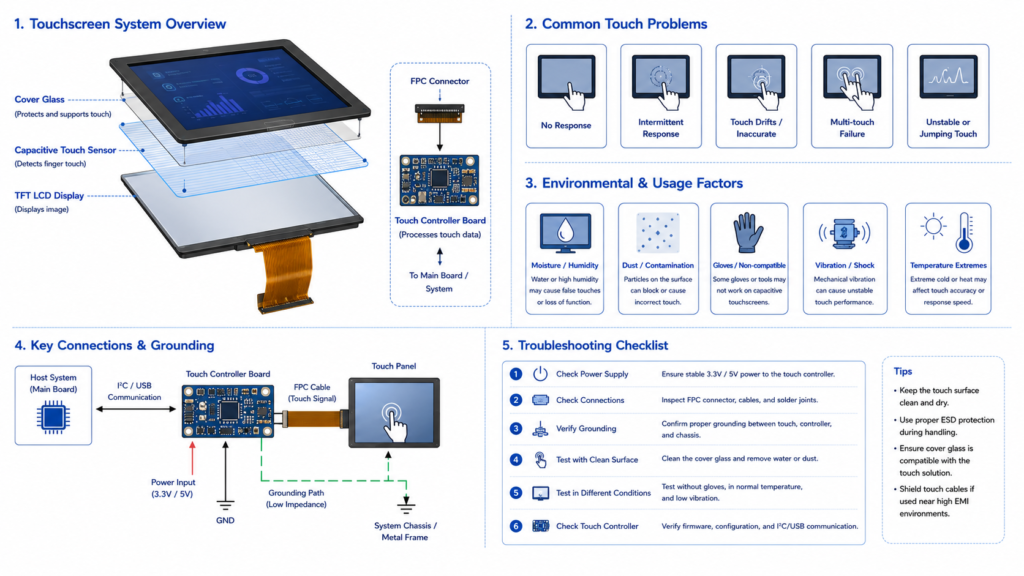
In industrial HMI systems, a touch failure can stop operators from controlling the equipment. The root cause may be the touch panel, touch controller, cable, driver, grounding, operating system, surface condition, or environmental interference.
If the issue is software or calibration related, the repair may be simple. If the touch sensor, cover glass, or bonding structure is damaged, replacement is usually required. For capacitive touch systems, grounding and firmware tuning may be necessary before deciding that the touch panel itself has failed.
For industrial products, touch selection should be based on real use conditions. Gloves, water droplets, dust, oil, impact risk, and cleaning chemicals should be reviewed before the display is finalized.
Color distortion may appear as a strong blue, yellow, red, or green tint. It may also appear as washed-out colors, uneven brightness, poor contrast, or color differences across the screen.
In industrial displays, color accuracy may be important for image review, process monitoring, warning states, dashboard interpretation, and user interface consistency. However, not every industrial display needs the same level of color precision.
If the issue is caused by settings, color profile, or cable problems, repair may be straightforward. If the color shift is caused by backlight aging, panel damage, polarizer degradation, or heat stress, module replacement may be required.
For applications where color consistency matters, define the required color performance during product selection. Do not assume every industrial display is designed for color-critical use.
Vertical lines, horizontal lines, missing image areas, or banding may indicate a problem in the signal path, panel driver circuitry, FPC connection, timing configuration, or LCD cell.
If the problem is caused by a loose cable, re-seating or replacing the cable may solve it. If the issue is related to panel bonding, driver IC failure, or LCD glass damage, field repair is usually not practical and panel replacement is normally required.
Not every industrial display defect should be repaired at component level. The correct choice depends on downtime cost, safety risk, part availability, sealing requirements, labor cost, and whether the same issue is likely to happen again.
| Situation | Best Direction | Reason |
|---|---|---|
| Loose external cable or wrong resolution | Repair or reconfigure | Low-cost issue outside the panel |
| Touch calibration drift without physical damage | Recalibrate or update driver | Software or configuration issue may be recoverable |
| Backlight driver failure on accessible board | Replace driver board if available | Repair may be practical if module construction supports it |
| Panel glass crack or pressure damage | Replace panel or module | LCD cell damage is not normally field-repairable |
| True dead pixel cluster affecting operation | Replace panel if outside acceptance criteria | Hardware pixel failure is usually not repairable |
| Repeated flicker in same equipment environment | Redesign power, grounding, shielding, or mounting | Repeated failure suggests system-level root cause |
| Touch fails repeatedly in wet or gloved use | Review touch technology and tuning | The original touch design may not match the environment |
Preventive maintenance is often more valuable than emergency repair. Industrial displays should be inspected as part of equipment maintenance, especially in facilities with vibration, dust, moisture, heat, power variation, or electrical noise.
A practical maintenance checklist includes:
Many industrial display failures are influenced by design decisions made before deployment. A display that works on a test bench may fail in the field if the enclosure, power system, cable routing, touch structure, backlight brightness, or mounting method does not match the real environment.
For a more reliable design, review the following items early:
For long-term industrial applications, a display should be selected as part of the complete system, not as a standalone screen. The LCD panel, touch panel, controller board, firmware, enclosure, power supply, and user environment must work together.
RJY Display supports TFT LCD modules, controller boards, touch display solutions, and customization discussions for engineering-driven projects. For industrial display issues, the practical path is to identify whether the problem is caused by the panel, backlight, controller board, power system, interface, touch structure, firmware, or environment.
For new projects, RJY Display can help review display size, resolution, interface, brightness, touch requirement, cover glass requirement, controller board requirement, firmware requirement, operating environment, and expected production demand.
For replacement or troubleshooting projects, provide photos or videos of the defect, the LCD model number, controller board information, power input, signal source, operating environment, and failure conditions.
Send Your Industrial Display Requirements
Industrial display defects should be diagnosed systematically. A visible screen problem does not always mean the LCD panel itself has failed. Dead pixels, flicker, blurry images, dim screens, touch failure, color distortion, and line defects can come from different parts of the display system.
Some issues can be repaired through cleaning, calibration, cable replacement, driver updates, power stabilization, or controller board replacement. Other issues, such as cracked LCD glass, failed panel bonding, severe backlight aging, or true dead pixel clusters, usually require panel or module replacement.
The best long-term solution is prevention. Select the display based on the real operating environment, confirm interface and controller board compatibility, protect the screen mechanically, manage heat and power quality, and plan preventive maintenance before failures stop the equipment.
Common industrial display defects include dead pixels, stuck pixels, flickering, blurry images, dim backlight, touchscreen failure, color distortion, vertical or horizontal lines, and partial image loss.
True dead pixels are usually hardware failures and are not normally repairable at the field level. Stuck pixels may sometimes recover through color cycling or pixel-refresh tools, but recovery is not guaranteed.
Industrial display flickering may be caused by unstable power, loose cables, poor shielding, grounding problems, refresh rate mismatch, graphics driver issues, backlight driver failure, PWM dimming behavior, or electromagnetic interference.
A blurry display is often caused by running the panel at a non-native resolution, incorrect scaling, unstable signal input, controller board scaling, or poor source image quality. Hardware problems are possible but should be checked after configuration issues are ruled out.
If the screen is very dark but a faint image is visible when a flashlight is held close to the panel, the LCD signal may still be present and the backlight or backlight driver may be failing.
Touch failure may be caused by surface contamination, physical damage, loose touch cables, missing drivers, calibration errors, grounding problems, EMI, moisture, or a damaged touch sensor or controller.
Yes, many resistive touchscreens and some industrial touch systems can be recalibrated through system tools or driver utilities. If the touch sensor is physically damaged, recalibration will not solve the problem.
Replacement is usually safer when the LCD glass is cracked, panel bonding has failed, the backlight is severely aged, touch glass is damaged, or the defect repeatedly returns because of panel-level failure.
Share your display size, resolution, interface, brightness, touch requirement, controller board requirement, and application environment.
Continue reading related display technology guides and application references.


Explore product pages related to this article topic.




Talk to RJY’s engineering team for display matching, controller board review, and customization discussion.









