Столкнулись с трудностями в проекте встраиваемого дисплея?
Не позволяйте сложной интеграции или проблемам цепочки поставок замедлить ваш выход на рынок. Забронируйте бесплатную консультацию с экспертной командой RJY для получения индивидуальной поддержки в проектировании и производстве.
Могут ли сенсорный экран Android и сенсорный экран HDMI сосуществовать? Руководство по интеграции
Сенсорные экраны Android и HDMI-сенсорные экраны могут сосуществовать, и это уже реализовано в различных промышленных, розничных и потребительских средах. Однако эта двойная функциональность не обеспечивается автоматически — она зависит от аппаратной поддержки, распознавания USB и наличия драйверов.
Published:
13 минут чтения
Updated:
Прежде всего, сенсорный экран Android и HDMI-сенсорный экран могут сосуществовать, но только если система спроектирована и настроена правильно. Ключевой момент заключается в том, что HDMI обычно не передает сигнал касания. В типичной HDMI сенсорный дисплей конфигурации HDMI передает видеосигнал на внешний дисплей, в то время как USB передает сигнал касания обратно на устройство Android.
Это различие важно для проектов с дисплеями на Android. Многие заказчики описывают внешний монитор как “HDMI-сенсорный экран”, но функция касания обычно зависит от второго подключения, чаще всего USB. Плата Android должна поддерживать вывод HDMI, ввод через USB Host или OTG, совместимый драйвер сенсорного устройства и правильное отображение ввода. Если хотя бы одно из этих условий отсутствует, дисплей может корректно отображать интерфейс Android, но функция касания может не работать.
Для промышленных дисплеев Android, интеллектуальных панелей управления, киосков, HMI-терминалов и встраиваемых систем сосуществование сенсорного экрана Android и HDMI-сенсорного экрана следует рассматривать как проблему системной интеграции. Это не только вопрос кабелей. Это включает вывод изображения, сенсорный ввод, поддержку драйверов, конфигурацию прошивки, маршрутизацию ввода, электропитание, заземление и конечное поведение приложения.
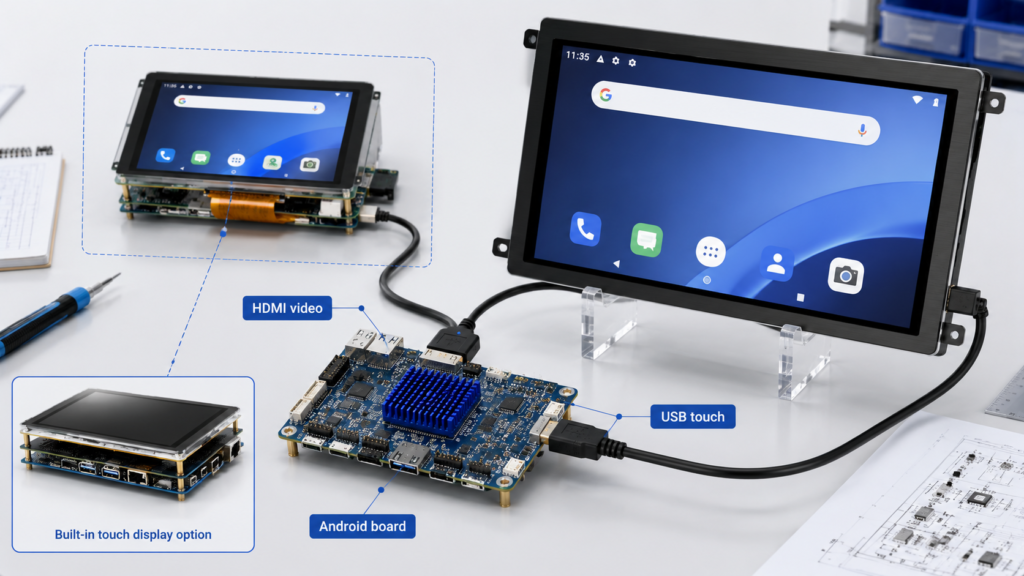
Плата контроллера Android, подключенная к HDMI-сенсорному дисплею с путями передачи HDMI-видео и USB-сигнала касания
Что такое сенсорный экран Android?
Сенсорный экран Android обычно относится к дисплею и сенсорной панели, которые напрямую интегрированы с устройством Android или платой контроллера Android. Во встраиваемых продуктах дисплей может подключаться к плате Android через MIPI, LVDS, eDP, RGB, HDMI или другой интерфейс дисплея, в то время как сенсорная панель может подключаться через I2C, USB, SPI или другой сенсорный интерфейс в зависимости от аппаратной конструкции.
Система Android получает данные касания через свою подсистему ввода. В документации Android поясняется, что сенсорные устройства могут быть внутренними встроенными сенсорными экранами или внешними сенсорными периферийными устройствами, такими как USB- или Bluetooth HID-сенсорные экраны и сенсорные панели.[1] На пользовательской плате Android встроенные сенсорные устройства часто требуют специфической конфигурации устройства, чтобы система могла правильно интерпретировать область касания, ориентацию, калибровку и привязку к дисплею.
В стандартном панельном продукте Android встроенный сенсорный экран обычно сопоставляется со встроенным дисплеем на этапе разработки прошивки. Пользователь касается того же физического экрана, на котором отображается интерфейс Android. Это самый простой случай, поскольку область отображения и область сенсорного ввода спроектированы как единая система.
Что такое HDMI-сенсорный экран?
HDMI-сенсорный экран обычно представляет собой внешний дисплей, который получает данные изображения через HDMI и передает данные касания через отдельное USB-соединение. Сам HDMI является в первую очередь цифровым аудио-, видео- и интерфейсом данных для подключения дисплеев к устройствам-источникам.[2] В большинстве конструкций сенсорных мониторов сенсорный датчик не передает координаты касания через путь видеосигнала HDMI.
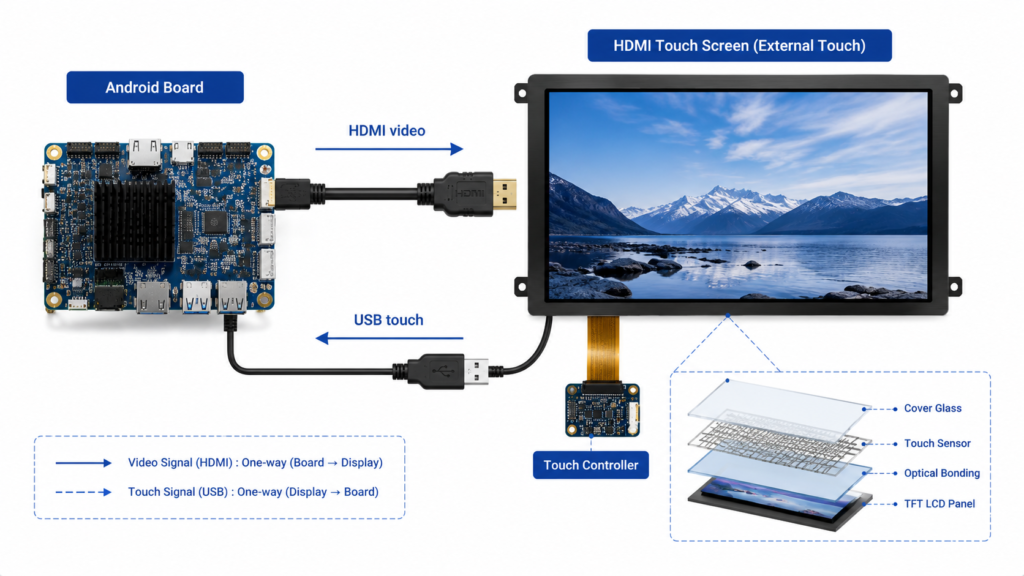
Это означает, что HDMI-сенсорный экран обычно требует как минимум двух подключений. Кабель HDMI передает видео с платы Android на дисплей. Кабель USB передает сенсорный ввод с дисплея обратно на плату Android. Некоторые продукты также могут требовать отдельного источника питания для внешнего монитора.
На практике HDMI сенсорный дисплей следует понимать как “видео через HDMI, касание через USB”. Если кабель HDMI подключен, а USB-кабель касания не подключен, экран может отображать интерфейс Android, но не будет работать как сенсорный экран. Если USB-кабель подключен, но Android не распознает сенсорное устройство, результат будет тот же: видео работает, касание — нет.
Могут ли сенсорный экран Android и HDMI-сенсорный экран работать одновременно?
Android может поддерживать несколько устройств ввода, включая встроенные сенсорные панели и внешние USB HID-сенсорные устройства, но сосуществование зависит от платы Android, ядра, прошивки, конфигурации ввода и режима отображения. Встроенный сенсорный экран Android и внешний HDMI-USB-сенсорный монитор могут генерировать события касания, но система должна знать, как интерпретировать и маршрутизировать эти события.
В простой конфигурации с зеркальным отображением плата Android выводит одно и то же изображение на встроенный дисплей и HDMI-дисплей. В этом случае внешний USB-сенсорный монитор может действовать как еще одно устройство ввода, управляющее тем же интерфейсом Android. Это может работать, если USB-сенсорное устройство распознается как абсолютное сенсорное устройство и сопоставление координат соответствует отображаемому изображению.
В настоящей многодисплейной конфигурации проблема становится более сложной. В документации Android поясняется, что маршрутизация ввода для нескольких дисплеев может требовать информацию о маршрутизации для дисплеев и панелей ввода, особенно когда панели ввода связаны с конкретными дисплеями.[3] Без правильной маршрутизации сенсорный ввод с HDMI-сенсорного экрана может управлять не тем дисплеем, отображаться некорректно или вести себя как указатель мыши вместо прямой сенсорной поверхности.
Следовательно, правильный ответ является условным: сенсорный экран Android и HDMI-сенсорный экран могут сосуществовать, но интеграция должна быть проверена на конкретной плате Android, версии Android, конфигурации ядра, режиме отображения и сенсорном устройстве.
Как работают сигналы касания в конфигурации Android с HDMI-сенсорным экраном
В конфигурации Android с HDMI-сенсорным экраном путь сигнала разделяется на две части. Вывод видео идет с платы Android на внешний дисплей через HDMI. Сенсорный ввод идет от сенсорного контроллера внутри дисплея обратно на плату Android через USB.
USB-сенсорное устройство часто представляется системе как устройство ввода класса HID. Форум разработчиков USB описывает спецификацию класса HID как способ для производителей HID создавать USB-совместимые устройства и для драйверов класса HID извлекать данные из USB-устройств.[4] Многие внешние сенсорные мониторы используют этот подход, поскольку он улучшает совместимость с распространенными операционными системами.
В Android подсистема ввода принимает события касания и передает их через фреймворк ввода. Если устройство распознано правильно, Android может использовать координаты касания как экранный ввод. Если устройство ввода не распознано, классифицировано неверно или не имеет необходимой конфигурации, поведение касания может быть некорректным, даже если USB-соединение физически работает.
Схема сигналов HDMI-сенсорного экрана, показывающая вывод HDMI-видео и USB-ввод касания
Проверьте разрешение, частоту обновления, поведение EDID и качество кабеля
USB
Передает данные касания с дисплея на плату Android
Требует поддержки USB Host или OTG и совместимого распознавания ввода
Питание
Питает внешний дисплей и сенсорную электронику
Некоторые HDMI-сенсорные мониторы требуют внешнего питания
Заземление и экранирование
Улучшает стабильность сигнала
Важно в промышленных средах или при использовании длинных кабелей
Для быстрой функциональной проверки сначала подключите HDMI и подтвердите вывод на дисплей. Затем подключите USB-кабель касания и проверьте, обнаруживает ли Android новое устройство ввода. Если дисплей работает, а касание нет, проблема обычно на стороне USB-ввода, а не HDMI-видео.
Контрольный список совместимости для интеграции Android и HDMI-сенсорного экрана
Перед использованием HDMI-сенсорного экрана с платой Android инженеры должны проверить совместимость как аппаратного, так и программного обеспечения. Дисплей, работающий на ПК с Windows, может не работать автоматически на каждой плате Android, поскольку сборки Android различаются в зависимости от чипсета, конфигурации ядра, прошивки, поведения USB и отображения ввода.
Элемент для проверки
Почему это важно
Распространенный риск
Поддержка вывода HDMI
Плата Android должна выводить видео на внешний экран
Отсутствие изображения, неверное разрешение, нестабильное изображение
Поддержка USB Host или OTG
Плата Android должна получать данные касания от USB-сенсорного контроллера
Сенсорное устройство не обнаружено
Совместимость с USB HID-касанием
Многие внешние сенсорные экраны полагаются на поведение HID-ввода
Касание отображается как мышь, тачпад или неизвестное устройство
Конфигурация устройства ввода
Для корректной работы сенсорного ввода и сопоставления может потребоваться настройка Android
Неправильное сопоставление координат или неверная ориентация
Режим отображения
Режимы зеркалирования и многодисплейной работы ведут себя по-разному
Сенсорное управление воздействует не на тот экран
Электропитание
Внешний дисплей и сенсорный контроллер требуют стабильного питания
Прерывистая реакция сенсора или мерцание дисплея
Качество кабелей
Качество кабелей HDMI и USB влияет на стабильность видео и сенсорного ввода
Ложные срабатывания сенсора, отключения или нестабильное изображение
Поддержка прошивки
Для пользовательских плат Android может потребоваться настройка прошивки
Дисплей работает при тестировании, но выходит из строя в производственной конфигурации
Наиболее надежный подход — тестирование именно того дисплея, платы Android, образа ОС, набора кабелей и конфигурации питания, которые будут использоваться в конечном продукте. Совместимость не следует предполагать только на основе типа разъема.
Совместное использование встроенного сенсорного экрана Android и внешнего HDMI-сенсорного экрана
Когда устройство Android имеет встроенный сенсорный экран и внешний сенсорный дисплей HDMI, возможно несколько вариантов поведения. Внешний дисплей HDMI может зеркалировать встроенный экран. Система может рассматривать внешний USB-сенсор как другое устройство ввода, управляющее тем же интерфейсом. Или, в более продвинутой многодисплейной среде, внешний сенсорный ввод может потребовать привязки к конкретному дисплею.
Если система только зеркалирует один и тот же интерфейс Android, сосуществование обычно проще. Оба источника сенсорного ввода могут управлять одним и тем же содержимым экрана. Это может быть приемлемо для киосков, тестовых стендов, интеллектуальных панелей или сред разработки, где дублирование взаимодействия достаточно.
Если продукт требует отображения разного контента на разных дисплеях, интеграция становится более сложной. Сборка Android должна поддерживать многодисплейный режим, а маршрутизация ввода должна быть настроена так, чтобы правильное сенсорное устройство управляло правильным дисплеем. Документация Android по многодисплейной работе определяет основной и дополнительный дисплеи и поясняет, что дополнительные дисплеи используют идентификаторы, отличные от дисплея по умолчанию.[5] Это различие важно, когда сенсорный ввод должен быть связан с неосновным дисплеем.
Для промышленных продуктов это следует тестировать на этапе разработки. Рискованно предполагать, что любой выход HDMI на Android в сочетании с любым USB-сенсорным монитором автоматически создаст стабильную двухсенсорную, двухдисплейную систему.
Распространенные проблемы и методы их диагностики
Наиболее распространенная проблема — видео по HDMI работает, а сенсор — нет. Обычно это означает, что путь вывода дисплея корректен, но путь USB-сенсора не работает или не распознается Android. Инженер должен проверить USB-кабель, USB-порт, электропитание, режим USB Host и то, отображается ли сенсорный контроллер как устройство ввода.
Другая распространенная проблема — неправильное сопоставление сенсора. Пользователь касается одной части экрана HDMI, а курсор или реакция на касание появляются в другом месте. Это может произойти, когда область сенсора, ориентация или привязка к дисплею неверны. Файлы конфигурации устройств ввода Android могут влиять на поведение устройства ввода, и документация Android отмечает, что встроенные сенсорные устройства обычно требуют правильной конфигурации, специфичной для устройства.[1]
Ложные срабатывания или нестабильная реакция сенсора могут быть вызваны плохим заземлением, длинными USB-кабелями, электрическими помехами, недостаточным питанием, низкокачественными сенсорными контроллерами или проблемами с прошивкой. Это особенно актуально в промышленных средах, где двигатели, реле, преобразователи питания и длинные кабельные линии могут создавать помехи.
Для отладки инженеры могут использовать инструменты и журналы Android, чтобы проверить, обнаружено ли сенсорное устройство и какие события оно генерирует. В инженерных сборках такие команды, как проверка ввода, журналы ядра и дампы ввода Android, могут помочь определить, распознается ли устройство как сенсорный экран, тачпад, мышь или неизвестный источник ввода.
Встроенный сенсор Android и внешний сенсорный дисплей HDMI USB, работающие с одной платой контроллера Android
Когда HDMI-сенсорный экран является хорошим выбором для проектов на Android
Сенсорные экраны HDMI полезны, когда проект требует модульной архитектуры дисплея. Вместо разработки пользовательского MIPI или LVDS дисплея с нуля, плата Android может выводить видео через HDMI и получать сенсорный ввод через USB. Это может упростить раннее прототипирование и позволить команде продукта быстрее оценить размер UI, разрешение и сенсорное взаимодействие.
Сенсорный HDMI также может быть полезен для киосков, POS-терминалов, промышленных испытательных станций, интеллектуальных панелей управления, интерактивных цифровых вывесок, заводских терминалов и интерфейсов оборудования, где дисплей физически отделен от платы контроллера Android.
Однако сенсорный HDMI не всегда является лучшим выбором для массового производства. Разъемы HDMI и USB-кабели могут занимать больше места, чем интерфейсы дисплея на уровне платы. Необходимо оценить надежность кабеля, конструкцию фиксации, ЭМС-характеристики, электропитание, конструкцию корпуса и долгосрочную доступность. Для компактных встраиваемых продуктов более подходящим может быть прямой LCD-модуль с интерфейсом MIPI, LVDS, eDP или RGB.
Когда лучше использовать нативный дисплейный модуль Android
Нативное решение с дисплейным модулем Android или решением «дисплей плюс плата контроллера» может быть лучше, когда проект требует компактной механической конструкции, стабильного сопоставления сенсора, контролируемой прошивки, долгосрочной стабильности производства или более чистой внутренней сборки. В этой конструкции LCD, сенсорная панель, плата контроллера, прошивка и корпус могут быть спроектированы как одна интегрированная система.
Этот подход часто предпочтителен для промышленных HMI-панелей, панелей управления умным домом, интерфейсов медицинского оборудования, встраиваемых терминалов и других OEM-продуктов, где дисплей является не просто монитором, а частью конечного дизайна продукта.
Решение между сенсорным HDMI и нативным дисплейным решением Android должно приниматься исходя из этапа проекта. Сенсорный HDMI может быть удобен для прототипирования и модульных систем. Прямой LCD-модуль или интегрированное дисплейное решение Android могут быть лучше для серийных продуктов, где размер, надежность, контроль прошивки и механическая интеграция имеют большее значение.
Инженерные вопросы, которые необходимо прояснить перед выбором решения
Прежде чем решать, должны ли сенсор Android и сенсор HDMI сосуществовать в продукте, инженеры должны подтвердить реальную системную архитектуру. Зеркалирует ли HDMI-дисплей только экран Android, или продукт требует независимого контента на нескольких дисплеях? Должен ли сенсорный ввод управлять основным или дополнительным дисплеем? Распознается ли сенсорный монитор как USB HID-сенсорный экран? Поддерживает ли плата Android режим USB Host? Поддерживает ли прошивка требуемую маршрутизацию ввода?
Механические и электрические вопросы также важны. Какова длина кабелей HDMI и USB? Установлен ли дисплей внутри того же корпуса, что и плата Android, или он вынесен удаленно? Подвержена ли среда электрическим помехам, вибрации или частым перемещениям кабеля? Требует ли дисплей отдельного питания? Требуются ли разъемы с фиксацией?
На эти вопросы следует ответить до утверждения образца. Многие проблемы с сенсором вызваны не самой LCD-панелью. Они вызваны неполной системной интеграцией.
Сотрудничество с RJY Display по интеграции сенсорных экранов Android и HDMI
RJY Display предлагает TFT LCD-продукты, платы контроллеров, поддержку плат контроллеров Android и услуги по кастомизации для B2B-проектов дисплеев. Для приложений с сенсорным экраном Android и сенсорным HDMI компания RJY Display может помочь с оценкой размера дисплея, разрешения, интерфейса, типа сенсора, требований к плате контроллера, поведения USB-сенсора, потребностей в прошивке, конструкции корпуса и конечного использования продукта.
Если ваш проект требует дисплея Android, интеграции сенсорного монитора HDMI, TFT LCD с платой контроллера или пользовательского решения сенсорного дисплея, свяжитесь с RJY Display, указав ваши технические требования. Полезная информация включает модель платы Android, версию Android, размер дисплея, разрешение, требования к выходу HDMI, тип USB-сенсора, информацию о сенсорном контроллере, требования к питанию, конструкцию корпуса, годовой объем и целевой образец.
Часто задаваемые вопросы
Может ли Android распознавать сенсорный ввод через HDMI?
Android может распознавать сенсорный ввод от сенсорного экрана HDMI, если сигнал сенсора передается через USB или другой поддерживаемый интерфейс ввода, и система Android правильно распознает устройство. HDMI сам по себе обычно передает видеосигнал, а не сигнал сенсора.
Передает ли HDMI сигналы сенсора?
В типичных конструкциях сенсорных мониторов HDMI — нет. HDMI передает сигнал дисплея, в то время как данные сенсора обычно передаются через отдельное USB-соединение.
Могут ли встроенный сенсор Android и внешний сенсор HDMI работать вместе?
Да, они могут работать вместе, если плата Android, ядро, прошивка, поддержка USB-ввода и сопоставление дисплеев настроены правильно. В более сложных многодисплейных системах может потребоваться дополнительная настройка маршрутизации ввода.
Почему мой HDMI-дисплей работает, а сенсор — нет?
Обычно это означает, что видеотракт HDMI работает, но тракт USB-сенсора не распознается. Проверьте USB-кабель, поддержку USB Host, совместимость сенсорного контроллера, электропитание и обнаружение устройств ввода Android.
Нужен ли мне специальный драйвер Android для сенсорного экрана HDMI?
Многие USB HID-сенсорные экраны могут работать со стандартной поддержкой ввода, но некоторые сенсорные контроллеры или пользовательские платы Android могут потребовать изменений драйвера, прошивки или конфигурации ввода.
Подходит ли сенсорный HDMI для промышленных продуктов Android?
Сенсорный HDMI может подходить для киосков, испытательных станций, модульных HMI-систем и прототипирования. Для компактных серийных продуктов прямой LCD-модуль или интегрированное дисплейное решение Android могут обеспечить лучшую механическую надежность и контроль прошивки.