組込み表示プロジェクトでボトルネックに直面していませんか?
複雑な統合作業やサプライチェーンの問題が市場投入までの時間を遅らせないようにしましょう。RJYの専門家チームによる無料コンサルテーションを予約し、お客様に合わせた設計・製造サポートをご利用ください。.

現代のディスプレイ技術において、解像度スケーリングは視覚性能の最適化とデバイス機能強化の重要なツールとなり、特に医療、IoT(モノのインターネット)、スマートホーム産業などのアプリケーションで注目を集めています。TFT LCD技術の普及に伴い、解像度スケーリングが表示品質と性能に与える影響を理解することが極めて重要です。本稿では、解像度スケーリングの概念、TFT LCDが解像度スケーリング調整をサポートするかどうか、および実際の使用におけるこれらの調整の利点と欠点について掘り下げ、様々なシナリオに適したLCDディスプレイの選択と調整方法をより深く理解するための手助けをします。
LCD解像度とは、ディスプレイの幅と高さにわたって配置されたピクセル数を表す。通常は水平ピクセル数×垂直ピクセル数(例:800×480、1280×720、1920×1080)で表記される。解像度が高いほどディスプレイはより多くのピクセルを含むが、解像度のみで画質や使いやすさを完全に説明できるわけではない。.
LCD解像度の実際の違いは、ピクセル数、画面サイズ、ピクセル密度、アスペクト比、ネイティブ解像度、スケーリング動作、インターフェース帯域幅、グラフィックス性能、消費電力、視聴距離といった複数の要素が連携して決まる。.
B2B向けディスプレイプロジェクトにおいて、LCD解像度の理解は重要である。なぜなら、誤った解像度はUIの明瞭性、タッチ操作性、コントローラ基板の選定、ソフトウェア性能、電力予算、機械設計に影響を及ぼす可能性があるからである。高解像度ディスプレイが常に最良の選択とは限らない。適切な解像度とは、製品の用途に合致したものである。.
LCD解像度は、ディスプレイパネルに内蔵されたピクセル数である。最初の数値は幅方向のピクセル数を、2番目の数値は高さ方向のピクセル数を示す。.
例えば:
総ピクセル数は、2つの数値を乗算して算出される。1920×1080のディスプレイは2,073,600ピクセルを持つ。このため、フルHDは適切に使用された場合、800×480よりも詳細を表示できる。.
ただし、総ピクセル数は全体像の一部に過ぎない。ディスプレイの解像度は、画面サイズ、ピクセル密度、アスペクト比、インターフェース、システム能力と併せて評価する必要がある。.
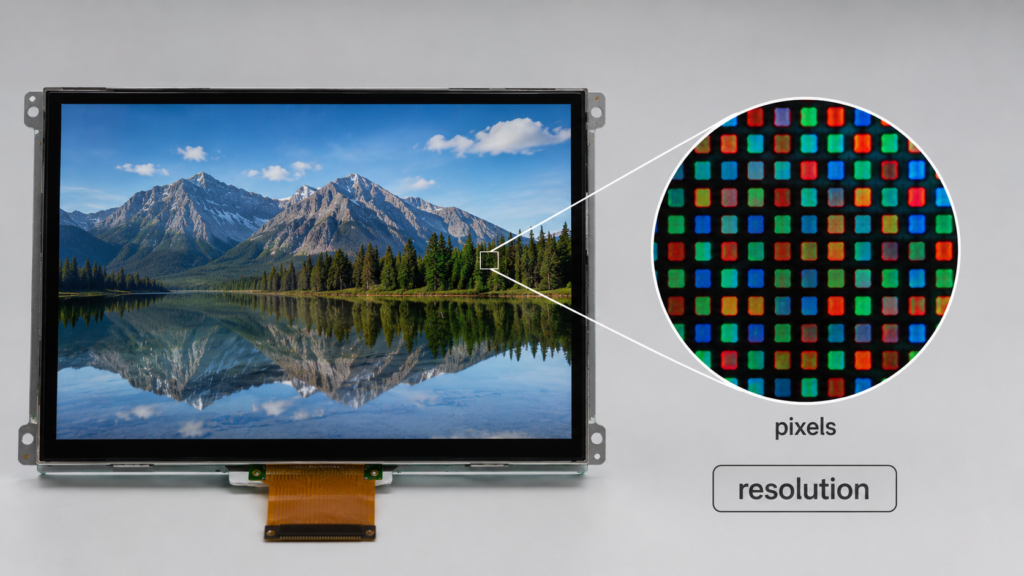
解像度の違いは、ディスプレイが表示できる情報量と、その情報の鮮明さに影響を与える。組み込み製品においては、これがユーザーエクスペリエンス全体に影響を及ぼす可能性がある。.
低解像度LCDは、シンプルなボタン、アイコン、数値、ステータス表示には十分な場合がある。高解像度LCDは、詳細なグラフィックス、カメラ映像、地図、チャート、ダッシュボード、高密度メニュー、画像ベースのインターフェースに必要となる場合がある。.
解像度は以下に影響を与える:
産業用ディスプレイ、スマートホームパネル、医療関連インターフェース、セキュリティ機器、車両関連ディスプレイ、民生用電子機器においては、画面が実際にどのように使用されるかに応じて適切な解像度を選択すべきである。.
| 決議 | フォーマットタイプ | 典型的なアプリケーションへの適合性 |
|---|---|---|
| 480 × 272 | コンパクトワイドスクリーン | 小型制御パネル、基本HMI、シンプルな組み込みインターフェース |
| 800 × 480 | WVGAクラス | 産業用タッチパネル、スマートホームパネル、機器インターフェース |
| 1024 × 600 | ワイドスクリーン組み込みフォーマット | 7インチクラスディスプレイ、HMI端末、制御システム |
| 1280 × 720 | HD | マルチメディアUI、ダッシュボード、スマート端末、グラフィカル制御 |
| 1280 × 800 | 16:10フォーマット | タブレット型インターフェース、データパネル、機器画面 |
| 1920 × 1080 | フルHD | 高精細ディスプレイ、画像インターフェース、大型組み込みパネル |
| 1080 × 1080 | 正方形フォーマット | スクエアディスプレイ、ダッシュボード、特殊UIレイアウト |
| 1920×720または類似 | バーまたはストレッチフォーマット | バー型LCD、サイネージ、車両関連ディスプレイ、狭幅機器パネル |
これらの例は固定ルールとして扱うべきではない。適切な解像度は、画面サイズ、視聴距離、UIコンテンツ、インターフェース、システム設計に依存する。.
解像度と画面サイズは異なる仕様である。解像度はピクセル数を表し、画面サイズはディスプレイの物理的な対角サイズ(通常インチで測定)を表す。.
2つのLCDが同じ解像度でも物理サイズが異なる場合がある。例えば、5インチ1280×720ディスプレイと10.1インチ1280×720ディスプレイは同じピクセル数を持つが、小型ディスプレイはそれらのピクセルをより小さな物理領域に詰め込む。その結果、小型ディスプレイはピクセル密度が高く、近距離視聴ではより鮮明に見える可能性がある。.
逆もまた真である。中程度の解像度を持つ大型ディスプレイは、近くで見るとピクセルが大きく見える場合がある。これはサイネージや遠距離視聴には許容されるが、近距離でのタッチ操作には適さない。.
このため、購入者は物理サイズと視聴距離を確認せずにLCD解像度を比較すべきではない。.
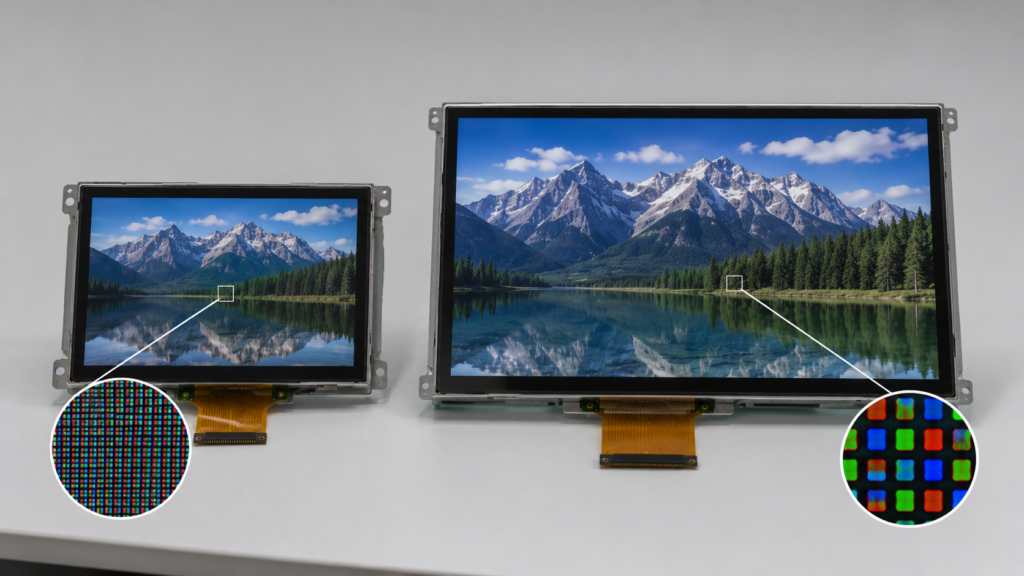
ピクセル密度は、表示領域にどれだけ密にピクセルが配置されているかを表す。通常はPPI(1インチあたりのピクセル数)で測定される。.
高いPPIは通常、近距離視聴での細かいディテールとシャープなテキストを意味する。しかし、高いPPIが常に必要とは限らない。遠くから見るディスプレイは、携帯端末よりも低いピクセル密度でも鮮明に見える場合がある。.
ピクセル密度は解像度と物理サイズの両方に依存する。1920×1080の解像度は、5インチ、10.1インチ、15.6インチのディスプレイで非常に異なる視覚結果を生み出す。.
対角サイズ、アスペクト比の推定、またはディスプレイパラメータの比較が必要な場合は、RJY Displayのディスプレイパラメータ計算ツールをクイックリファレンスとして使用できる。.
すべてのLCDパネルにはネイティブ解像度が存在する。これはパネルに内蔵された物理的なピクセル配置である。1024×600のLCDパネルは、1024列、600行のピクセルを持つ。ソフトウェア設定を変更するだけで物理的に1920×1080のパネルになることはない。.
LCDがネイティブ解像度で駆動される場合、1つのソースピクセルが1つのディスプレイピクセルにクリーンにマッピングされる。これにより通常、最もシャープな画像が得られる。.
入力信号がネイティブ解像度と一致しない場合、画像はスケーリングされる必要がある。スケーリングにより、特にアスペクト比も変化する場合、テキスト、アイコン、線がよりソフトまたは不正確に見える可能性がある。.
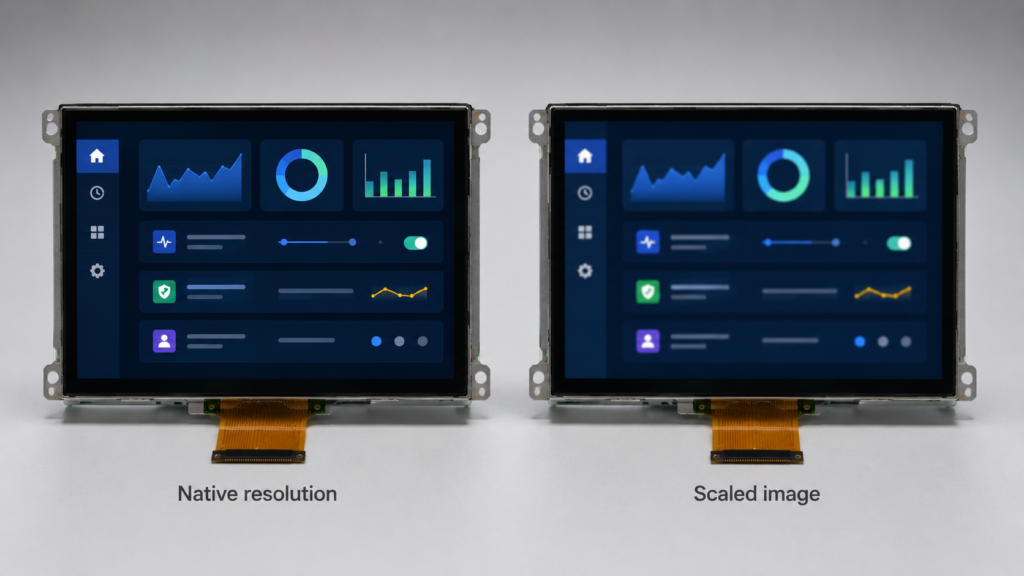
解像度スケーリングとは、コンテンツをある解像度から別の解像度に調整し、ディスプレイに適合させることを意味します。これは、オペレーティングシステム、グラフィックスプロセッサ、アプリケーションソフトウェア、コントローラボード、またはディスプレイハードウェアで発生する可能性があります。.
スケーリングは2つの方向で機能します。
スケーリングは有用ですが、正しいネイティブ解像度を持つことと同じではありません。スケーリングが大きい場合、テキストがぼやけて見えたり、細い線が不均一になったり、UI要素がピクセルグリッドにきれいに整列しないことがあります。.
組み込みデバイスの場合、スケーリングはタッチ精度、UIの明瞭さ、グラフィックスパフォーマンス、ユーザーエクスペリエンスに影響を与える可能性があるため、慎重に処理する必要があります。.
はい、解像度スケーリングは多くの場合システムレベルで調整できますが、LCDパネルのネイティブ解像度は固定されています。調整は通常、ソフトウェア、グラフィックス設定、アプリケーションUI設計、オペレーティングシステムのスケーリング、またはコントローラボードを介して行われます。.
例えば、組み込みLinuxシステム、Androidシステム、Windowsシステム、またはカスタムコントローラボードは、LCDに送信する前にユーザーインターフェースをスケーリングする場合があります。一部のシステムは、パフォーマンスを向上させるためにレンダリング解像度を下げる場合があります。他のシステムは、高解像度画面に適合するようにコンテンツを拡大する場合があります。.
ただし、スケーリング機能はLCDだけでなくシステムに依存します。パネル、コントローラボード、プロセッサ、GPU、メモリ、ディスプレイインターフェース、およびソフトウェアスタックのすべてが、スケーリングが可能かどうか、および結果が許容可能に見えるかどうかに影響します。.
解像度スケーリングは、特にパフォーマンス、バッテリー寿命、またはソフトウェア互換性が重要な場合に、一部のディスプレイシステムで有用です。.
レンダリングするピクセル数を減らすと、プロセッサとグラフィックスの負荷を軽減できます。これは、低電力組み込みシステム、スマートホームパネル、ハンドヘルド端末、またはプロセッサのグラフィックス能力が限られているデバイスで役立ちます。.
レンダリング負荷を減らすと、システムの消費電力を削減するのに役立つ場合があります。ただし、LCDシステムでは、バックライトが主要な電力消費源であることが多く、レンダリング解像度を下げても、すべてのディスプレイ電力が自動的に削減されるわけではありません。実際の電力効果はシステム設計に依存します。.
スケーリングは、古いソフトウェアや固定レイアウトのアプリケーションを新しいディスプレイに適合させるのに役立つ場合があります。これは、製造中止になったディスプレイを交換する場合や、既存のソフトウェアを維持しながら製品をアップグレードする場合に有用です。.
一部のシステムでは、UI設計者がスケーリングを使用して、1つのソフトウェアレイアウトを複数のディスプレイサイズや解像度に適応させます。これにより開発工数を削減できますが、最終的なディスプレイで慎重にテストする必要があります。.
解像度スケーリングにはトレードオフもあります。明瞭さと精度が重要な場合は、適切なパネルを選択する代わりとして使用すべきではありません。.
ネイティブ以外のスケーリングは、テキスト、アイコン、細い線、小さなUI要素をよりソフトに見せることがあります。これは、近距離のタッチディスプレイで特に顕著です。.
ソースのアスペクト比とディスプレイのアスペクト比が一致しない場合、スケーリングによって画像が引き伸ばされたり、切り取られたり、黒いバーが追加されたりする可能性があります。これにより、UIのデザインが不十分に見える可能性があります。.
タッチスクリーンシステムでは、ディスプレイスケーリングはタッチ座標マッピングと一致する必要があります。ソフトウェア、コントローラボード、タッチドライバーが調整されていない場合、タッチ入力がずれたり、不正確に感じられる可能性があります。.
すべてのコントローラボードがすべてのスケーリングモード、解像度、またはタイミングをサポートしているわけではありません。ディスプレイが物理的に解像度をサポートしていても、コントローラボードとファームウェアもそれに一致する必要があります。.
高解像度LCDを購入し、コンテンツをダウンスケーリングすることは、場合によっては有用ですが、常に最良の工学的選択であるとは限りません。.
高解像度ディスプレイは、将来のUIアップグレード、詳細な画像、高級感のある外観に対してより柔軟性を提供する可能性があります。ただし、コスト、インターフェース帯域幅、プロセッサ負荷、メモリ使用量、消費電力、ソフトウェアの複雑さが増加する可能性もあります。.
シンプルなUI、固定ボタン、基本的なデータ表示、または厳格なコスト目標を持つ製品の場合、適度なネイティブ解像度の方が実用的な場合があります。画像ベースのシステム、ダッシュボード、カメラディスプレイ、マッピングインターフェース、または高密度メニューの場合、高解像度が正当化される可能性があります。.
より良い質問は「最高解像度を購入すべきか?」ではありません。より良い質問は「私のUI、視聴距離、プロセッサ、インターフェース、電力予算、製品コストに一致するネイティブ解像度は何か?」です。“
高解像度では、より多くの画像データを転送する必要があります。これは、ディスプレイインターフェースとコントローラボードに影響します。.
低解像度ディスプレイは、設計に応じてSPI、MCU、またはRGBインターフェースを使用する場合があります。高解像度TFT LCDモジュールは、パネルとシステムアーキテクチャに応じて、RGB、LVDS、MIPI DSI、HDMI、またはeDPを必要とすることがよくあります。.
コントローラボードベースのプロジェクトの場合、解像度はボードの出力能力、ディスプレイタイミング、ファームウェア構成、およびバックライト要件と一致する必要があります。不一致があると、画像が表示されない、ディスプレイ動作が不安定、スケーリングが正しくない、ちらつき、または画質低下を引き起こす可能性があります。.
| 解像度レベル | 可能なインターフェース方向 | エンジニアリングノート |
|---|---|---|
| 低解像度 | モジュールに応じてSPI、MCU、RGB | コンパクトな組み込みインターフェースによく使用される |
| 中解像度 | システムに応じてRGB、LVDS、MIPI | 産業用およびスマートデバイスパネルで一般的 |
| 高解像度 | アーキテクチャに応じてLVDS、MIPI DSI、HDMI、eDP | より強力なコントローラと注意深い互換性レビューが必要 |
| 特殊フォーマット | プロジェクト依存 | 正方形、円形、またはバー型ディスプレイは、特定のUIとコントローラサポートが必要な場合がある |
正確なインターフェースは解像度だけで決定できません。パネルモデル、ドライバIC、ピン定義、バックライト、タッチ要件、およびホストシステムを一緒にレビューする必要があります。.
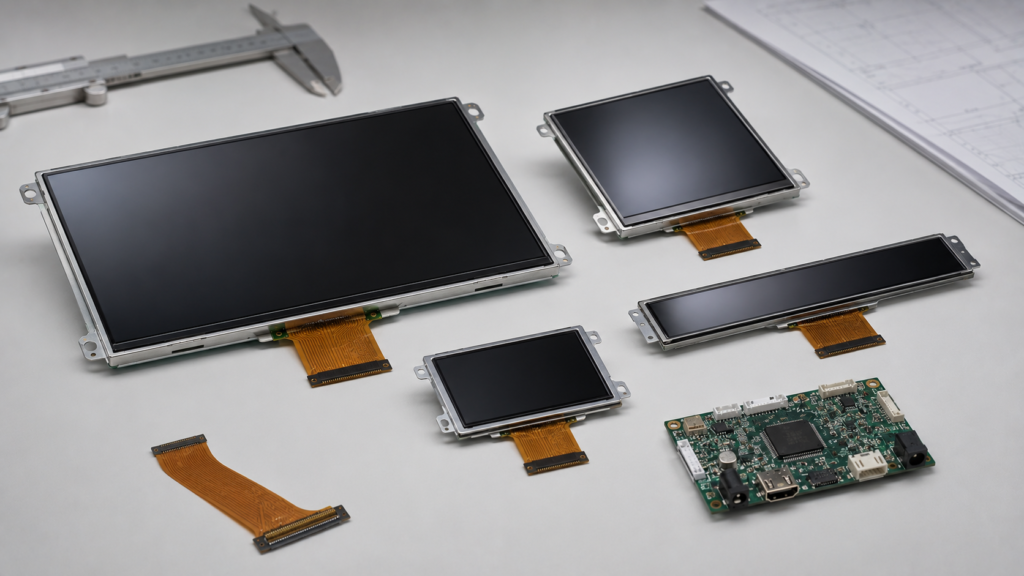
解像度はシステム負荷に影響します。なぜなら、より多くのピクセルは通常、より多くの画像データ、メモリ帯域幅、およびグラフィックス処理を必要とするからです。これにより、システムレベルでの消費電力が増加する可能性があります。.
LCDモジュールでは、バックライトが最大の電力消費源の1つであることがよくあります。したがって、バックライトの明るさが同じままの場合、レンダリング解像度を下げても、ディスプレイ全体の電力が大幅に削減されるとは限りません。.
バッテリー駆動のデバイスの場合、解像度とバックライトの明るさの両方を評価する必要があります。産業用機器の場合、電力制限は緩いかもしれませんが、熱、安定性、および長期信頼性は依然として重要です。.
異なる業界や製品タイプには、異なる解像度戦略が必要です。ディスプレイは、解像度の数値を比較するだけでなく、アプリケーションに基づいて選択する必要があります。.
産業用HMI画面には、読みやすいテキスト、明確なボタン、安定したタッチ応答、および信頼性の高い動作が必要です。シンプルな制御パネルには適度な解像度で十分な場合がありますが、高密度のダッシュボード、トレンドチャート、アラーム、マルチウィンドウインターフェースには高解像度が有用な場合があります。.
スマートホームディスプレイは、多くの場合、視覚的な外観、タッチの使いやすさ、コスト、および消費電力のバランスが必要です。解像度は、コントローラボードに過負荷をかけたり、不必要にコストを増加させたりすることなく、UIをサポートする必要があります。.
医療関連デバイスは、明確なテキスト、安定した視認性、および一貫した画像表示を必要とする場合があります。製品が詳細な画像を表示する場合、ネイティブ解像度は慎重に選択する必要があります。詳細と可読性が重要な場合、過度のスケーリングに依存することは避けてください。.
車両関連ディスプレイは、製品設計に応じて、標準、正方形、円形、またはバー型フォーマットを使用する場合があります。解像度は、UIレイアウト、視聴距離、明るさ要件、およびコントローラボードの能力と一致する必要があります。高解像度だけで運転や機器の使いやすさが向上すると想定しないでください。.
セキュリティデバイスは、メニュー、カメラ映像、ステータスダッシュボード、または制御インターフェースを表示する場合があります。高解像度は視覚的な詳細に役立ちますが、システム処理、ビデオ入力、およびディスプレイインターフェースがそれをサポートできる必要があります。.
適切なLCD解像度を選択するには、解像度表ではなく製品設計から始めてください。ユーザーが何を見る必要があるか、画面からどの程度の距離にいるか、どの程度の情報を表示する必要があるか、そしてどのシステムがディスプレイを駆動するかを問いかけてください。.
重要な選択に関する質問は以下の通りです:
これらの質問は、解像度の選択肢を絞り込み、開発中の互換性問題を低減するのに役立ちます。.
よくある間違いの一つは、より高い解像度が常に優れていると想定することです。高解像度は詳細を向上させることができますが、コスト、消費電力、帯域幅、およびソフトウェアの複雑性も増加させる可能性があります。.
別の間違いは、画面サイズを無視することです。小さなディスプレイで鮮明に見える解像度でも、はるかに大きなディスプレイでは鮮明に見えない場合があります。.
三つ目の間違いは、ネイティブ解像度以外を使用し、完全な鮮明さを期待することです。LCDパネルは、入力信号がそのネイティブ解像度と一致するときに最も美しく見えます。.
四つ目の間違いは、アスペクト比を無視することです。ディスプレイは十分なピクセル数を持っていても、画面形状がUIまたは筐体と一致しない場合には不適切である可能性があります。.
五つ目の間違いは、コントローラーボードの互換性を確認する前にディスプレイを選択することです。解像度、タイミング、インターフェース、ピン定義、バックライト、タッチ、およびファームウェアのすべてが一致する必要があります。.
RJY Displayは、TFT LCDモジュール、コントローラボード、および カスタムディスプレイ エンジニアリング主導のB2Bプロジェクト向けのソリューション議論。解像度の選択は、ディスプレイサイズ、アスペクト比、輝度、インターフェース、タッチパネル、カバーガラス、FPC、コントローラーボード、ファームウェア、および機械構造と共に検討できます。.
多くのプロジェクトにおいて、最適な解像度は利用可能な最高解像度ではありません。それは、UI、視聴距離、プロセッサ、インターフェース、電力予算、機械設計、および生産計画に適合する解像度です。.
プロジェクトで標準的なTFT LCDモジュール、正方形ディスプレイ、, ラウンドディスプレイ, バーLCD, 高輝度ディスプレイ、タッチディスプレイ、コントローラーボード、または カスタムディスプレイ サポートが必要な場合は、お問い合わせの前に必要なディスプレイサイズ、解像度、インターフェース、輝度、タッチ、およびアプリケーションの詳細を準備してください。.
LCD解像度の違いは、ピクセル数だけではありません。解像度は、画面サイズ、ピクセル密度、アスペクト比、ネイティブ解像度、スケーリング動作、インターフェース帯域幅、コントローラーボードサポート、消費電力、および視聴距離と共に理解する必要があります。.
高解像度は詳細を向上させることができますが、システム要件も増加させる可能性があります。低解像度はコストと作業負荷を削減できますが、密度の高いUIや画像ベースのアプリケーションに十分な明瞭さを提供できない場合があります。.
B2Bディスプレイプロジェクトにおいて、最良の選択はバランスの取れたディスプレイ構成です。実際の製品に適合する解像度を選択してください:画面サイズ、UI設計、視聴距離、インターフェース、タッチ要件、コントローラーボード、電力予算、機械構造、および生産期待値。.
LCD解像度とは、ディスプレイ上に水平および垂直に配置されたピクセルの数です。通常、800 × 480 や 1920 × 1080 のように幅 × 高さで表記されます。.
解像度はピクセル数を表し、画面サイズはディスプレイの物理的なサイズを表します。物理サイズが異なる場合、同じ解像度でもピクセル密度が異なることがあります。.
ネイティブ解像度とは、LCDパネルに組み込まれた物理的なピクセル配置です。ディスプレイは通常、入力信号がこのネイティブ解像度と一致するときに最も鮮明に見えます。.
解像度スケーリングは、コンテンツをある解像度から別の解像度に調整してディスプレイに適合させるものです。高解像度コンテンツのダウンスケーリングや低解像度コンテンツのアップスケーリングが含まれる場合があります。.
低下させる可能性があります。非ネイティブのスケーリングは、特にアスペクト比が一致しない場合に、テキスト、アイコン、細い線、およびUI要素をぼやけたり歪んだり見せることがあります。.
いいえ。高解像度は詳細を向上させることができますが、コスト、電力需要、インターフェース帯域幅、グラフィックス負荷、およびソフトウェアの複雑性も増加させる可能性があります。適切な解像度はアプリケーションに依存します。.
画面サイズ、視聴距離、UIの複雑性、画像の詳細、アスペクト比、インターフェース、コントローラーボードサポート、プロセッサ能力、電力予算、および機械設計に基づいて選択してください。.
RJY Displayは、TFT LCDプロジェクト向けに、ディスプレイサイズ、解像度、アスペクト比、インターフェース、輝度、タッチ要件、コントローラーボードサポート、およびカスタマイズニーズのレビューを支援できます。.
ディスプレイサイズ、解像度、インターフェース、輝度、タッチ要件、コントローラーボード要件、およびアプリケーション環境を共有してください。.
関連するディスプレイ技術ガイドとアプリケーションリファレンスを引き続きお読みください。.
この記事のトピックに関連する製品ページをご覧ください。.




RJYのエンジニアリングチームにご相談いただき、ディスプレイマッチング、コントローラーボードの確認、およびカスタマイズについて話し合ってください。.