Столкнулись с трудностями в проекте встраиваемого дисплея?
Не позволяйте сложной интеграции или проблемам цепочки поставок замедлить ваш выход на рынок. Забронируйте бесплатную консультацию с экспертной командой RJY для получения индивидуальной поддержки в проектировании и производстве.
ИИ-голосовые переводчики и небольшие ЖК-дисплеи для баров: новая продуктовая возможность
Published:
9 минут чтения
Updated:
AI-голосовой перевод переходит от программного решения к более широкому спектру специализированных устройств: портативные переводчики, инструменты для путешествий и общения, терминалы для деловых переговоров, устройства для гостиничного сектора, а также компактные носимые или настольные интерфейсы.
Для разработчиков продуктов ценность специализированного переводчика не ограничивается распознаванием речи и программным обеспечением для перевода. Успешное устройство также должно делать разговор понятным для обоих людей, стоящих перед ним. Это создает новую возможность применения для малый дисплей в формате «бар» обеспечивает.
Компактный горизонтальный дисплей может отображать статус говорящего, направление языка, короткий переведенный текст, запросы подтверждения, статус сети и обратную связь устройства, не превращая продукт в планшет. Он поддерживает более естественное взаимодействие двух людей, сохраняя при этом тонкий портативный форм-фактор, ожидаемый от голосового переводчика.
Почему устройствам голосового перевода нужен более продуманный физический интерфейс
Европа является особенно актуальным рыночным контекстом для устройств, ориентированных на перевод. Европейский союз имеет 24 официальных языка, что создает 552 возможные комбинации перевода и интерпретации между этими языками.[1] Путешествия, трансграничный бизнес, международное образование, туризм и многоязычное обслуживание клиентов создают ситуации, где быстрая коммуникационная поддержка может быть полезной.
Приложения для перевода на смартфонах остаются важными, но они не всегда являются наиболее удобным форматом продукта для личного разговора. Портативный AI-голосовой переводчик может быть разработан вокруг более простого сценария взаимодействия:
Один человек говорит.
Устройство указывает, что оно слушает или обрабатывает.
Результат перевода озвучивается и отображается.
Другой человек может прочитать, подтвердить или ответить с противоположной стороны.
В этом рабочем процессе дисплей не является украшением. Это видимый слой, который помогает обоим участникам понимать, что делает устройство.
Почему небольшой Баровые ЖК-дисплеи дисплей подходит для дизайна AI-голосового переводчика
Естественный формат для разговора двух людей
Горизонтальный дисплей может соответствовать горизонтальной форме многих портативных устройств перевода. Он может визуально разделять области исходного и переведенного языка, показывать последовательность разговора или представлять компактный индикатор состояния без необходимости в большом прямоугольном экране.
Для устройства, размещенного на столе, удерживаемого между двумя пользователями или направленного на другого говорящего, горизонтальный формат может сделать интерфейс более похожим на общий инструмент разговора, чем на личный мобильный экран.
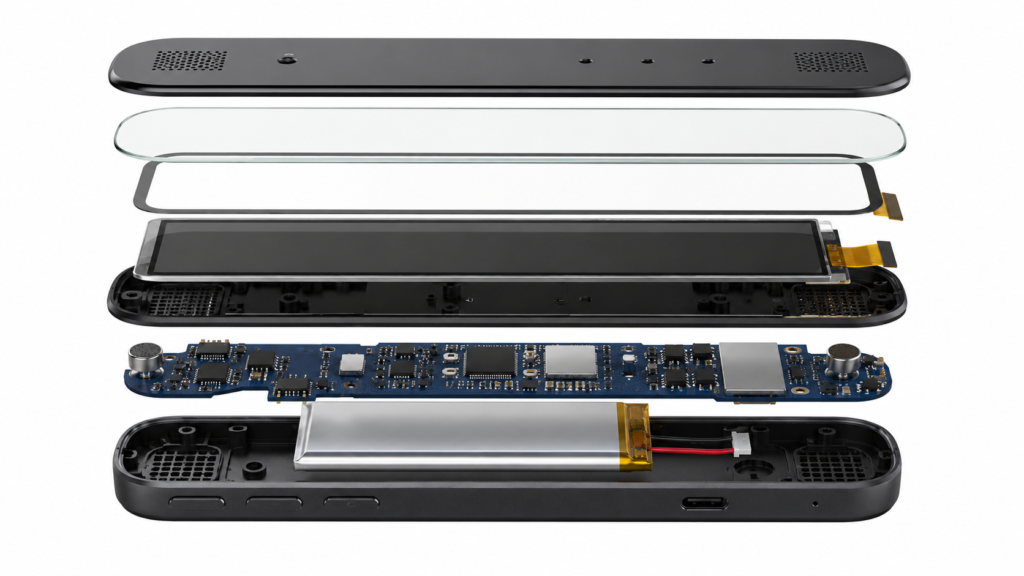
Разобранная сборка устройства голосового переводчика с горизонтальным ЖК-дисплеем
Компактная альтернатива HMI в стиле планшета
Многим устройствам перевода не нужен большой дисплей для приложений, видео или сложных панелей управления. Их основной пользовательский интерфейс может требовать только краткий текст, указатели направления, выбор языка, статус микрофона, информацию о заряде батареи и простые подсказки взаимодействия.
Небольшой горизонтальный TFT-ЖК-дисплей может поддерживать эту более узкую информационную иерархию, оставляя больше внутреннего пространства для микрофонов, динамиков, батарей, антенн, камер или процессорных плат.
Более заметная обратная связь во время речевого взаимодействия
Голосовое взаимодействие может стать неясным, когда пользователи не знают, слушает ли устройство, ожидает, обрабатывает, подключено или готово к следующему говорящему. Дисплей может обеспечить немедленную визуальную обратную связь через простые состояния, такие как:
Состояние взаимодействия
Полезная роль дисплея
Прослушивание
Показывать четкий индикатор активного говорящего или записи.
Обработка
Показывать, что устройство работает, не подразумевая фиксированное время ответа.
Перевод готов
Представлять краткий переведенный контент и направление языка.
Проблема с подключением
Помогать пользователю понять, что результат может зависеть от сети или состояния устройства.
Повтор или исправление
Предлагать пользователю повторить речь или изменить выбранный язык.
Такая видимая обратная связь особенно ценна, когда устройство используется в шумных общественных местах, в поездках, в зонах приема, магазинах или на деловых встречах.
Рост AI-перевода не устраняет необходимость в понятном дизайне устройства
Машинный перевод и AI-языковые инструменты быстро развиваются, но производители устройств не должны считать результаты перевода универсально одинаковыми для всех языковых пар, акцентов, контекстов или сетевых условий. Европейская комиссия отмечает, что качество и точность машинного перевода могут значительно варьироваться в зависимости от содержания и комбинации языков.[2]
Для аппаратного продукта это означает, что дисплей должен помогать пользователям понимать взаимодействие, а не скрывать системную неопределенность. Четкий выбор языка, видимое состояние прослушивания, читаемый переведенный текст, подсказки повтора и обратная связь о подключении могут сделать общий опыт использования продукта более надежным.
Дизайн дисплея не может решить ограничения модели перевода. Однако он может сделать устройство более простым в использовании, когда пользователю необходимо проверить, повторить, переключить язык или продолжить разговор.
Ключевые требования к дизайну голосового переводчика Полосовой дисплей
Пропорции экрана и компоновка текста
Видимая область должна выбираться вокруг предполагаемого интерфейса, а не только вокруг диагонального размера. Устройству перевода может потребоваться отображать одно короткое предложение, два языковых блока, историю разговора или простую анимацию прослушивания. Эти выборы влияют на соотношение сторон, разрешение, размер шрифта, ориентацию экрана и количество контента, видимого одновременно.
Узкий экран может хорошо работать для коротких состояний взаимодействия. Более длинный горизонтальный дисплей может быть более подходящим, когда интерфейс должен показывать как исходный, так и переведенный контент в общей горизонтальной компоновке.
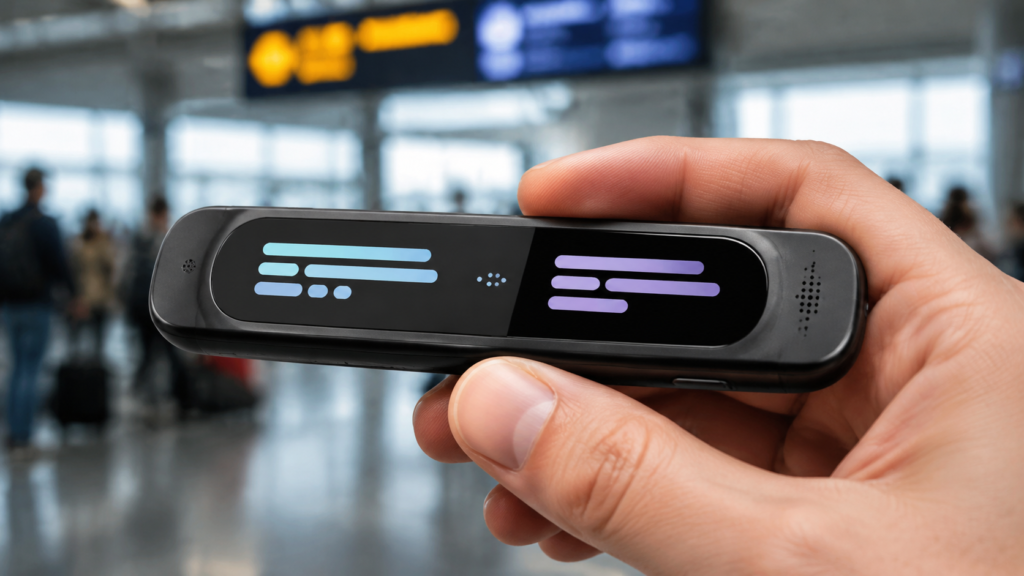
Небольшой ЖК-дисплей в форме полосы, встроенный в портативный голосовой переводчик
Угол обзора и ориентация установки
Ручное устройство может просматриваться двумя людьми под разными углами. Поэтому дисплей следует оценивать с учётом реального использования: разговор в руках, использование на столе, книжная или альбомная ориентация, а также необходимость чтения интерфейса с одной или с обеих сторон.
Ожидания по углу обзора должны определяться совместно с выбранным дисплейным модулем, а не предполагаться на основе обобщённого изображения продукта.
Покровное стекло и интеграция лицевой поверхности
Лицевая поверхность в значительной степени определяет, воспринимается ли устройство перевода как готовый потребительский продукт или как незащищённый электронный прототип. Индивидуальное покровное стекло может помочь согласовать проём экрана, чёрную рамку, сенсорную зону, отверстия для динамика, кнопки и форму корпуса.
RJY Display может оценить кастомизацию покровного стекла, конфигурацию сенсорного экрана и координацию корпуса, связанную с дисплеем, на основе существующего дисплейного модуля и механических требований устройства.
Сенсорный экран, кнопки и голосовое взаимодействие
Устройство перевода может сочетать голосовой ввод с сенсорным управлением и физическими кнопками. Сенсорное управление может поддерживать выбор языка, настройки, просмотр текста или подтверждение, тогда как физические кнопки могут быть полезны для быстрой активации в поездках или общественных местах.
Дисплей, сенсорная панель, сенсорный контроллер, интерфейс хоста, программные драйверы и сопоставление координат должны рассматриваться как единая конфигурация. Интерфейс дисплея и интерфейс сенсорного экрана представляют собой отдельные инженерные направления и не должны считаться автоматически совместимыми.
Питание, подсветка и компактное тепловое проектирование
Портативные переводчики часто работают от аккумулятора. Выбранный дисплей, конфигурация подсветки, материнская плата, микрофонная система, акустическая камера, беспроводное оборудование и расположение аккумулятора — всё это влияет на конечную компоновку продукта.
Яркость, визуальное поведение и конструкция питания должны оцениваться с учётом реальной предполагаемой среды. Устройство, используемое в ярком терминале, кафе, холле отеля или в условиях уличных поездок, может требовать иных проектных решений, чем переводчик, используемый преимущественно в помещении.
Вопросы контроллера и интерфейса платы
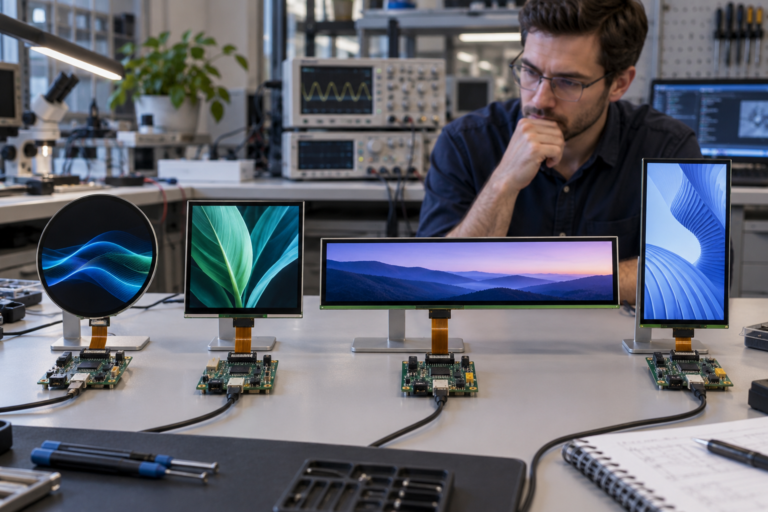
Многие компактные полосовые дисплеи используют такие интерфейсы, как MIPI, RGB, SPI, LVDS или другие панельные соединения. Правильный маршрут зависит от фактической панели, процессора хоста, разрешения, таймингов, требований к питанию, прошивки и механической компоновки.
RJY Display поддерживает адаптацию контроллерных плат для проектов TFT LCD, включая распространённые интерфейсы, такие как HDMI, VGA, LVDS, MIPI, eDP, USB и связанные панельные интерфейсы. Однако совместимость контроллерной платы всегда должна подтверждаться на основе модели панели, технического описания, определения контактов, таймингов дисплея, информации о подсветке, требований к сенсорному экрану, входного сигнала хоста, требований операционной системы и прошивки.
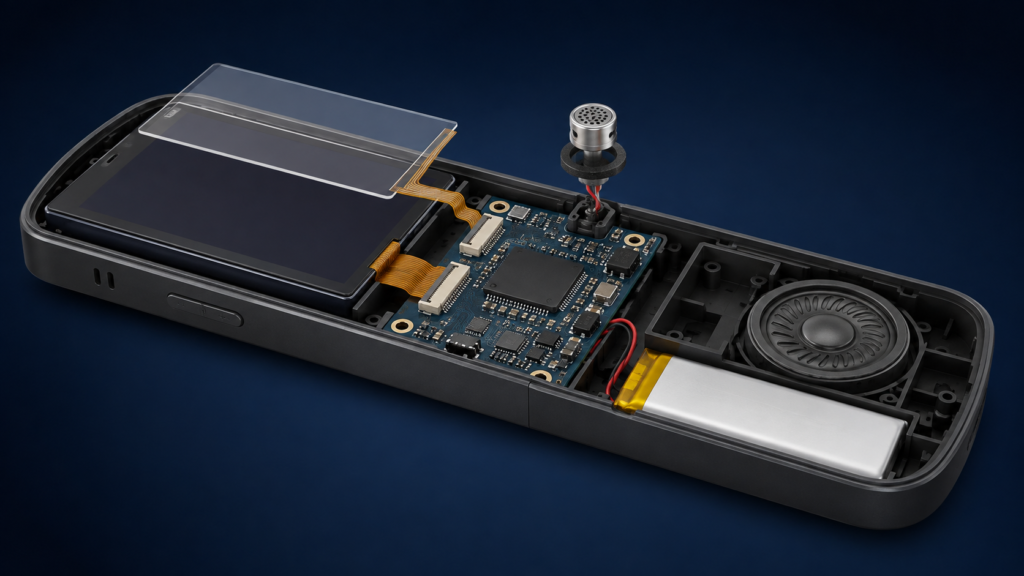
Внутренний полосовой дисплей и интеграция контроллерной платы в голосовом переводчике
Разъём с одинаковым количеством контактов или шагом не доказывает совместимость. Полное определение сигналов, ориентация FPC, требования к инициализации, цепи питания и механический маршрут кабеля должны быть проверены до предложения конфигурации дисплей-контроллер.
Варианты кастомизации дисплеев для AI-голосовых переводчиков
RJY Display поддерживает проектно-ориентированную кастомизацию дисплеев на основе преимущественно существующих дисплейных модулей. В зависимости от выбранного модуля и результатов рассмотрения проекта доступные опции могут включать:
Выбор размера полосового дисплея и видимой области на основе существующих модулей
Координация формы покровного стекла и печатной рамки
Конфигурация сенсорного экрана
Индивидуальная настройка подсветки
Индивидуальная настройка интерфейса и гибкого печатного кабеля (FPC)
Индивидуальная настройка платы контроллера
Индивидуальная настройка прошивки
Согласование корпуса и механической конструкции, связанных с дисплеем
Это не означает, что каждый полосовой ЖК-дисплей может быть адаптирован к любой платформе переводчика. Итоговый объём работ должен быть подтверждён после рассмотрения выбранного модуля, архитектуры хоста, концепции пользовательского интерфейса, корпуса и объёма проекта.
Информация, необходимая для проекта кастомного дисплея переводчика
Для инженерного рассмотрения просьба предоставить следующую информацию:
Целевое применение: ручной переводчик, настольное устройство, носимое устройство, кассовый терминал или устройство для гостиничного сервиса
Эталонный дизайн, чертёж корпуса или целевые габариты продукта
Целевой размер полосового дисплея, активная область и разрешение
Ожидаемая компоновка текста и ориентация интерфейса
Процессор хоста и требуемый интерфейс дисплея
Техническое описание панели, определение контактов или эталонный модуль, если доступно
Требования к сенсорному экрану, покровному стеклу, кнопкам и отверстиям для динамика
Требования к подсветке и предполагаемой рабочей среде
Направление FPC, положение разъёма и ограничения внутреннего пространства
Требования к контроллерной плате, прошивке и операционной системе
Количество образцов, ориентировочный годовой спрос, целевой MOQ и сроки проекта
Обсуждение небольшого горизонтального дисплея для вашего AI-устройства перевода
RJY Display может помочь оценить компактную полосовую сборку TFT LCD для AI-голосового переводчика на основе существующего дисплейного модуля. Поделитесь концепцией продукта, эталоном корпуса, требованиями к интерфейсу, компоновкой дисплея, потребностями в сенсорном экране и ожидаемым объёмом проекта, чтобы дисплей, покровное стекло, подсветка, FPC, контроллерная плата, прошивка и механический объём могли быть рассмотрены до предложения конфигурации.
Проекты по индивидуальной настройке обычно начинаются с MOQ около 500 единиц, в зависимости от типа продукта и требований проекта.
Часто задаваемые вопросы
Зачем использовать полосовой ЖК-дисплей в AI-голосовом переводчике?
Полосовой ЖК-дисплей может поместиться в компактное горизонтальное устройство, отображая переведённый текст, направление языка, статус прослушивания, обратную связь по подключению и короткие подсказки взаимодействия. Он может поддерживать совместный диалог двух человек без необходимости в экране размером с планшет.
Может ли небольшой полосовой дисплей отображать оба языка одновременно?
Возможно. Ответ зависит от выбранного размера дисплея, разрешения, компоновки интерфейса, размера шрифта и объёма текста, ожидаемого в каждом взаимодействии. Программный интерфейс должен разрабатываться с учётом фактической видимой области, а не исходя из предположений на основе одной лишь диагонали.
Может ли RJY Display разработать любой нестандартный размер полосового ЖК-дисплея с нуля?
RJY Display специализируется на кастомизации на основе существующих дисплейных модулей. Поддержка может включать покровное стекло, сенсорный экран, подсветку, интерфейс, FPC, контроллерную плату, прошивку и механическую координацию, связанную с дисплеем. Разработка совершенно нового размера ЖК-панели не должна предполагаться.
Может ли RJY Display подтвердить контроллерную плату для полосового TFT LCD?
Совместимость может быть рассмотрена после получения фактической модели ЖК-панели, разрешения, интерфейса, определения контактов или технического описания, информации о подсветке, требований к сенсорному экрану, входного сигнала хоста, требований к прошивке или операционной системе и рабочей среды.
Каков типичный MOQ для нестандартного дисплея голосового переводчика?
Проекты по настройке обычно начинаются с MOQ около 500 единиц, в зависимости от типа продукта и требований проекта. Окончательный MOQ должен быть подтверждён после определения конфигурации дисплея и объёма настройки.