Столкнулись с трудностями в проекте встраиваемого дисплея?
Не позволяйте сложной интеграции или проблемам цепочки поставок замедлить ваш выход на рынок. Забронируйте бесплатную консультацию с экспертной командой RJY для получения индивидуальной поддержки в проектировании и производстве.
Как компаньон-роботы могут добиться успеха в Европе: роль индивидуальных ЖК-дисплеев
Published:
8 мин. чтения
Updated:
Роботы-компаньоны выходят за рамки концепции новинки. В Европе их возможности заключаются в создании полезных, уважительных и доступных взаимодействий в домашних условиях, в сфере гостеприимства, в образовании и в отдельных сервисных средах. Робот может предоставлять напоминания, сообщать о статусе, направлять выполнение простых процедур, поддерживать развлекательные функции или создавать более вовлекающий интерфейс для подключённых сервисов.
Для OEM-производителя робота-компаньона пользовательский опыт определяется не только искусственным интеллектом, мобильностью, аудиосистемой или датчиками. Видимый интерфейс часто формирует первое впечатление. Тщательно интегрированный дисплей робота-компаньона может сделать робота понятным, отзывчивым и целенаправленным. Он может передавать присутствие, отображать простые выражения, обеспечивать немедленную обратную связь и делать настройку или повседневное взаимодействие менее пугающим.
Именно здесь важным становится индивидуальный ЖК-модуль. Стандартный TFT-ЖК-модуль может быть полезной отправной точкой, но конечный пользовательский опыт зависит от формы дисплея, защитного стекла, видимой области, поведения сенсорного слоя, конфигурации яркости, трассировки FPC, пути контроллерной платы и соответствия корпусу робота.
Почему Европа является важным рынком для разработки роботов-компаньонов
Европа предоставляет значимый долгосрочный контекст для разработки роботов-компаньонов и интерактивных роботов. 1 января 2025 года люди в возрасте 65 лет и старше составляли 22% населения ЕС, а люди в возрасте 80 лет и старше — 6%.[1] Это демографическое изменение не означает, что каждый пожилой человек нуждается в роботе или хочет его. Однако оно повышает важность доступных цифровых продуктов, интуитивно понятных домашних интерфейсов и технологий, которые могут комфортно использоваться людьми с разным уровнем уверенности в обращении с цифровыми устройствами.
Европейские покупатели также склонны оценивать робота-компаньона как целостный опыт, а не как набор технических функций. Промышленный дизайн, ожидания в отношении конфиденциальности, прозрачность, простота настройки, стиль взаимодействия и визуальная коммуникация — всё это влияет на то, насколько продукт уместен в домашней или публичной среде.
Для продуктов с искусственным интеллектом прозрачность всё чаще становится частью уравнения доверия. Европейская комиссия заявляет, что обязательства по прозрачности согласно статье 50 Закона об ИИ начали применяться со 2 августа 2026 года, включая требование информировать людей о том, что они напрямую взаимодействуют с системой ИИ в соответствующих случаях.[2] Дисплей сам по себе не обеспечивает юридическое соответствие, но он может предоставить чёткий, читаемый человеком канал для передачи состояния робота, контекста взаимодействия и выбора пользователя.
Что означает “эмоциональная ценность” в дизайне роботов-компаньонов
В контексте дизайна продукта эмоциональная ценность не означает, что робот заменяет человеческие отношения или обеспечивает терапевтический результат. Это означает, что продукт может восприниматься как менее механический, более понятный и более приятный во взаимодействии в ходе обычного использования.
Дисплей вносит вклад в этот опыт несколькими практическими способами:
Выражение: визуальное лицо, движение глаз, цвет или анимация могут передавать внимание и реакцию без необходимости длительного устного объяснения.
Обратная связь: пользователи могут видеть, услышал ли робот запрос, ожидает ли он ввода данных, заряжается ли, обновляется ли или нуждается в помощи.
Индивидуальность: видимый интерфейс может согласовывать характер робота с предполагаемым тоном бренда — от спокойного и минималистичного до игривого и ориентированного на семью.
Уверенность: понятный экран может снизить неоднозначность при настройке, подтверждении задач и восстановлении после ошибки или проблемы с подключением.
Участие: робот может отображать простую контекстную информацию, такую как подсказка, выбор действия, визуальный ответ или статус домашнего хозяйства, таким образом, который воспринимается более доступным, чем рабочий процесс только через приложение.
Наиболее сильные дизайнерские решения не перегружают экран информационными панелями. Робот-компаньон обычно воспринимается с близкого расстояния и в ходе коротких взаимодействий. Дисплей должен отдавать приоритет чётким визуальным сигналам, простым состояниям взаимодействия и согласованной взаимосвязи между голосом робота, движением, звуком и видимой обратной связью.
Где ЖК-дисплей может быть использован на роботе-компаньоне
Лицевой дисплей
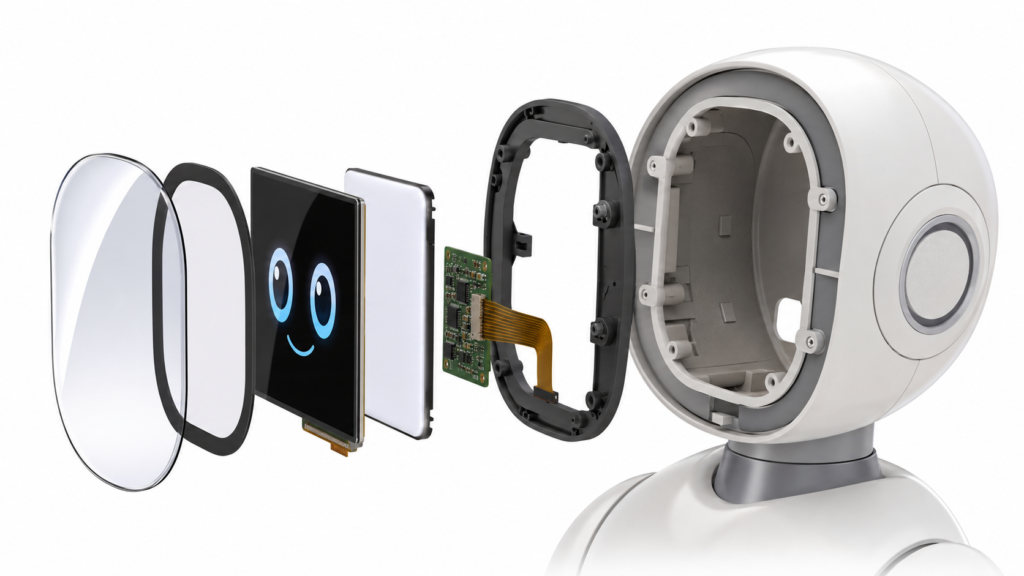
Лицевой дисплей часто является наиболее узнаваемой реализацией. Он может отображать абстрактные глаза, анимированное выражение, состояние прослушивания или сигнал взаимодействия. В этой роли дисплей является частью дизайна персонажа робота, а также его HMI-дизайна.
Инженерная задача заключается в том, чтобы дисплей естественно вписался в корпус головы сложной формы. Видимая область, чёрная рамка, контур защитного стекла, требования к кривизне дисплея, монтажная рама и направление выхода FPC должны оцениваться как единый узел.
Дисплей на корпусе или боковой дисплей
Дисплей, установленный на корпусе, может поддерживать настройку, подтверждение задач, статус зарядки, настройки устройства или сервисный доступ. Это может быть полезно, когда лицевой дисплей намеренно сохраняется минималистичным и выразительным, а не информационным.
Расположение дисплея должно оцениваться с учётом роста пользователя, угла обзора, случайного контакта, зазоров корпуса, прокладки кабелей и доступа при сборке или ремонте.
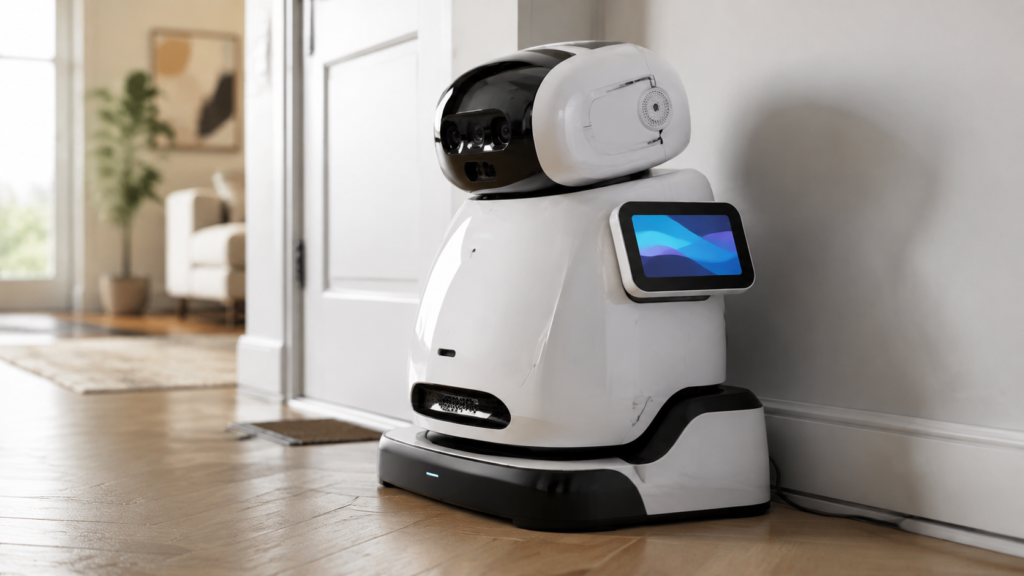
Робот-компаньон с дисплеем на корпусе на зарядной станции
Дисплей на док-станции или внешний HMI-дисплей
Не каждому роботу-компаньону нужен большой дисплей на корпусе. Некоторые продукты могут выиграть от дисплея, интегрированного в зарядную станцию, базовую станцию или внешнее устройство управления. Это позволяет отделить повседневную информацию и задачи обслуживания от выразительного интерфейса робота.
Как индивидуальный дизайн ЖК-дисплея улучшает пользовательский опыт
Согласование формы и видимой области
Роботы-компаньоны часто используют округлые, компактные или ориентированные на персонажа корпуса. Стандартный прямоугольный ЖК-дисплей может технически работать, но при этом выглядеть визуально оторванным от продукта. Индивидуальное защитное стекло, печатная рамка и компоновка видимой области помогают дисплею гармонично сочетаться с лицом или корпусом робота.
Интеграция сенсорного экрана
Сенсорное управление может поддерживать настройку, параметры, простые выборы и сервисные рабочие процессы. Однако сенсорное управление следует рассматривать в рамках полной модели взаимодействия. Сенсорная панель, контроллер, защитное стекло, интерфейс хост-системы, программный драйвер и сопоставление координат должны оцениваться совместно.
Для некоторых роботов-компаньонов физические кнопки, голосовой ввод или маршрут через мобильное приложение могут быть более подходящими для частых команд. Сенсорное управление следует использовать там, где оно повышает ясность, а не добавлять его как функцию по умолчанию.
Как роботы-компаньоны могут добиться успеха в Европе: роль индивидуальных ЖК-дисплеев 4
Оптический стек и конструкция обзора
Робот-компаньон может использоваться в яркой гостиной, в условиях низкого освещения вечером, в приёмной офиса или в пространстве гостеприимства. Читаемость зависит от полного оптического стека: характеристик панели, конфигурации подсветки, защитного стекла, отражений, угла отображения, визуального дизайна и геометрии корпуса.
Дисплей не следует описывать как подходящий для любых условий освещения без оценки конкретного проекта. Вместо этого OEM-производитель должен определить ожидаемые условия эксплуатации и определить, как выбранный дисплейный узел будет поддерживать предполагаемый визуальный опыт.
Механическая посадка и трассировка FPC
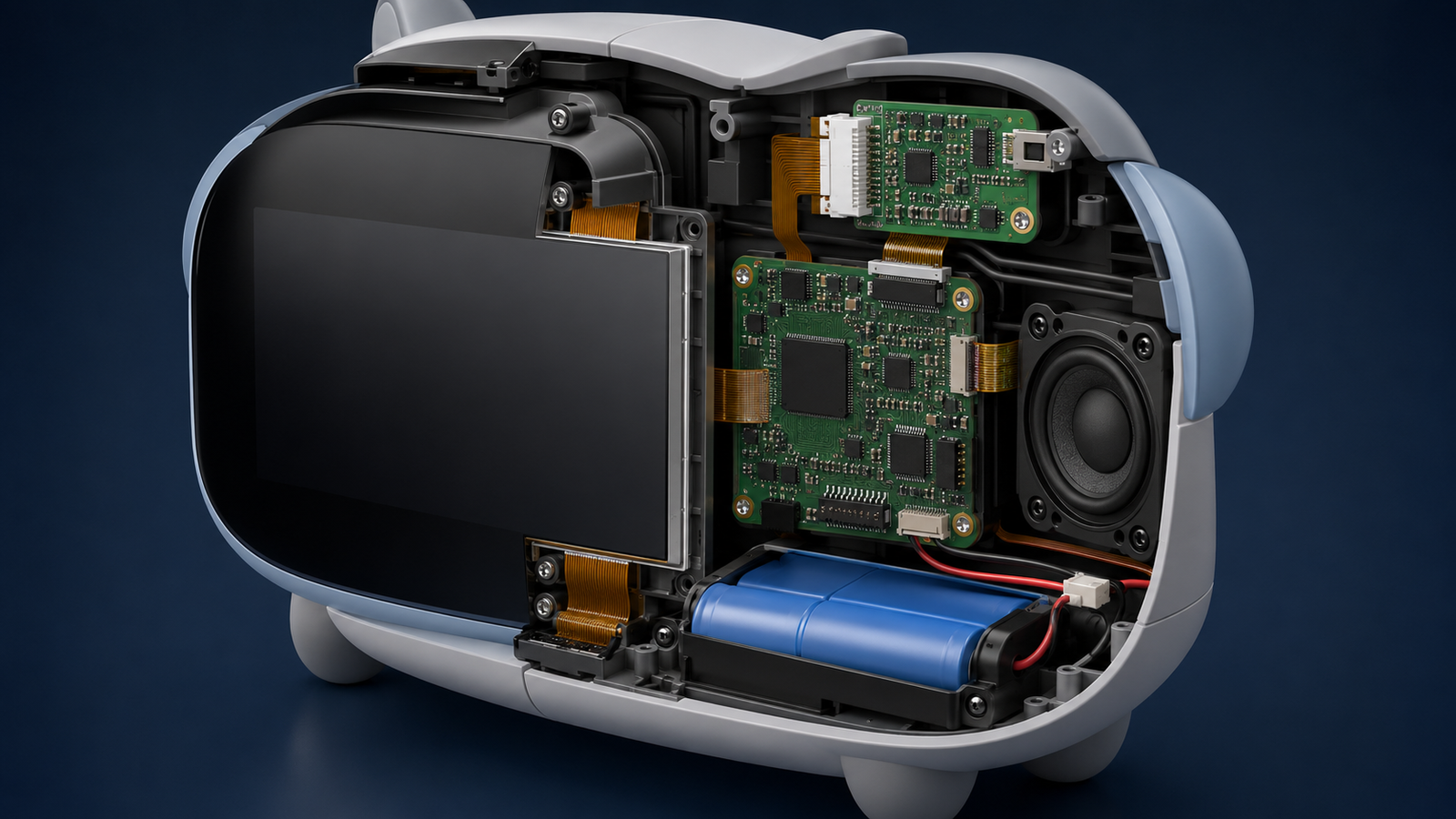
В компактном роботе дисплей должен сосуществовать с динамиками, микрофонами, камерами, батареями, датчиками, контроллерными платами и движущимися механическими частями. Направление FPC, доступ к разъёмам, радиус изгиба, точки крепления, источники тепла и доступ для ремонта могут быть не менее важны, чем размер и разрешение дисплея.
Начало с существующего дисплейного модуля и адаптация окружающей конструкции часто является практичным способом снижения рисков разработки при одновременном улучшении посадки продукта.
Координация контроллерной платы и прошивки
Путь отображения должен соответствовать фактической электронной архитектуре робота. В зависимости от проекта это может включать встроенный процессор, платформу Android или Linux, выделенную плату контроллера или пользовательскую системную плату.
До подтверждения конфигурации дисплей-контроллера проект должен предоставить модель ЖК-панели, разрешение, интерфейс, определение выводов или техническое описание, информацию о подсветке, требования к сенсорному экрану, входные данные хост-системы, требования к прошивке или операционной системе, а также ожидаемую рабочую среду. Совместимость должна проверяться на основе фактических данных проекта, а не предполагаться.
Варианты кастомизации ЖК-модуля для робота-компаньона
RJY Display поддерживает индивидуальную настройку под конкретный проект, основанную главным образом на существующих дисплейных модулях. Практический объём работ зависит от выбранного модуля и предоставленной для рассмотрения технической информации.
Согласование покровного стекла и видимой области
Конфигурация сенсорного экрана
Индивидуальная настройка подсветки
Индивидуальная настройка интерфейса и гибкого печатного кабеля (FPC)
Индивидуальная настройка платы контроллера
Индивидуальная настройка прошивки
Согласование корпуса и механической конструкции, связанных с дисплеем
RJY Display не позиционирует данную услугу как разработку совершенно нового размера ЖК-панели с нуля. Практический путь — выбор существующей платформы TFT LCD с последующей настройкой дисплейного узла в соответствии с визуальными, электрическими и механическими требованиями продукта.
Что разработчикам роботов-компаньонов следует подготовить до запроса котировки (RFQ)
Полное техническое задание помогает сократить количество итераций проектирования и обеспечивает более полезный технический анализ. Просьба предоставить:
Назначение робота и целевой рынок
Роль дисплея: лицо, HMI корпуса, док-станция или сервисный интерфейс
Референтный продукт, чертёж промышленного дизайна или модель корпуса
Целевой размер, активная область, разрешение и предпочтительная форма дисплея
Требуемый интерфейс и доступная информация о хост-системе
Требования к сенсорному экрану и покровному стеклу
Требования к подсветке и предполагаемой среде эксплуатации
Ограничения по FPC, разъёму, прокладке кабелей и доступу для обслуживания
Требования к плате контроллера, операционной системе и прошивке
Количество образцов, ожидаемый годовой спрос, целевой минимальный объём заказа (MOQ) и сроки
Внутренняя интеграция дисплея и контроллера в роботе-компаньоне
Разработка индивидуального дисплея для робота-компаньона с RJY Display
RJY Display может помочь разработчикам роботов-компаньонов оценить кастомный TFT ЖК-дисплей узел на основе существующего дисплейного модуля. Предоставьте ваш референт промышленного дизайна, роль дисплея, требования к корпусу, интерфейс хост-системы и предполагаемый объём настройки, чтобы требования к дисплею, сенсорному экрану, покровному стеклу, подсветке, FPC, плате контроллера, прошивке и механической интеграции были рассмотрены до предложения конфигурации.
Проекты по индивидуальной настройке обычно начинаются с MOQ около 500 единиц, в зависимости от типа продукта и требований проекта.
Часто задаваемые вопросы
Как ЖК-дисплей может улучшить взаимодействие с роботом-компаньоном?
ЖК-дисплей может помочь роботу-компаньону передавать выражение, состояние взаимодействия, статус зарядки, простые варианты выбора и обратную связь. Его ценность заключается в том, что поведение робота становится более понятным и визуально согласованным с дизайном продукта.
Нужен ли роботу-компаньону дисплей в качестве лица?
Не всегда. Дисплей-лицо может быть полезен для выразительного взаимодействия, но некоторые продукты могут использовать дисплей на корпусе, дисплей на док-станции, физические элементы управления, голосовое взаимодействие или мобильное приложение. Правильный выбор зависит от предполагаемой модели взаимодействия продукта.
Может ли RJY Display создать экран нестандартной формы для робота-компаньона с нуля?
RJY Display специализируется на настройке на основе существующих дисплейных модулей. Поддержка может включать покровное стекло, сенсорный экран, подсветку, интерфейс, FPC, плату контроллера, прошивку и связанную с дисплеем механическую координацию. Полностью новый размер ЖК-панели не следует предполагать.
Какая информация необходима для подтверждения совместимости дисплей-контроллера?
Просьба предоставить выбранную модель ЖК-панели, разрешение, интерфейс, определение выводов или техническое описание, информацию о подсветке, требования к сенсорному экрану, входные данные хост-системы, потребности в прошивке или операционной системе, а также среду применения. Совместимость должна быть подтверждена после технического анализа.
Каков типичный MOQ для индивидуального дисплея робота-компаньона?
Проекты по настройке обычно начинаются с MOQ около 500 единиц, в зависимости от типа продукта и требований проекта. Окончательный MOQ должен быть подтверждён после определения конфигурации дисплея и объёма настройки.