¿Enfrenta un cuello de botella en su proyecto de pantalla integrada?
No permita que la integración compleja o los problemas de la cadena de suministro retrasen su tiempo de comercialización. Reserve una consulta gratuita con el equipo experto de RJY para obtener soporte personalizado en diseño y fabricación.
Cómo pueden triunfar los robots acompañantes en Europa: el papel de las pantallas LCD personalizadas
Publicado:
8 minutos de lectura
Actualizado:
Los robots acompañantes están superando la idea de ser un dispositivo novedoso. En Europa, su oportunidad radica en crear interacciones útiles, respetuosas y accesibles en el hogar, en entornos de hostelería, en la educación y en determinados entornos de servicios. El robot puede proporcionar recordatorios, comunicar estado, guiar rutinas sencillas, apoyar el entretenimiento o crear una interfaz más atractiva para servicios conectados.
Para un fabricante de robots acompañantes, la experiencia del producto no está determinada únicamente por la inteligencia artificial, la movilidad, el audio o los sensores. La interfaz visible suele moldear la primera impresión. Una pantalla cuidadosamente integrada de robot acompañante puede hacer que el robot resulte comprensible, receptivo e intencionado. Puede comunicar presencia, mostrar expresiones simples, proporcionar retroalimentación inmediata y hacer que la configuración o la interacción diaria resulten menos intimidantes.
Aquí es donde un ensamblaje LCD personalizado cobra importancia. Un módulo LCD TFT estándar puede ser un punto de partida útil, pero la experiencia final del producto depende de la forma de la pantalla, el vidrio de cubierta, el área visible, el comportamiento táctil, la configuración de brillo, el enrutamiento del FPC, la ruta de la placa controladora y el ajuste con el gabinete del robot.
Por qué Europa es un mercado importante para el desarrollo de robots acompañantes
Europa ofrece un contexto significativo a largo plazo para el desarrollo de robots acompañantes e interactivos. El 1 de enero de 2025, las personas de 65 años o más representaban el 22% de la población de la UE, mientras que las personas de 80 años o más representaban el 6%.[1] Este cambio demográfico no significa que toda persona mayor necesite o quiera un robot. Sin embargo, sí aumenta la importancia de los productos digitales accesibles, las interfaces domésticas intuitivas y las tecnologías que puedan ser utilizadas cómodamente por personas con diferentes niveles de confianza en los dispositivos digitales.
Es probable que los compradores europeos evalúen un robot acompañante como una experiencia completa, más que como una colección de funciones técnicas. El diseño industrial, las expectativas de privacidad, la transparencia, la simplicidad de configuración, el estilo de interacción y la comunicación visual influyen en si el producto resulta apropiado en un hogar o en un entorno público.
Para los productos habilitados con IA, la transparencia es cada vez más parte de esta ecuación de confianza. La Comisión Europea establece que las obligaciones de transparencia del Artículo 50 de la Ley de IA comenzaron a aplicarse a partir del 2 de agosto de 2026, incluido el requisito de que las personas sean informadas cuando interactúan directamente con un sistema de IA en los casos pertinentes.[2] Una pantalla no crea cumplimiento legal por sí misma, pero puede proporcionar un canal claro y legible para comunicar el estado del robot, el contexto de interacción y las elecciones del usuario.
Qué significa el “valor emocional” en el diseño de robots acompañantes
En un contexto de diseño de producto, el valor emocional no significa que un robot reemplace las relaciones humanas o proporcione un resultado terapéutico. Significa que el producto puede sentirse menos mecánico, más fácil de entender y más agradable de usar durante la interacción cotidiana.
Una pantalla contribuye a esta experiencia de varias maneras prácticas:
Expresión: un rostro visual, movimiento de ojos, color o animación puede comunicar atención y respuesta sin requerir una explicación verbal extensa.
Retroalimentación: los usuarios pueden ver si el robot ha escuchado una solicitud, está esperando entrada, se está cargando, se está actualizando o necesita asistencia.
Personalidad: la interfaz visible puede alinear el carácter del robot con el tono previsto de la marca, desde calmado y minimalista hasta lúdico y orientado a la familia.
Confianza: una pantalla comprensible puede reducir la ambigüedad durante la configuración, la confirmación de tareas y la recuperación de un error o problema de conexión.
Participación: un robot puede mostrar información contextual simple, como una indicación, una opción de actividad, una respuesta visual o el estado del hogar, de una manera que resulte más accesible que un flujo exclusivo de aplicación móvil.
Los diseños más sólidos no sobrecargan la pantalla con paneles de control. Un robot acompañante generalmente se experimenta a corta distancia y en interacciones breves. La pantalla debe priorizar señales visuales claras, estados de interacción simples y una relación coherente entre la voz, el movimiento, el sonido y la retroalimentación visible del robot.
Dónde se puede utilizar una pantalla LCD en un robot acompañante
Pantalla facial
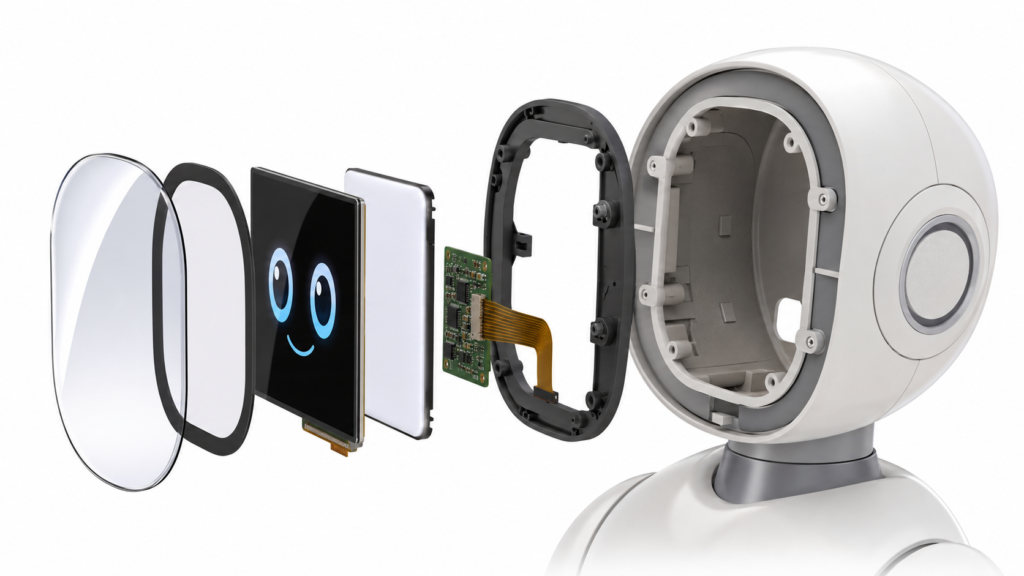
Una pantalla facial es a menudo la implementación más reconocible. Puede mostrar ojos abstractos, una expresión animada, un estado de escucha o una señal de interacción. En este rol, la pantalla forma parte tanto del diseño del personaje del robot como de su diseño de interfaz hombre-máquina (HMI).
El desafío de ingeniería consiste en hacer que la pantalla encaje naturalmente dentro de un gabinete de cabeza con forma. El área visible, el borde negro, el contorno del vidrio de cubierta, los requisitos de curvatura de la pantalla, el marco de montaje y la dirección de salida del FPC deben evaluarse como un solo ensamblaje.
Pantalla corporal o lateral
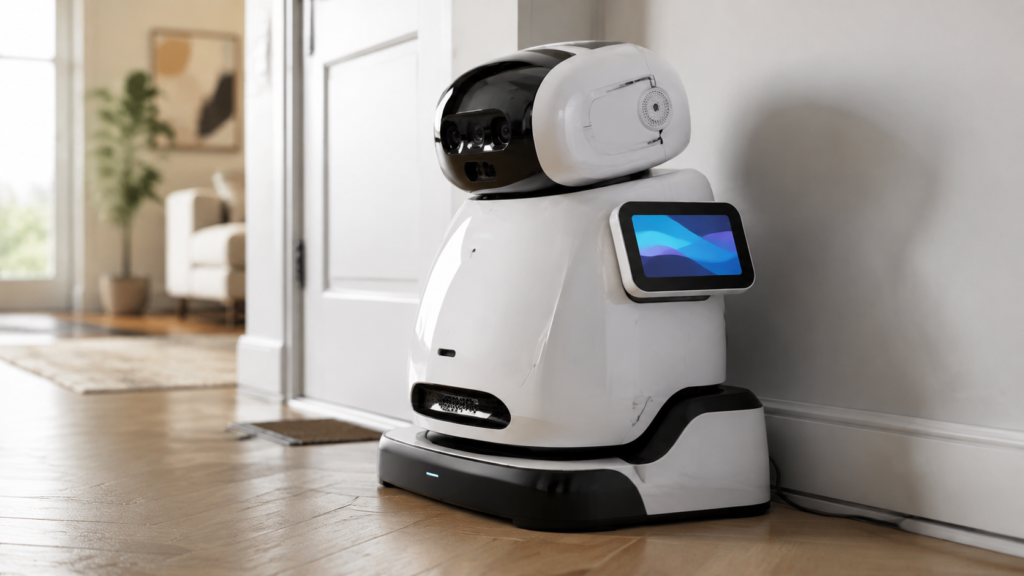
Una pantalla montada en el cuerpo puede respaldar la configuración, la confirmación de tareas, el estado de carga, los ajustes del dispositivo o el acceso al servicio. Esto puede ser útil cuando la pantalla facial se mantiene intencionalmente mínima y expresiva en lugar de informativa.
La ubicación de la pantalla debe revisarse considerando la altura del usuario, el ángulo de visión, el contacto accidental, el espacio libre del gabinete, el enrutamiento de cables y el acceso durante el ensamblaje o la reparación.
Robot acompañante con pantalla montada en el cuerpo sobre una base de carga
Pantalla en estación de acoplamiento o HMI externo
No todos los robots acompañantes necesitan una pantalla grande en su cuerpo. Algunos productos pueden beneficiarse de una pantalla integrada en una base de carga, una estación base o un dispositivo de control externo. Esto puede separar la información diaria y las tareas de mantenimiento de la interfaz expresiva del robot.
Cómo el diseño LCD personalizado mejora la experiencia del producto
Coordinación de forma y área visible
Los robots acompañantes suelen utilizar gabinetes redondeados, compactos o impulsados por personajes. Una pantalla LCD rectangular estándar puede funcionar técnicamente, pero aún así verse visualmente desconectada del producto. Un vidrio de cubierta personalizado, un borde impreso y una disposición del área visible pueden ayudar a que la pantalla se integre con la estructura facial o corporal del robot.
Integración de pantalla táctil
El táctil puede respaldar la configuración, los ajustes, las opciones simples y los flujos de servicio. Sin embargo, el táctil debe considerarse con el modelo de interacción completo. El panel táctil, el controlador, el vidrio de cubierta, la interfaz del host, el controlador de software y el mapeo de coordenadas deben evaluarse en conjunto.
Para algunos robots acompañantes, los botones físicos, la entrada por voz o una ruta de aplicación móvil pueden ser más apropiados para comandos frecuentes. El táctil debe utilizarse donde mejore la claridad, en lugar de añadirse como una característica predeterminada.
Cómo los Robots de Compañía Pueden Triunfar en Europa: El Papel de las Pantallas LCD Personalizadas 4
Diseño de pila óptica y visualización
Un robot acompañante puede utilizarse en una sala de estar brillante, en un entorno nocturno con poca luz, en un área de recepción de oficina o en un espacio de hostelería. La legibilidad depende de la pila óptica completa: características del panel, configuración de retroiluminación, vidrio de cubierta, reflejos, ángulo de pantalla, diseño visual y geometría del gabinete.
Una pantalla no debe describirse como adecuada para cualquier condición de iluminación sin una revisión específica del proyecto. En su lugar, el fabricante debe definir los entornos esperados y determinar cómo el ensamblaje de pantalla seleccionado respaldará la experiencia visual prevista.
Ajuste mecánico y enrutamiento del FPC
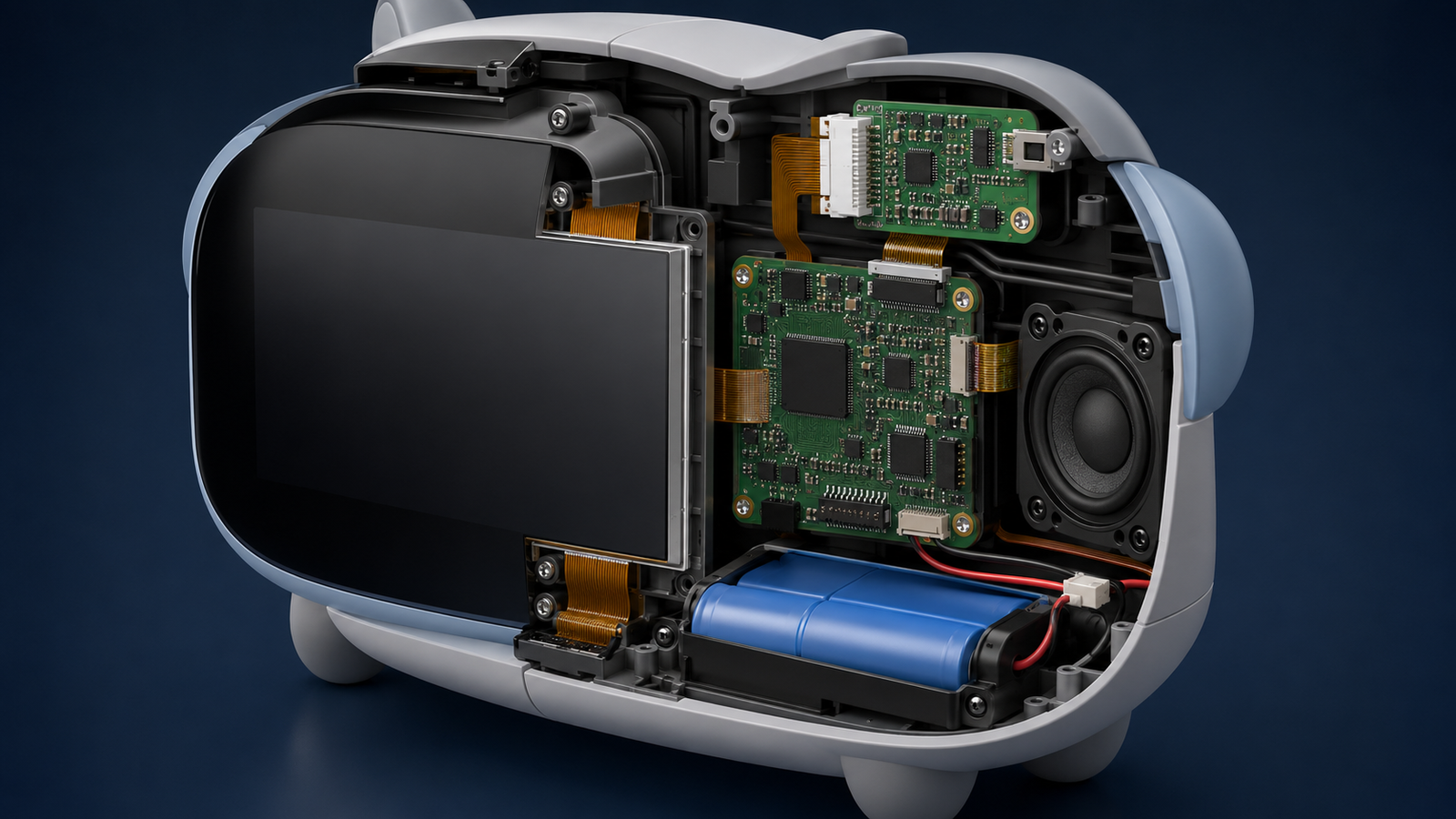
En un robot compacto, la pantalla debe coexistir con altavoces, micrófonos, cámaras, baterías, sensores, placas controladoras y piezas mecánicas móviles. La dirección del FPC, el acceso al conector, el radio de curvatura, los puntos de montaje, las fuentes de calor y el acceso para reparación pueden ser tan importantes como el tamaño y la resolución de la pantalla.
Comenzar con un módulo de pantalla existente y adaptar el ensamblaje circundante suele ser una forma práctica de reducir el riesgo de desarrollo mientras se mejora el ajuste del producto.
Coordinación de placa controladora y firmware
La ruta de visualización debe coincidir con la arquitectura electrónica real del robot. Según el proyecto, esto puede implicar un procesador integrado, una plataforma Android o Linux, una placa controladora dedicada o una placa de sistema personalizada.
Antes de confirmar una configuración de controlador de pantalla, el proyecto debe proporcionar el modelo del panel LCD, la resolución, la interfaz, la definición de pines o la hoja de datos, la información de retroiluminación, los requisitos táctiles, la entrada del host, los requisitos de firmware o sistema operativo y el entorno operativo esperado. La compatibilidad debe verificarse a partir de los datos reales del proyecto, no asumirse.
Opciones de personalización para un ensamblaje LCD de robot acompañante
RJY Display admite personalización específica del proyecto basada principalmente en módulos de visualización existentes. El alcance práctico depende del módulo seleccionado y de la información técnica proporcionada para su revisión.
Coordinación de vidrio de cubierta y área visible
Configuración de la pantalla táctil
Personalización de retroiluminación
Personalización de interfaz y FPC
Personalización de la placa controladora
Personalización de firmware
Coordinación de la carcasa relacionada con la pantalla y la estructura mecánica
RJY Display no posiciona este servicio como el desarrollo de un tamaño de panel LCD completamente nuevo desde cero. La ruta práctica es elegir una plataforma TFT LCD existente y luego personalizar el ensamblaje de la pantalla según los requisitos visuales, eléctricos y mecánicos del producto.
Qué deben preparar los desarrolladores de robots acompañantes antes de una solicitud de cotización
Un resumen completo ayuda a reducir las iteraciones de diseño y respalda una revisión técnica más útil. Por favor, proporcione:
Aplicación del robot y mercado objetivo
Función de la pantalla: cara, HMI del cuerpo, estación de acoplamiento o interfaz de servicio
Producto de referencia, dibujo de diseño industrial o modelo de carcasa
Tamaño objetivo, área activa, resolución y forma de pantalla preferida
Interfaz requerida e información disponible del sistema host
Requisitos de pantalla táctil y vidrio de cubierta
Requisitos de retroiluminación y entorno de uso previsto
Restricciones de FPC, conector, enrutamiento de cables y acceso de servicio
Requisitos de placa controladora, sistema operativo y firmware
Cantidad de muestras, demanda anual esperada, MOQ objetivo y cronograma
Integración interna de pantalla y controlador dentro de un robot compañero
Desarrolle una pantalla personalizada para robot acompañante con RJY Display
RJY Display puede ayudar a los desarrolladores de robots compañeros a evaluar un diseño de pantallas TFT LCD ensamblaje basado en un módulo de visualización existente. Comparta su referencia de diseño industrial, función de pantalla, requisitos de carcasa, interfaz host y alcance de personalización previsto para que los requisitos de pantalla, táctil, vidrio de cubierta, retroiluminación, FPC, placa controladora, firmware e integración mecánica puedan revisarse antes de proponer una configuración.
Los proyectos de personalización generalmente comienzan con un MOQ de alrededor de 500 unidades, dependiendo del tipo de producto y los requisitos del proyecto.
Preguntas frecuentes
¿Cómo puede una pantalla LCD mejorar la experiencia de un robot compañero?
Una pantalla LCD puede ayudar a un robot compañero a comunicar expresiones, estado de interacción, estado de carga, opciones simples y retroalimentación. Su valor proviene de hacer que el comportamiento del robot sea más fácil de entender y más coherente visualmente con el diseño del producto.
¿Un robot compañero necesita una pantalla en la cara?
No siempre. Una pantalla en la cara puede ser útil para la interacción expresiva, pero algunos productos pueden usar una pantalla en el cuerpo, una pantalla en la estación de acoplamiento, controles físicos, interacción por voz o una aplicación móvil en su lugar. La elección correcta depende del modelo de interacción previsto del producto.
¿Puede RJY Display crear una pantalla de robot compañero con forma personalizada desde cero?
RJY Display se centra en la personalización basada en módulos de visualización existentes. El soporte puede incluir vidrio de cubierta, pantalla táctil, retroiluminación, interfaz, FPC, placa controladora, firmware y coordinación mecánica relacionada con la pantalla. No debe asumirse un tamaño de panel LCD completamente nuevo.
¿Qué información se necesita para confirmar la compatibilidad del controlador de pantalla?
Proporcione el modelo del panel LCD seleccionado, la resolución, la interfaz, la definición de pines o la hoja de datos, la información de retroiluminación, los requisitos táctiles, la entrada del host, las necesidades de firmware o sistema operativo y el entorno de aplicación. La compatibilidad debe confirmarse después de la revisión técnica.
¿Cuál es el MOQ típico para una pantalla personalizada de robot compañero?
Los proyectos de personalización suelen comenzar con un MOQ de alrededor de 500 unidades, dependiendo del tipo de producto y los requisitos del proyecto. El MOQ final debe confirmarse después de definir la configuración de la pantalla y el alcance de la personalización.
¿Aún no sabe qué pantalla se adapta a su proyecto?
Hable con el equipo de ingeniería de RJY para obtener asesoramiento sobre compatibilidad de pantallas, revisión de placas controladoras y discusión sobre personalización.