Stehen Sie bei Ihrem Embedded-Display-Projekt vor einer Herausforderung?
Lassen Sie nicht komplexe Integration oder Lieferkettenprobleme Ihre Markteinführung verzögern. Vereinbaren Sie eine kostenlose Beratung mit dem RJY-Expertenteam für maßgeschneiderte Design- und Fertigungsunterstützung.
Industrieller Display-Montageprozess: Leitfaden zur Integration von Touchscreens
Industrie-Touchscreens sind längst keine Nischentechnologie mehr – sie sind zentral für die Art und Weise, wie Menschen in Fabriken, Krankenhäusern, Außenterminals und Transportsystemen mit Maschinen interagieren. Anders als Verbraucherdisplays muss ein Industrie-Touchscreen robust, intelligent konstruiert und extrem zuverlässig sein.
Veröffentlicht:
16 Minuten Lesezeit
Aktualisiert:
Ein Industriedisplay ist nicht nur ein TFT-LCD-Panel, das hinter einer Glasscheibe montiert ist. In den meisten realen Projekten handelt es sich um ein integriertes System, das aus LCD-Panel, Touch-Sensor, Abdeckglas, Bondingschicht, Hintergrundbeleuchtung, FPC, Controller-Platine, Gehäuse, Firmware, Kabeln, Dichtungen und dem Testprozess besteht. Das Endprodukt muss in Geräten, die Vibrationen, Staub, Feuchtigkeit, Temperaturschwankungen, elektrisches Rauschen und lange Betriebszeiten ausgesetzt sein können, lesbar, stabil und mechanisch zuverlässig bleiben.
Aus diesem Grund ist der Montageprozess von Industriedisplays von Bedeutung. Zwei Displaymodule mögen von vorne ähnlich aussehen, aber ihr interner Aufbau, die Bondingqualität, das Design der Controller-Platine, die Abdichtungsmethode und der Testprozess können im Feldeinsatz zu sehr unterschiedlichen Ergebnissen führen. Für OEM-Käufer und Hardware-Ingenieure hilft das Verständnis dieses Prozesses, das Integrationsrisiko zu reduzieren, bevor das Display in ein größeres Produkt eingebaut wird.
Ein gut durchdachter Montageprozess für Industriedisplays besteht nicht einfach darin, den Bildschirm zum Leuchten zu bringen. Es geht darum, sicherzustellen, dass das Display, das Touch-Panel, die Controller-Platine, das Gehäuse und die mechanische Schnittstelle unter den tatsächlichen Bedingungen der Zielanwendung zusammenarbeiten.
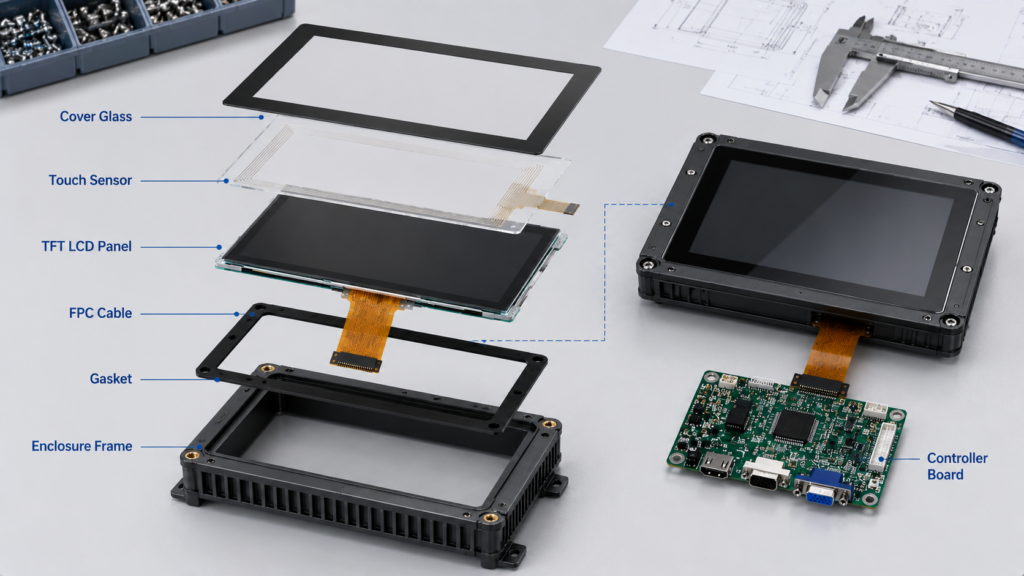
Montageprozess für Industriedisplays mit TFT-LCD-Panel, Touch-Sensor, Controller-Platine und Gehäuse
Was definiert einen industriellen Touchscreen?
Ein industrieller Touchscreen ist für Geräte, Maschinen, Terminals, Instrumente und eingebettete Systeme konzipiert, die eine stabilere Leistung als ein handelsübliches Consumer-Display erfordern. Er kann in industriellen Bedienfeldern, medizinischen Geräten, Sicherheitsausrüstungen, intelligenten Terminals, fahrzeugbezogenen Geräten, Testinstrumenten, Lagersystemen und anderen B2B-Anwendungen eingesetzt werden.
Das grundlegende Display-Prinzip mag dem eines handelsüblichen TFT-LCD-Bildschirms ähneln, aber die Designprioritäten sind unterschiedlich. Ein industrieller Touchscreen muss in der Regel Betriebstemperatur, Helligkeit, Betrachtungswinkel, Touch-Zuverlässigkeit, elektrischen Schutz, mechanische Montage, Verfügbarkeit über den Lebenszyklus und die Gehäuseintegration berücksichtigen. In manchen Projekten kann auch ein kundenspezifisches Abdeckglas, eine FPC-Anpassung, eine Schnittstellenadaption, ein Abgleich der Controller-Platine, Firmware-Support oder eine spezifische Touch-Abstimmung erforderlich sein.
"Industriell" bedeutet nicht automatisch die gleiche Spezifikation für jedes Projekt. Ein Display, das in einem sauberen, innenliegenden Steuerungsterminal verwendet wird, hat andere Anforderungen als ein Display in Außengeräten, medizinischer Elektronik, einem Fahrzeugarmaturenbrett oder einem industriellen HMI-System. Der korrekte Montageprozess sollte von der Anwendungsumgebung bestimmt werden, nicht von einem generischen Produktlabel.
Hauptkomponenten einer Industriedisplay-Montage
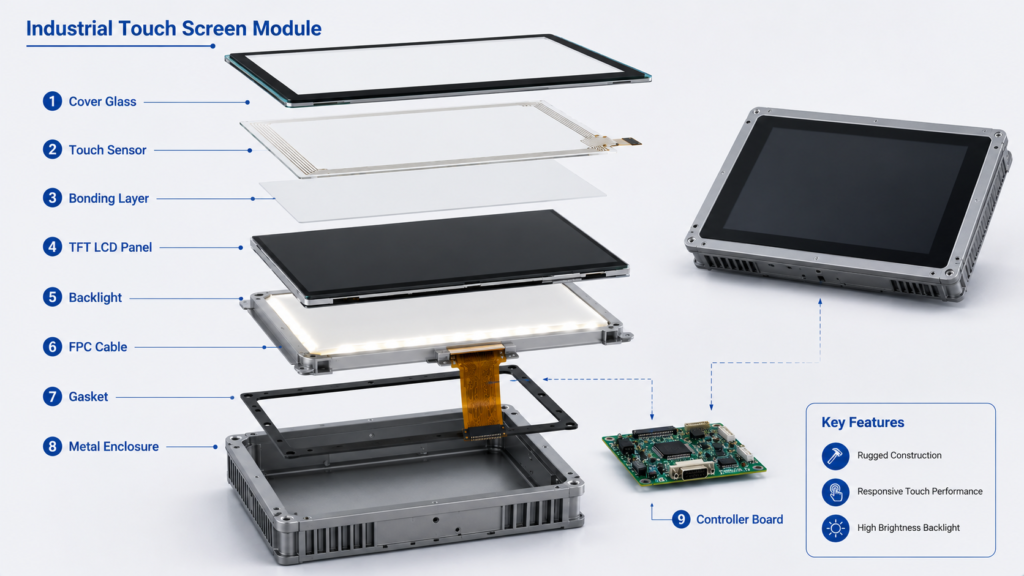
Der Montageprozess beginnt mit der Definition der Komponenten. Eine vollständige Industriedisplay-Baugruppe kann ein TFT-LCD-Panel, einen Touch-Sensor, ein Abdeckglas, eine Hintergrundbeleuchtungseinheit, ein Bonding-Material, ein FPC-Kabel, einen Steckverbinder, eine Controller-Platine, ein Gehäuse, eine Dichtung und eine Montagestruktur umfassen. Jedes Teil beeinflusst die endgültige Display-Leistung.
Das TFT-LCD-Panel bestimmt den aktiven Anzeigebereich, die Auflösung, die Helligkeitsgrundlage, den Betrachtungswinkel, die Schnittstelle und die optische Leistung. Der Touch-Sensor bestimmt, wie Benutzer mit dem Gerät interagieren. Projektiv-kapazitives Touch (oft PCAP genannt) wird häufig verwendet, wenn Multi-Touch, schnelle Reaktion und ein sauberes Erscheinungsbild der Frontglasscheibe erforderlich sind. Resistives Touch kann immer noch geeignet sein für Anwendungen, bei denen die Bedienung mit Handschuhen, Stifteingabe oder bestimmten nassen und staubigen Bedingungen wichtig ist.
Das Abdeckglas schützt die Vorderseite und beeinflusst sowohl das Erscheinungsbild als auch die Haltbarkeit. Seine Dicke, Kantenform, Bedruckungsfläche und Oberflächenbehandlung sollten mit dem mechanischen Design des Endprodukts übereinstimmen. Die Hintergrundbeleuchtung beeinflusst Helligkeit und Lesbarkeit. Die FPC und die Steckverbinder beeinflussen die Montageflexibilität und -zuverlässigkeit. Die Controller-Platine übernimmt die Signalumwandlung, die Touch-Kommunikation, das Energiemanagement und manchmal das Firmware-Verhalten.
Bei einem einfachen Produkt kann das Display nur aus einem Panel und einem Touch-Modul bestehen. In einem vollständigeren industriellen HMI-System kann die Display-Baugruppe je nach Host-System und Anwendungsarchitektur auch eine HDMI-, LVDS-, MIPI-, eDP-, USB- oder Android-Controller-Platine umfassen.
Explosionszeichnung der Komponenten eines industriellen Touchscreens, einschließlich Abdeckglas, LCD-Panel, Hintergrundbeleuchtung und Controller-Platine
Schritt 1: Anforderungsprüfung vor der Montage
Der Montageprozess für Industriedisplays sollte vor der physischen Produktion beginnen. Ein zuverlässiges Projekt beginnt mit einer Anforderungsprüfung. Dieser Schritt bestätigt, ob das Display-Modul, die Touch-Struktur, die Controller-Platine und das mechanische Design die reale Anwendungsumgebung erfüllen können.
Die Prüfung sollte Displaygröße, Auflösung, Schnittstelle, Helligkeit, Betrachtungswinkel, Betriebstemperatur, Touch-Typ, Anforderungen an das Abdeckglas, Anforderungen an die Hintergrundbeleuchtung, FPC-Position, Steckverbindertyp, Anforderungen an die Controller-Platine, Gehäusestruktur, Montagemethode, Abdichtungsziel, Jahresbedarf und erwarteten Produktlebenszyklus abdecken.
Dieser Schritt ist oft der Punkt, an dem kostspielige Fehler vermieden werden können. Beispielsweise kann ein Display die richtige Größe und Auflösung haben, aber die falsche Schnittstelle für das Mainboard des Kunden verwenden. Ein Touch-Panel kann beim Testen auf dem Labortisch funktionieren, aber nach dem Hinzufügen des Abdeckglases instabil werden. Ein Display mag drinnen hell genug erscheinen, aber in einer Umgebung mit hohem Umgebungslicht nicht mehr lesbar sein. Ein Gehäuse lässt möglicherweise zu wenig Platz für den Biegeradius der FPC, was zu langfristigen Zuverlässigkeitsproblemen führt.
Bei industriellen Projekten sollte der Montageprozess nicht von der technischen Bewertung getrennt werden. Je früher die Display-Struktur überprüft wird, desto einfacher ist es, Kosten, Entwicklungszeit und das Risiko von Neukonstruktionen zu kontrollieren.
Schritt 2: Auswahl des TFT-LCD-Panels und der Touch-Technologie
Nach der Anforderungsprüfung besteht der nächste Schritt in der Auswahl des richtigen TFT-LCD-Panels und der richtigen Touch-Technologie. Das Display-Panel sollte der erforderlichen Größe, Auflösung, Schnittstelle, Helligkeit, dem Betrachtungswinkel und dem mechanischen Umriss entsprechen. Die Touch-Technologie sollte dem Betriebsverhalten des Endprodukts entsprechen.
PCAP-Touch wird oft für moderne HMI-Panels, intelligente Terminals, Schnittstellen medizinischer Geräte und verbraucherähnliche Industrieanwendungen bevorzugt. Es unterstützt eine glatte Frontoberfläche, Multi-Touch-Gesten und ein verbessertes Benutzererlebnis. PCAP-Touch kann jedoch eine sorgfältige Abstimmung erfordern, wenn das Gerät dickes Abdeckglas, Bedienung mit Handschuhen, Wasser auf der Oberfläche oder starke elektromagnetische Störungen unterstützen muss.
Resistives Touch ist älter, aber immer noch relevant. Es kann auf Druck von Fingern, Handschuhen, Stiften oder Werkzeugen reagieren. In bestimmten industriellen, Außen- oder stark störungsbehafteten Anwendungen kann resistives Touch praktisch bleiben, da es weniger von kapazitiven Erfassungsbedingungen abhängig ist. Der Nachteil ist, dass es in der Regel nicht das gleiche Multi-Touch-Erlebnis oder das gleiche Erscheinungsbild der Frontglasscheibe wie PCAP bietet.
Die Display- und Touch-Schicht sollten zusammen ausgewählt werden. Ein gutes LCD-Panel mit der falschen Touch-Struktur kann immer noch eine schlechte Benutzerfreundlichkeit erzeugen. Ein guter Touch-Sensor, der über einem Panel mit geringer Helligkeit oder schmalem Betrachtungswinkel installiert ist, kann ebenfalls die Anforderungen des Endprodukts nicht erfüllen.
Schritt 3: Design von Abdeckglas und mechanischer Struktur
Abdeckglas ist nicht nur eine Schutzschicht. Bei der Montage von Industriedisplays beeinflusst es das Erscheinungsbild, die Abdichtung, die Touch-Empfindlichkeit, die optische Klarheit, die mechanische Passung und das Benutzererlebnis. Das Glas kann je nach Produkt eine kundenspezifische Größe, Kantenbearbeitung, Bedruckung des schwarzen Rahmens, Logodruck, Lochdesign, Sonderform oder Oberflächenbehandlung erfordern.
Das Abdeckglas muss auch zur Gehäusestruktur passen. Wenn das Produkt eine Frontplattenabdichtung erfordert, müssen Glas, Dichtung, Klebebereich und Gehäuse als ein System ausgelegt werden. Wenn das Produkt eine bündige Montage erfordert, müssen Glasdicke und Kantenform zum vorderen Gehäuse passen. Wenn das Produkt Vibrationen ausgesetzt ist, müssen die Bonding- und mechanische Stützstruktur Spannungskonzentrationen verhindern.
Ein schlechtes mechanisches Design kann ein ansonsten gutes Display-Modul beschädigen. Häufige Probleme sind Glasdruck auf den aktiven Bereich, übermäßiges Biegen der FPC, unzureichende Dichtungskompression, ungleichmäßige Klebstoffverteilung und Gehäuseverformung. Diese Probleme treten möglicherweise nicht beim ersten Einschalttest auf, können aber nach Transport, Installation oder längerem Gebrauch zu Ausfällen führen.
Schritt 4: Touch-Bonding und optische Integration
Touch-Bonding ist einer der wichtigsten Schritte bei der Montage von Industriedisplays. Das Touch-Panel kann durch Air-Bonding oder Optical Bonding mit dem LCD verbunden werden. Air-Bonding hinterlässt einen Luftspalt zwischen dem Touch-Panel und dem LCD. Es ist einfacher und kostengünstiger, aber der Luftspalt kann die interne Reflexion erhöhen und den Kontrast bei starkem Umgebungslicht verringern.
Optical Bonding füllt den Spalt zwischen dem Touch-Panel und dem LCD mit einem optisch klaren Klebstoff oder Harz. Dies kann die optische Leistung verbessern, indem die interne Reflexion reduziert und der wahrgenommene Kontrast erhöht wird. Es kann auch die mechanische Stabilität verbessern, da die Schichten fester miteinander verbunden sind. Optical Bonding erfordert jedoch eine strengere Prozesskontrolle und ist schwieriger nachzuarbeiten.
Zwei gängige Materialien für Optical Bonding sind OCA und OCR. OCA (optisch klarer Klebstoff) ist ein festes Folienmaterial. Es eignet sich für viele flache Bonding-Strukturen und kann bei stabilem Prozess eine effiziente Produktion unterstützen. OCR (optisch klares Harz) ist ein flüssiges Material, das Spalten füllen und sich an komplexere Strukturen anpassen kann, erfordert jedoch eine sorgfältige Aushärtungskontrolle und Prozessverwaltung.
Die richtige Bonding-Methode hängt von Displaygröße, Struktur, Touch-Typ, Betriebsumgebung, optischem Ziel, Kostenrahmen und Produktionsvolumen ab. Für industrielle Käufer sollte die Bonding-Wahl nicht als kosmetische Option behandelt werden. Sie beeinflusst die Lesbarkeit, die Montageausbeute, den Nacharbeitsaufwand und die Feldzuverlässigkeit.
Vergleich von Air-Bonding und Optical Bonding für industrielle TFT-LCD-Touchdisplays
Schritt 5: FPC-, Steckverbinder- und Kabelmontage
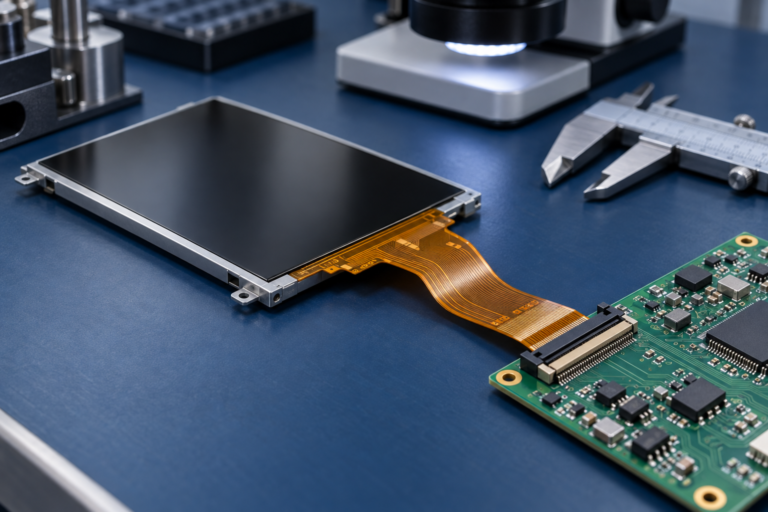
Die FPC- und Steckverbinderanordnung bestimmt, wie einfach das Display in das Endprodukt eingebaut werden kann. In vielen industriellen Projekten wird das Display nicht im freien Raum verwendet. Es ist in einem Gehäuse montiert, mit einem Mainboard, einer Controller-Platine oder einem Kabelbaum verbunden und von mechanischen Teilen umgeben. Wenn die FPC-Position falsch ist, kann das Display selbst bei korrekter elektrischer Spezifikation schwierig zu montieren sein.
Während der Montage sollte die FPC sorgfältig behandelt werden, um Risse, übermäßiges Biegen oder Spannung am Steckverbinder zu vermeiden. Der Kabelweg sollte scharfe Kanten, Druckpunkte und Bereiche mit hohem Rauschen vermeiden. Bei Systemen mit Touch-Kommunikation, Hintergrundbeleuchtungsstrom und Displaysignalen kann die Kabelführung die Signalstabilität beeinflussen.
Industriedisplay-Baugruppen können Schnittstellen wie RGB, LVDS, MIPI, eDP, HDMI, USB, I2C, UART oder andere projektspezifische Schnittstellen verwenden. Die Schnittstellenauswahl sollte zusammen mit der Controller-Platine oder dem Host-System überprüft werden. Eine Nichtübereinstimmung bei Spannung, Pin-Definition, Timing oder Firmware-Konfiguration kann verhindern, dass das Display korrekt funktioniert, selbst wenn das Panel an sich geeignet ist.
Schritt 6: Integration der Controller-Platine
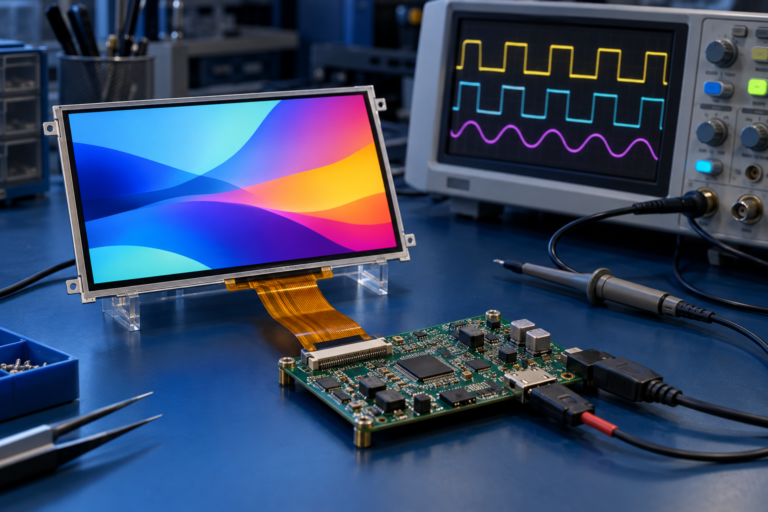
Viele Industriedisplay-Baugruppen benötigen eine Controller-Platine, um das LCD-Modul mit dem System des Kunden zu verbinden. Die Controller-Platine kann je nach Projekt HDMI-, VGA-, LVDS-, MIPI-, eDP-, USB- oder andere Signale umwandeln. In Touch-Display-Systemen kann die Controller-Platine auch die Touch-Kommunikation, die Hintergrundbeleuchtungssteuerung, die Stromeingabe und das Firmware-Verhalten übernehmen.
Für Industrieanlagen sollte die Controller-Platine entsprechend der LCD-Schnittstelle, Auflösung, den Hintergrundbeleuchtungsanforderungen, der Touch-Schnittstelle, dem Betriebssystem, der Stromeingabe, den Firmware-Anforderungen und dem Gehäuseplatz ausgewählt werden. Es sollte nicht angenommen werden, dass eine Platine ohne Überprüfung jedes Display unterstützen kann.
Elektrischer Schutz ist ebenfalls wichtig. Industriesysteme können in der Nähe von Motoren, Relais, Netzteilen, langen Kabeln oder anderen Rauschquellen betrieben werden. Zu den Designüberlegungen können Erdung, Abschirmung, ESD-Schutz, EMV-Kontrolle, Stromfilterung, Signalisolierung und Watchdog-Wiederherstellung gehören. EMV-bezogene Normen wie die IEC-61000-Reihe werden häufig als Referenzen für elektromagnetische Verträglichkeitsanforderungen in elektrischen und elektronischen Geräten verwendet.[1]
Die Integration der Controller-Platine ist oft der Punkt, an dem Hardware- und Softwareanforderungen aufeinandertreffen. Firmware-Anpassung, Display-Timing, Touch-Treiberverhalten, Boot-Display, Hintergrundbeleuchtungssteuerung und Kommunikationsprotokolle können alle das endgültige Benutzererlebnis beeinflussen.
Schritt 7: Hintergrundbeleuchtung und Helligkeitssteuerung
Helligkeit ist ein zentraler Faktor bei der Montage von Industriedisplays. Ein Display, das in einem Büro akzeptabel aussieht, kann in einer Fabrik, einem Lager, einem Fahrzeug oder einem nach außen gerichteten Terminal schwer lesbar sein. Die Hintergrundbeleuchtung muss entsprechend der endgültigen Lichtumgebung, Displaygröße, dem Leistungsbudget, dem thermischen Design und der erwarteten Produktlebensdauer ausgewählt werden.
Industriedisplays können eine höhere Helligkeit, eine.
Backlight design should also be evaluated together with thermal structure. A brighter backlight generates more heat, and heat can affect LCD performance, LED lifetime, bonding materials, and enclosure temperature. If the display is sealed inside a compact housing, thermal planning becomes more important.
Step 8: Rugged Housing and Sealing Integration
In many industrial applications, the display assembly must be mounted into a rugged enclosure. This process requires more than placing the LCD behind a front panel. The enclosure, glass, gasket, adhesive, mounting screw positions, cable path, and mechanical support must work together.
If the product requires dust or water protection, the design may refer to IP Code principles defined under IEC 60529. The IP Code classifies degrees of protection provided by enclosures against access to hazardous parts, solid foreign objects, and water ingress.[2] However, an IP rating applies to the final enclosure or product structure, not only to the LCD panel. A display module by itself does not guarantee that the final equipment will meet a specific IP rating.
This distinction is important. A customer may ask for an “IP65 display,” but the real requirement may involve front-panel sealing, gasket compression, enclosure material, screw torque, connector sealing, cable exit design, and final product testing. If these factors are not considered, water or dust protection may fail even if the front glass looks sealed.
For rugged display integration, mechanical tolerance is also critical. Uneven pressure can cause light leakage, touch failure, glass stress, or display mura. Good assembly design should protect the active display area while supporting the cover glass and touch layer under expected use conditions.
Rugged industrial display enclosure integration with gasket sealing and controller board
Step 9: Inspection, Calibration, and Functional Testing
After physical assembly, the display should be inspected and tested before shipment or final integration. Visual inspection checks for dust, bubbles, scratches, uneven bonding, glass defects, display mura, dead pixels, light leakage, and abnormal color. Touch testing checks touch accuracy, linearity, response, multi-touch behavior when required, and stability near edges and corners.
Functional testing verifies the display signal, backlight control, touch communication, controller board behavior, power input, connector stability, and firmware behavior. For touch products, calibration or touch parameter tuning may be required depending on the touch technology, cover glass thickness, and controller configuration.
Burn-in or aging tests may be used to detect early failures. In B2B projects, the exact test plan should match the application risk level. A simple indoor display terminal and a mission-critical industrial control device should not necessarily use the same validation depth.
Reliability Testing for Industrial Display Assemblies
Industrial display assemblies may need reliability testing depending on the end product and market. Typical test categories include temperature operation, temperature storage, thermal cycling, humidity exposure, vibration, shock, ESD, EMI, and long-term operation tests. IEC 60068 provides a series of environmental testing methods for assessing whether products can perform under expected transportation, storage, and operating conditions.[3]
Reliability testing should be defined according to the final application. A display used in a smart home panel may not require the same test profile as a display used in industrial automation or vehicle-related equipment. The supplier and customer should confirm the actual test conditions rather than using broad terms such as “rugged” or “industrial grade” without definition.
For products entering regulated markets, compliance may also involve EMC, safety, environmental, or market-access requirements. FCC equipment authorization applies to RF devices before they are marketed or imported into the United States.[4] EU RoHS rules restrict the use of hazardous substances in electrical and electronic equipment to protect human health and the environment.[5] ISO 9001 is widely recognized as a quality management system standard that helps organizations maintain and improve process consistency.[6]
These standards should be understood carefully. They do not automatically prove that a specific display is suitable for every industrial environment. They provide frameworks, test references, or market requirements that may apply depending on the product, region, and customer specification.
Häufige Montageprobleme, die Industriedisplays beeinträchtigen
Viele Displayfehler werden nicht allein durch das LCD-Panel verursacht. Sie entstehen durch Montage- oder Integrationsprobleme. Staub und Blasen in der Bondingschicht können die optische Qualität beeinträchtigen. Fehlausrichtungen zwischen Touchpanel und LCD können das Erscheinungsbild und die Touch-Genauigkeit beeinflussen. Falscher Dichtungsdruck kann das Glas beschädigen oder die Dichtungszuverlässigkeit verringern. Schlechte Kabelführung kann zu intermittierenden Signalproblemen führen. Unzureichende Erdung oder Abschirmung kann Geisterberührungen oder instabiles Displayverhalten verursachen.
Auch Hintergrundbeleuchtungsprobleme sind häufig. Ungleichmäßige Helligkeit, lokale Dimmfehler, unzureichendes Wärmemanagement oder falsche Ansteuerung der Hintergrundbeleuchtung können die Lesbarkeit und Langzeitstabilität beeinträchtigen. Mechanische Spannungen können nach der Installation zu Lichtlecks, Display-Mura oder Glasbruch führen.
Diese Probleme lassen sich während der Design- und Montageprüfung leichter vermeiden, als sie zu beheben, nachdem das Display bereits in das Endgerät integriert wurde. Bei OEM-Projekten sollte der Display-Lieferant ausreichende mechanische, elektrische und umweltbezogene Informationen erhalten, um mögliche Risiken vor der Serienproduktion zu prüfen.
Individualisierung bei der Montage von Industriedisplays
Industriedisplay-Projekte erfordern oft Individualisierung, da Standardmodule nicht immer zur endgültigen Produktstruktur passen. Die Individualisierung kann Helligkeitsanpassung, Abdeckglasdesign, Touchscreen-Anpassung, Änderungen an der Hintergrundbeleuchtung, FPC-Modifikation, Schnittstellenanpassung, Anpassung der Controller-Platine, Firmware-Anpassung und mechanische Strukturabstimmung umfassen.
Die praktischsten kundenspezifische Display- Projekte beginnen in der Regel mit einem vorhandenen LCD-Modul und passen dann die umgebende Struktur an. Dies hilft, Entwicklungskosten zu kontrollieren, Risiken zu reduzieren und den Weg zur Muster- und Serienproduktion zu verkürzen. Die Entwicklung einer völlig neuen Bildschirmgröße von Grund auf ist ein wesentlich komplexeres Projekt und für die meisten OEM-Teams nicht immer der richtige Ausgangspunkt.
Bei der Montage von Industriedisplays sollte die Individualisierung vom endgültigen Anwendungsfall geleitet werden. Ein medizinisches Display kann sich auf Klarheit, stabile Touch-Reaktion und konstante Versorgung konzentrieren. Ein Smart-Home-Panel kann sich auf das Erscheinungsbild des Abdeckglases, das Touch-Erlebnis und die Integration der Controller-Platine konzentrieren. Ein Sicherheitsgeräte-Display kann sich auf lange Betriebsstunden und Schnittstellenkompatibilität konzentrieren. Ein fahrzeugbezogenes Display kann Aufmerksamkeit auf Helligkeit, Betrachtungswinkel, Temperatur und Einbauposition erfordern.
So bereiten Sie eine RFQ für eine Industriedisplay-Montage vor
Eine klare RFQ hilft dem Lieferanten, das Projekt genau zu bewerten. Anstatt nur nach einer Displaygröße zu fragen, sollten Käufer den vollständigen Kontext der Display-Anwendung bereitstellen.
Nützliche RFQ-Informationen umfassen Displaygröße, Auflösung, Schnittstelle, Helligkeitsanforderung, Betrachtungswinkelanforderung, Touch-Typ, Abdeckglasanforderung, FPC-Position, Anforderung an die Controller-Platine, Firmware-Anforderung, Betriebstemperatur, Installationsmethode, Gehäusestruktur, Abdichtungsziel, Anwendungsbranche, Jahresbedarf, Stückzahl für Muster, Zielzeitplan sowie etwaige Referenzmodelle oder Datenblätter.
Wenn das Display in einer anspruchsvollen Umgebung eingesetzt wird, sollten Käufer auch die zu erwartende Exposition gegenüber Staub, Wasser, Vibrationen, Stößen, Chemikalien, Sonnenlicht, EMV oder langen Betriebsstunden erläutern. Diese Informationen ermöglichen es dem Display-Lieferanten, eine geeignetere Montagestruktur zu empfehlen, anstatt nur ein Modul anzubieten, das der grundlegenden Größe entspricht.
Arbeiten Sie mit RJY Display an der Montage von Industriedisplays
RJY Display bietet TFT-LCD-Produkte, Controller-Platinen und Individualisierungsunterstützung für B2B-Display-Projekte. Für industrielle Touchscreen- und Embedded-Display-Anwendungen kann RJY Display eine Projektprüfung basierend auf Displaygröße, Schnittstelle, Helligkeit, Touch-Anforderungen, Abdeckglasdesign, Hintergrundbeleuchtungsanforderungen, Anpassung der Controller-Platine, firmwarespezifischen Anforderungen und mechanischer Strukturabstimmung unterstützen.
Wenn Ihr Projekt ein industrielles Display-Modul, eine Touch-Display-Montage, ein TFT-LCD mit Controller-Platine oder eine kundenspezifische Display- Lösung basierend auf einem vorhandenen Modul erfordert, kontaktieren Sie RJY Display mit Ihren Projektanforderungen. Ein klarer Satz technischer Details hilft dem Ingenieurteam, die Machbarkeit zu bewerten, die Kommunikationszeit zu reduzieren und einen geeigneteren Display-Montageansatz zu empfehlen.
FAQ
Wie sieht der Prozess der industriellen Display-Montage aus?
Der Montageprozess für Industriedisplays ist die Integration eines TFT-LCD-Panels, Touchsensors, Abdeckglases, Bondingschicht, Hintergrundbeleuchtung, FPC, Controller-Platine, Gehäuses und Testprozesses in ein Display-Modul oder eine HMI-fähige Baugruppe für Industrieanlagen.
Was ist der Unterschied zwischen einem kommerziellen Touchscreen und einem industriellen Touchscreen?
Ein kommerzieller Touchscreen ist normalerweise für den standardmäßigen Innenbereich ausgelegt, während ein industrieller Touchscreen die Betriebsumgebung, mechanische Montage, Touch-Zuverlässigkeit, elektrisches Rauschen, Helligkeit, Lebenszyklus und Gehäuseintegration berücksichtigen muss.
Welche Touch-Technologie ist besser für Industriedisplays?
PCAP-Touch eignet sich für moderne Schnittstellen, Multi-Touch-Bedienung und sauberes Frontglasdesign. Resistiver Touch kann immer noch für Anwendungen mit Handschuhen, Stiften, Nässe, Staub oder bestimmten stark störenden Umgebungen nützlich sein. Die bessere Wahl hängt von der Betriebsumgebung ab.
Ist optisches Bonding für Industriedisplays erforderlich?
Optisches Bonding ist nicht für jedes Projekt erforderlich, kann aber die Lesbarkeit verbessern und interne Reflexionen bei hohem Umgebungslicht oder in robusten Anwendungen reduzieren. Die Entscheidung hängt von den optischen Anforderungen, dem Kostenrahmen, der Displaygröße und der Betriebsumgebung ab.
Kann ein Display-Modul allein eine IP-Schutzart garantieren?
Nein. Eine IP-Schutzart bezieht sich auf das endgültige Gehäuse oder die Produktstruktur. Das Display, Abdeckglas, Dichtung, Klebstoff, Gehäuse, Anschlüsse und Kabelausgänge müssen gemeinsam ausgelegt und getestet werden, um eine angestrebte IP-Schutzklasse zu unterstützen.
Welche Informationen sollte ich für eine Industriedisplay-RFQ bereitstellen?
Sie sollten Displaygröße, Auflösung, Schnittstelle, Helligkeit, Touch-Typ, Abdeckglasanforderungen, Anforderungen an die Controller-Platine, Betriebsumgebung, Installationsmethode, Jahresbedarf, Stückzahl für Muster sowie etwaige Referenzmodelle oder Datenblätter bereitstellen.