Vous rencontrez un goulot d'étranglement dans votre projet d'affichage embarqué ?
Ne laissez pas l'intégration complexe ou les problèmes de chaîne d'approvisionnement ralentir votre mise sur le marché. Réservez une consultation gratuite avec l'équipe d'experts RJY pour un accompagnement sur mesure en conception et fabrication.
Comprendre le terme de pixel, la résolution et le rapport d'aspect d'un écran LCD
Lors de la conception d'un écran LCD TFT sur mesure - que ce soit pour des moniteurs médicaux, des dispositifs portables ou l'automatisation industrielle - il est essentiel de comprendre des concepts fondamentaux tels que le pixel d'affichage, la résolution et le format d'image. Ces éléments influent directement sur la netteté de l'image, la compatibilité du contenu, l'efficacité de la batterie et l'expérience utilisateur globale.
Publié :
Lecture de 12 minutes
Mis à jour :
Les pixels, la résolution, la densité de pixels et le rapport d'aspect sont des termes d'affichage de base, mais ils sont souvent mal compris lors de la sélection d'un module LCD. Un écran avec une haute résolution n'est pas automatiquement le meilleur choix. Un affichage avec la même résolution peut sembler net sur un petit écran et moins net sur un écran plus grand. Un affichage avec un rapport d'aspect inapproprié peut donner à l'interface utilisateur une apparence étirée, surchargée ou mal adaptée au boîtier du produit.
Qu'est-ce qu'un pixel ?
Un pixel, abréviation de "picture element", est la plus petite unité d'image adressable sur un affichage numérique. Lorsque des millions de pixels sont disposés sur un écran, ils forment du texte, des icônes, des images, des vidéos et des interfaces utilisateur.
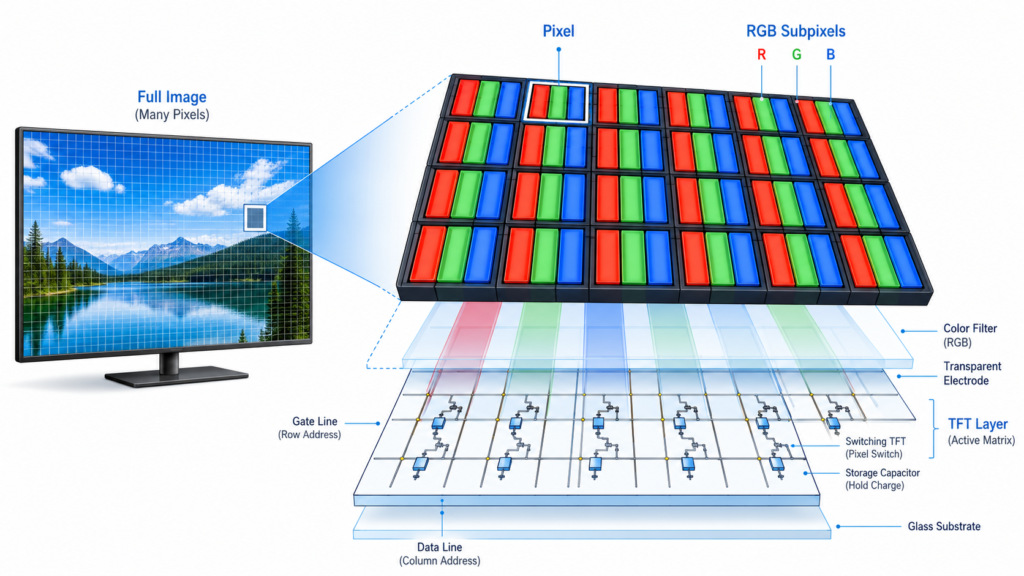
Dans un écran LCD couleur, chaque pixel est généralement composé de sous-pixels rouges, verts et bleus. En contrôlant la luminosité de ces sous-pixels, l'affichage crée différentes couleurs. La structure exacte des pixels dépend de la conception du panneau, de l'agencement du filtre couleur, de la méthode de pilotage et de la technologie d'affichage.
Structure de pixel d'un écran TFT LCD montrant les sous-pixels RVB et l'agencement matriciel actif des pixels
Dans un écran TFT LCD, chaque pixel est contrôlé par des circuits à transistors en couche mince. Ce contrôle matriciel actif permet à l'affichage d'adresser les pixels avec plus de précision que les anciennes structures LCD matricielles passives.
Pourquoi les pixels sont importants dans les écrans LCD
Les pixels affectent la quantité d'informations visuelles qu'un écran peut afficher. Plus de pixels permettent plus de détails, mais le résultat dépend également de la taille de l'écran, de la distance de visualisation, de la qualité optique, de la conception de l'interface utilisateur et des performances de pilotage de l'affichage.
Par exemple, 800 × 480 pixels peuvent être suffisants pour un petit panneau de contrôle industriel avec des boutons simples et des indicateurs d'état. Un IHM plus grand, un terminal intelligent ou une interface basée sur des images peut nécessiter une résolution plus élevée pour afficher plus de données, des icônes plus claires ou un texte plus fin.
Les pixels sont importants car ils influencent :
La clarté du texte
La netteté des icônes
Détail de l'image
La densité de l'interface utilisateur
La charge de travail graphique
La consommation électrique
La bande passante de l'interface d'affichage
Les exigences de la carte contrôleur
Un affichage ne doit pas être sélectionné uniquement en fonction du nombre de pixels. La question est de savoir si la structure des pixels, la résolution, la taille physique, l'interface et la distance de visualisation correspondent à l'application du produit.
Qu'est-ce que la résolution d'affichage ?
La résolution d'affichage décrit le nombre de pixels disposés horizontalement et verticalement sur un écran. Elle est généralement écrite sous la forme largeur × hauteur.
Par exemple :
800 × 480 signifie 800 pixels sur la largeur et 480 pixels sur la hauteur.
1280 × 720 signifie 1280 pixels sur la largeur et 720 pixels sur la hauteur.
1920 × 1080 signifie 1920 pixels sur la largeur et 1080 pixels sur la hauteur.
Le nombre total de pixels peut être calculé en multipliant la largeur par la hauteur. Un affichage 1920 × 1080 possède 2 073 600 pixels. Ceci est souvent appelé Full HD.
Différences entre les résolutions
Une résolution plus élevée peut montrer plus de détails, mais elle augmente également la quantité de données qui doivent être transmises et traitées. Dans les systèmes embarqués, cela peut affecter le processeur, la mémoire, les performances graphiques, la sélection de l'interface, la configuration du firmware et le budget énergétique.
Résolutions d'affichage LCD courantes
Résolution
Nom commun ou format
La première question est simple : la carte de contrôle Android prend-elle en charge la même interface d'affichage que le module d'affichage TFT LCD ?
480 × 272
Classe WQVGA
Petits panneaux de contrôle, interfaces IHM de base, dispositifs embarqués compacts
800 × 480
WVGA
Panneaux tactiles industriels, panneaux domotiques, interfaces de contrôle embarquées
1024 × 600
WSVGA
Écrans de classe 7 pouces, terminaux IHM, interfaces d'équipement
1280 × 720
HD
Interfaces multimédia, panneaux de contrôle intelligents, écrans de type tableau de bord
1280 × 800
WXGA
Panneaux industriels, interfaces de dispositifs médicaux, écrans embarqués de type tablette
1920 × 1080
Full HD
Interfaces très détaillées, systèmes d'imagerie, écrans embarqués plus grands
Écrans LCD en barre, signalétique, interfaces liées aux véhicules, panneaux de contrôle panoramiques
La meilleure résolution dépend de l'application. Une interface de contrôle simple peut ne pas nécessiter de Full HD. Un produit qui affiche des images, des cartes, des graphiques, des flux de caméra ou des données denses peut nécessiter un panneau de résolution plus élevée.
La résolution n'est pas la même chose que la taille de l'écran
La résolution vous indique le nombre de pixels de l'écran. La taille de l'écran vous indique la taille physique de l'affichage, généralement mesurée par la diagonale. Ces deux éléments sont liés, mais ils ne sont pas identiques.
Par exemple, un écran de 5 pouces et un écran de 15,6 pouces peuvent tous deux avoir une résolution de 1920 × 1080. Le plus petit écran aura plus de pixels par pouce, il apparaîtra donc généralement plus net à courte distance de visualisation. Le plus grand écran répartit le même nombre de pixels sur une plus grande surface, donc chaque pixel est physiquement plus grand.
C'est pourquoi les ingénieurs doivent vérifier la résolution conjointement avec la taille physique et la distance de visualisation.
Qu'est-ce que la densité de pixels ?
La densité de pixels décrit la compacité des pixels dans une zone d'affichage. Elle est généralement mesurée en PPI, ou pixels par pouce.
La formule de base est :
PPI = nombre de pixels en diagonale / taille diagonale de l'écran en pouces
Le nombre de pixels en diagonale peut être calculé à partir de la résolution horizontale et verticale :
Pixels en diagonale = √(pixels horizontaux² + pixels verticaux²)
Par exemple, un affichage 1920 × 1080 a un nombre de pixels en diagonale d'environ 2203 pixels. Si la taille de l'écran est de 10,1 pouces, la densité de pixels est d'environ 218 PPI.
La densité de pixels est importante car elle affecte la netteté perçue. Un affichage à haute densité de pixels peut rendre le texte, les icônes, les courbes et les images plus lisses, en particulier à courte distance de visualisation. Cependant, une très haute densité de pixels peut également nécessiter plus de puissance de traitement graphique et une bande passante d'interface plus élevée.
Si vous souhaitez estimer la taille diagonale de l'écran ou comparer la largeur, la hauteur et le rapport d'aspect, vous pouvez utiliser le calculateur de RJY Display comme outil de référence rapide.
Le rapport d'aspect est la relation proportionnelle entre la largeur et la hauteur d'un affichage. Il est généralement écrit sous la forme largeur:hauteur.
Par exemple :
16:9 signifie que l'affichage a 16 unités de largeur pour 9 unités de hauteur.
4:3 signifie que l'affichage a une largeur de 4 unités pour une hauteur de 3 unités.
1:1 signifie que l'affichage est carré.
Les formats 21:9 ou autres formats ultra-larges sont beaucoup plus larges que hauts.
Le rapport hauteur/largeur affecte la manière dont le contenu s'adapte à l'écran. Il influence la disposition de l'interface utilisateur, la lecture vidéo, la conception des tableaux de bord, le placement des boutons, l'affichage des graphiques, la disposition des flux de caméra et la conception du boîtier.
Différences dans les formats d'écran
Une inadéquation entre le contenu et le rapport hauteur/largeur peut entraîner des bandes noires, un recadrage, un étirement ou une utilisation inefficace de la surface de l'écran. Pour les produits embarqués, un mauvais rapport hauteur/largeur peut également déséquilibrer le panneau avant ou rendre les commandes tactiles plus difficiles à utiliser.
Rapports d'aspect courants dans les projets d'écrans LCD
Rapport hauteur/largeur
Style d'affichage typique
Application courante
16:9
Écran large
Interfaces multimédia, panneaux de contrôle intelligents, affichages pour véhicules, dispositions HMI modernes
16:10
Écran large légèrement plus haut
Interfaces de type tablette, panneaux d'équipement, dispositions axées sur la productivité
4:3
Affichage rectangulaire traditionnel
Équipements anciens, panneaux de contrôle industriels, interfaces de données compactes
Le rapport hauteur/largeur doit être sélectionné tôt dans le processus de conception du produit. Modifier le rapport hauteur/largeur ultérieurement peut nécessiter des changements majeurs de l'interface utilisateur, du boîtier, du verre de protection, du panneau tactile et du module d'affichage.
Comment la résolution et le rapport d'aspect fonctionnent ensemble
La résolution et le rapport hauteur/largeur sont liés. Un affichage avec une résolution de 1920 × 1080 a un rapport hauteur/largeur de 16:9 car 1920 divisé par 1080 se simplifie en 16:9. Un affichage avec une résolution de 1080 × 1080 a un rapport hauteur/largeur de 1:1 car la largeur et la hauteur sont égales.
Cependant, le même rapport hauteur/largeur peut avoir différentes résolutions. Par exemple, 800 × 450, 1280 × 720 et 1920 × 1080 sont tous des formats 16:9, mais ils offrent différents niveaux de détail.
Cela signifie que le rapport hauteur/largeur définit la forme de l'écran, tandis que la résolution définit la structure des pixels à l'intérieur de cette forme.
Exemples de résolution et de rapport d'aspect
Résolution
Rapport hauteur/largeur
Signification en conception
800 × 480
5:3
Format large embarqué courant pour HMI compact
1024 × 600
Environ 17:10
Format large souvent utilisé dans les affichages de classe 7 pouces
1280 × 720
16:9
Format large HD pour les interfaces multimédia et les dispositions d'interface utilisateur modernes
1280 × 800
16:10
Disposition légèrement plus haute pour les interfaces de données et de contrôle
1920 × 1080
16:9
Format Full HD pour les interfaces à haute définition
1080 × 1080
1:1
Format carré pour les conceptions d'interface utilisateur et de tableau de bord spéciales
Comment ces termes affectent la sélection d'un écran LCD
Les pixels, la résolution, la densité de pixels et le rapport hauteur/largeur affectent directement la conception du produit. Ils influencent la quantité d'informations pouvant être affichées, la lisibilité de l'écran, la manière dont l'interface utilisateur doit être conçue et les exigences de l'affichage pour le système hôte.
Un affichage haute résolution peut sembler net, mais il peut également nécessiter un processeur ou une carte de contrôle plus performante. Un rapport hauteur/largeur large peut être adapté aux tableaux de bord ou à la vidéo, mais peut ne pas convenir à un petit boîtier carré. Une densité de pixels élevée peut améliorer la lisibilité à courte distance, mais peut ne pas être nécessaire pour un affichage vu à plusieurs mètres.
Une bonne sélection d'affichage est un équilibre entre qualité visuelle, adaptation mécanique, budget énergétique, performance logicielle, compatibilité d'interface et coût.
Densité de pixels et distance de visualisation
La densité de pixels doit être évaluée en même temps que la distance de visualisation. Un appareil portable, un affichage portable ou une interface de dispositif médical à courte distance bénéficie généralement d'un PPI plus élevé car les utilisateurs regardent l'écran de près.
Un panneau industriel mural, un affichage de signalétique ou un moniteur d'équipement peut ne pas nécessiter le même PPI car l'utilisateur le regarde de plus loin. Dans ce cas, la luminosité, le contraste, l'angle de vision et la durabilité peuvent être plus importants qu'une densité de pixels extrêmement élevée.
C'est pourquoi un affichage à faible PPI n'est pas automatiquement de mauvaise qualité. Il peut être adapté si la distance de visualisation et les exigences de l'application sont correctes.
Résolution et bande passante d'interface
Une résolution plus élevée signifie que davantage de données de pixels doivent être transférées à l'affichage. Cela affecte le choix de l'interface. Un petit affichage SPI peut fonctionner pour des graphiques simples à faible résolution, mais les modules LCD TFT à plus haute résolution nécessitent souvent des interfaces telles que RGB, LVDS, MIPI DSI, HDMI ou eDP selon l'architecture du système.
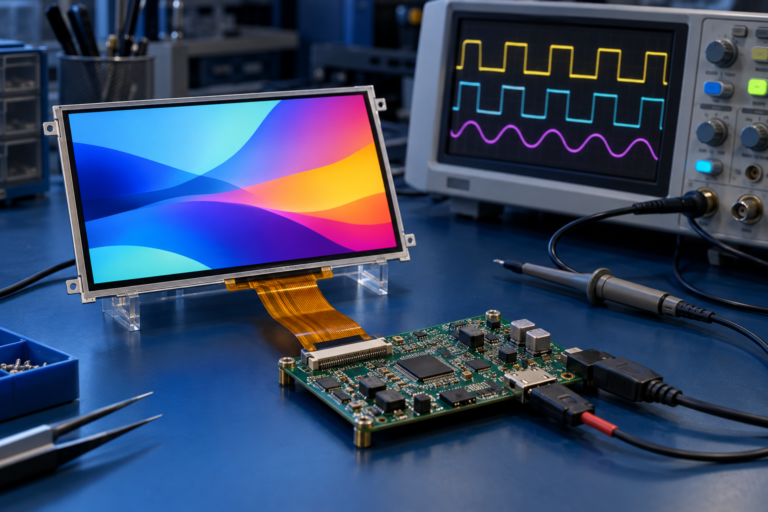
Pour les projets de cartes de contrôle, la résolution doit correspondre à la sortie prise en charge par la carte, à la configuration temporelle, au firmware et aux exigences du panneau LCD. Une inadéquation peut entraîner l'absence d'image, une image instable, un mauvais redimensionnement ou une performance visuelle médiocre.
Avant de choisir un affichage haute résolution, les acheteurs doivent vérifier si le processeur hôte, la carte de contrôle, l'interface, la mémoire et la pile logicielle peuvent le prendre en charge de manière fiable.
Rapport d'aspect et conception d'interface utilisateur
Le rapport hauteur/largeur a un fort impact sur la conception de l'interface utilisateur. Un écran 16:9 est utile pour les dispositions horizontales, le contenu vidéo, les tableaux de bord et les interfaces tactiles modernes. Un écran 4:3 peut être meilleur pour les panneaux de contrôle traditionnels ou les dispositions riches en données. Un écran carré peut bien fonctionner pour les tableaux de bord symétriques, les appareils intelligents et les produits embarqués spéciaux. Un affichage en barre est utile lorsque le produit a une zone d'affichage longue et étroite.
La conception de l'interface utilisateur ne doit pas être imposée à un rapport hauteur/largeur inadapté. Si la disposition contient de nombreuses commandes verticales, un écran très large peut gaspiller de l'espace. Si le produit nécessite un tableau de bord large, un écran étroit ou carré peut limiter la visibilité du contenu.
La forme de l'affichage doit correspondre au flux de travail réel de l'utilisateur du produit.
Consommation électrique et performances
Une résolution plus élevée peut augmenter la consommation d'énergie car davantage de pixels doivent être pilotés et davantage de données d'image doivent être traitées. Le rétroéclairage est souvent un consommateur d'énergie majeur dans les systèmes LCD, mais la résolution affecte toujours la charge de travail du processeur, la bande passante mémoire, le rendu graphique et l'activité de l'interface.
Pour les appareils alimentés par batterie, il peut ne pas être pratique de choisir la résolution la plus élevée disponible. Une résolution équilibrée peut offrir une clarté visuelle suffisante tout en réduisant la demande énergétique et le coût du système.
Pour les équipements industriels alimentés par le secteur, la consommation d'énergie peut être moins restrictive, mais la chaleur, la fiabilité et la compatibilité de la carte de contrôle restent importantes.
Erreurs courantes lors de la comparaison des résolutions d'écran LCD
Une erreur courante est de supposer qu'une résolution plus élevée est toujours meilleure. Une résolution plus élevée peut améliorer les détails, mais elle peut également augmenter le coût, la consommation d'énergie, la bande passante des données et la complexité du système.
Une autre erreur est de comparer la résolution sans tenir compte de la taille de l'écran. Une résolution de 1280 × 800 peut sembler nette sur un petit affichage mais moins nette sur un affichage beaucoup plus grand.
Une troisième erreur est d'ignorer le rapport hauteur/largeur. Un affichage peut avoir suffisamment de pixels, mais si sa forme ne correspond pas à l'interface utilisateur ou au boîtier, le produit final peut encore sembler mal conçu.
Une quatrième erreur est de supposer que le module d'affichage seul détermine la qualité de l'image. La qualité de l'image dépend également du rétroéclairage, du type de panneau, de l'angle de vision, du contraste, du verre de protection, de l'empilement tactile, de l'interface, de la carte de contrôle et du rendu logiciel.
Comment choisir la résolution et le rapport d'aspect LCD appropriés
Pour choisir le bon affichage LCD, commencez par le cas d'utilisation réel du produit. Demandez ce que l'utilisateur doit voir, à quelle distance il se trouve de l'écran, combien d'espace est disponible et quel type de système pilotera l'affichage.
Pour un simple dispositif embarqué, une résolution modérée peut suffire. Pour une interface basée sur l'image, une résolution plus élevée peut être nécessaire. Pour un tableau de bord, le rapport hauteur/largeur peut être aussi important que le nombre de pixels. Pour un appareil alimenté par batterie, la consommation d'énergie et la bande passante de l'interface doivent être vérifiées avant d'augmenter la résolution.
Avant la sélection finale, examinez ces points :
Taille de l'écran
Résolution
Densité de pixels
Distance de visualisation
Format d'image
Disposition de l'interface utilisateur
Exigence de luminosité
Exigence tactile
Type d'interface
Support de carte contrôleur
Adaptation du firmware ou du logiciel
Budget énergétique
Structure mécanique
Volume de production cible
Support de RJY Display pour la sélection de la résolution et du rapport d'aspect LCD
RJY Display prend en charge les modules LCD TFT, les cartes de contrôle et les discussions sur les solutions d'affichage personnalisées pour les projets axés sur l'ingénierie. La taille de l'affichage, la résolution, le rapport hauteur/largeur, l'interface, le panneau tactile, le verre de protection, le rétroéclairage, la carte de contrôle et les exigences du firmware peuvent être examinés ensemble en fonction du produit cible.
Pour de nombreux projets, le meilleur choix n'est pas la résolution la plus élevée. C'est la configuration d'affichage qui correspond à la structure du produit, à l'interface utilisateur, à l'environnement d'exploitation, au coût de développement et au plan de production.
Si votre projet nécessite un module LCD TFT standard, un affichage carré, un affichage rond, un LCD en barre, un affichage haute luminosité, un affichage tactile, une carte de contrôle ou une solution d'affichage personnalisée, préparez vos exigences de projet avant de demander.
Les pixels sont les plus petites unités d'image adressables sur un affichage. La résolution décrit le nombre de pixels que l'affichage a horizontalement et verticalement. La densité de pixels décrit à quel point ces pixels sont serrés dans la zone de l'écran. Le rapport hauteur/largeur décrit la forme proportionnelle de l'affichage.
Ces termes fonctionnent ensemble. La résolution affecte les détails. La densité de pixels affecte la netteté perçue. Le rapport hauteur/largeur affecte la disposition et l'adaptation du contenu. La taille de l'écran et la distance de visualisation déterminent si une résolution est appropriée. Le support de l'interface et de la carte de contrôle détermine si l'affichage peut être piloté correctement.
Pour les projets d'affichage LCD, la bonne décision n'est pas simplement de choisir la résolution la plus élevée. La meilleure approche est de faire correspondre les pixels, la résolution, la densité de pixels, le rapport hauteur/largeur, la luminosité, le tactile, l'interface, la carte de contrôle et la conception mécanique à l'application réelle du produit.
FAQ
Qu'est-ce qu'un pixel dans un affichage LCD ?
Un pixel est la plus petite unité d'image adressable sur un écran. Dans un écran LCD couleur, chaque pixel est généralement composé de sous-pixels rouges, verts et bleus qui fonctionnent ensemble pour créer différentes couleurs.
Qu'est-ce que la résolution d'affichage LCD ?
La résolution d'affichage LCD correspond au nombre de pixels disposés horizontalement et verticalement sur l'écran. Par exemple, 1920 × 1080 signifie 1920 pixels sur la largeur et 1080 pixels sur la hauteur.
Quelle est la différence entre la résolution et la densité de pixels ?
La résolution est la disposition totale des pixels sur l'écran. La densité de pixels, généralement mesurée en PPI, décrit la compacité avec laquelle ces pixels sont regroupés dans la taille physique de l'écran.
Une résolution plus élevée est-elle toujours meilleure ?
Non. Une résolution plus élevée peut améliorer les détails, mais elle peut également augmenter le coût, la consommation d'énergie, la charge de travail graphique et la bande passante de l'interface. La résolution appropriée dépend de la taille de l'écran, de la distance de visualisation, de l'application et des capacités du système.
Qu'est-ce que le rapport d'aspect dans un écran ?
Le rapport d'aspect est la relation proportionnelle entre la largeur et la hauteur de l'écran. Les exemples courants incluent le 16:9, le 16:10, le 4:3, le 1:1 et les formats ultra-larges.
Pourquoi le rapport d'aspect est-il important pour les écrans embarqués ?
Le rapport d'aspect affecte la disposition de l'interface utilisateur, l'adaptation du contenu, le placement des commandes tactiles, la conception du boîtier et l'expérience utilisateur. Un écran avec un rapport d'aspect inapproprié peut entraîner un étirement, un recadrage, un gaspillage d'espace ou une mauvaise utilisabilité.
Comment choisir la bonne résolution d'écran LCD ?
Choisissez la résolution en fonction de la taille de l'écran, de la distance de visualisation, de la complexité de l'interface utilisateur, des détails de l'image, du budget énergétique, de la capacité du processeur, de la bande passante de l'interface et du support de la carte contrôleur.
La résolution et le rapport d'aspect peuvent-ils être personnalisés ?
La personnalisation de l'écran dépend de la plateforme de modules LCD disponible et des exigences du projet. Dans de nombreux projets, la personnalisation est plus pratique autour des modules existants, y compris le panneau tactile, le verre de protection, le rétroéclairage, le FPC, l'interface, la carte contrôleur, le firmware et la coordination mécanique.
Partagez la taille de votre écran, sa résolution, son interface, sa luminosité, ses exigences tactiles, les besoins en carte contrôleur et l'environnement d'application.