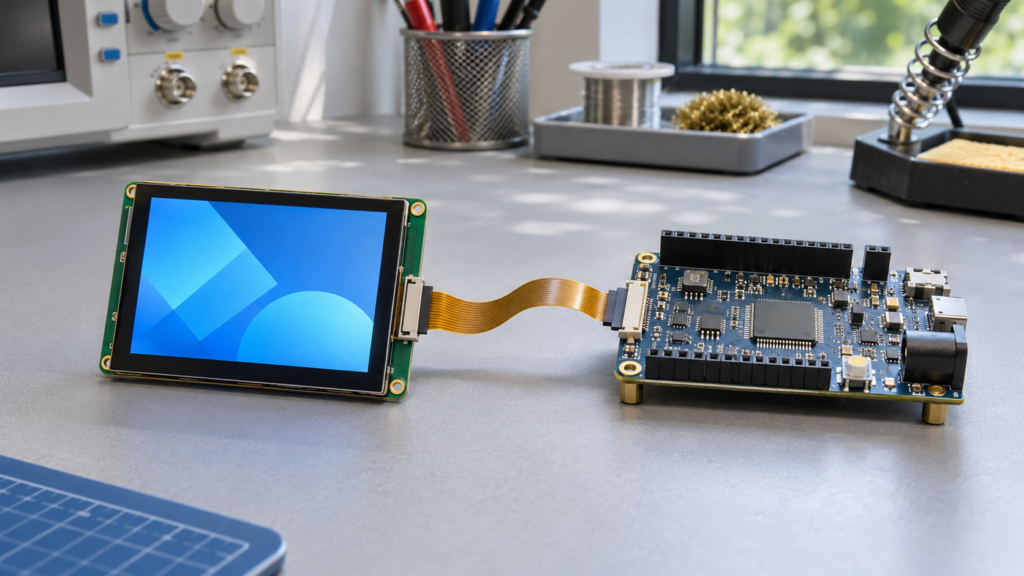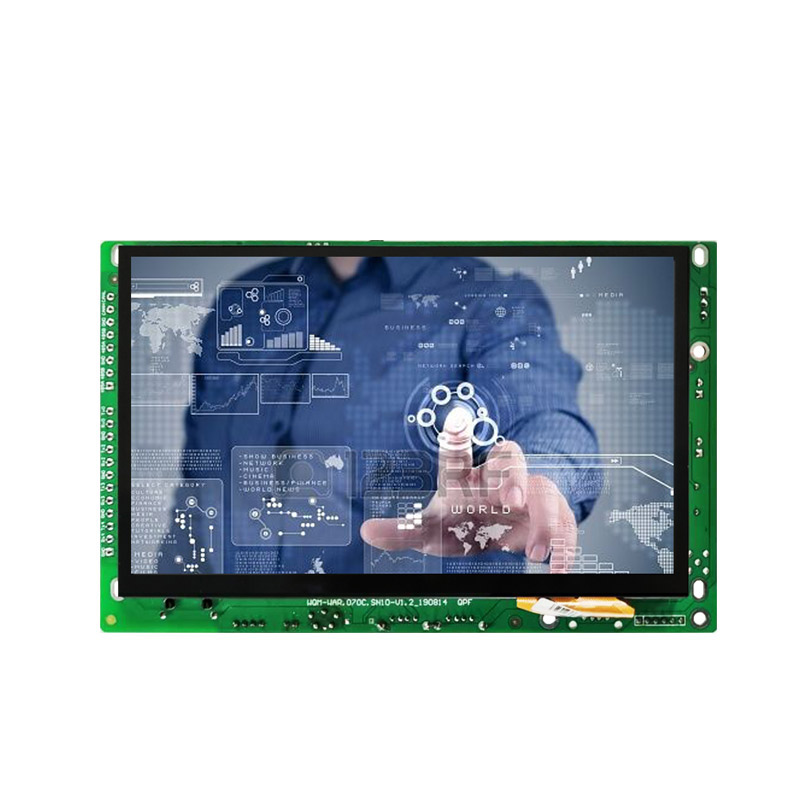
An “Android display” is not one standardized type of display module. In OEM discussions, the term may describe a TFT LCD connected to an Android control board, a touch display assembly supplied with a computing board, an external monitor driven by Android, or a complete enclosed HMI running an Android-based software image.
Those products can share the same visible screen size while having very different interfaces, software ownership, power requirements, mechanical boundaries, update paths, and qualification responsibilities.
The first engineering decision is therefore not which Android display to buy. It is which system boundary the project needs, which configuration will be controlled, and who owns every layer from the LCD pixels to the field application.
What Is an Android Display?
For an embedded or OEM project, an Android display is a display system in which an Android-based computing platform participates in rendering, application execution, user input, communications, or system control.
Android does not define the LCD technology, panel mode, brightness, viewing behavior, touch technology, video connector, enclosure, or environmental limits. Those characteristics belong to the implemented display, touch, board, software, and mechanical configuration.
| Commercial Description | Possible Delivery Boundary | What Must Be Confirmed |
|---|---|---|
| Android-compatible LCD | A raw or complete LCD module intended for connection to a separate Android board | Interface, timing, initialization, power, backlight, FPC, connector, driver, and board compatibility |
| Android touch display | LCD, touch sensor, touch controller, cover, bonding, and one or more cables | Display path, touch host path, Android driver, coordinates, cover, grounding, power, and mechanical assembly |
| Android controller-board display | Display assembly supplied with a separate or attached embedded computing board | Board revision, Android image, BSP, display output, touch, peripherals, power, firmware, and cables |
| Android HMI | Display, touch, computing, software, I/O, power, mounting, housing, and application | Complete system ownership, user workflow, validation, updates, security, service, and lifecycle |
| External Android display | A monitor or touch monitor connected to an Android host through video and input connections | Video modes, scaling, EDID, touch return path, Android input routing, power, cabling, and recovery |
The phrase “all-in-one” should be used only when the quoted product actually includes the computing, display, touch, required I/O, software, power architecture, and mechanical boundary. A TFT LCD module by itself is not an Android computer.
Define the Product Boundary Before Selecting Hardware
Begin with the equipment architecture rather than a catalog category. Determine whether the product needs only a display component, a display-and-board subsystem, or a released HMI.
LCD module plus a separate Android board
This structure gives the OEM explicit control over board placement, display selection, cabling, power, software, and enclosure design. It also makes the OEM responsible for coordinating the panel interface, timing, initialization, backlight, touch path, Android configuration, and mechanical integration.
Use the TFT LCD and Android control-board matching guide when the board and LCD are selected as separate items.
Display assembly supplied with a controller board
A coordinated assembly can reduce the number of open interfaces, but it does not remove the need to control identities and responsibilities. Confirm the exact LCD, board, PCB revision, firmware image, touch controller, cables, power input, mounting, and tested operating states. Do not assume that one board configuration supports every display listed for the same processor family.
Complete Android HMI
A complete HMI adds application behavior, enclosure, mounting, external I/O, thermal design, update and recovery procedures, and field-service responsibilities. Approval should be based on the finished equipment configuration rather than on a separately demonstrated LCD and development board.
Start With the User Interface and Workload
Android is appropriate only when its operating-system and application architecture support the actual product requirements. Define the production workload before selecting the processor, memory, storage, display resolution, or Android version.
Document:
- The production application, UI framework, services, and background processes
- Physical-size screens, smallest required text, languages, warnings, charts, images, video, and camera content
- Startup target, normal interaction, peak workload, idle, sleep, wake, reboot, update, fault, and recovery states
- Local storage, logging, database, media, communication, and peripheral requirements
- Touch contacts, gestures, keyboards, scanners, cameras, audio, serial devices, USB devices, and network interfaces
- Kiosk, operator, administrator, service, and factory-programming workflows
- Required software maintenance period and field-update process
Android’s graphics pipeline uses graphic buffers, SurfaceFlinger, the Hardware Composer HAL, graphics drivers, and the display subsystem to create the final output.[1] Display performance therefore depends on more than the panel resolution or processor name. The released application, composition workload, memory path, display configuration, and thermal state must be evaluated together.
Freeze the Exact Board and Android Software Configuration
A system-on-chip name does not identify a complete Android platform. Two boards using the same processor can differ in routed interfaces, bridge devices, connectors, power domains, memory, storage, wireless options, PCB revisions, thermal behavior, and vendor software branches.
| Configuration Layer | Identity to Freeze | Why It Matters |
|---|---|---|
| Control board | Complete model, PCB revision, assembly option, processor, memory, storage, bridges, and populated connectors | Determines the electrical and physical resources actually available |
| Boot chain | Bootloader, board identification, partition layout, signing, recovery, and update configuration | Controls startup, software selection, recovery, and production programming |
| Kernel and BSP | Kernel branch, board support package, device tree, panel driver, touch driver, and binary dependencies | Connects the Android framework to the released hardware |
| Android image | Android version, vendor image, system configuration, included services, permissions, and build identity | Defines the operating environment delivered to production |
| Application | Application version, UI assets, configuration, data, dependencies, and deployment method | Defines the user-visible workload and operational behavior |
| Display subsystem | LCD, timing, initialization, orientation, density, scaling, backlight, and touch configuration | Determines whether the physical display and Android UI behave as one system |
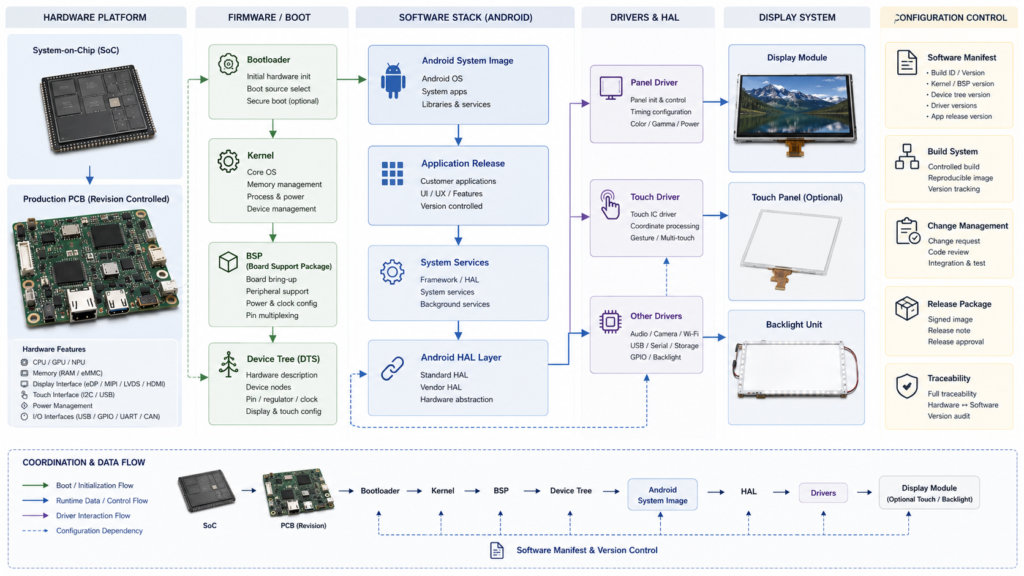
Do not treat “Android 11,” “Rockchip board,” or “custom firmware” as a complete configuration. Each label can cover multiple hardware and software releases.
Android Does Not Automatically Mean Google Play or GMS
A project using Android source code or an Android-based image should not automatically be described as supporting Google Play, Google Mobile Services, or every third-party Android application.
The Android Open Source Project states that an Android-compatible device must meet the applicable Compatibility Definition Document and pass the Compatibility Test Suite. Android compatibility then makes the device eligible to be considered for potential Google Play and Google Mobile Services licensing; it does not make those services an automatic property of every Android build.[2]
Before release, define:
- Whether the project uses AOSP, a board-vendor image, or another licensed distribution
- Whether Google Play or specific Google services are required
- Which application packages are preinstalled, sideloaded, privately distributed, or remotely deployed
- Required Android APIs, hardware features, permissions, and device-owner behavior
- Who performs application, compatibility, licensing, and destination-market review
Do not approve the platform from the existence of an APK alone. Test the released application against the exact Android image, board, peripherals, display configuration, network environment, and update process.
Choose the Display Path Before the Connector
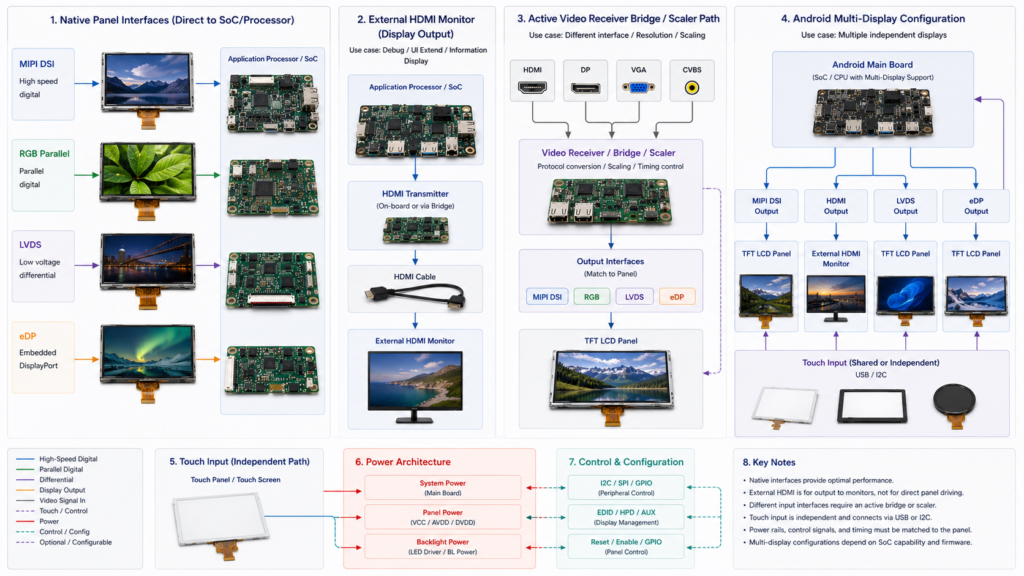
The system architecture must establish whether Android drives a native embedded panel, sends external video to a monitor, or uses an active controller to convert between the two.
| Display Architecture | Typical Boundary | Primary Questions |
|---|---|---|
| Native MIPI DSI, RGB, LVDS, or eDP panel | Android board directly drives a compatible LCD implementation | Electrical configuration, timing, initialization, mapping, power, backlight, FPC, and software support |
| External HDMI or DisplayPort display | Android board sends video to a monitor containing an active receiver and display controller | Supported modes, EDID, scaling, hot plug, cable, audio, touch return, and recovery |
| Active video-to-panel controller | A receiver, bridge, scaler, or controller converts external video into the LCD interface | Input modes, panel output, firmware, native timing, scaling, power, backlight, touch, thermal behavior, and lifecycle |
| Multi-display Android system | Android manages a primary display and one or more secondary displays | Display roles, task placement, mirroring, application behavior, input routing, performance, and recovery |
Android supports primary and secondary display concepts, but secondary-display behavior varies with the system and application configuration.[3] The presence of two physical outputs does not prove that the intended UI, video, touch, or independent task behavior is implemented.
A raw MIPI DSI, RGB, LVDS, or eDP LCD cannot accept HDMI through a passive connector change. Review the LCD interface guide for interface-level compatibility or the HDMI-to-MIPI controller-board guide for an active conversion path.
Select the LCD From Production UI and Observer Evidence
Android does not determine the required LCD size, resolution, brightness, viewing behavior, response, color, backlight, or environmental range. Define those requirements from the finished product.
Evaluate the exact LCD using:
- The physical-size production UI and every required language
- Native resolution, Android logical resolution, density, orientation, and scaling
- Real observer positions, viewing distances, postures, and installation orientation
- Ambient-light direction, reflections, required luminance, black level, and UI contrast
- Required motion, video, camera, scrolling, warning, grayscale, and transition behavior
- The production touch, cover, bonding, bezel, gasket, mounting, and enclosure
Do not use universal rules such as 300–500 nits for indoor products or more than 1,000 nits for outdoor products. Test readability under the project’s actual ambient, observer, UI, optical-stack, power, and thermal conditions.
Use the TFT LCD module selection guide when the display itself remains an open decision.
Integrate Touch as an Independent Input System
Touch is not carried automatically by the LCD image interface. The touch sensor, controller, firmware, host connection, Android driver, coordinates, cover, bonding, grounding, and enclosure form a separate subsystem.
Android input-device configuration can use device-specific files to define properties such as touch-device behavior, orientation, scaling, and display association.[4] The exact requirements depend on the Android release and implemented input architecture.
| Touch Area | Evidence Required |
|---|---|
| Sensor and controller | Technology, sensor outline, controller model, firmware, required contacts, and input tools |
| Host connection | I2C, USB, SPI, or another implemented path; voltage, address or identity, reset, interrupt, and cable |
| Android software | Kernel driver, configuration file, coordinates, rotation, mirroring, display association, sleep, wake, and recovery |
| Front structure | Cover material, thickness, printing, openings, surface, adhesive or air-gap structure, bezel, and gasket |
| Operating environment | Finger, glove, stylus, moisture, contamination, cleaning, electrical noise, grounding, and enclosure conditions |
Do not infer five or ten contacts, glove behavior, moisture performance, or stylus support from the word “capacitive.” Confirm the released sensor, controller, firmware, cover, host, and test conditions.
For external HDMI video with USB touch, use the Android HDMI touch integration guide. For the physical touch-display stack, use the TFT LCD touch-display guide.
Define Software and Update Ownership Before Sampling
An Android display project needs a controlled answer for who owns the bootloader, kernel, BSP, device tree, panel driver, touch driver, Android image, application, security updates, production programming, and field recovery.
Android provides mechanisms for over-the-air updates to system and application software, but the OEM platform must implement, build, sign, test, distribute, and support the selected update architecture.[5] The existence of Android OTA documentation does not establish that a particular board includes a released OTA service.
| Software Deliverable | Questions to Resolve |
|---|---|
| Production image | Which version, board revision, display configuration, applications, binaries, permissions, and settings are included? |
| Source and build environment | Which source files, patches, binary dependencies, licenses, tools, and build instructions are delivered? |
| Programming | How are boards flashed, identified, verified, serialized, and associated with the correct display configuration? |
| Updates | Who builds, signs, distributes, tests, approves, and rolls back an update? |
| Recovery | What happens after interrupted power, an incomplete update, corrupted storage, watchdog reset, or application failure? |
| Maintenance | Who reviews Android, kernel, BSP, security, application, panel, touch, and board changes over the product lifecycle? |
RJY Display supports project-dependent firmware customization, but the actual panel driver, Android BSP, source, binary, update, test, and maintenance scope must be confirmed for the selected platform. Do not treat “custom firmware” as an unlimited or automatically included deliverable.
Close Power and Thermal Requirements at the System Boundary
An Android HMI can include processor, memory, storage, display interface, LCD, panel I/O, backlight, touch, wireless communications, USB devices, audio, cameras, and power conversion. The LCD datasheet and board input rating describe only parts of this load.
Create a power and thermal budget for cold boot, normal UI, peak application workload, video, camera, network transfer, maximum required backlight state, dimmed operation, idle, sleep, wake, reboot, update, brownout, and fault recovery.
Confirm the stabilized temperatures of the processor, board power components, display, backlight, touch controller, cover, enclosed air, and external surfaces under the production enclosure and mounting conditions.
Use the TFT LCD power guide to separate panel, backlight, touch, controller-board, and system power.
Coordinate Mechanics, Cables, and Service Access
A working development-board demonstration does not prove that the system fits the product. Review the display, touch, board, antennas, storage, cables, FPCs, connectors, power supply, mounting, gasket, cooling path, and enclosure together.
Check:
- LCD and touch active areas, outlines, thicknesses, tolerances, and production orientation
- FPC exit direction, stiffener, bend region, connector access, and keep-out requirements
- Board outline, connector positions, antennas, debug access, storage access, and thermal zones
- Cable length, retention, grounding, shielding, assembly routing, and service replacement
- Bezel overlap, cover printing, gasket load, supports, fasteners, pressure, and flatness
- Programming, repair, recovery, and replacement access after the enclosure is assembled
Validate the Released Android Display Configuration
| Validation Area | Representative Checks | Release Evidence |
|---|---|---|
| Configuration | Board, PCB, Android image, BSP, display, touch, cables, application, and enclosure identities | Controlled BOM, software manifest, drawings, and approved samples |
| Display | Timing, initialization, image stability, orientation, density, scaling, UI, color, grayscale, and motion | Production UI operating on the released LCD and software |
| Touch and input | Coordinates, contacts, gestures, tools, rotation, noise, moisture, sleep, wake, and recovery | Application-specific result on the released front assembly |
| Application | Startup, normal workflow, peak workload, permissions, data, peripherals, communications, and errors | Controlled application and system test record |
| Power and thermal | Boot, normal, peak, backlight, network, idle, sleep, update, fault, and enclosure temperatures | Complete-load measurements and stabilized thermal results |
| Recovery | Reboot, watchdog, interrupted power, failed application, storage condition, update, and service procedure | Documented recovery and rollback results where applicable |
| Mechanical | Alignment, FPCs, cables, connectors, mounting, pressure, gasket, antennas, cooling, and service access | Approved CAD and production-representative assembly |
| Lifecycle | Hardware and software revisions, change notification, maintenance, spares, replacement, and revalidation | Configuration-control and lifecycle plan |
Test every released state with the production application and enclosure. A home screen shown on an open development board does not approve the application, display, touch, power, thermal, update, recovery, or lifecycle requirements.
Plan Customization Around Existing Display and Board Platforms
RJY Display’s practical customization route begins with an existing display module and controller-board platform whose fundamental display, computing, software, and mechanical architecture is suitable.
Depending on the selected products and project feasibility, surrounding work may evaluate:
- Backlight, enable, dimming, power, and thermal coordination
- Compatible FPC, connector, cable, adapter, or controller-board integration
- Touch sensor, controller, firmware, host driver, and touch FPC
- Cover-glass outline, printing, thickness, openings, edges, and surface requirements
- Air gap, adhesive, OCA, OCR, or another defined assembly structure
- Panel timing, initialization, mapping, orientation, sleep, wake, and recovery
- Project-dependent controller-board firmware work
- Bezel, gasket, supports, PCB position, cable routing, and enclosure coordination
Controller boards may be discussed separately or together with a TFT LCD. Available solutions can cover displays from 1.28 inch to 15.6 inch, depending on the exact panel, interface, resolution, firmware, touch, power, and project requirements.
This does not imply compatibility with every LCD, unrestricted Android BSP development, or development of an arbitrary new LCD size, active area, resolution, panel architecture, or controller board from scratch.
What to Send for an Android Display Review
- Target equipment, users, workflow, installation, and destination markets
- Physical-size UI, required languages, text, warnings, images, video, camera content, and workload
- Required LCD active area, resolution, orientation, optical behavior, and enclosure opening
- Current or candidate LCD model, revision, datasheet, drawing, interface, timing, and initialization
- Android board model, PCB revision, processor, memory, storage, connectors, and schematic information
- Android version, kernel, BSP, bootloader, device tree, vendor image, and application release
- Google Play, GMS, application-distribution, compatibility, permission, and kiosk requirements
- Touch sensor, controller, firmware, cover, bonding, coordinates, input tools, and environment
- Panel, backlight, touch, board, communication, peripheral, and complete-system power requirements
- FPC, connectors, cables, PCB, mounting, gasket, antennas, thermal structure, and enclosure CAD
- Boot, sleep, wake, reboot, update, interrupted-power, fault, and recovery requirements
- Required software, binary, source, build, signing, programming, update, and maintenance deliverables
- Prototype quantity, annual demand, production plan, lifecycle, spares, and change-control expectations
Request an Android Display Architecture Review
RJY Display can review an existing TFT LCD and controller-board platform against your UI, Android software, display output, timing, initialization, touch, backlight, power, FPC, cable, mounting, enclosure, validation, and lifecycle requirements.
Browse current computing modules, review available display modules, or send your board, LCD, Android software, touch, power, UI, and enclosure documents for engineering review.
FAQ
What is an Android display?
An Android display is a display system in which an Android-based computing platform handles application execution, graphics, input, communications, or system control. The term may describe an LCD connected to an Android board, a touch display and board assembly, an external monitor, or a complete HMI, so the delivery boundary must be confirmed.
Does an Android display include a touchscreen and controller board?
Not automatically. The LCD, touch sensor, touch controller, cover, bonding, Android board, cables, software, power system, and enclosure may be separate or explicitly included items. Confirm the complete quoted configuration.
Does every Android display support Google Play?
No. An Android-based or AOSP software image does not automatically include Google Play or Google Mobile Services. Confirm the Android compatibility status, licensing, software image, required services, application-distribution method, and destination-market requirements.
Can any TFT LCD connect to an Android control board?
No. The exact LCD and board must be compatible in display architecture, electrical interface, timing, initialization, power sequence, backlight, touch, software, FPC, connector, mechanics, and operating states.
Does an Android display require custom firmware?
It depends on the selected board, LCD, touch system, and existing software configuration. Project-dependent work may be required for timing, initialization, device tree, drivers, touch, backlight, orientation, density, sleep, wake, or recovery, but a supported existing configuration may not require new firmware development.
What information should I send for an Android display quotation?
Send the application, UI, LCD and board models, revisions, datasheets, drawings, interfaces, timing, Android and BSP information, touch system, backlight and power requirements, software deliverables, cables, enclosure constraints, operating conditions, quantities, lifecycle, and project schedule.