¿Enfrenta un cuello de botella en su proyecto de pantalla integrada?
No permita que la integración compleja o los problemas de la cadena de suministro retrasen su tiempo de comercialización. Reserve una consulta gratuita con el equipo experto de RJY para obtener soporte personalizado en diseño y fabricación.
Pantalla Android para productos OEM: Arquitectura, selección y validación
En el mundo en evolución de los dispositivos inteligentes y los sistemas integrados, las pantallas Android se han convertido en una de las soluciones más versátiles y ampliamente adoptadas. Desde teléfonos inteligentes y tabletas hasta tableros de automóviles, paneles industriales y quioscos interactivos, las pantallas con sistema Android combinan hardware potente, software flexible y una experiencia de usuario familiar.
Publicado:
Lectura de 14 minutos
Actualizado:
Una “pantalla Android” no es un tipo estandarizado de módulo de pantalla. En discusiones con OEM, el término puede describir una LCD TFT conectada a un Placa de control Android, un ensamblaje de pantalla táctil suministrado con una placa de computación, un monitor externo controlado por Android, o una HMI cerrada completa que ejecuta una imagen de software basada en Android.
Estos productos pueden compartir el mismo tamaño de pantalla visible mientras tienen interfaces, propiedad de software, requisitos de energía, límites mecánicos, rutas de actualización y responsabilidades de calificación muy diferentes.
Por lo tanto, la primera decisión de ingeniería no es qué pantalla Android comprar. Es qué límite del sistema necesita el proyecto, qué configuración se controlará y quién posee cada capa, desde los píxeles de la LCD hasta la aplicación de campo.
¿Qué es una pantalla Android?
Para un proyecto embebido o de OEM, una pantalla Android es un sistema de visualización en el que una plataforma de computación basada en Android participa en la representación, ejecución de aplicaciones, entrada del usuario, comunicaciones o control del sistema.
Android no define la tecnología LCD, el modo de panel, el brillo, el comportamiento de visualización, la tecnología táctil, el conector de video, el gabinete ni los límites ambientales. Esas características pertenecen a la configuración implementada de pantalla, táctil, placa, software y mecánica.
Descripción Comercial
Posible Límite de Entrega
Lo que debe confirmarse
LCD compatible con Android
Un módulo LCD en bruto o completo destinado a la conexión a una placa Android separada
Interfaz, temporización, inicialización, alimentación, retroiluminación, FPC, conector, controlador y compatibilidad con la placa
Pantalla táctil Android
LCD, sensor táctil, controlador táctil, cubierta, unión y uno o más cables
Ruta de pantalla, ruta del host táctil, controlador Android, coordenadas, cubierta, conexión a tierra, alimentación y ensamblaje mecánico
Pantalla con placa controladora Android
Ensamblaje de pantalla suministrado con una placa de computación embebida separada o adjunta
Revisión de placa, imagen Android, BSP, salida de pantalla, táctil, periféricos, alimentación, firmware y cables
HMI Android
Pantalla, táctil, computación, software, E/S, alimentación, montaje, carcasa y aplicación
Propiedad completa del sistema, flujo de trabajo del usuario, validación, actualizaciones, seguridad, servicio y ciclo de vida
Pantalla Android externa
Un monitor o monitor táctil conectado a un host Android a través de conexiones de video y entrada
Modos de video, escalado, EDID, ruta de retorno táctil, enrutamiento de entrada Android, alimentación, cableado y recuperación
La frase “todo en uno” debe usarse solo cuando el producto cotizado realmente incluye la computación, pantalla, táctil, E/S requerida, software, arquitectura de alimentación y límite mecánico. Un módulo LCD TFT por sí mismo no es un computador Android.
Defina el límite del producto antes de seleccionar el hardware
Comience con la arquitectura del equipo en lugar de una categoría de catálogo. Determine si el producto necesita solo un componente de pantalla, un subsistema de pantalla y placa, o una HMI liberada.
Módulo LCD más una placa Android separada
Esta estructura le da al OEM control explícito sobre la ubicación de la placa, selección de pantalla, cableado, alimentación, software y diseño del gabinete. También hace que el OEM sea responsable de coordinar la interfaz del panel, temporización, inicialización, retroiluminación, ruta táctil, configuración Android e integración mecánica.
Ensamblaje de pantalla suministrado con una placa controladora
Un ensamblaje coordinado puede reducir el número de interfaces abiertas, pero no elimina la necesidad de controlar identidades y responsabilidades. Confirme la LCD exacta, placa, revisión de PCB, imagen de firmware, controlador táctil, cables, entrada de alimentación, montaje y estados operativos probados. No asuma que una configuración de placa soporta cada pantalla listada para la misma familia de procesadores.
HMI Android completa
Una HMI completa añade comportamiento de aplicación, gabinete, montaje, E/S externa, diseño térmico, procedimientos de actualización y recuperación, y responsabilidades de servicio en campo. La aprobación debe basarse en la configuración del equipo terminado en lugar de en una LCD y placa de desarrollo demostradas por separado.
Comience con la interfaz de usuario y la carga de trabajo
Android es apropiado solo cuando su arquitectura de sistema operativo y aplicación soporta los requisitos reales del producto. Defina la carga de trabajo de producción antes de seleccionar el procesador, memoria, almacenamiento, resolución de pantalla o versión de Android.
Documente:
La aplicación de producción, framework de UI, servicios y procesos en segundo plano
Pantallas de tamaño físico, texto más pequeño requerido, idiomas, advertencias, gráficos, imágenes, video y contenido de cámara
Estados de inicio objetivo, interacción normal, carga máxima, inactivo, suspensión, activación, reinicio, actualización, fallo y recuperación
Almacenamiento local, registro, base de datos, medios, comunicación y requisitos periféricos
Contactos táctiles, gestos, teclados, escáneres, cámaras, audio, dispositivos serie, dispositivos USB e interfaces de red
Flujos de trabajo de quiosco, operador, administrador, servicio y programación en fábrica
Período de mantenimiento de software requerido y proceso de actualización en campo
El pipeline gráfico de Android utiliza búferes gráficos, SurfaceFlinger, el HAL del Compositor de Hardware, controladores gráficos y el subsistema de pantalla para crear la salida final.[1] Por lo tanto, el rendimiento de la pantalla depende de más que la resolución del panel o el nombre del procesador. La aplicación liberada, la carga de trabajo de composición, la ruta de memoria, la configuración de la pantalla y el estado térmico deben evaluarse juntos.
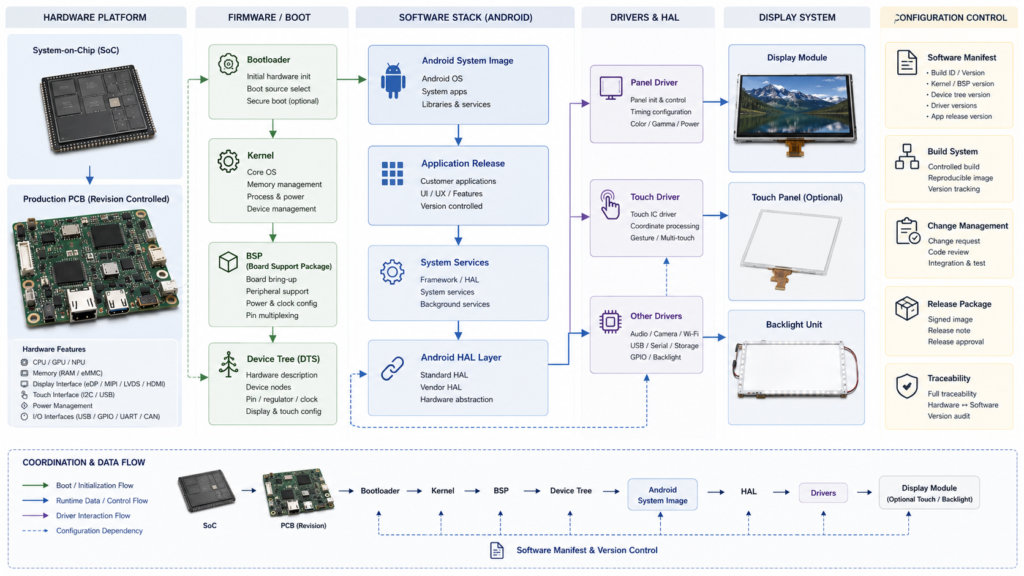
Congele la placa exacta y la configuración del software Android
El nombre de un sistema en chip no identifica una plataforma Android completa. Dos placas que usan el mismo procesador pueden diferir en interfaces enrutadas, dispositivos puente, conectores, dominios de alimentación, memoria, almacenamiento, opciones inalámbricas, revisiones de PCB, comportamiento térmico y ramas de software del proveedor.
Capa de Configuración
Identidad a Congelar
Por qué es importante
Placa de control
Modelo completo, revisión de PCB, opción de ensamblaje, procesador, memoria, almacenamiento, puentes y conectores poblados
Determina los recursos eléctricos y físicos realmente disponibles
Cadena de arranque
Gestor de arranque, identificación de la placa, diseño de particiones, firma, recuperación y configuración de actualización
Controla el inicio, la selección de software, la recuperación y la programación de producción
Kernel y BSP
Rama del kernel, paquete de soporte de placa, árbol de dispositivos, controlador de panel, controlador táctil y dependencias binarias
Conecta el marco de Android con el hardware lanzado
Imagen de Android
Versión de Android, imagen del proveedor, configuración del sistema, servicios incluidos, permisos e identidad de compilación
Define el entorno operativo entregado a producción
Aplicación
Versión de la aplicación, recursos de interfaz de usuario, configuración, datos, dependencias y método de implementación
Define la carga de trabajo visible para el usuario y el comportamiento operativo
Subsistema de visualización
LCD, temporización, inicialización, orientación, densidad, escalado, retroiluminación y configuración táctil
Determina si la pantalla física y la interfaz de usuario de Android se comportan como un solo sistema
Configuración de visualización de Android controlada en toda la placa, gestor de arranque, kernel, BSP, imagen de Android, aplicación, LCD y sistema táctil
No trate “Android 11”, “placa Rockchip” o “firmware personalizado” como una configuración completa. Cada etiqueta puede abarcar múltiples versiones de hardware y software.
Android no implica automáticamente Google Play ni GMS
Un proyecto que utilice código fuente de Android o una imagen basada en Android no debe describirse automáticamente como compatible con Google Play, Google Mobile Services o cualquier aplicación de terceros de Android.
El Proyecto de Código Abierto de Android establece que un dispositivo compatible con Android debe cumplir con el Documento de Definición de Compatibilidad aplicable y pasar el Conjunto de Pruebas de Compatibilidad. La compatibilidad con Android hace que el dispositivo sea elegible para ser considerado para una posible licencia de Google Play y Google Mobile Services; no convierte esos servicios en una propiedad automática de cada compilación de Android.[2]
Antes del lanzamiento, defina:
Si el proyecto utiliza AOSP, una imagen de proveedor de placa u otra distribución con licencia
Si se requieren Google Play o servicios específicos de Google
Qué paquetes de aplicación se preinstalan, cargan lateralmente, distribuyen de forma privada o implementan de forma remota
APIs de Android requeridas, características de hardware, permisos y comportamiento del propietario del dispositivo
Quién realiza la revisión de la aplicación, compatibilidad, licencias y mercado de destino
No apruebe la plataforma solo por la existencia de un APK. Pruebe la aplicación lanzada contra la imagen exacta de Android, la placa, los periféricos, la configuración de visualización, el entorno de red y el proceso de actualización.
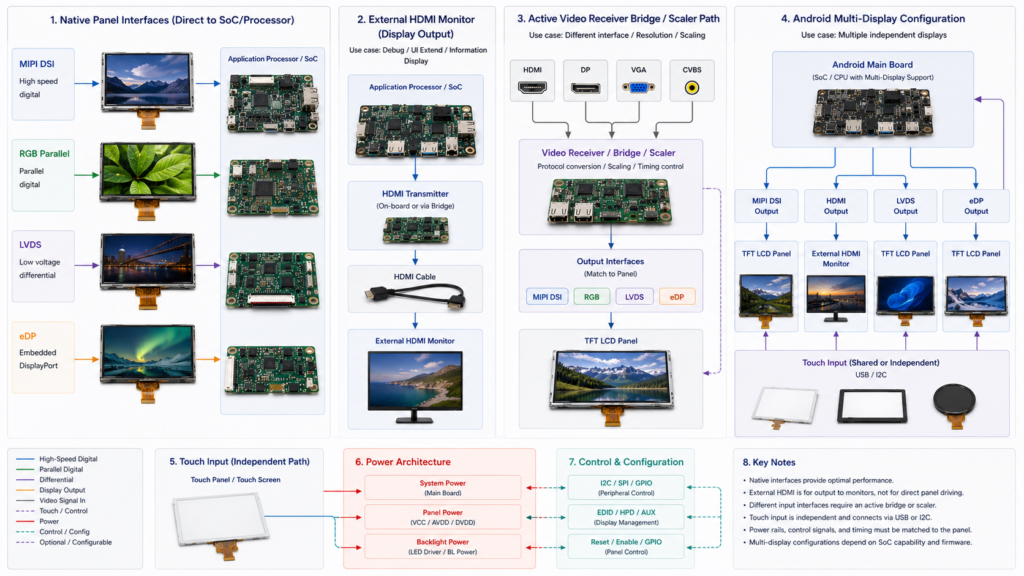
Panel nativo, video externo, controlador activo y arquitecturas de múltiples pantallas para un sistema de visualización Android
Elija la ruta de la pantalla antes que el conector
La arquitectura del sistema debe establecer si Android controla un panel integrado nativo, envía video externo a un monitor o utiliza un controlador activo para convertir entre ambos.
Arquitectura de visualización
Límite típico
Preguntas principales
Panel nativo MIPI DSI, RGB, LVDS o eDP
La placa Android controla directamente una implementación LCD compatible
Configuración eléctrica, temporización, inicialización, mapeo, alimentación, retroiluminación, FPC y soporte de software
Pantalla externa HDMI o DisplayPort
La placa Android envía video a un monitor que contiene un receptor activo y un controlador de visualización
Modos compatibles, EDID, escalado, conexión en caliente, cable, audio, retorno táctil y recuperación
Controlador activo de video a panel
Un receptor, puente, escalador o controlador convierte el video externo en la interfaz LCD
Modos de entrada, salida del panel, firmware, temporización nativa, escalado, alimentación, retroiluminación, táctil, comportamiento térmico y ciclo de vida
Sistema Android de múltiples pantallas
Android gestiona una pantalla principal y una o más pantallas secundarias
Roles de pantalla, colocación de tareas, duplicación, comportamiento de la aplicación, enrutamiento de entrada, rendimiento y recuperación
Android admite conceptos de pantalla principal y secundaria, pero el comportamiento de la pantalla secundaria varía según la configuración del sistema y la aplicación.[3] La presencia de dos salidas físicas no demuestra que se haya implementado la interfaz de usuario, el video, el táctil o el comportamiento de tareas independientes previstos.
Un LCD nativo MIPI DSI, RGB, LVDS o eDP no puede aceptar HDMI mediante un cambio de conector pasivo. Revise la Guía de interfaz LCD para compatibilidad a nivel de interfaz o la Guía de placa controladora HDMI a MIPI para una ruta de conversión activa.
Seleccione la LCD a partir de la UI de producción y la evidencia del observador
Android no determina el tamaño, la resolución, el brillo, el comportamiento de visualización, la respuesta, el color, la retroiluminación o el rango ambiental requeridos del LCD. Defina esos requisitos a partir del producto terminado.
Evalúe el LCD exacto utilizando:
La interfaz de usuario de producción de tamaño físico y cada idioma requerido
Resolución nativa, resolución lógica de Android, densidad, orientación y escalado
Posiciones reales del observador, distancias de visualización, posturas y orientación de instalación
Dirección de la luz ambiental, reflejos, luminancia requerida, nivel de negro y contraste de la interfaz de usuario
Movimiento requerido, video, cámara, desplazamiento, advertencia, escala de grises y comportamiento de transición
El táctil de producción, cubierta, adhesión, bisel, junta, montaje y carcasa
No utilice reglas universales como 300–500 nits para productos de interior o más de 1,000 nits para productos de exterior. Pruebe la legibilidad bajo las condiciones reales del proyecto de ambiente, observador, interfaz de usuario, pila óptica, alimentación y térmicas.
Integre el táctil como un sistema de entrada independiente
El táctil no se transporta automáticamente mediante la interfaz de imagen del LCD. El sensor táctil, el controlador, el firmware, la conexión al host, el controlador de Android, las coordenadas, la cubierta, la adhesión, la conexión a tierra y la carcasa forman un subsistema separado.
La configuración del dispositivo de entrada de Android puede usar archivos específicos del dispositivo para definir propiedades como el comportamiento del dispositivo táctil, la orientación, el escalado y la asociación con la pantalla.[4] Los requisitos exactos dependen de la versión de Android y de la arquitectura de entrada implementada.
Área táctil
Evidencia requerida
Sensor y controlador
Tecnología, contorno del sensor, modelo del controlador, firmware, contactos requeridos y herramientas de entrada
Conexión del host
I2C, USB, SPI u otra ruta implementada; voltaje, dirección o identidad, reinicio, interrupción y cable
Software Android
Controlador del kernel, archivo de configuración, coordenadas, rotación, espejado, asociación de pantalla, suspensión, activación y recuperación
Estructura frontal
Material de la cubierta, espesor, impresión, aberturas, superficie, estructura adhesiva o de espacio de aire, bisel y junta
Entorno operativo
Dedo, guante, lápiz óptico, humedad, contaminación, limpieza, ruido eléctrico, conexión a tierra y condiciones del gabinete
No infiera cinco o diez contactos, comportamiento con guantes, rendimiento en humedad o soporte de lápiz óptico a partir de la palabra “capacitivo”. Confirme el sensor, controlador, firmware, cubierta, host y condiciones de prueba liberados.
Defina la propiedad del software y las actualizaciones antes del muestreo
Un proyecto de pantalla Android necesita una respuesta controlada sobre quién posee el cargador de arranque, kernel, BSP, árbol de dispositivos, controlador de panel, controlador táctil, imagen de Android, aplicación, actualizaciones de seguridad, programación de producción y recuperación en campo.
Android proporciona mecanismos para actualizaciones inalámbricas del software del sistema y de aplicaciones, pero la plataforma OEM debe implementar, compilar, firmar, probar, distribuir y respaldar la arquitectura de actualización seleccionada.[5] La existencia de documentación de OTA en Android no establece que una placa en particular incluya un servicio de OTA liberado.
Entregable de software
Preguntas por resolver
Imagen de producción
¿Qué versión, revisión de placa, configuración de pantalla, aplicaciones, binarios, permisos y configuraciones están incluidos?
Entorno de compilación y fuente
¿Qué archivos fuente, parches, dependencias binarias, licencias, herramientas e instrucciones de compilación se entregan?
Programación
¿Cómo se flashean, identifican, verifican, serializan y asocian las placas con la configuración de pantalla correcta?
Actualizaciones
¿Quién compila, firma, distribuye, prueba, aprueba y revierte una actualización?
Recuperación
¿Qué sucede después de una interrupción de energía, una actualización incompleta, almacenamiento corrupto, reinicio por watchdog o fallo de aplicación?
Mantenimiento
¿Quién revisa los cambios en Android, kernel, BSP, seguridad, aplicación, panel, pantalla táctil y placa durante el ciclo de vida del producto?
RJY Display admite personalización de firmware según el proyecto, pero el controlador de panel real, BSP de Android, fuente, binario, actualización, prueba y alcance de mantenimiento deben confirmarse para la plataforma seleccionada. No trate el “firmware personalizado” como un entregable ilimitado o incluido automáticamente.
Cierre los requisitos de energía y térmicos en el límite del sistema
Una HMI Android puede incluir procesador, memoria, almacenamiento, interfaz de pantalla, LCD, E/S de panel, retroiluminación, pantalla táctil, comunicaciones inalámbricas, dispositivos USB, audio, cámaras y conversión de energía. La hoja de datos del LCD y la clasificación de entrada de la placa describen solo partes de esta carga.
Cree un presupuesto de energía y térmico para arranque en frío, interfaz de usuario normal, carga máxima de trabajo de aplicación, video, cámara, transferencia de red, estado máximo requerido de retroiluminación, operación atenuada, inactividad, suspensión, activación, reinicio, actualización, caída de tensión y recuperación de fallos.
Confirme las temperaturas estabilizadas del procesador, componentes de potencia de la placa, pantalla, retroiluminación, controlador táctil, cubierta, aire encerrado y superficies externas bajo las condiciones del gabinete de producción y montaje.
Coordine la mecánica, los cables y el acceso de servicio
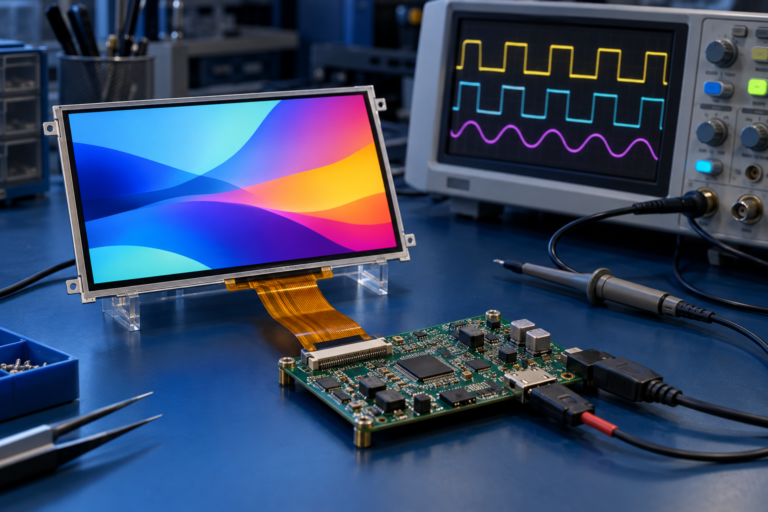
Una demostración funcional en una placa de desarrollo no prueba que el sistema se ajuste al producto. Revise juntos la pantalla, pantalla táctil, placa, antenas, almacenamiento, cables, FPC, conectores, fuente de alimentación, montaje, junta, ruta de enfriamiento y gabinete.
Verifique:
Áreas activas de LCD y pantalla táctil, contornos, espesores, tolerancias y orientación de producción
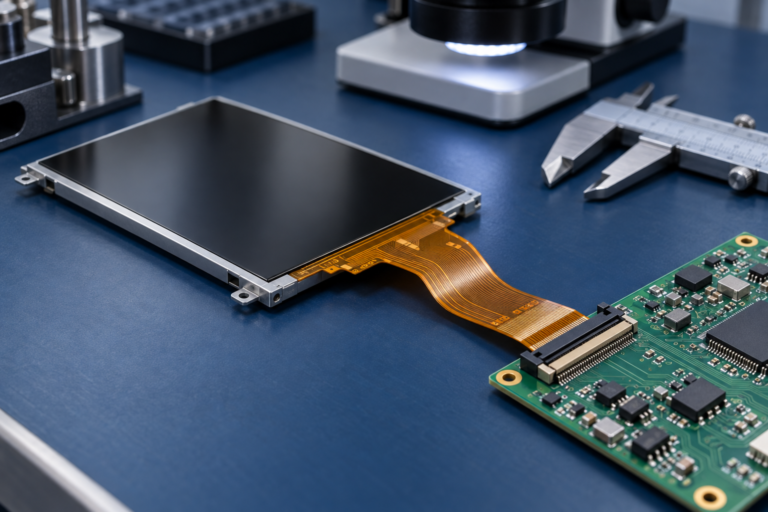
Dirección de salida del FPC, refuerzo, región de curvatura, acceso al conector y requisitos de exclusión
Contorno de la placa, posiciones de conectores, antenas, acceso de depuración, acceso de almacenamiento y zonas térmicas
Longitud del cable, retención, conexión a tierra, blindaje, enrutamiento de ensamblaje y reemplazo en servicio
Superposición del bisel, impresión de la cubierta, carga de la junta, soportes, sujetadores, presión y planitud
Acceso para programación, reparación, recuperación y reemplazo después del ensamblaje del gabinete
Valide la configuración de la pantalla Android liberada
Área de validación
Verificaciones representativas
Evidencia de liberación
Configuración
Identidades de placa, PCB, imagen de Android, BSP, pantalla, pantalla táctil, cables, aplicación y gabinete
BOM controlado, manifiesto de software, dibujos y muestras aprobadas
Pantalla
Temporización, inicialización, estabilidad de imagen, orientación, densidad, escalado, interfaz de usuario, color, escala de grises y movimiento
Interfaz de usuario de producción funcionando en el LCD y software liberados
Resultado específico de la aplicación en el ensamblaje frontal liberado
Aplicación
Arranque, flujo de trabajo normal, carga máxima de trabajo, permisos, datos, periféricos, comunicaciones y errores
Registro de prueba controlado del sistema y aplicación
Potencia y térmica
Arranque, normal, pico, retroiluminación, red, inactividad, suspensión, actualización, fallo y temperaturas del gabinete
Mediciones de carga completa y resultados térmicos estabilizados
Recuperación
Reinicio, watchdog, interrupción de energía, fallo de aplicación, condición de almacenamiento, actualización y procedimiento de servicio
Resultados documentados de recuperación y reversión cuando corresponda
Características
Alineación, FPC, cables, conectores, montaje, presión, junta, antenas, enfriamiento y acceso de servicio
CAD aprobado y ensamblaje representativo de producción
Ciclo de vida
Revisiones de hardware y software, notificación de cambios, mantenimiento, repuestos, reemplazo y revalidación
Plan de control de configuración y ciclo de vida
Pruebe cada estado liberado con la aplicación de producción y el gabinete. Una pantalla de inicio mostrada en una placa de desarrollo abierta no aprueba los requisitos de aplicación, pantalla, pantalla táctil, potencia, térmica, actualización, recuperación o ciclo de vida.
Planifique la personalización en torno a las plataformas de pantalla y placa existentes
La ruta práctica de personalización de RJY Display comienza con un módulo de pantalla existente y una plataforma de placa controladora cuya arquitectura fundamental de visualización, computación, software y mecánica sea adecuada.
Dependiendo de los productos seleccionados y la viabilidad del proyecto, el trabajo circundante puede evaluar:
Coordinación de retroiluminación, habilitación, atenuación, alimentación y térmica
Integración de FPC, conector, cable, adaptador o placa controladora compatible
Sensor táctil, controlador, firmware, controlador de host y FPC táctil
Contorno de cubierta de vidrio, impresión, grosor, aberturas, bordes y requisitos de superficie
Espacio de aire, adhesivo, OCA, OCR u otra estructura de ensamblaje definida
Sincronización del panel, inicialización, mapeo, orientación, suspensión, activación y recuperación
Trabajo de firmware de la placa controladora dependiente del proyecto
Bisel, junta, soportes, posición de PCB, enrutamiento de cables y coordinación del gabinete
Las placas controladoras pueden discutirse por separado o junto con una pantalla LCD TFT. Las soluciones disponibles pueden cubrir pantallas desde 1.28 pulgadas hasta 15.6 pulgadas, según el panel exacto, la interfaz, la resolución, el firmware, el táctil, la alimentación y los requisitos del proyecto.
Esto no implica compatibilidad con cada LCD, desarrollo ilimitado de BSP de Android, o desarrollo de un nuevo tamaño de LCD, área activa, resolución, arquitectura de panel o placa controladora desde cero.
Qué enviar para una revisión de pantalla Android
Equipo objetivo, usuarios, flujo de trabajo, instalación y mercados de destino
Interfaz de usuario de tamaño físico, idiomas requeridos, texto, advertencias, imágenes, video, contenido de cámara y carga de trabajo
Área activa requerida de LCD, resolución, orientación, comportamiento óptico y abertura del gabinete
Modelo de LCD actual o candidato, revisión, hoja de datos, dibujo, interfaz, sincronización e inicialización
Modelo de placa Android, revisión de PCB, procesador, memoria, almacenamiento, conectores e información del esquemático
Versión de Android, kernel, BSP, gestor de arranque, árbol de dispositivos, imagen de proveedor y versión de aplicación
Requisitos de Google Play, GMS, distribución de aplicaciones, compatibilidad, permisos y modo quiosco
Sensor táctil, controlador, firmware, cubierta, unión, coordenadas, herramientas de entrada y entorno
Requisitos de alimentación del panel, retroiluminación, táctil, placa, comunicación, periférico y sistema completo
FPC, conectores, cables, PCB, montaje, junta, antenas, estructura térmica y CAD del gabinete
Requisitos de arranque, suspensión, activación, reinicio, actualización, interrupción de alimentación, fallo y recuperación
Entregables de software requerido, binario, fuente, compilación, firma, programación, actualización y mantenimiento
Cantidad de prototipos, demanda anual, plan de producción, ciclo de vida, repuestos y expectativas de control de cambios
Solicite una revisión de la arquitectura de la pantalla Android
RJY Display puede revisar una plataforma existente de LCD TFT y placa controladora frente a sus requisitos de UI, software Android, salida de pantalla, sincronización, inicialización, táctil, retroiluminación, alimentación, FPC, cable, montaje, gabinete, validación y ciclo de vida.
Una pantalla Android es un sistema de visualización en el que una plataforma informática basada en Android maneja la ejecución de aplicaciones, gráficos, entrada, comunicaciones o control del sistema. El término puede describir un LCD conectado a una placa Android, un ensamblaje de pantalla táctil y placa, un monitor externo o un HMI completo, por lo que el límite de entrega debe confirmarse.
¿Una pantalla Android incluye una pantalla táctil y una placa controladora?
No automáticamente. El LCD, el sensor táctil, el controlador táctil, la cubierta, la unión, la placa Android, los cables, el software, el sistema de alimentación y el gabinete pueden ser elementos separados o incluidos explícitamente. Confirme la configuración completa cotizada.
¿Toda pantalla Android admite Google Play?
No. Una imagen de software basada en Android o AOSP no incluye automáticamente Google Play o Google Mobile Services. Confirme el estado de compatibilidad de Android, las licencias, la imagen de software, los servicios requeridos, el método de distribución de aplicaciones y los requisitos del mercado de destino.
No. El LCD exacto y la placa deben ser compatibles en arquitectura de pantalla, interfaz eléctrica, sincronización, inicialización, secuencia de alimentación, retroiluminación, táctil, software, FPC, conector, mecánica y estados operativos.
Depende de la placa seleccionada, el LCD, el sistema táctil y la configuración de software existente. Puede requerirse trabajo dependiente del proyecto para sincronización, inicialización, árbol de dispositivos, controladores, táctil, retroiluminación, orientación, densidad, suspensión, activación o recuperación, pero una configuración existente compatible puede no requerir desarrollo de nuevo firmware.
¿Qué información debo enviar para una cotización de pantalla Android?
Envíe la aplicación, UI, modelos de LCD y placa, revisiones, hojas de datos, dibujos, interfaces, sincronización, información de Android y BSP, sistema táctil, requisitos de retroiluminación y alimentación, entregables de software, cables, restricciones del gabinete, condiciones operativas, cantidades, ciclo de vida y cronograma del proyecto.
↗
¿Planificando un proyecto de pantalla?
Comparta el tamaño de su pantalla, resolución, interfaz, brillo, requisitos táctiles, requisitos de la placa controladora y el entorno de aplicación.
¿Aún no sabe qué pantalla se adapta a su proyecto?
Hable con el equipo de ingeniería de RJY para obtener asesoramiento sobre compatibilidad de pantallas, revisión de placas controladoras y discusión sobre personalización.