¿Enfrenta un cuello de botella en su proyecto de pantalla integrada?
No permita que la integración compleja o los problemas de la cadena de suministro retrasen su tiempo de comercialización. Reserve una consulta gratuita con el equipo experto de RJY para obtener soporte personalizado en diseño y fabricación.
Pantalla Multi-Táctil para Contadores de Juegos de Mesa: Una Nueva Forma de Construir Juego Interactivo
Publicado:
Lectura de 7 minutos
Actualizado:
Los juegos de mesa se basan en la interacción física: cartas, fichas, miniaturas, tableros y conversación cara a cara. Sin embargo, muchos juegos también dependen de una administración repetitiva: seguimiento de puntuaciones, salud, recursos, rondas, temporizadores y orden de turnos. Un contador digital compacto puede reducir esa fricción sin quitar el juego físico de la mesa.
A Pantalla multitáctil otorga a este accesorio una interfaz compartida más natural. En lugar de pasar un dispositivo entre jugadores o añadir un botón separado para cada función, los jugadores pueden interactuar con áreas dedicadas en pantalla, mientras el equipo de producto puede configurar la interfaz para diferentes formatos de juego. Para marcas de hardware de mesa, editoriales y desarrolladores de accesorios interactivos, esto crea un camino hacia un dispositivo compañero de juego más adaptable.
Por qué los contadores de juegos pequeños se están convirtiendo en un accesorio útil para mesa
Un contador de juegos pequeño no pretende reemplazar un juego de mesa. Su función es facilitar que la información cambiante del juego sea más fácil de ver, actualizar y compartir. Puede reunir valores que de otro modo se registrarían con papel, cartas, dados o ruedas contadoras separadas.
Los casos de uso más sólidos son juegos con cambios frecuentes de estado, incluyendo:
Seguimiento compartido de puntuación, vida, energía o recursos
Gestión de rondas, fases y orden de turnos
Temporizadores de cuenta regresiva para partidas cronometradas o sesiones de eventos
Contadores específicos por jugador en un dispositivo central compacto
Accesorios digitales reutilizables para múltiples títulos de juegos
Para los desarrolladores de producto, la pregunta clave no es simplemente “¿cabe una pantalla?”. Es si la pantalla hace que la experiencia de juego físico sea más clara y rápida. Un buen contador debe seguir siendo comprensible de un vistazo, dejar espacio para cartas y componentes, y evitar convertirse en el centro de atención cuando el juego mismo debería serlo.
Cómo una pantalla multitáctil cambia la experiencia del producto
Una pantalla pequeña convencional puede mostrar valores. Una pantalla LCD multitáctil puede convertir esos valores en una superficie de interacción compartida. Esto brinda a los diseñadores más flexibilidad en cómo se comporta un contador de mesa.
Acceso compartido alrededor de la mesa
Diferentes áreas de la interfaz pueden asignarse a distintos jugadores, zonas de juego o acciones. Por ejemplo, un jugador puede ajustar un valor de recurso mientras otro confirma la ronda o el temporizador actual. Esto es especialmente útil cuando el dispositivo se encuentra en el centro de la mesa en lugar de frente a un solo usuario.
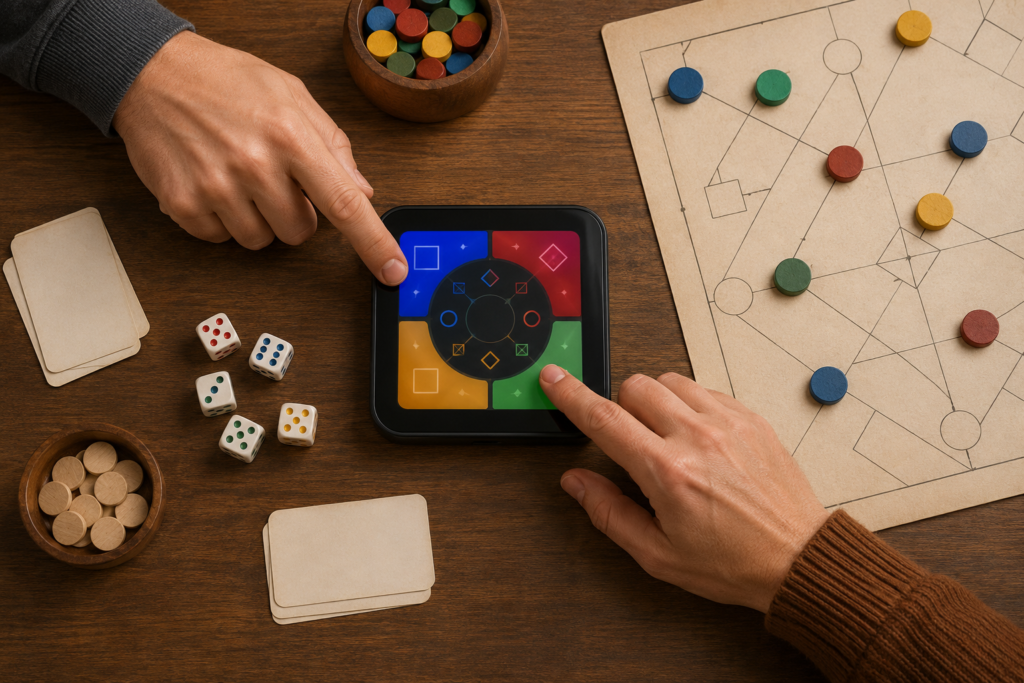
Dos jugadores usando zonas táctiles separadas en una pantalla de contador de juegos de mesa
Una plataforma de hardware, más formatos de juego
Los diseños basados en táctil pueden adaptarse mediante software. Una editorial puede usar una plataforma de hardware compacta para un contador de puntuación, un rastreador de campaña, un temporizador de juego cooperativo o un accesorio de evento, y luego cambiar la interfaz según la experiencia de juego.
Menos controles físicos, diseño industrial más limpio
Una interfaz basada en pantalla puede reducir la necesidad de una disposición densa de botones, leyendas impresas y ruedas contadoras mecánicas. Esto puede simplificar el exterior de un dispositivo portátil mientras crea espacio para un vidrio de cubierta con forma, un bisel estrecho o un concepto de carcasa más distintivo.
Importante: La capacidad multitáctil por sí sola no garantiza una experiencia fluida de juego compartido. El comportamiento requerido de toque simultáneo depende del stack táctil seleccionado, el controlador táctil, el sistema operativo o firmware, y el diseño de la interfaz. El producto debe probarse con manos reales, posiciones reales en la mesa y el flujo de juego previsto antes de la producción. Android, por ejemplo, maneja múltiples punteros activos como objetos de entrada separados; el software del producto aún debe decidir cómo deben interpretarse esas entradas.1
Casos de uso prácticos para un contador de puntuación con pantalla táctil
Controlador central de puntuación y rondas
Un contador compacto puede mostrar la ronda activa, el objetivo compartido, el temporizador y las puntuaciones de los jugadores en un solo lugar. Una pantalla multitáctil permite dar a cada jugador un área de interacción claramente separada mientras se mantiene visible el estado compartido.
Contadores por zona de jugador
En juegos competitivos o cooperativos, cada borde de la pantalla puede corresponder a una posición de jugador. La interfaz de usuario puede rotar la información hacia cada jugador, mostrar zonas codificadas por color o crear grandes objetivos táctiles para acciones comunes.
Accesorios complementarios con marca de la editorial
Para una editorial de juegos o una marca de accesorios de mesa, un contador con pantalla personalizada puede convertirse en una plataforma de producto reutilizable. La misma arquitectura de hardware puede soportar diferentes interfaces de juego, siempre que la pantalla, la solución táctil, los recursos del procesador y el plan de firmware se evalúen en conjunto.
Cafés de juegos, clubes y mesas de eventos
Los organizadores pueden usar contadores compactos para sesiones cronometradas, rondas de torneos, mesas de enseñanza o eventos de demostración. Aquí, las prioridades de diseño suelen incluir reinicio rápido, incorporación sencilla, vidrio de cubierta duradero y un diseño que siga siendo legible desde varias posiciones de asiento.
Cómo seleccionar una pantalla LCD multitáctil para un contador de juegos pequeño
Comience con el mapa de interacción, no con el tamaño diagonal
Una pantalla pequeña puede ser suficiente para un contador de puntuación de dos jugadores, pero resultar abarrotada para cuatro zonas operadas de forma independiente. Defina el número de jugadores, los objetivos táctiles requeridos, la orientación preferida y la información visible durante el juego antes de elegir la resolución y el área activa.
Elija un stack táctil para el entorno de uso real
Para un dispositivo de mesa de consumo, el táctil capacitivo proyectado suele considerarse cuando se requiere una interfaz frontal de vidrio receptiva. La forma del vidrio de cubierta táctil, el grosor, el tratamiento de superficie, el diseño del borde y la compatibilidad del controlador deben revisarse como un conjunto. Si los jugadores pueden interactuar cerca de bebidas, alimentos, mangas o componentes de juego, esas condiciones del mundo real deben formar parte de la validación.
Diseñe para visualización desde más de un asiento
Los productos de mesa se ven en ángulos cambiantes y bajo luz ambiental variada. Considere la orientación de la pantalla, el ángulo de visión, el objetivo de brillo, el contraste de la interfaz y si la pantalla estará empotrada bajo un vidrio de cubierta. Una pantalla visualmente atractiva en una demostración frontal puede ser difícil de leer desde el lado opuesto de una mesa de juego.
Planifique la placa controladora y la ruta de firmware desde el inicio
La interfaz de pantalla, el pinout del panel, los requisitos de retroiluminación, la interfaz táctil y la plataforma host prevista deben revisarse en conjunto. La selección de la placa controladora no debe basarse únicamente en el tipo de conector. El módulo de pantalla final, la solución táctil, el firmware o sistema operativo y la carga de trabajo de la interfaz de usuario afectan la compatibilidad.
¿Qué se puede personalizar en un contador de juegos de mesa?
La ruta más eficiente suele ser partir de una plataforma de módulo de visualización existente y luego adaptar el ensamblaje en torno al concepto del producto. Según el proyecto, la personalización puede incluir:
Tamaño, forma, área de impresión y tratamiento de superficie del vidrio de cubierta
Configuración de pantalla táctil capacitiva y compatibilidad del IC táctil
Requisitos de brillo de pantalla y mejora óptica
Interfaz de visualización y disposición del FPC o cable
Selección de la placa controladora, distribución de E/S y coordinación del firmware
Coordinación mecánica para carcasa, botones, acceso de carga y montaje
Estas opciones deben confirmarse en función de la carcasa objetivo, la estrategia de batería, el volumen esperado y la interfaz de usuario. Una solución personalizada no implica automáticamente desarrollar un tamaño de panel LCD completamente nuevo desde cero; en muchos casos, adaptar un módulo existente con un ensamblaje táctil y de vidrio de cubierta personalizado es la ruta más práctica.
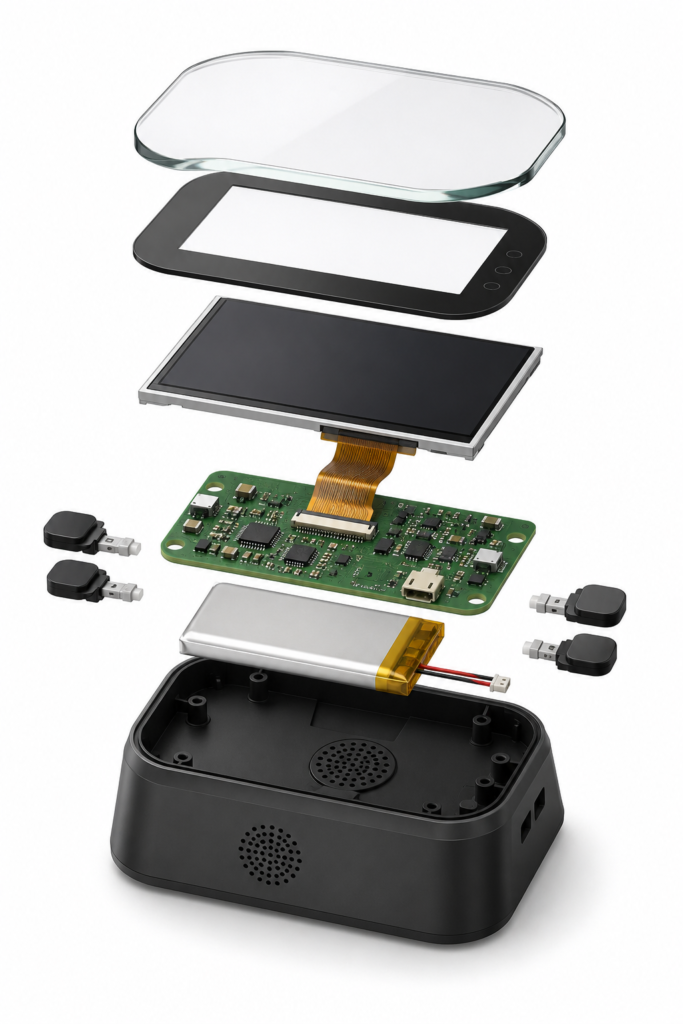
Vista explosionada de un contador de juego de mesa compacto con ensamblaje de pantalla táctil
Qué preparar antes de solicitar una solución de pantalla
Un brief inicial más claro ayuda a acortar la revisión técnica. Incluya lo siguiente cuando esté disponible:
Concepto del producto objetivo y escenario de uso de mesa
Forma de pantalla preferida, área activa y dimensiones de la carcasa
Número de jugadores o zonas de interacción simultánea
Resolución requerida, dirección de visualización y expectativas de brillo
Requisitos táctiles, incluidos gestos previstos y comportamiento táctil simultáneo
Plataforma host, sistema operativo, preferencia de interfaz y necesidades de la placa controladora
Restricciones de vidrio de cubierta, mecánica, batería y carga
Cronograma de prototipos y demanda anual estimada
Construya un contador de juegos que complemente la mesa, no que distraiga de ella
La mejor tecnología de mesa se siente como parte de la noche de juegos: clara cuando se necesita, silenciosa cuando no. Una pantalla multitáctil bien diseñada puede dar a los jugadores un control más rápido sobre la información cambiante del juego, preservando al mismo tiempo el atractivo táctil de las cartas, tableros y fichas.
¿Por qué usar una pantalla multitáctil en un contador de juego de mesa?
Una pantalla multitáctil puede admitir una interfaz compartida más flexible, como zonas de jugador separadas, controles de puntuación, seguimiento de rondas y temporizadores. La experiencia final depende del hardware táctil, el firmware y el diseño de la interfaz.
¿Cuántos jugadores pueden usar la pantalla al mismo tiempo?
Eso depende del controlador táctil seleccionado, el ensamblaje de pantalla, el sistema host y el comportamiento del software. Defina las interacciones simultáneas previstas desde el principio y verifíquelas con la configuración real durante la creación de prototipos.
¿Puede un contador compacto usar un vidrio de cubierta de forma personalizada?
Sí. La forma del vidrio de cubierta, el área de impresión, el grosor y el tratamiento de superficie pueden revisarse como parte de un ensamblaje de pantalla personalizado, sujeto al módulo seleccionado y al diseño mecánico.
¿Puede RJY ayudar a seleccionar una placa controladora para la pantalla?
RJY puede revisar el modelo del panel, la resolución, la interfaz de visualización, la definición de pines, la interfaz táctil, los requisitos de retroiluminación y el sistema previsto antes de recomendar una ruta de placa controladora compatible.
¿Se puede desarrollar un tamaño de panel LCD completamente nuevo para un accesorio de mesa?
El desarrollo de un nuevo panel requiere una discusión separada de viabilidad y volumen. Para muchos proyectos, un módulo de visualización existente combinado con táctil personalizado, vidrio de cubierta, cable y coordinación de carcasa es un punto de partida más práctico.
¿Aún no sabe qué pantalla se adapta a su proyecto?
Hable con el equipo de ingeniería de RJY para obtener asesoramiento sobre compatibilidad de pantallas, revisión de placas controladoras y discusión sobre personalización.