組込み表示プロジェクトでボトルネックに直面していませんか?
複雑な統合作業やサプライチェーンの問題が市場投入までの時間を遅らせないようにしましょう。RJYの専門家チームによる無料コンサルテーションを予約し、お客様に合わせた設計・製造サポートをご利用ください。.

「screen touch screen」を検索する購入者は、検索語が似ていても、しばしばいくつかの異なる製品を比較しています。ある購入者が必要とするのは、タッチパネル単体かもしれません。別の購入者が必要とするのは、タッチセンサーを統合したTFT LCDかもしれません。さらに別の購入者は、HDMI入力、USBタッチデータ、筐体、取り付けハードウェアを備えた完全なタッチスクリーンモニターを期待しているかもしれません。スクリーンの背後にコンピューターも必要なプロジェクトもあります。.
これらの製品は互換性がありません。含まれるもの、ホストへの接続方法、取り付け方法、そして残るエンジニアリング作業量が異なります。誤った構造を選ぶと、コントローラーハードウェアの重複、ドライバーの問題、不正確なタッチ座標、ケーブルの競合、または最終アセンブリを収められない筐体といった問題につながる可能性があります。.
本ガイドでは、スクリーン、タッチスクリーン、タッチパネル、タッチディスプレイモジュール、タッチモニター、タッチコンピューターの違いを説明します。また、機器メーカーおよび製品開発者が、サンプルや見積もりを依頼する前に、完全なディスプレイおよびタッチのアーキテクチャをどのように定義すべきかも示します。.
スクリーンは視覚情報を表示します。LCD製品では、TFT LCDモジュールが画像データを受信し、ピクセルを制御し、バックライトを使用して画像を可視化します。それ自体は指を検出しません。.
タッチスクリーンは入力層を追加します。タッチセンサーは、指、スタイラス、またはその他の対応入力ツールを検出します。タッチコントローラーはセンサーを測定し、座標またはタッチイベントをホストに報告します。その後、ホストのオペレーティングシステムまたはアプリケーションが、それらのイベントの意味を判断します。.
画像経路とタッチ経路は通常、別々です:
これが、ディスプレイが正しい画像を表示しているのにタッチが機能しない理由です。また、ホストがタッチコントローラーを検出しているのに、座標が回転している、反転している、誤って拡大縮小されている、または間違ったディスプレイに割り当てられている理由でもあります。.
タッチスクリーンディスプレイのすべての出品の背後に、単一の製品構造があるわけではありません。価格や仕様を比較する前に、何が含まれているかを確認してください。.
| 製品タイプ | 通常含まれるもの | 一般的な接続 | 最適な用途 |
|---|---|---|---|
| LCDまたはTFTディスプレイ | LCDセル、バックライト、フレーム、ドライバーIC、およびディスプレイFPC | MIPI、LVDS、eDP、RGB、SPI、またはその他のパネルインターフェース | タッチを必要としない組み込み製品、またはタッチを別途追加する製品 |
| タッチパネル | タッチセンサー、および構成に応じてタッチコントローラーとFPC | USB、I2C、SPI、またはコントローラー固有の接続 | 対応ディスプレイおよびフロントパネル構造への入力追加 |
| タッチディスプレイモジュール | TFT LCDと、ディスプレイおよびタッチの電気経路が別々の、適合するタッチセンサー | 映像用のパネルインターフェースと、タッチ用の第2インターフェース | 組み込み機器およびカスタム製品 |
| タッチスクリーンモニター | LCD、タッチシステム、表示制御電子回路、電源入力、および通常はフレームまたは筐体 | 映像用のHDMI、DisplayPort、VGA、またはUSB-C;タッチ用は多くの場合USB | 外部ディスプレイ、キオスク、テストステーション、レトロフィット、および機器コンソール |
| オープンフレームまたはパネルマウント型タッチモニター | 別の筐体向けに設計されたタッチモニター電子回路および取り付け構造 | 標準映像入力とタッチデータ接続 | キャビネット、キオスク、機械、および商用機器 |
| タッチスクリーンコンピュータまたはパネルPC | タッチディスプレイとプロセッサ、メモリ、ストレージ、I/O、およびオペレーティングシステムのサポート | 生のLCDインターフェースではなく、外部システムI/O | 自己完結型コンピューティング端末 |
したがって、タッチスクリーンディスプレイコンピュータは単にタッチ機能付きのモニターではない。モニターは別のコンピュータから画像データを受信する。パネルPCはコンピューティングプラットフォームを内蔵している。この違いはコスト、ソフトウェア責任、熱設計、サービスアクセス、および製品ライフサイクル計画に影響する。.
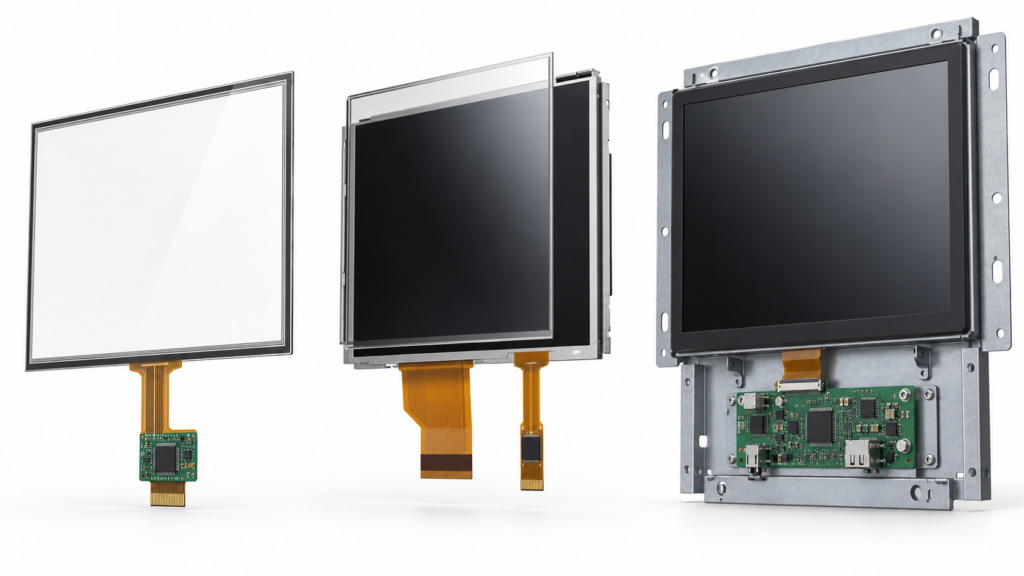
完全な静電容量式タッチディスプレイは以下の部品を含むことができる:
各部品は他の部品に影響を与える。厚いカバーレンズは、指とセンサー間の静電容量結合を低減させる可能性がある。Microchipの静電容量式タッチ設計ガイドでは、カバー厚さ、材料、電極形状、およびノイズ条件を総合的に考慮する必要があると説明している。.1 したがって、露出したセンサーで機能するタッチコントローラー構成は、最終的なカバーガラス、接着剤、筐体、グラウンディング、およびディスプレイ電子部品が取り付けられた後に見直しが必要になる場合がある。.
LCDインターフェースも完全なシステムを定義するものではない。NXPのMIPI DSIアプリケーションノートでは、ディスプレイパス、バックライト制御、およびオプションのタッチ接続を別個の統合要件として扱っている。.2 同じ原則は、画像がLVDS、eDP、RGB、または外部HDMIコントローラーボードを介して到着する場合にも適用される。.
投影型静電容量式タッチは、しばしばPCAPまたはPCTと呼ばれ、滑らかなガラス前面、ジェスチャー、または複数の同時接触を必要とする製品に一般的である。抵抗膜式タッチは導電層間の圧力を検出し、パッシブスタイラスまたは他の定義された入力ツールを使用するアプリケーションに適している場合がある。.
| 決定領域 | 投影型静電容量式タッチ | 抵抗膜方式 |
|---|---|---|
| 入力原理 | 静電容量式センサーフィールドの変化を測定する | 感圧抵抗層間の接触を測定する |
| 一般的な入力 | 選択されたセンサー・コントローラー構成でサポートされる裸指およびその他の入力 | 指、パッシブスタイラス、または十分な圧力を加える他のツール |
| マルチタッチ | センサー、コントローラー、ファームウェア、ドライバー、およびオペレーティングシステムでサポートされている場合に可能 | 特定の技術に依存する;従来の4線式システムは一般に単一接触入力に使用される |
| 前面表面 | 定義されたカバーレンズスタックの背後で動作可能 | 構造は圧力が感知層に到達することを可能にしなければならない |
| 主な検証リスク | カバー厚さ、電気ノイズ、グラウンディング、湿気、手袋、エッジ動作、およびチューニング | 圧力閾値、層の摩耗、キャリブレーション、セトリング、および機械的統合 |
Texas Instrumentsは、4線式抵抗膜式タッチスクリーンを、絶縁スペーサーで分離された2つの透明抵抗層として説明している。圧力が層を接続すると、コントローラーは結果として生じる電圧から接触位置を測定する。.3
より現代的に見えるという理由だけでPCAPを選択しないでください。より古いという理由だけで抵抗膜式タッチを拒否しないでください。必要な入力ツール、ジェスチャーセット、ユーザーインターフェース、カバー構造、環境、および受け入れテストから始めてください。静電容量式タッチディスプレイとして説明されている製品が、特定の手袋、スタイラス、水条件、または同時接触数を自動的にサポートするわけではない。.
より深い技術比較については、以下を参照 静電容量式対抵抗膜式タッチ および以下のガイド PCAPタッチスクリーン技術.
タッチスクリーンディスプレイモニターは、ホストが既に標準ビデオ出力を提供しており、プロジェクトが別個のサービス可能なディスプレイを必要とする場合に有用である。モニターはディスプレイ制御電子部品を含むため、パネルレベルの統合量を削減できる。製品チームは依然として、ビデオ入力、タッチデータ接続、オペレーティングシステムのサポート、電源、取り付け、および環境適合性を確認する必要がある。.
組み込みタッチディスプレイモジュールは、製品開発者にサイズ、深さ、カバーガラス、ケーブル配線、ベゼル外観、および内部電子部品に対するより多くの制御を提供する。また、ホストボード、ファームウェア、電源設計、筐体、および組立プロセスにより多くの作業を残す。.
部品単価が低いからといって、システムコストが低いとは限らない。生のモジュールには、コントローラボード、バックライトドライバ、タッチドライバ、ケーブル、機械的フレーム、ファームウェア作業、検証、生産治具が必要になる場合がある。完成品モニタはより多くのハードウェアを含むが、開発作業を削減できる場合がある。ディスプレイ価格だけでなく、統合スコープ全体を比較すること。.
ディスプレイインターフェースは画像を伝送する。組み込みLCDモジュールは、MIPI DSI、LVDS、eDP、RGB、SPI、またはその他のパネルレベルのインターフェースを使用できる。タッチスクリーンモニタは、コントローラボードを介してHDMI、DisplayPort、VGA、またはUSB-Cを受け入れることが多い。正確な接続はパネルとホストに依存する。.
一致するコネクタは互換性の証明ではない。パネルモデル、解像度、タイミング、インターフェースモード、ピン定義、電圧、初期化シーケンス、バックライト要件、および入手可能な場合はドライバICを確認すること。HDMI-to-MIPIコントローラボードは、アクティブなパネル固有のシステムである。汎用のパッシブアダプタではない。.
タッチコントローラは入力データをホストに送信する。USBは外付けタッチスクリーンモニタで一般的である。組み込みシステムでは、I2C、SPI、USB、またはコントローラがサポートするその他のインターフェースを使用する場合がある。ロジックレベル、電源、割り込み、リセット、ウェイク動作、コントローラファームウェア、およびドライバの可用性を確認すること。.
HDMIは通常、選択されたシステムがサポートする画像と音声を伝送する。それ自体はタッチ座標を返さない。多くのHDMIタッチディスプレイは、タッチ用に別のUSB接続を使用する。 AndroidタッチおよびHDMIタッチ統合 に関する記事では、この2経路アーキテクチャについてより詳細に説明している。.
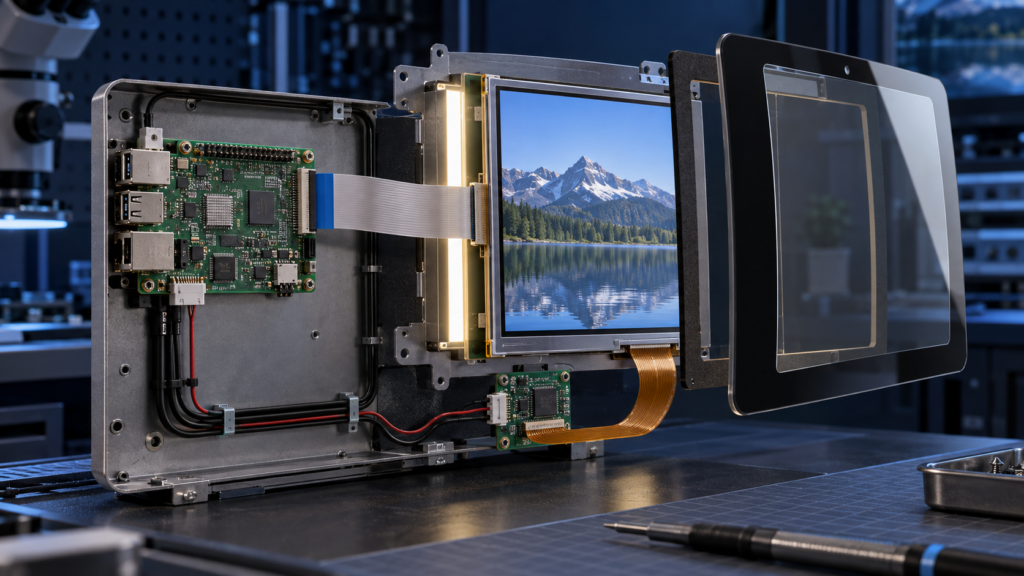
ホストはタッチイベントを正しいディスプレイに関連付ける必要がある。これは、製品が複数の画面を使用する場合や向きを変更する場合に重要になる。Androidのタッチデバイスドキュメントは、ダイレクトタッチデバイスとポインタデバイスを区別し、システムがタッチ座標をディスプレイビューポートにマッピングする方法を説明している。.4
コールドブート、スリープとウェイク、ケーブル再接続、画面回転、リカバリモード後に、最終ソフトウェアイメージをテストすること。コントローラを認識するドライバは、ディスプレイ上のすべてのポイントが正しくマッピングされることを証明しない。.
同じタッチスクリーンでも、まったく異なるシステムに組み込まれることがある。部品を選定する前にアーキテクチャを定義すること。なぜなら、それによってコントローラボード、ファームウェア、筐体、ケーブル、および最終検証をどの組織が担当するかが決まるからである。.
この構造では、製品プロセッサがMIPI DSI、LVDS、eDP、RGB、またはSPIなどのネイティブパネルインターフェースを介してLCDを駆動する。別のI2C、SPI、またはUSB経路がタッチデータを伝送する。機器メーカーは、ホストPCB、電源レール、パネル初期化、バックライト制御、タッチドライバ、および機械設計を管理する。.
このルートは、コンパクトで統合された製品を実現できるが、最も多くのエンジニアリング調整を必要とする。ホストは正しい表示タイミングを生成し、パネル初期化シーケンスをサポートしなければならない。また、タッチコントローラの電源、リセット、割り込み、ファームウェア、および座標マッピングを管理する必要がある。機械図面は両方のFPC経路を管理し、可能な限りタッチ電子部品をノイズ源から遠ざけなければならない。.
コントローラボードは、HDMIなどの標準ホスト出力をパネルのネイティブインターフェースに変換する。タッチは依然として別経路、多くの場合USBを介して戻る。この構造は、コンピュータがLCDに直接一致するネイティブMIPI、LVDS、またはeDP出力を必要としないため、ホスト接続を簡素化できる。.
コントローラボードは、依然として正確なパネル用に構成する必要がある。解像度だけでは十分ではない。エンジニアリングレビューでは、タイミング、インターフェースモード、レーンまたはチャネル配置、ピン定義、電源シーケンス、バックライト回路、パネル初期化、および物理ケーブルを網羅しなければならない。製品がオンスクリーンディスプレイまたはファームウェア制御機能を使用する場合、それらの要件もボード選定前に定義する必要がある。.
オープンフレームモニタは、LCD、タッチシステム、コントローラ電子部品、および取り付けフレームを組み合わせるが、外装筐体は機器メーカーに委ねる。キオスク、試験装置、機械コンソール、および標準ビデオソースを使用しながら組み込み外観を必要とするその他の製品に適する場合がある。.
主な検討事項は、パネルタイミングから統合へ移る。モニタ外形、前面開口部、取り付け点、コネクタアクセス、換気、ケーブル出口、コントロールボタンアクセス、接地、電源入力、およびサービス経路を確認すること。ベンチで動作するモニタでも、筐体がコネクタを塞いだり、コントローラボード周辺に熱を閉じ込めたりする場合、設置が困難になることがある。.
筐体付きタッチスクリーンモニタは、最も独立したディスプレイ構造である。機器の横または上に取り付け、外部コンピュータに接続できる。タッチコンピュータはプロセッサとオペレーティングシステムを追加する。これらの製品は、標準フォーマットが適合する場合に機器開発を短縮できるが、深さ、ベゼル設計、コネクタ位置、および内部部品ライフサイクルに対する制御は少なくなる。.
これらのアーキテクチャ間の選択は、製品境界をどこに置くかによって決める。画面がコンパクトなブランドデバイスの一部になる必要がある場合は、組み込みアセンブリが適切である場合がある。ディスプレイが複数の既存コンピュータに接続する必要がある場合、または1つのサービスユニットとして交換される場合は、モニタ構造がライフサイクルの複雑さを軽減する場合がある。.
プロジェクトにタッチパネル、LCDおよびタッチアセンブリ、オープンフレームタッチモニタ、完成筐体付きモニタ、またはパネルPCが必要かどうかを決定する。この最初の決定により、見積もりに含まれるハードウェアが多すぎたり少なすぎたりすることを防ぐ。.
対角サイズだけではユーザビリティを定義できない。視距離、最小タッチターゲット、必要な文字サイズ、画面の向き、ユーザーの位置、および一度に表示される情報量を考慮すること。LCDアクティブエリア、タッチアクティブエリア、カバーガラス開口部、印刷枠、およびソフトウェア座標範囲を一致させること。.
アプリケーションが使用する同時接触数を明記し、どのジェスチャーがそれを必要とするかを示す。想定される入力ツールを定義する。ユーザーが手袋を着用する場合は、手袋の材質と厚さを指定する。製品が濡れる可能性がある場合は、液体条件と必要な動作を定義する。「防水タッチ」または「手袋タッチ」は、エンジニアリング承認には広範すぎる。.
プロセッサまたはコンピュータプラットフォーム、オペレーティングシステム、利用可能なディスプレイ出力、タッチ入力、ドライバ制約、および起動要件を提供すること。あるホスト構成で動作するタッチスクリーンディスプレイモニタが、別の構成では異なるドライバまたは設定を必要とする場合がある。.
屋内または屋外使用、周囲照明、視方向、反射、目標輝度、および製品が別のウィンドウの背後に設置されるかどうかを定義する。より明るいLCDがすべての視認性問題を解決するわけではない。カバーガラス、エアギャップ、ボンディング、表面処理、UIコントラスト、および筐体角度も結果に影響する。.
カバーレンズは、目に見える製品表面であると同時にタッチシステムの一部でもある。その外形、厚さ、印刷枠、材質、エッジ詳細、接着エリア、および表面処理は、適合性、外観、およびタッチ感度に影響する場合がある。カバーガラスは、タッチセンサ、コントローラ、ファームウェア、筐体、および接地計画とともに承認すること。.
LCD外形、アクティブエリア、タッチセンサ外形、FPC経路、コネクタ位置、部品高さ、取り付け点、接着エリア、およびキープアウトゾーンをレビューすること。実際の筐体CADとPCBレイアウトを使用すること。モジュールが前面開口部に適合しても、そのFPCがブラケットまたはコネクタと干渉する場合がある。.
広範なラベルを測定可能な条件に置き換える。予想温度範囲、結露または湿気、洗浄方法、振動、近接するモータまたは電力変換器、接地、および電磁ノイズ源を指定すること。選択した構成に関する証拠なしに、民生用タッチスクリーンモニタが産業用またはアプリケーション固有の要件を満たすと仮定してはならない。.
データシートレビューは不適切な選択肢を除外できるが、最終タッチディスプレイを承認することはできない。検証には、実際のLCD、タッチセンサ、コントローラ、カバーガラス、コントローラボード、ケーブル、ホストソフトウェア、電源、および筐体を使用しなければならない。これらの要素のいずれか1つを変更すると、タッチ動作またはディスプレイの安定性が変わる可能性がある。.
LCDモデルとリビジョン、タッチコントローラモデル、コントローラファームウェア、ディスプレイボードバージョン、ケーブルバージョン、ドライバパッケージ、オペレーティングシステムビルド、および機械図面を記録する。このベースラインがなければ、成功したサンプルテストをパイロット生産時に再現できない。.
Test native resolution, color format, orientation, startup sequence, backlight control, brightness adjustment, sleep, wake, and signal recovery. Run the content patterns that matter to the application rather than relying only on a logo or static desktop. Look for unstable startup, intermittent blank screens, abnormal colors, cropped content, flicker, and backlight behavior that changes after repeated power cycles.
Check the center, corners, edges, and areas close to the printed border. Test taps, drags, long presses, and every required gesture. Confirm that the software maps the touch device to the correct screen and follows the approved orientation. If the product can rotate, test each supported rotation instead of assuming that the operating system will transform coordinates correctly.
Use the intended finger, glove, or stylus. Test the smallest controls in the real UI. If moisture is relevant, define the liquid, amount, location, and expected response. The requirement may be to continue accepting deliberate touches, reject false input, or temporarily lock input until the surface is dry. These are different behaviors and require different acceptance criteria.
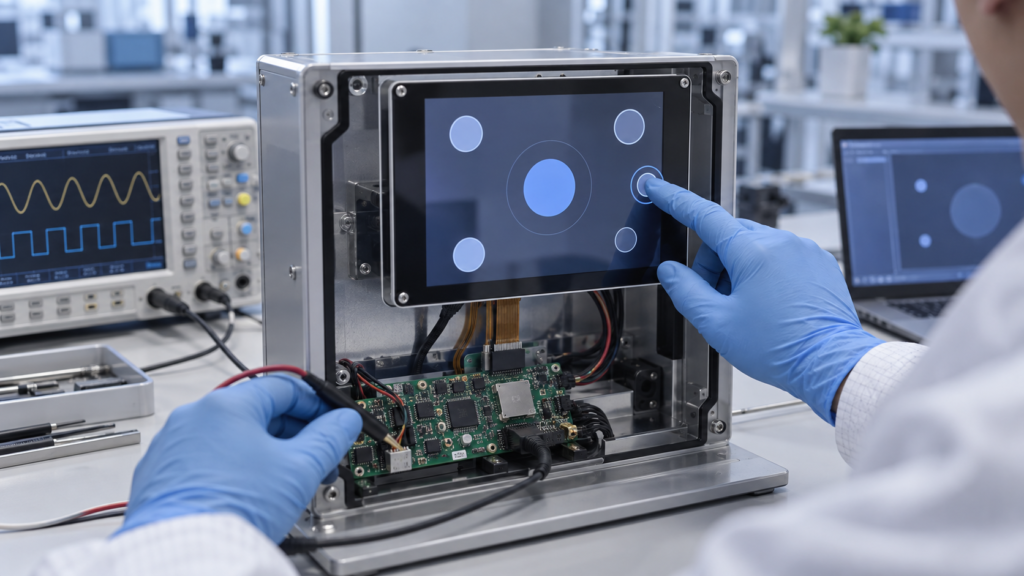
Operate the display while motors, chargers, radio modules, switching power supplies, and other expected equipment are active. Route the final cables as they will appear in production. Check whether enclosure pressure, fasteners, adhesive, bezel contact, or cable bending changes touch behavior. Also verify that users cannot pull or pinch exposed cables during normal operation or service.
Run repeated cold starts, warm restarts, sleep-and-wake cycles, signal disconnects, USB reconnects, and power interruptions. Confirm that the image and touch input recover without a hidden service step. If the equipment has a diagnostic or recovery mode, confirm whether touch must work there and test that condition separately.
Finish with written acceptance criteria. Record what counts as a pass for image stability, coordinate accuracy, edge response, required contacts, false-touch rejection, recovery, and physical appearance. This turns a subjective demonstration into a configuration that procurement, engineering, and production can control.
A large screen touch screen is not simply a small capacitive touch display enlarged to a new diagonal. As the active area grows, the project must manage sensor routing, controller capability, cover-lens support, flatness, bonding, enclosure stiffness, cable length, electrical noise, transport, installation, and field service.
The user interface also changes. A person may operate a small display from one fixed position but approach a large touch screen from several angles. Touch targets, reach zones, viewing distance, hand support, accidental contact, and multi-user behavior must be evaluated on a full-scale prototype.
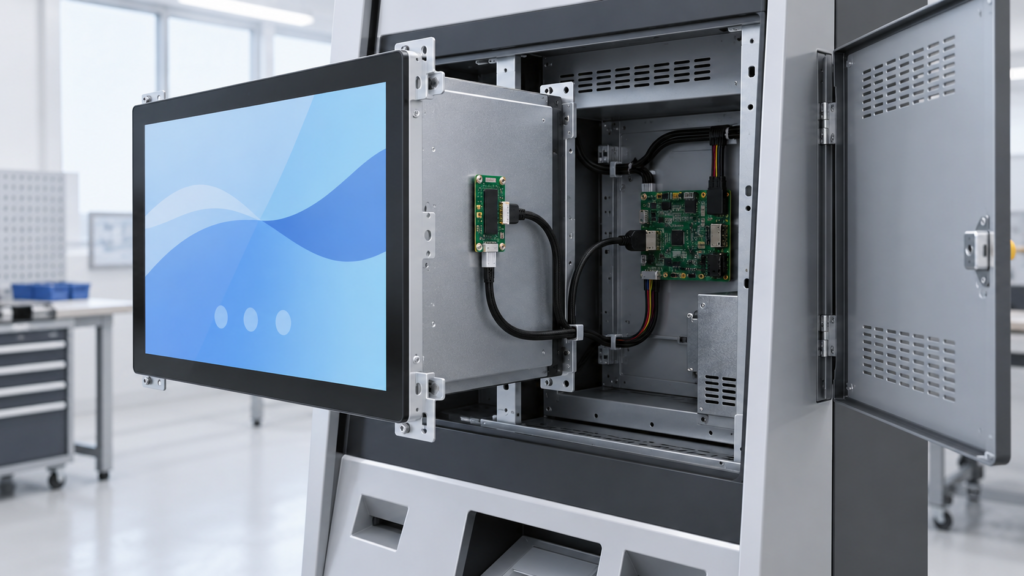
For some projects, a standard commercial or industrial monitor platform is the practical route. For others, an open-frame monitor or custom front assembly offers a better mechanical fit. RJY Display’s standard TFT portfolio is not a promise that every large touch-screen size or monitor structure is available. The feasible route must be confirmed from the target dimensions, interface, touch requirements, enclosure, quantity, and application environment.
Application labels do not replace engineering requirements, but they can reveal which risks deserve early attention.
The purpose of this comparison is not to assign one touch technology to every application. It is to identify the tests, drawings, and configuration details that the project must define before production.
A standard touchscreen monitor is often suitable when its size, inputs, housing, stand, and operating-system support already fit the equipment. Customization becomes useful when the display must become part of the product rather than an accessory attached to it.
Based on the selected module and project scope, customization can include:
RJY Display focuses mainly on customization based on existing display modules. A custom project should not be assumed to include development of any completely new LCD panel size from scratch. For more detail, see the TFT LCD module with touch screen selection guide そして RJYカスタムディスプレイソリューション.
A precise brief allows the supplier to identify whether the project needs a panel, module, monitor, controller board, or complete embedded assembly. Prepare the following information:
The right touch product is the one that fits the complete system. A touch panel, embedded capacitive touch display, touchscreen monitor, and touch computer can all provide on-screen input, but they solve different engineering problems.
Start by defining the product structure. Then verify the display path, touch path, software, cover glass, mounting, environment, and production plan. This process helps prevent a low-cost component choice from becoming an expensive system redesign.
If you are developing equipment that needs a custom touch display, request a touch display architecture review. Share the display size, resolution, host platform, video interface, touch interface, operating system, cover-glass requirements, mounting structure, and expected volume so RJY Display can review the feasible module and controller-board path before sampling.
No. A touch screen may refer only to a touch sensor or to an LCD-and-touch assembly. A touch screen monitor normally adds display-control electronics, external video input, touch-data output, power input, and a mounting frame or housing.
HDMI normally carries image and supported audio data. A touch monitor commonly uses a separate USB connection to return touch input to the host. Confirm the actual monitor and controller-board design before connecting the system.
No. The supported number of contacts and gestures depends on the touch sensor, controller, firmware, driver, host operating system, and application. Verify the required behavior with the final assembly.
A touch monitor displays video from an external host and sends touch input back to that host. A touch computer or panel PC also includes the processor, memory, storage, system I/O, and operating-system platform.
Often, a compatible touch sensor, touch controller, cover glass, bonding structure, and mechanical design can be reviewed for an existing LCD module. Feasibility depends on the module dimensions, active area, enclosure, optical requirements, host interface, and intended environment.
RJY can review a large touch-screen requirement, but feasibility depends on the available display platform, target size, sensor and controller solution, cover structure, interface, enclosure, project quantity, and validation requirements. Availability should not be assumed before an engineering review.
Provide the panel or monitor model, size, resolution, display interface, pin definition or datasheet, backlight requirements, touch controller and interface, host platform, operating system, cover-glass structure, enclosure constraints, environment, and required touch behavior.
ディスプレイサイズ、解像度、インターフェース、輝度、タッチ要件、コントローラーボード要件、およびアプリケーション環境を共有してください。.
関連するディスプレイ技術ガイドとアプリケーションリファレンスを引き続きお読みください。.
RJYのエンジニアリングチームにご相談いただき、ディスプレイマッチング、コントローラーボードの確認、およびカスタマイズについて話し合ってください。.