Vous rencontrez un goulot d'étranglement dans votre projet d'affichage embarqué ?
Ne laissez pas l'intégration complexe ou les problèmes de chaîne d'approvisionnement ralentir votre mise sur le marché. Réservez une consultation gratuite avec l'équipe d'experts RJY pour un accompagnement sur mesure en conception et fabrication.
Comment économiser de l'argent sur le matériel d'affichage numérique sans acheter un système inadapté
Publié :
Lecture de 13 minutes
Mis à jour :
Chercher à économiser sur le matériel de signalétique numérique ne signifie pas nécessairement choisir le LCD, le processeur ou le boîtier au prix le plus bas. Dans de nombreux projets, les coûts évitables les plus importants proviennent de l'achat de spécifications que l'application ne peut pas utiliser, de la combinaison de composants incompatibles ou de la découverte de problèmes d'installation après que la conception matérielle a déjà été approuvée.
Un système de signalétique numérique à coût maîtrisé commence par une compréhension claire du contenu, de l'environnement de visualisation et du flux de travail opérationnel. Une fois ces exigences définies, les développeurs peuvent sélectionner un écran, une carte contrôleur, une solution tactile et une structure mécanique suffisants pour la tâche sans être inutilement complexes.
Ce guide se concentre sur la signalétique numérique compacte et embarquée, notamment les écrans de bord d'étagère, les terminaux d'information de comptoir, les écrans d'état de salle, les écrans de distributeurs automatiques, les écrans publicitaires intégrés aux appareils électroménagers et autres petits systèmes d'affichage commerciaux. Les téléviseurs commerciaux grand format et les panneaux publicitaires LED extérieurs nécessitent une stratégie d'achat différente.
Le matériel de signalétique numérique le moins cher n'est pas toujours le choix au coût le plus bas
Le prix unitaire est visible immédiatement. Le coût d'intégration ne l'est pas.
Un écran à bas prix peut sembler réduire la nomenclature, mais l'économie peut disparaître si l'équipe de développement a ensuite besoin d'une carte de conversion supplémentaire, d'un câble différent, d'un boîtier révisé ou d'un nouveau firmware. Des problèmes similaires surviennent lorsqu'une carte contrôleur est sélectionnée avant que l'interface LCD et la définition des broches ne soient confirmées.
Le budget matériel réel peut inclure :
Module LCD et rétroéclairage
Écran tactile et verre de protection
Carte contrôleur ou hôte embarqué
Adaptateurs d'interface, connecteurs FPC et câbles
Alimentation électrique et câblage interne
Boîtier, quincaillerie de montage et outillage
Firmware et intégration du système d'exploitation
Révisions de prototypes et travaux de certification
Main-d'œuvre d'installation, pièces de rechange et visites de maintenance
Économiser sur un composant tout en augmentant trois autres catégories de coûts ne constitue pas une réduction de coûts efficace. L'objectif devrait être de simplifier le système complet et de réduire la possibilité de reconception.
Pour une discussion plus large sur les raisons pour lesquelles le prix d'achat le plus bas peut créer des dépenses supplémentaires sur le cycle de vie, consultez le guide de RJY sur les coûts cachés et risques des écrans LCD bon marché.
1. Définir ce que l'écran doit afficher avant de sélectionner le matériel
Le contenu détermine le matériel. Un écran d'étagère affichant des prix et des graphiques promotionnels simples n'a pas les mêmes exigences qu'un répertoire tactile diffusant des vidéos haute résolution et récupérant des données en direct.
Avant de demander des devis, définissez :
Si le contenu est statique, animé ou basé sur la vidéo
La distance de visualisation prévue
La fréquence de changement du contenu
Si l'écran fonctionne de manière autonome ou se connecte à un réseau
Si les utilisateurs doivent toucher ou interagir autrement avec l'écran
Le nombre et le type d'interfaces externes requises
L'espace physique disponible pour le LCD, le contrôleur et les câbles
Ces informations empêchent les fournisseurs de proposer un système inutilement puissant simplement parce que le cas d'utilisation réel n'est pas clair. Elles facilitent également la comparaison des propositions concurrentes, car chaque fournisseur travaille à partir du même cahier des charges applicatif.
2. Choisir un format d'écran adapté au contenu
Les entreprises choisissent parfois un écran rectangulaire conventionnel puis construisent un grand boîtier autour, même lorsque le contenu n'occupe qu'une portion étroite de l'écran. Cela peut augmenter le coût du LCD, la taille du boîtier, le volume d'expédition et l'espace d'installation.
Un écran de type barre peut être un choix plus efficace pour les promotions en bord d'étagère, les en-têtes d'équipement, les informations de transport, les messages directionnels ou les bandes publicitaires compactes. Un écran carré peut convenir à un contrôleur de salle ou à un produit de comptoir. Un écran paysage conventionnel reste approprié lorsque l'interface contient du texte plus long, plusieurs éléments de menu ou de la vidéo.
L'économie provient de l'alignement de la zone d'affichage active sur l'architecture de l'information. Le format d'écran ne doit pas être choisi uniquement pour la nouveauté, mais un rapport d'aspect non standard approprié peut éliminer la zone inutilisée et contribuer à réduire la taille du dispositif complet.
3. Ne pas payer pour une résolution que le spectateur ne peut pas utiliser
Une résolution plus élevée est attrayante dans un tableau de spécifications, mais elle n’est pas automatiquement plus précieuse dans le produit fini. La résolution utile dépend de la taille de l’écran, de la distance de visualisation, de la conception du contenu et des détails visuels.
Une augmentation de la résolution peut affecter plus que le prix du LCD. Elle peut nécessiter une capacité supplémentaire de traitement graphique, de bande passante mémoire, de stockage, d’optimisation logicielle et d’alimentation. Elle peut également réduire le nombre d’options de cartes contrôleurs disponibles pour le projet.
Si un affichage présente principalement de grands chiffres, des icônes, des logos ou de courts messages, l’interface peut ne pas bénéficier d’une densité de pixels extrêmement élevée. La meilleure approche consiste à tester un contenu représentatif à la distance de visualisation prévue et à sélectionner une résolution qui maintient une interface claire sans surcharger le système.
4. Adapter la luminosité à l'environnement d'installation
La luminosité est un autre domaine où une spécification excessive peut augmenter le coût du matériel. Un panneau intérieur installé sous un éclairage commercial contrôlé ne nécessite pas nécessairement la même conception de rétroéclairage qu’un écran exposé à une forte lumière du jour.
Les configurations à luminosité plus élevée peuvent affecter le rétroéclairage, l’alimentation électrique, la gestion thermique et le boîtier. Choisir un objectif de luminosité sans évaluer l’environnement réel peut donc augmenter à la fois le coût des composants et le travail d’ingénierie.
Parallèlement, sous-spécifier la luminosité est une fausse économie. Un affichage qui ne peut pas être lu à son emplacement d’installation peut devoir être remplacé ou repositionné.
Fournissez des photographies ou des informations sur l’éclairage du site d’installation lorsque cela est possible. Tenez compte des reflets de la vitre de protection, de l’angle de l’écran, de la distance de visualisation et de savoir si la lumière du soleil atteint directement l’écran. La luminosité doit être traitée comme une exigence environnementale, et non comme un chiffre marketing.
5. Ajouter la fonction tactile uniquement lorsqu'elle soutient une action à valeur ajoutée
Le tactile peut transformer un panneau numérique en répertoire, terminal de commande, sélecteur de produits ou interface de service. Cependant, un écran tactile n’est pas nécessaire lorsque les clients n’ont besoin que de lire un message ou de regarder du contenu.
L’ajout du tactile peut introduire des coûts pour le capteur, la vitre de protection, le contrôleur tactile, le collage, le câblage, les logiciels et la validation. Le boîtier peut également devoir supporter une interaction publique répétée et un nettoyage fréquent.
Avant d’ajouter le tactile, identifiez l’action exacte que l’utilisateur doit accomplir. Si l’application ne nécessite qu’un accès technique occasionnel, un bouton de service caché ou un flux de gestion à distance peut être plus économique. Si les clients doivent parcourir des produits ou effectuer des sélections, le tactile peut justifier son coût en remplaçant les boutons physiques et en permettant une interface configurable.
Pour les projets interactifs, le LCD, le capteur tactile, la vitre de protection, le contrôleur et le système d’exploitation doivent être examinés comme une seule configuration. Le comportement final doit être vérifié avec l’assemblage réel plutôt que supposé à partir d’une spécification tactile générique.
6. Sélectionner la carte contrôleur en fonction de la charge de travail, et non de la réputation
Une carte contrôleur Android puissante peut prendre en charge la vidéo, la mise en réseau, les logiciels d’application et des interfaces sophistiquées. Elle n’est pas automatiquement le choix le plus économique pour chaque panneau.
Un affichage simple qui répète une séquence d’informations fixe peut nécessiter moins de ressources de traitement qu’un terminal tactile connecté. À l’inverse, un contrôleur sous-alimenté peut créer des problèmes de lecture, une interaction lente ou un travail supplémentaire de développement logiciel.
Définissez la charge de travail requise avant de choisir la carte :
Format d’image, d’animation ou de vidéo
Résolution de lecture cible
Complexité du tactile et de l’interface utilisateur
Exigences réseau et périphériques
Système d’exploitation et cadre applicatif
Méthode de stockage et de mise à jour
Fonctions futures attendues
Achetez une marge de performance raisonnable lorsque la feuille de route du produit l’exige, mais évitez de payer pour des interfaces et une capacité de traitement que l’application n’a pas l’intention d’utiliser.
La compatibilité de la carte contrôleur ne peut pas être déterminée uniquement par l’apparence du connecteur. Le modèle du panneau, la résolution, l’interface d’affichage, la définition des broches, la synchronisation, le rétroéclairage, le chemin tactile, le micrologiciel et l’environnement d’exploitation doivent être vérifiés. La Guide d’appariement des écrans LCD TFT et des cartes contrôleur Android liste les informations nécessaires pour cet examen.
7. Réduire les adaptateurs, les cartes de conversion et les câbles superflus
Chaque couche d’interface supplémentaire ajoute quelque chose à acheter, monter, alimenter et tester. Elle peut également créer un autre connecteur susceptible de se desserrer pendant le transport ou la maintenance sur site.
Pour un prototype précoce, l’utilisation d’un adaptateur peut être le moyen le plus rapide de démontrer un concept. Pour un système de production, l’équipe doit déterminer si l’hôte et le LCD peuvent être connectés via une architecture plus propre et spécifique au projet.
La configuration à moindre risque dépend du panneau et de l’hôte sélectionnés. MIPI, LVDS, eDP, HDMI et d’autres interfaces d’affichage ne sont pas interchangeables, même lorsque des adaptateurs existent. Un chemin de carte contrôleur ne doit être confirmé qu’une fois les informations réelles sur le LCD disponibles.
RJY peut examiner les configurations de contrôleurs HDMI-vers-MIPI et autres au cas par cas. La Guide de compatibilité HDMI-vers-MIPI explique pourquoi la documentation du panneau, les exigences de rétroéclairage et le micrologiciel doivent être évalués avant qu’une carte ne soit approuvée.
8. Partir d'une plateforme LCD existante
Une taille de panneau entièrement nouvelle peut sembler être le meilleur moyen d’obtenir un produit de signalétique numérique unique. Dans de nombreux projets compacts, elle introduit également des coûts de développement évitables, des exigences de volume et des risques techniques.
Une voie plus pratique consiste souvent à sélectionner un module LCD existant et à personnaliser l’assemblage environnant. Selon le module et le projet, cela peut inclure :
Forme de la vitre de protection et bordure imprimée
Configuration de l'écran tactile
Exigences de rétroéclairage
Direction du FPC ou disposition des câbles
Adaptation de la carte contrôleur
Coordination du micrologiciel
Détails du boîtier et du montage liés à l’affichage
Cette stratégie préserve une apparence distinctive du panneau avant tout en évitant l’hypothèse que chaque produit nécessite une nouvelle cellule LCD ou une nouvelle géométrie de panneau. Elle peut également rendre les premiers échantillons plus représentatifs de la conception de production prévue.
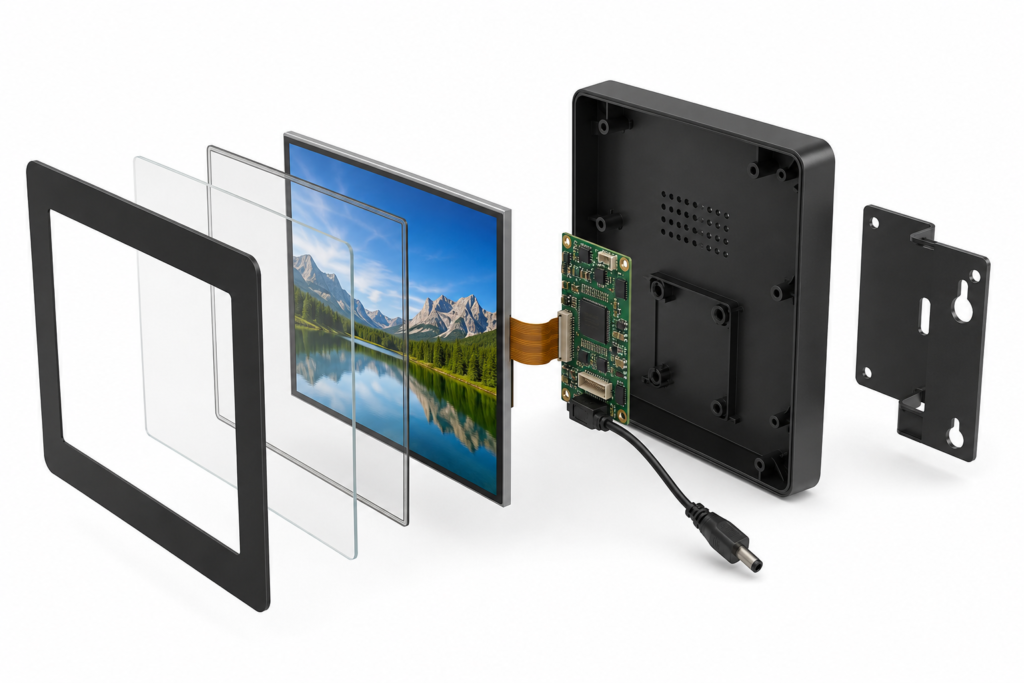
Vue éclatée d’un affichage de signalétique numérique compact et de son assemblage contrôleur
9. Standardiser le matériel sur plusieurs produits de signalétique
Une entreprise exploitant plusieurs formats de signalétique peut être en mesure d’utiliser une architecture d’affichage et de contrôleur unique pour plusieurs variantes de produits. L’image de marque, le contenu et le comportement de l’interface peuvent ensuite être modifiés par logiciel ou via la conception de la vitre de protection.
La standardisation peut réduire le nombre de pièces de rechange, de documents techniques, de câbles et de versions de micrologiciels que l’organisation doit gérer. Les installateurs se familiarisent également avec une architecture interne unique.
Cela ne signifie pas forcer un seul écran dans chaque boîtier. La standardisation fonctionne mieux lorsque les exigences de visualisation, la charge de travail du contenu et les conditions environnementales sont similaires. Un magasin peut utiliser une plateforme matérielle pour plusieurs affichages de comptoir tout en maintenant une plateforme distincte pour les unités étroites en bord de rayon.
L’économie doit être mesurée sur l’ensemble des achats, du développement, du déploiement et de la maintenance—pas uniquement à travers une commande plus importante pour un seul composant.
10. Concevoir l'installation et l'accès de maintenance avant la production
Un panneau compact peut néanmoins s’avérer coûteux à installer si les points de fixation sont difficiles d’accès, si le câble sort dans une mauvaise direction ou si le boîtier doit être retiré pour accéder à une connexion de service courante.
Examiner l’environnement d’installation avant de figer la conception mécanique. Confirmer :
L’orientation de montage et la profondeur disponible
La position de l’entrée d’alimentation
La longueur du câble et le dégagement de courbure
Les exigences de ventilation pour le contrôleur
L’accès aux fonctions de stockage, de réinitialisation et de mise à jour
La protection de l’écran LCD, du FPC et des connecteurs
La manière dont une unité défaillante sera retirée et remplacée
Quelques minutes gagnées lors de chaque installation peuvent avoir un impact significatif sur un déploiement multi-sites. Plus important encore, un bon accès de service peut éviter que les techniciens n’endommagent des composants non liés lors du remplacement d’une pièce.
Une liste de contrôle pratique des coûts matériels en signalétique numérique
Décision
Fausse économie courante
Approche maîtrisée en coûts
Taille d'affichage
Acheter un écran plus grand que ce que le contenu exige
Adapter la zone active et le format d’image au message
Résolution
Choisir la valeur la plus élevée disponible
Tester le contenu réel à la distance de visualisation prévue
Luminosité
Utiliser une cible extérieure pour chaque installation
Évaluer la lumière ambiante, les reflets et l’angle de vision
Toucher
Ajouter un écran tactile sans action utilisateur définie
L’ajouter lorsque l’interaction crée une valeur produit mesurable
Contrôleur
Acheter des performances maximales ou sélectionner uniquement en fonction du connecteur
Adapter le traitement, les interfaces et le firmware à la charge de travail
Conception personnalisée
Supposer qu’un tout nouveau panneau LCD est nécessaire
Personnaliser autour d’un module existant approprié
Interfaces
Empiler plusieurs adaptateurs dans la conception de production
Examiner l’architecture panneau-hôte dès le début
Maintenance
Ignorer l’accès jusqu’à l’installation
Concevoir à l’avance les procédures de montage, de câblage et de remplacement
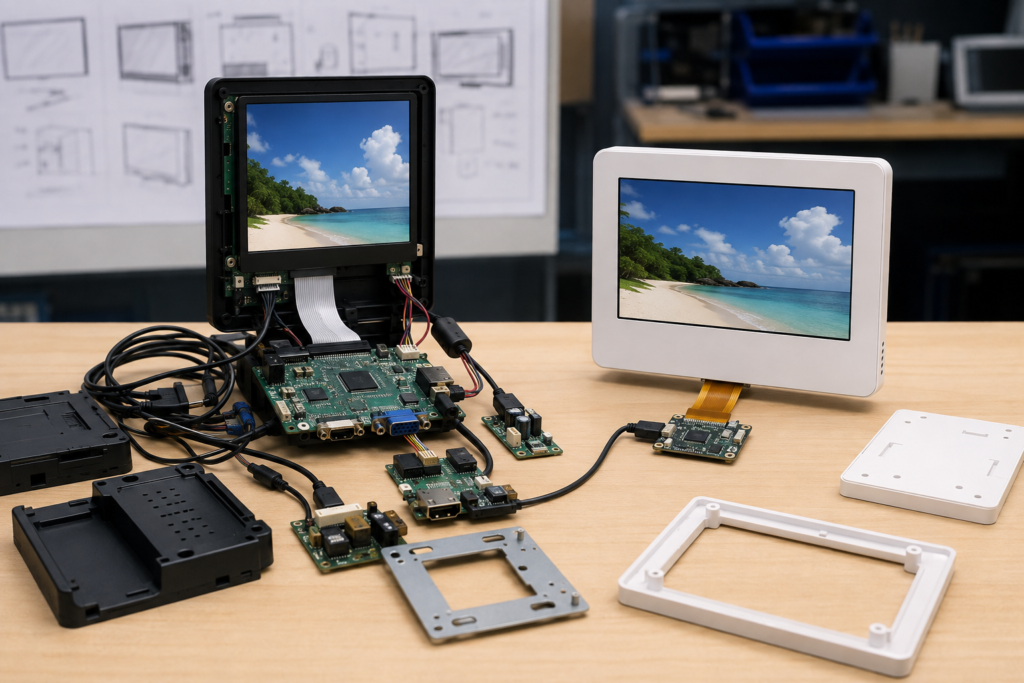
Comparaison des conceptions matérielles de signalétique numérique complexes et simplifiées
Quand un investissement initial plus élevé peut permettre d'économiser à long terme
L’optimisation des coûts ne signifie pas toujours supprimer des fonctionnalités. Certains investissements peuvent réduire les dépenses sur le cycle de vie lorsqu’ils résolvent une exigence vérifiée.
Un rétroéclairage à luminosité plus élevée peut être justifié lorsque la lumière ambiante rendrait autrement le message illisible. Une façade avant durable peut réduire les dommages dans un environnement public. Des performances supplémentaires du contrôleur peuvent être utiles lorsque des fonctions logicielles futures font déjà partie de la feuille de route du produit. Une coordination du firmware peut éviter un désalignement coûteux entre la synchronisation LCD et la plateforme hôte.
La distinction repose sur des preuves. Dépenser davantage lorsque l’application, le résultat de test ou le plan de déploiement justifie la décision. Éviter d’ajouter des spécifications uniquement parce qu’elles semblent plus solides dans un tableau comparatif.
Calculer le coût matériel total avant d'approuver la conception
Une comparaison utile doit inclure plus que le prix du LCD et de la carte contrôleur. Construire un modèle simple de coût total couvrant les composants, le développement, l’installation et la maintenance.
Pour chaque architecture candidate, comparer :
Le coût de l’écran, du tactile et du verre de protection
Le coût du contrôleur, de l’alimentation et des câbles
Le coût du boîtier, de l’outillage et du montage
L’effort de firmware et d’intégration applicative
Les exigences de prototype et de validation
Le temps d’installation par site
La stratégie recommandée pour les unités de rechange
Le processus prévu de maintenance et de remplacement
Cet exercice montre souvent que le système le plus économique est celui qui comporte moins de pièces, une compatibilité plus claire et une installation plus facile — pas nécessairement celui qui contient l’écran individuel le moins cher.
Comment RJY soutient la signalétique numérique compacte à coût maîtrisé
RJY Display peut aider les développeurs d’équipements à examiner les modules TFT LCD compacts, les assemblages tactiles et les options de cartes contrôleurs pour des projets de signalétique numérique embarquée. L’adaptation de cartes contrôleurs est disponible pour certains écrans d’environ 1,28 à 15,6 pouces, selon la résolution, l’interface, le firmware et les exigences complètes du projet.
Le support peut inclure les éléments existants Sélection du module d'affichage TFT LCD, verre de protection, écran tactile, rétroéclairage, FPC, interface, carte contrôleur, firmware et coordination mécanique liée à l’affichage. Les modules LCD et les cartes contrôleurs peuvent également être discutés séparément lorsque le client possède déjà une partie de l’architecture système.
La compatibilité et la portée de la personnalisation doivent être confirmées à partir du panneau réel et des informations du projet. RJY ne considère pas qu’une carte contrôleur est universellement compatible avec chaque LCD, et la personnalisation ne doit pas être supposée inclure le développement sans restriction d’une toute nouvelle taille de LCD.
Informations à inclure dans votre appel d'offres de signalétique numérique
Pour recevoir une proposition techniquement pertinente, fournir :
Environnement d'application et d'installation
Taille, forme et résolution de l'écran cible
Type de contenu et distance de visualisation
Exigences de luminosité et d'angle de vision
Exigences relatives à l'écran tactile et à la vitre de protection
Plateforme hôte, système d'exploitation et interface d'affichage
Fiche technique du panneau ou modèle de référence, s'il est déjà sélectionné
Contraintes relatives au FPC, aux connecteurs et au boîtier
Exigences relatives à la carte contrôleur et au micrologiciel
Quantité de prototypes, demande annuelle estimée et calendrier
Un cahier des charges complet facilite l'élimination du matériel superflu avant qu'il n'entre dans la conception. Il permet également d'identifier les problèmes de compatibilité lorsqu'ils sont encore peu coûteux à corriger.
Signalétique numérique LCD en format barre, économique, intégrée dans une étagère de vente au détail
Construire un système de signalétique à moindre coût, pas simplement un écran moins cher
Le moyen le plus fiable d'économiser sur le matériel de signalétique numérique est de faire en sorte que chaque composant serve un objectif défini. Choisissez une forme d'écran adaptée au contenu, une résolution dont le spectateur peut bénéficier, un niveau de luminosité adapté à l'environnement et un contrôleur capable de gérer la charge de travail réelle.
Ensuite, simplifiez le chemin de connexion, personnalisez à partir d'un module existant et planifiez l'installation avant la production. Ces décisions peuvent réduire la nomenclature tout en diminuant le temps de développement, les problèmes sur le terrain et les risques de reconception.
Si vous développez un panneau de vente au détail compact, un affichage d'étagère, un terminal de comptoir ou un affichage commercial intégré, explorez les solutions d'affichage personnalisées RJY ou contactez RJY avec vos exigences en matière d'écran LCD, de carte contrôleur, de tactile et de mécanique pour une revue technique.
Questions fréquemment posées
Quel est le meilleur moyen d'économiser sur le matériel de signalétique numérique ?
Commencez par définir le contenu, l'environnement de visualisation et l'interaction requise. Sélectionnez ensuite uniquement la taille d'écran, la résolution, la luminosité, la capacité tactile et les performances du contrôleur nécessaires pour cette application. Réduire les composants inutiles et éviter les reconceptions peut être plus avantageux que de choisir l'écran individuel le moins cher.
Ai-je besoin d'une carte Android puissante pour chaque panneau de signalétique numérique ?
Non. Le contrôleur approprié dépend de la résolution vidéo, de la complexité de l'interface, de la mise en réseau, du tactile, du logiciel et des fonctions futures. Un affichage d'information simple peut nécessiter moins de ressources, tandis qu'un terminal interactif connecté peut justifier une plateforme Android plus performante.
Une résolution LCD plus élevée vaut-elle toujours le coût supplémentaire ?
Non. Le bénéfice dépend de la taille de l'écran, du niveau de détail du contenu et de la distance de visualisation. Une résolution plus élevée peut également augmenter les exigences en matière de traitement, de bande passante et de consommation électrique. Le contenu représentatif doit être testé avant de finaliser la résolution.
Une seule plateforme matérielle peut-elle prendre en charge plusieurs conceptions de signalétique ?
Possiblement. Les produits ayant des exigences similaires en matière de contenu, de performances et d'environnement peuvent partager une architecture LCD-et-contrôleur tout en utilisant différents logiciels, verres de protection ou boîtiers. Chaque configuration doit néanmoins être validée pour son installation prévue.
RJY peut-elle fournir un écran LCD et une carte contrôleur ensemble ?
RJY peut examiner une solution associant écran LCD et carte contrôleur après réception des exigences relatives au panneau, à la résolution, à l'interface, à la définition des broches, au rétroéclairage, au tactile, au micrologiciel et à l'environnement d'exploitation. Les modules LCD et les cartes contrôleurs peuvent également être discutés séparément.
↗
Vous planifiez un projet d'affichage ?
Partagez la taille de votre écran, sa résolution, son interface, sa luminosité, ses exigences tactiles, les besoins en carte contrôleur et l'environnement d'application.