組込み表示プロジェクトでボトルネックに直面していませんか?
複雑な統合作業やサプライチェーンの問題が市場投入までの時間を遅らせないようにしましょう。RJYの専門家チームによる無料コンサルテーションを予約し、お客様に合わせた設計・製造サポートをご利用ください。.

デジタルサイネージ用ハードウェアで コストを節約しようとすることは、 必ずしも最も安価なLCD、プロセッサー、筐体を選ぶことを意味するわけではない。多くのプロジェクトにおいて、回避可能な最大のコストは、アプリケーションが活用できない仕様を購入すること、互換性のないコンポーネントを組み合わせること、またはハードウェア設計が承認された後に設置上の問題を発見することから発生する。.
コスト管理型デジタルサイネージシステムは、コンテンツ、視聴環境、運用ワークフローを明確に理解することから始まる。これらの要件が定義されれば、開発者は不必要に複雑にすることなく、業務に十分なディスプレイ、コントローラーボード、タッチソリューション、機械構造を選定できる。.
本ガイドは、コンパクト型および組み込み型デジタルサイネージに焦点を当てている。具体的には、棚端ディスプレイ、カウンタートップ情報端末、部屋状況表示スクリーン、自動販売機ディスプレイ、家電統合型広告スクリーン、その他の小型商業用表示システムを含む。大型商業用テレビや屋外LEDビルボードには、異なる調達戦略が必要である。.
単価はすぐに確認できるが、統合コストは確認できない。.
低価格のディスプレイは部品表のコストを削減しているように見えるかもしれないが、開発チームが後日、追加の変換ボード、異なるケーブル、修正された筐体、または新しいファームウェアを必要とした場合、その節約分は消えてしまう可能性がある。LCDインターフェースとピン定義が確認される前にコントローラーボードが選定された場合にも、同様の問題が発生する。.
実際のハードウェア予算には以下が含まれる場合がある:
1つのコンポーネントで節約しながら、他の3つのコストカテゴリーを増加させることは、効果的なコスト削減ではない。目標は、システム全体を簡素化し、再設計の可能性を低減することであるべきだ。.
最低の購入価格がなぜ追加のライフサイクル費用を生み出すのかについてのより広範な議論については、RJYのガイドを参照されたい。 安価なLCDディスプレイの隠れたコストとリスク.
コンテンツがハードウェアを決定する。価格と簡単なプロモーション用グラフィックを表示する棚端ディスプレイは、高解像度ビデオを再生しライブデータを取得するタッチスクリーン案内板と同じ要件を持つわけではない。.
見積もりを依頼する前に、以下を定義すること:
この情報により、実際の使用ケースが不明確であるために、サプライヤーが不必要に高性能なシステムを見積もることを防ぐことができる。また、すべてのサプライヤーが同じアプリケーション概要に基づいて作業するため、競合する提案の比較も容易になる。.
企業は、コンテンツが画面の狭い部分のみを占める場合でも、従来の長方形ディスプレイを選択し、その周囲に大きな筐体を構築することがある。これにより、LCDコスト、筐体サイズ、輸送量、設置スペースが増加する可能性がある。.
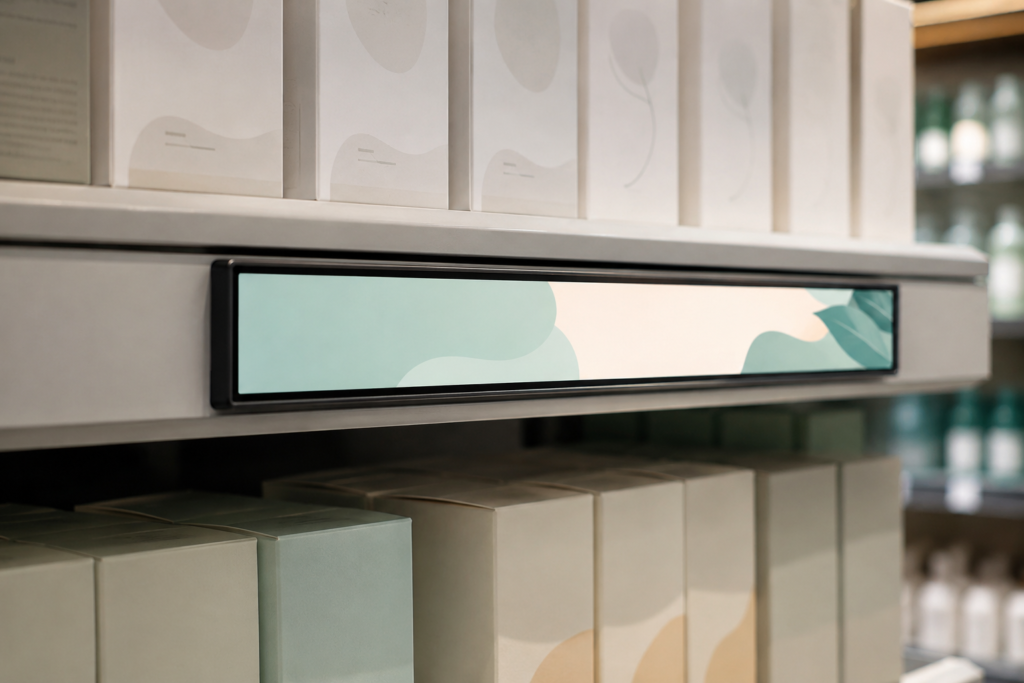
バータイプディスプレイは、棚端プロモーション、機器ヘッダー、交通情報、案内メッセージ、またはコンパクトな広告ストリップにとって、より効率的な選択肢となる場合がある。正方形ディスプレイは、部屋コントローラーやカウンタートップ製品に適合する場合がある。従来の横長ディスプレイは、インターフェースに長いテキスト、複数のメニュー項目、またはビデオが含まれる場合に適切であり続ける。.
節約は、アクティブ表示領域を情報アーキテクチャに一致させることから生まれる。画面形状は純粋に新規性のために選択すべきではないが、適切な非標準アスペクト比は未使用領域を排除し、デバイス全体のサイズ削減に貢献できる。.
棚板用および狭幅パネルシステムの開発者は、RJYの バー型LCDディスプレイオプションを検討できます および 6.9インチバー型TFT LCDモジュール これらはコンパクトな表示フォーマットの例です。.
仕様表において高解像度は魅力的ですが、完成品において自動的に価値が高まるわけではありません。有効な解像度は、画面サイズ、視聴距離、コンテンツ設計、および視覚的詳細に依存します。.
解像度の向上はLCD価格以上の影響を及ぼす可能性があります。追加のグラフィックス処理能力、メモリ帯域幅、ストレージ、ソフトウェア最適化、および電力を必要とする場合があります。また、プロジェクトで利用可能なコントローラーボードの選択肢が減少する可能性もあります。.
ディスプレイが主に大きな数字、アイコン、ロゴ、または短いメッセージを表示する場合、インターフェースは極めて高いピクセル密度から恩恵を受けない可能性があります。より良いアプローチは、意図した視聴距離で代表的なコンテンツをテストし、システムに過負荷をかけずにインターフェースを明確に保つ解像度を選択することです。.
RJYのガイド LCD解像度、ピクセル、およびアスペクト比 では、解像度を品質の独立した指標として扱うのではなく、これらの要素をまとめて評価すべき理由を説明しています。.
輝度もまた、過剰仕様がハードウェアコストを引き上げる可能性がある領域です。管理された小売照明下に設置される屋内サインは、強い日光にさらされる画面と同じバックライト設計を必ずしも必要としません。.
高輝度構成は、バックライト、電源、熱管理、および筐体に影響を及ぼす可能性があります。実際の環境を評価せずに輝度目標を選択すると、部品コストとエンジニアリング作業の両方が増加する可能性があります。.
同時に、輝度の過小仕様は見せかけの節約です。設置場所で読み取れないディスプレイは、交換または再配置が必要になる場合があります。.
可能な場合は、設置サイトの写真または照明情報を提供してください。カバーガラスからの反射、ディスプレイ角度、視聴距離、および日光が画面に直接到達するかどうかを考慮してください。輝度はマーケティング上の数値ではなく、環境要件として扱うべきです。.
タッチ機能は、デジタルサイネージを案内板、注文端末、製品セレクター、またはサービスインターフェースに変えることができます。しかし、顧客がメッセージを読むかコンテンツを視聴するだけであれば、タッチスクリーンは不要です。.
タッチを追加すると、センサー、カバーガラス、タッチコントローラー、ボンディング、ケーブリング、ソフトウェア、および検証にかかるコストが発生する可能性があります。筐体も、公衆による繰り返しの操作や清掃に対応する必要がある場合があります。.
タッチを追加する前に、ユーザーが完了しなければならない正確な操作を特定してください。アプリケーションが時折の技術者アクセスのみを必要とする場合、隠しサービスボタンまたはリモート管理ワークフローの方が経済的である可能性があります。顧客が製品を閲覧したり選択したりする場合、タッチは物理ボタンを置き換え、設定可能なインターフェースを可能にすることで、そのコストを正当化できる可能性があります。.
インタラクティブプロジェクトでは、LCD、タッチセンサー、カバーガラス、コントローラー、およびオペレーティングシステムを一つの構成として検討する必要があります。最終的な動作は、一般的なタッチスクリーン仕様から推定するのではなく、実際のアセンブリで検証する必要があります。.
高性能なAndroidコントローラーボードは、ビデオ、ネットワーキング、アプリケーションソフトウェア、および高度なインターフェースをサポートできます。しかし、すべてのサイネージにとって自動的に最も経済的な選択肢であるとは限りません。.
固定された情報シーケンスを繰り返すシンプルなディスプレイは、接続されたタッチスクリーン端末よりも少ない処理リソースを必要とする場合があります。逆に、処理能力が不十分なコントローラーは、再生の問題、操作の遅延、または追加のソフトウェア開発作業を引き起こす可能性があります。.
ボードを選択する前に必要なワークロードを定義してください:
製品ロードマップが要求する場合は妥当な性能余裕を購入してください。ただし、アプリケーションが使用する計画のないインターフェースや処理能力に費用を支払うことは避けてください。.
コントローラーボードの互換性は、コネクタの外観だけで判断することはできません。パネルモデル、解像度、ディスプレイインターフェース、ピン定義、タイミング、バックライト、タッチ経路、ファームウェア、および動作環境を確認する必要があります。 TFT LCDとAndroidコントローラーボードのマッチングガイド このレビューに必要な情報をリストに示します。.
追加のインターフェース層はそれぞれ、購入、取り付け、電源供給、およびテストの対象を増やします。また、輸送中や現場サービス中に緩む可能性のある別のコネクタを生み出す可能性もあります。.
初期プロトタイプでは、アダプタを使用することがコンセプトを実証する最速の方法である場合があります。量産システムでは、チームはホストとLCDをよりクリーンでプロジェクト固有のアーキテクチャで接続できるかどうかを判断する必要があります。.
最もリスクの低い構成は、選択したパネルとホストに依存します。MIPI、LVDS、eDP、HDMI、およびその他のディスプレイインターフェースは、アダプタが存在する場合でも互換性がありません。コントローラーボードの経路は、実際のLCD情報が利用可能になった後にのみ確認すべきです。.
RJYは、プロジェクトベースでHDMI-to-MIPIおよびその他のコントローラー構成をレビューできます。 HDMI-to-MIPI互換性ガイド パネルドキュメント、バックライト要件、およびファームウェアがボード承認前に評価されなければならない理由を説明しています。.
完全に新しいパネルサイズは、独自のデジタルサイネージ製品を実現する最良の方法のように聞こえるかもしれません。多くのコンパクトプロジェクトでは、回避可能な開発コスト、数量要件、および技術的リスクも導入します。.
より実用的な方法は、既存のLCDモジュールを選択し、周囲のアセンブリをカスタマイズすることであることが多いです。モジュールとプロジェクトに応じて、これには以下が含まれる場合があります:
この戦略は、すべての製品に新しいLCDセルやパネル形状が必要であるという前提を避けながら、特徴的な前面パネルの外観を維持します。また、初期サンプルを意図した量産設計により忠実にすることもできます。.
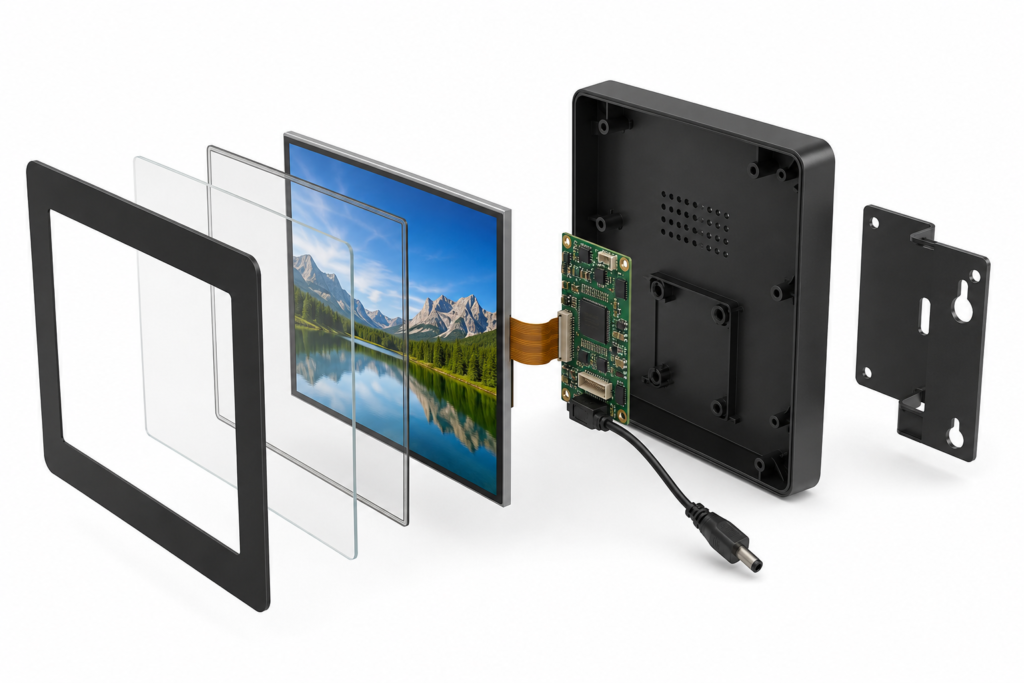
複数のサイネージフォーマットを運営する企業は、複数の製品バリエーションに対して1つのディスプレイおよびコントローラーアーキテクチャを使用できる場合があります。ブランディング、コンテンツ、およびインターフェース動作は、ソフトウェアまたはカバーガラス設計を通じて変更できます。.
標準化により、組織が管理しなければならないスペアパーツ、技術文書、ケーブル、およびファームウェアバージョンの数を削減できます。設置業者も1つの内部アーキテクチャに精通するようになります。.
これは、1つの画面をすべての筐体に強制することを意味しません。標準化は、視聴要件、コンテンツワークロード、および環境条件が類似している場合に最も効果的に機能します。店舗では、複数のカウンタートップディスプレイに1つのハードウェアプラットフォームを使用しながら、狭い棚端ユニットには別のプラットフォームを維持する場合があります。.
節約は、単一部品の大口注文だけでなく、調達、開発、展開、および保守全体で測定されるべきです。.
取り付けポイントへのアクセスが困難な場合、ケーブルの出口方向が不適切な場合、または一般的なサービス接続にアクセスするために筐体を取り外す必要がある場合、コンパクトな標識でも設置コストが高くなる可能性があります。.
機械設計を確定する前に設置環境を確認してください。以下を確認します:
各設置で数分節約できることは、複数拠点への展開において重要です。さらに重要なのは、適切なサービスアクセスにより、部品交換時に技術者が無関係なコンポーネントを損傷することを防げる点です。.
| 決定 | よくある誤った節約 | コスト管理型アプローチ |
|---|---|---|
| ディスプレイサイズ | コンテンツに必要なサイズより大きな画面を購入する | アクティブエリアとアスペクト比をメッセージに合わせる |
| 決議 | 利用可能な最高値を選択する | 意図した視聴距離で実際のコンテンツをテストする |
| 明るさ | すべての設置に屋外用ターゲットを使用する | 周囲光、反射、視野角を評価する |
| タッチ | 明確なユーザー操作なしにタッチ機能を追加する | 操作が測定可能な製品価値を生み出す場合にのみ追加する |
| コントローラー | 最大性能を購入する、またはコネクタだけで選択する | 処理能力、インターフェース、ファームウェアをワークロードに合わせる |
| カスタム設計 | 完全に新しいLCDパネルが必要だと想定する | 適切な既存モジュールを中心にカスタマイズする |
| インターフェース | 生産設計に複数のアダプタを積み重ねる | パネルとホスト間のアーキテクチャを早期に検討する |
| メンテナンス | 設置までアクセスを無視する | 取り付け、配線、交換手順を事前に設計する |
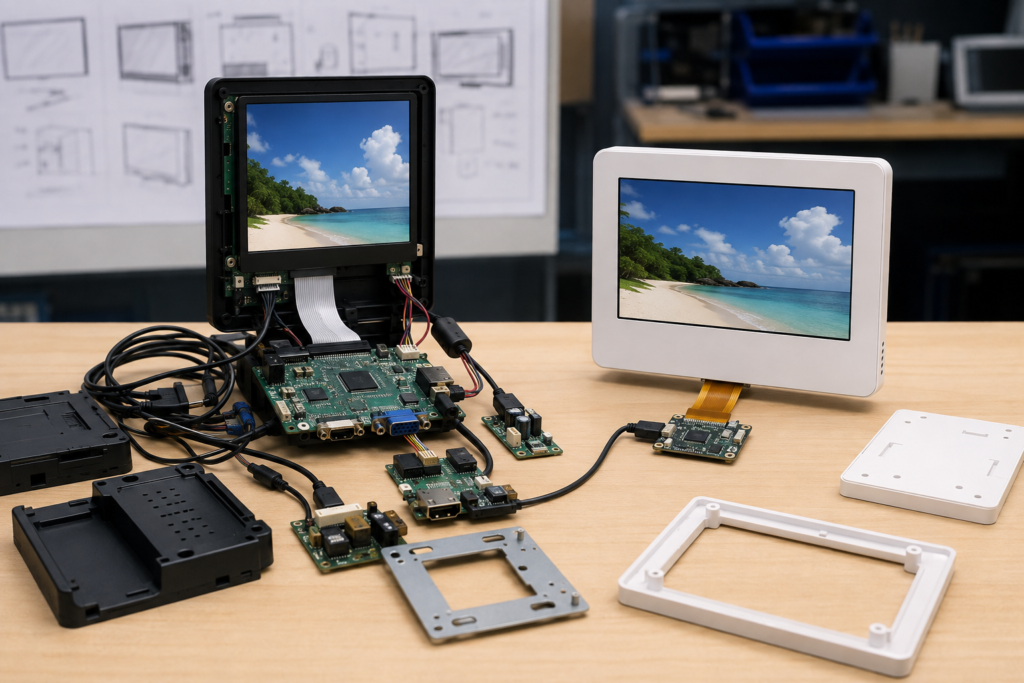
コスト最適化は必ずしも機能の削除を意味しません。検証済みの要件を解決する場合、一部の投資はライフサイクルコストを削減できます。.
周囲光によってメッセージが読めなくなる環境では、高輝度バックライトが正当化される場合があります。耐久性のある前面カバーは、公共環境での損傷を軽減できます。将来のソフトウェア機能がすでに製品ロードマップに含まれている場合、追加のコントローラ性能は価値があるかもしれません。ファームウェアの調整により、LCDタイミングとホストプラットフォーム間の高コストな不整合を防ぐことができます。.
その違いはエビデンスです。アプリケーション、テスト結果、または展開計画が決定を裏付ける場合にのみ、より多く支出してください。比較表で見栄えが良くなるという理由だけで仕様を追加することは避けてください。.
有用な比較には、LCDとコントローラーボードの価格だけでなく、コンポーネント、開発、設置、保守をカバーする単純な総コストモデルを含めるべきです。.
各候補アーキテクチャについて、以下を比較します:
この作業により、最も経済的なシステムは、部品点数が少なく、互換性が明確で、設置が容易なシステムであることがしばしば明らかになります。必ずしも最も安価な個別画面を含むシステムではありません。.
RJY Displayは、組み込みデジタルサイネージプロジェクト向けに、コンパクトなTFT LCDモジュール、タッチアセンブリ、コントローラーボードのオプションを検討する機器開発者を支援できます。コントローラーボードの適合は、解像度、インターフェース、ファームウェア、およびプロジェクト全体の要件に応じて、約1.28インチから15.6インチまでの選択されたディスプレイで利用可能です。.
サポートには、既存の TFT LCDモジュール選定, カバーガラス、タッチスクリーン、バックライト、FPC、インターフェース、コントローラーボード、ファームウェア、およびディスプレイ関連の機械的調整が含まれる場合があります。顧客がシステムアーキテクチャの一部をすでに保有している場合は、LCDモジュールとコントローラーボードを個別に検討することもできます。.
互換性とカスタマイズの範囲は、実際のパネルとプロジェクト情報に基づいて確認する必要があります。RJYは、1つのコントローラーボードがすべてのLCDと普遍的に互換性があるとは見なしておらず、カスタマイズに完全に新しいLCDサイズの無制限な開発が含まれると想定すべきではありません。.
技術的に意味のある提案を受け取るには、以下を提供してください:
完全なブリーフがあれば、設計段階に入る前に不要なハードウェアを排除しやすくなります。また、修正コストが低いうちに互換性の問題を特定するのにも役立ちます。.
デジタルサイネージのハードウェアでコストを削減する最も確実な方法は、すべてのコンポーネントに明確な目的を持たせることです。コンテンツに合った画面形状、視聴者が恩恵を受けられる解像度、環境に適した輝度レベル、実際のワークロードに対応できるコントローラーを選択してください。.
その上で、接続経路を簡素化し、既存モジュールをベースにカスタマイズし、生産前に設置計画を立ててください。これらの判断により、部品表コストを削減できるだけでなく、開発期間、現場での問題、再設計リスクも低減できます。.
コンパクトな小売用サイネージ、棚ディスプレイ、カウンタートップ端末、組み込み型業務用ディスプレイを開発中の場合は、以下をご確認ください。 RJYカスタムディスプレイソリューション または RJYにお問い合わせください LCD、コントローラーボード、タッチ、機構に関する要件を添えて、技術レビューをご依頼ください。.
まず、コンテンツ、視聴環境、必要な操作を定義してください。その上で、そのアプリケーションに必要な表示サイズ、解像度、輝度、タッチ機能、コントローラーの性能のみを選択します。不要なコンポーネントを削減し、再設計を回避することは、最も安価な個別画面を選ぶことよりも価値がある場合があります。.
いいえ。適切なコントローラーは、ビデオ解像度、インターフェースの複雑さ、ネットワーキング、タッチ、ソフトウェア、将来の機能によって異なります。単純な情報表示には少ないリソースで十分な場合がありますが、対話型の接続端末にはより高性能なAndroidプラットフォームが適している場合があります。.
いいえ。その利点は、画面サイズ、コンテンツの詳細度、視聴距離によって異なります。解像度が高いと、処理、帯域幅、消費電力の要件も増加する可能性があります。解像度を確定する前に、代表的なコンテンツでテストを行う必要があります。.
可能性はあります。コンテンツ、性能、環境要件が類似した製品は、異なるソフトウェア、カバーガラス、筐体を使用しながら、LCDとコントローラーのアーキテクチャを共有できる場合があります。ただし、各構成は意図した設置環境で検証される必要があります。.
RJYは、パネル、解像度、インターフェース、ピン定義、バックライト、タッチ、ファームウェア、動作環境の要件を受け取った後、適合するLCDおよびコントローラーボードのソリューションをレビューできます。LCDモジュールとコントローラーボードは個別にご相談いただくことも可能です。.
ディスプレイサイズ、解像度、インターフェース、輝度、タッチ要件、コントローラーボード要件、およびアプリケーション環境を共有してください。.
関連するディスプレイ技術ガイドとアプリケーションリファレンスを引き続きお読みください。.
RJYのエンジニアリングチームにご相談いただき、ディスプレイマッチング、コントローラーボードの確認、およびカスタマイズについて話し合ってください。.