Stehen Sie bei Ihrem Embedded-Display-Projekt vor einer Herausforderung?
Lassen Sie nicht komplexe Integration oder Lieferkettenprobleme Ihre Markteinführung verzögern. Vereinbaren Sie eine kostenlose Beratung mit dem RJY-Expertenteam für maßgeschneiderte Design- und Fertigungsunterstützung.
So sparen Sie Geld bei Digital-Signage-Hardware, ohne das falsche System zu kaufen
Veröffentlicht:
13 Minuten Lesezeit
Aktualisiert:
Der Versuch, bei Digital-Signage-Hardware Geld zu sparen, muss nicht bedeuten, das preisgünstigste LCD, den günstigsten Prozessor oder das billigste Gehäuse zu wählen. In vielen Projekten entstehen die größten vermeidbaren Kosten durch den Kauf von Spezifikationen, die die Anwendung nicht nutzen kann, durch die Kombination inkompatibler Komponenten oder durch die Entdeckung von Installationsproblemen, nachdem das Hardwaredesign bereits freigegeben wurde.
Ein kostengesteuertes Digital-Signage-System beginnt mit einem klaren Verständnis der Inhalte, der Betrachtungsumgebung und des Betriebsablaufs. Sobald diese Anforderungen definiert sind, können Entwickler ein Display, eine Controller-Platine, eine Touch-Lösung und eine mechanische Struktur auswählen, die für die Aufgabe ausreichend sind, ohne unnötig komplex zu sein.
Dieser Leitfaden konzentriert sich auf kompaktes und eingebettetes Digital Signage, einschließlich Regaldisplays, Informationsterminals für Theken, Raumstatusanzeigen, Verkaufsautomaten-Displays, geräteintegrierte Werbebildschirme und andere kleine kommerzielle Anzeigesysteme. Großformatige kommerzielle Fernseher und Außen-LED-Werbetafeln erfordern eine andere Beschaffungsstrategie.
Die günstigste Digital-Signage-Hardware ist nicht immer die kostengünstigste Wahl
Der Stückpreis ist sofort sichtbar. Die Integrationskosten sind es nicht.
Ein preisgünstiges Display scheint die Materialkosten zu senken, aber die Ersparnis kann verschwinden, wenn das Entwicklungsteam später eine zusätzliche Konvertierungsplatine, ein anderes Kabel, ein überarbeitetes Gehäuse oder neue Firmware benötigt. Ähnliche Probleme treten auf, wenn eine Controller-Platine ausgewählt wird, bevor die LCD-Schnittstelle und die Pin-Definition bestätigt sind.
Das tatsächliche Hardwarebudget kann Folgendes umfassen:
LCD-Modul und Hintergrundbeleuchtung
Touchscreen und Abdeckglas
Controller-Platine oder eingebetteter Host
Schnittstellenadapter, FPCs und Kabel
Netzteil und interne Verkabelung
Gehäuse, Montagehardware und Werkzeuge
Firmware- und Betriebssystemintegration
Prototyp-Überarbeitungen und Zertifizierungsarbeiten
Installationsarbeit, Ersatzteile und Servicebesuche
Bei einer Komponente zu sparen, während drei andere Kostenkategorien steigen, ist keine effektive Kostenreduzierung. Das Ziel sollte sein, das Gesamtsystem zu vereinfachen und die Möglichkeit einer Neukonstruktion zu reduzieren.
1. Definieren Sie, was das Schild anzeigen muss, bevor Sie Hardware auswählen
Der Inhalt bestimmt die Hardware. Ein Regaldisplay, das Preise und einfache Werbegrafiken zeigt, hat nicht dieselben Anforderungen wie ein Touchscreen-Verzeichnis, das hochauflösende Videos abspielt und Live-Daten abruft.
Bevor Sie Angebote anfordern, definieren Sie:
Ob der Inhalt statisch, animiert oder videobasiert ist
Die erwartete Betrachtungsdistanz
Wie oft sich der Inhalt ändert
Ob der Bildschirm unabhängig arbeitet oder mit einem Netzwerk verbunden ist
Ob Benutzer ihn berühren oder anderweitig mit ihm interagieren müssen
Die Anzahl und Art der erforderlichen externen Schnittstellen
Der physische Platz, der für LCD, Controller und Kabel verfügbar ist
Diese Informationen verhindern, dass Anbieter ein unnötig leistungsstarkes System anbieten, nur weil der tatsächliche Anwendungsfall unklar ist. Sie erleichtern auch den Vergleich konkurrierender Angebote, da jeder Anbieter auf derselben Anwendungsspezifikation basiert.
2. Wählen Sie eine Displayform, die zum Inhalt passt
Unternehmen wählen manchmal ein herkömmliches rechteckiges Display und bauen dann ein großes Gehäuse darum herum, selbst wenn der Inhalt nur einen schmalen Teil des Bildschirms einnimmt. Das kann die LCD-Kosten, die Gehäusegröße, das Versandvolumen und den Installationsraum erhöhen.
Ein Balkendisplay kann für Regalwerbung, Geräteköpfe, Verkehrsinformationen, Richtungsanzeigen oder kompakte Werbestreifen die effizientere Wahl sein. Ein quadratisches Display kann zu einem Raumcontroller oder Thekenprodukt passen. Ein herkömmliches Querformat-Display bleibt geeignet, wenn die Oberfläche längeren Text, mehrere Menüpunkte oder Video enthält.
Die Ersparnis entsteht dadurch, dass der aktive Anzeigebereich an die Informationsarchitektur angepasst wird. Die Bildschirmform sollte nicht rein aus Neuheitsgründen gewählt werden, aber ein geeignetes nicht standardmäßiges Seitenverhältnis kann ungenutzte Fläche eliminieren und dazu beitragen, die Größe des gesamten Geräts zu reduzieren.
3. Zahlen Sie nicht für eine Auflösung, die der Betrachter nicht nutzen kann
Eine höhere Auflösung wirkt in einer Spezifikationstabelle attraktiv, ist aber im Endprodukt nicht automatisch wertvoller. Die nutzbare Auflösung hängt von Bildschirmgröße, Betrachtungsabstand, Content-Design und visuellen Details ab.
Eine Auflösungserhöhung kann mehr als nur den LCD-Preis beeinflussen. Sie kann zusätzliche Grafikverarbeitungskapazität, Speicherbandbreite, Speicherplatz, Softwareoptimierung und Stromversorgung erfordern. Sie kann auch die Anzahl der für das Projekt verfügbaren Controller-Board-Optionen reduzieren.
Wenn ein Display hauptsächlich große Zahlen, Symbole, Logos oder kurze Nachrichten darstellt, profitiert die Schnittstelle möglicherweise nicht von einer extrem hohen Pixeldichte. Der bessere Ansatz besteht darin, repräsentative Inhalte beim vorgesehenen Betrachtungsabstand zu testen und eine Auflösung zu wählen, die die Schnittstelle klar hält, ohne das System zu überlasten.
Der Leitfaden von RJY zu LCD-Auflösung, Pixeln und Seitenverhältnis erläutert, warum diese Faktoren gemeinsam bewertet werden sollten, anstatt die Auflösung als isoliertes Qualitätsmerkmal zu behandeln.
4. Passen Sie die Helligkeit an die Installationsumgebung an
Auch die Helligkeit ist ein Bereich, in dem eine Überspezifikation die Hardwarekosten erhöhen kann. Ein Innenraum-Schild unter kontrollierter Einzelhandelsbeleuchtung benötigt nicht unbedingt dasselbe Hintergrundbeleuchtungsdesign wie ein Bildschirm, der starkem Tageslicht ausgesetzt ist.
Konfigurationen mit höherer Helligkeit können Hintergrundbeleuchtung, Stromversorgung, Wärmemanagement und Gehäuse beeinflussen. Die Wahl eines Helligkeitsziels ohne Bewertung der realen Umgebung kann daher sowohl Komponentenkosten als auch Entwicklungsaufwand erhöhen.
Gleichzeitig ist eine zu geringe Helligkeit eine Scheinökonomie. Ein Display, das am Installationsort nicht lesbar ist, muss möglicherweise ersetzt oder neu positioniert werden.
Stellen Sie nach Möglichkeit Fotos oder Beleuchtungsinformationen vom Installationsort bereit. Berücksichtigen Sie Reflexionen des Abdeckglases, Displaywinkel, Betrachtungsabstand und ob Sonnenlicht den Bildschirm direkt erreicht. Helligkeit sollte als Umweltanforderung behandelt werden, nicht als Marketingzahl.
5. Integrieren Sie Touch nur, wenn es eine wertvolle Aktion unterstützt
Touch kann ein digitales Schild in ein Verzeichnis, Bestellterminal, Produktauswahlgerät oder Serviceinterface verwandeln. Ein Touchscreen ist jedoch unnötig, wenn Kunden nur eine Nachricht lesen oder Inhalte ansehen müssen.
Die Hinzufügung von Touch kann Kosten für Sensor, Abdeckglas, Touch-Controller, Bonding, Verkabelung, Software und Validierung verursachen. Das Gehäuse muss möglicherweise auch wiederholte öffentliche Interaktion und Reinigung unterstützen.
Vor der Hinzufügung von Touch sollte die genaue Aktion identifiziert werden, die der Benutzer ausführen muss. Wenn die Anwendung nur gelegentlichen Technikerzugriff benötigt, können ein versteckter Serviceknopf oder ein Remote-Management-Workflow wirtschaftlicher sein. Wenn Kunden Produkte durchsuchen oder Auswahlen treffen, kann Touch seine Kosten rechtfertigen, indem es physische Tasten ersetzt und eine konfigurierbare Schnittstelle ermöglicht.
Bei interaktiven Projekten sollten LCD, Touch-Sensor, Abdeckglas, Controller und Betriebssystem als eine Konfiguration betrachtet werden. Das endgültige Verhalten sollte mit der tatsächlichen Baugruppe verifiziert werden, anstatt aus einer generischen Touchscreen-Spezifikation abgeleitet zu werden.
6. Wählen Sie die Controller-Platine nach Arbeitslast, nicht nach Ruf
Ein leistungsfähiges Android-Controller-Board kann Video, Netzwerk, Anwendungssoftware und anspruchsvolle Schnittstellen unterstützen. Es ist nicht automatisch die wirtschaftlichste Wahl für jedes Schild.
Ein einfaches Display, das eine feste Informationssequenz wiederholt, benötigt möglicherweise weniger Verarbeitungsressourcen als ein vernetztes Touchscreen-Terminal. Umgekehrt kann ein unterdimensionierter Controller Wiedergabeprobleme, langsame Interaktion oder zusätzliche Softwareentwicklungsarbeit verursachen.
Definieren Sie die erforderliche Arbeitslast, bevor Sie das Board auswählen:
Bild-, Animations- oder Videoformat
Zielwiedergabeauflösung
Touch- und Benutzeroberflächenkomplexität
Netzwerk- und Peripherieanforderungen
Betriebssystem und Anwendungsframework
Speicher- und Aktualisierungsmethode
Erwartete zukünftige Funktionen
Kaufen Sie angemessene Leistungsreserven, wenn die Produkt-Roadmap dies erfordert, vermeiden Sie jedoch die Bezahlung für Schnittstellen und Verarbeitungskapazität, die die Anwendung nicht zu nutzen plant.
Die Kompatibilität des Controller-Boards kann nicht allein anhand des Steckeraussehens bestimmt werden. Panelmodell, Auflösung, Display-Schnittstelle, Pin-Definition, Timing, Hintergrundbeleuchtung, Touch-Pfad, Firmware und Betriebsumgebung müssen geprüft werden. Die Leitfaden zur Abstimmung von TFT-LCD und Android-Controller-Platine listet die für diese Überprüfung benötigten Informationen auf.
7. Reduzieren Sie Adapter, Konvertierungsplatinen und unnötige Kabel
Jede zusätzliche Schnittstellenebene fügt etwas hinzu, das gekauft, montiert, mit Strom versorgt und getestet werden muss. Sie kann auch einen weiteren Stecker erzeugen, der sich während des Transports oder im Feldeinsatz lockern kann.
Für einen frühen Prototyp kann die Verwendung eines Adapters der schnellste Weg sein, ein Konzept zu demonstrieren. Für ein Produktionssystem sollte das Team feststellen, ob Host und LCD über eine sauberere, projektspezifische Architektur verbunden werden können.
Die Konfiguration mit dem geringsten Risiko hängt vom ausgewählten Panel und Host ab. MIPI, LVDS, eDP, HDMI und andere Display-Schnittstellen sind nicht austauschbar, selbst wenn Adapter existieren. Ein Controller-Board-Pfad sollte erst bestätigt werden, wenn die tatsächlichen LCD-Informationen verfügbar sind.
RJY kann HDMI-zu-MIPI- und andere Controller-Konfigurationen projektbezogen prüfen. Die HDMI-zu-MIPI-Kompatibilitätsleitfaden erläutert, warum Panel-Dokumentation, Hintergrundbeleuchtungsanforderungen und Firmware bewertet werden müssen, bevor ein Board genehmigt wird.
8. Starten Sie von einer bestehenden LCD-Plattform
Eine völlig neue Panelgröße klingt möglicherweise nach dem besten Weg, ein einzigartiges digitales Signage-Produkt zu erreichen. In vielen kompakten Projekten führt sie jedoch auch zu vermeidbaren Entwicklungskosten, Mengenanforderungen und technischem Risiko.
Ein praktischerer Weg ist oft die Auswahl eines vorhandenen LCD-Moduls und die Anpassung der umgebenden Baugruppe. Je nach Modul und Projekt kann dies Folgendes umfassen:
Abdeckglasform und bedruckter Rahmen
Touchscreen-Konfiguration
Anforderungen an die Hintergrundbeleuchtung
FPC-Richtung oder Kabelanordnung
Controller-Board-Anpassung
Firmware-Koordination
Displaybezogene Gehäuse- und Montagedetails
Diese Strategie bewahrt ein unverwechselbares Frontpanel-Erscheinungsbild, während sie die Annahme vermeidet, dass jedes Produkt eine neue LCD-Zelle oder Panelgeometrie benötigt. Sie kann auch frühe Muster repräsentativer für das beabsichtigte Produktionsdesign machen.
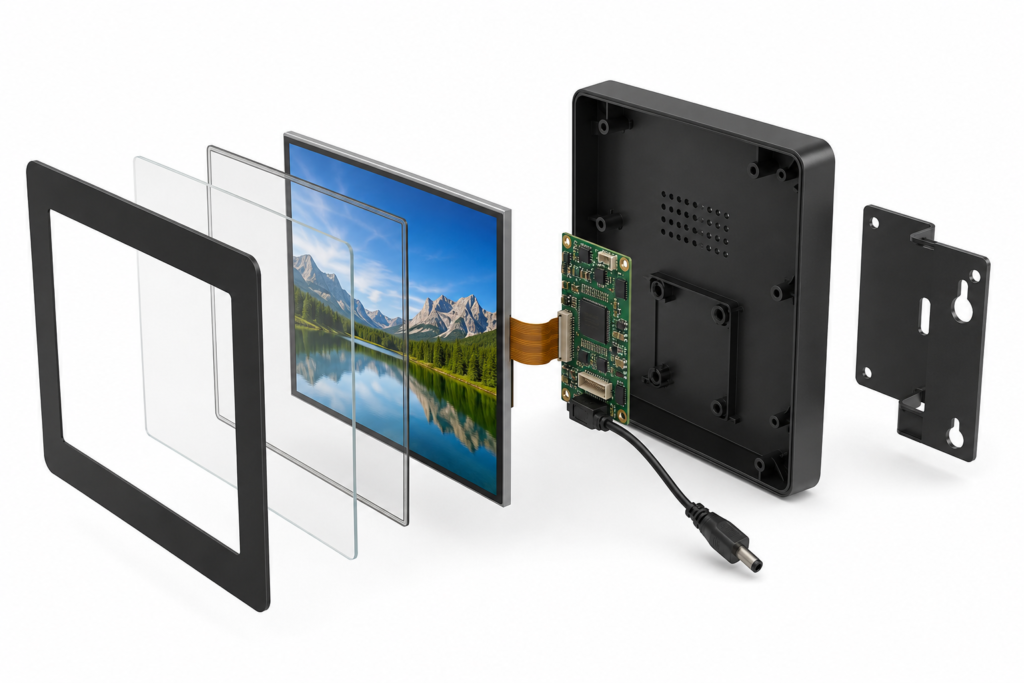
Explosionsdarstellung einer kompakten Digital-Signage-Display- und Controller-Baugruppe
9. Standardisieren Sie die Hardware über mehrere Signage-Produkte hinweg
Ein Unternehmen, das mehrere Signage-Formate betreibt, kann möglicherweise eine Display-und-Controller-Architektur für mehrere Produktvarianten verwenden. Branding, Inhalte und Schnittstellenverhalten können dann per Software oder durch das Abdeckglasdesign geändert werden.
Standardisierung kann die Anzahl der Ersatzteile, technischen Dokumente, Kabel und Firmware-Versionen reduzieren, die das Unternehmen verwalten muss. Installateure werden auch mit einer internen Architektur vertraut.
Dies bedeutet nicht, einen Bildschirm in jedes Gehäuse zu zwingen. Standardisierung funktioniert am besten, wenn Betrachtungsanforderungen, Inhaltsarbeitslast und Umgebungsbedingungen ähnlich sind. Ein Geschäft kann eine Hardwareplattform für mehrere Tischdisplays verwenden, während eine separate Plattform für schmale Shelf-Edge-Einheiten beibehalten wird.
Die Einsparung sollte über Einkauf, Entwicklung, Bereitstellung und Wartung gemessen werden – nicht nur durch eine größere Bestellung einer einzelnen Komponente.
10. Planen Sie Installation und Servicezugang vor der Produktion
Ein kompaktes Schild kann trotzdem teuer in der Installation sein, wenn die Montagepunkte schwer erreichbar sind, die Kabel in die falsche Richtung austreten oder das Gehäuse entfernt werden muss, um einen gemeinsamen Serviceanschluss zu erreichen.
Überprüfen Sie die Installationsumgebung, bevor Sie das mechanische Design festlegen. Bestätigen Sie:
Montageausrichtung und verfügbare Bautiefe
Position des Stromanschlusses
Kabellänge und Biegeradius
Lüftungsanforderungen für die Steuerung
Zugang zu Speicher-, Reset- und Update-Funktionen
Schutz von LCD, FPC und Steckverbindern
Wie ein defektes Gerät entfernt und ersetzt wird
Ein paar Minuten, die bei jeder Installation gespart werden, können bei einem Rollout über mehrere Standorte hinweg eine Rolle spielen. Wichtiger noch: Ein guter Servicezugang kann verhindern, dass Techniker beim Austausch eines Bauteils unzusammenhängende Komponenten beschädigen.
Eine praktische Checkliste für Digital-Signage-Hardwarekosten
Entscheidung
Häufige Scheinersparnis
Kostenkontrollierter Ansatz
Display-Größe
Kauf eines größeren Bildschirms, als der Inhalt erfordert
Aktive Fläche und Seitenverhältnis an die Botschaft anpassen
Auflösung
Wahl des höchsten verfügbaren Werts
Echte Inhalte bei der vorgesehenen Betrachtungsentfernung testen
Helligkeit
Verwendung eines Außenbereichs-Ziels für jede Installation
Umgebungslicht, Reflexionen und Betrachtungswinkel bewerten
Berühren Sie
Hinzufügen von Touch ohne definierte Benutzeraktion
Touch hinzufügen, wenn Interaktion einen messbaren Produktwert schafft
Controller
Kauf maximaler Leistung oder Auswahl allein nach Steckverbinder
Verarbeitung, Schnittstellen und Firmware an die Arbeitslast anpassen
Kundenspezifisches Design
Annahme, dass ein völlig neues LCD-Panel erforderlich ist
Anpassung um ein geeignetes vorhandenes Modul herum
Schnittstellen
Stapeln mehrerer Adapter im Produktionsdesign
Panel-Host-Architektur frühzeitig überprüfen
Wartung
Ignorieren des Zugangs bis zur Installation
Montage, Verkabelung und Austauschverfahren im Voraus planen
Vergleich komplexer und optimierter Digital-Signage-Hardware-Designs
Wenn höhere Anfangsinvestitionen später Geld sparen können
Kostenoptimierung bedeutet nicht immer das Entfernen von Funktionen. Einige Investitionen können die Lebenszykluskosten senken, wenn sie einen verifizierten Anforderungsbedarf lösen.
Eine Hintergrundbeleuchtung mit höherer Helligkeit kann gerechtfertigt sein, wenn Umgebungslicht die Botschaft andernfalls unlesbar machen würde. Eine langlebige Frontabdeckung kann Schäden in öffentlichen Umgebungen reduzieren. Zusätzliche Steuerungsleistung kann sich lohnen, wenn zukünftige Softwarefunktionen bereits Teil der Produkt-Roadmap sind. Firmware-Koordination kann eine kostspielige Diskrepanz zwischen LCD-Timing und Host-Plattform verhindern.
Der Unterschied liegt in der Evidenz. Geben Sie mehr aus, wenn Anwendung, Testergebnis oder Einsatzplan die Entscheidung stützen. Vermeiden Sie das Hinzufügen von Spezifikationen nur, weil sie in einer Vergleichstabelle stärker wirken.
Berechnen Sie die Gesamthardwarekosten, bevor Sie das Design freigeben
Ein sinnvoller Vergleich sollte mehr umfassen als den Preis von LCD und Steuerungsplatine. Erstellen Sie ein einfaches Gesamtkostenmodell, das Komponenten, Entwicklung, Installation und Wartung abdeckt.
Vergleichen Sie für jede Kandidatenarchitektur:
Kosten für Display, Touch und Abdeckglas
Kosten für Steuerung, Stromversorgung und Kabel
Kosten für Gehäuse, Werkzeuge und Montage
Aufwand für Firmware und Anwendungsintegration
Anforderungen an Prototyp und Validierung
Installationszeit pro Standort
Empfohlene Strategie für Ersatzgeräte
Erwarteter Service- und Austauschprozess
Diese Übung zeigt oft, dass das wirtschaftlichste System dasjenige mit weniger Teilen, klarerer Kompatibilität und einfacherer Installation ist – nicht unbedingt das System mit dem günstigsten Einzelbildschirm.
Wie RJY kostengesteuertes kompaktes Digital Signage unterstützt
RJY Display kann Geräteentwickler bei der Überprüfung kompakter TFT-LCD-Module, Touch-Baugruppen und Steuerungsplatinen-Optionen für eingebettete Digital-Signage-Projekte unterstützen. Eine Anpassung der Steuerungsplatine ist für ausgewählte Displays von ca. 1,28 bis 15,6 Zoll verfügbar, abhängig von Auflösung, Schnittstelle, Firmware und den vollständigen Projektanforderungen.
Der Support kann vorhandene Auswahl des TFT-LCD-Moduls, Abdeckgläser, Touchscreens, Hintergrundbeleuchtung, FPC, Schnittstellen, Steuerungsplatinen, Firmware und displaybezogene mechanische Koordination umfassen. LCD-Module und Steuerungsplatinen können auch separat besprochen werden, wenn der Kunde bereits Teile der Systemarchitektur besitzt.
Kompatibilität und Anpassungsumfang müssen anhand der tatsächlichen Panel- und Projektinformationen bestätigt werden. RJY behandelt keine Steuerungsplatine als universell mit jedem LCD kompatibel, und eine Anpassung sollte nicht als uneingeschränkte Entwicklung einer völlig neuen LCD-Größe angenommen werden.
Informationen, die in Ihre Digital-Signage-Anfrage aufzunehmen sind
Um ein technisch aussagekräftiges Angebot zu erhalten, geben Sie Folgendes an:
Anwendungs- und Installationsumgebung
Zielanzeigegröße, -form und -auflösung
Inhaltstyp und Betrachtungsabstand
Helligkeits- und Blickwinkelerwartungen
Touchscreen- und Abdeckglas-Anforderungen
Host-Plattform, Betriebssystem und Display-Schnittstelle
Panel-Datenblatt oder Referenzmodell, falls bereits ausgewählt
FPC-, Steckverbinder- und Gehäusebeschränkungen
Anforderungen an Controller-Platine und Firmware
Prototypenstückzahl, geschätzter Jahresbedarf und Zeitplan
Ein vollständiges Pflichtenheft erleichtert die Entfernung unnötiger Hardware, bevor sie in das Design einfließt. Es hilft auch, Kompatibilitätsprobleme zu identifizieren, solange deren Behebung noch kostengünstig ist.
Kosteneffiziente Balken-LCD-Digital Signage, integriert in ein Einzelhandelsregal
Bauen Sie ein kostengünstigeres Signage-System, nicht nur einen billigeren Bildschirm
Der zuverlässigste Weg, bei Digital-Signage-Hardware Geld zu sparen, besteht darin, jede Komponente einem definierten Zweck zuzuordnen. Wählen Sie eine Bildschirmform, die zum Inhalt passt, eine Auflösung, von der der Betrachter profitiert, eine Helligkeitsstufe, die der Umgebung entspricht, und einen Controller, der die tatsächliche Arbeitslast bewältigen kann.
Vereinfachen Sie dann den Verbindungspfad, passen Sie ein bestehendes Modul individuell an und planen Sie die Installation vor der Produktion. Diese Entscheidungen können die Materialkosten senken und gleichzeitig Entwicklungszeit, Feldprobleme und das Risiko von Neukonstruktionen reduzieren.
Wenn Sie ein kompaktes Einzelhandelsschild, eine Regalanzeige, ein Thekenterminal oder ein eingebettetes kommerzielles Display entwickeln, erkunden Sie RJY kundenspezifische Display-Lösungen oder kontaktieren Sie RJY mit Ihren LCD-, Controller-Platinen-, Touch- und mechanischen Anforderungen für eine technische Prüfung.
Häufig gestellte Fragen
Was ist der beste Weg, um bei Digital-Signage-Hardware Geld zu sparen?
Beginnen Sie mit der Definition von Inhalt, Betrachtungsumgebung und erforderlicher Interaktion. Wählen Sie dann nur die Displaygröße, Auflösung, Helligkeit, Touch-Fähigkeit und Controller-Leistung aus, die für diese Anwendung erforderlich sind. Die Reduzierung unnötiger Komponenten und die Vermeidung von Neukonstruktionen können wertvoller sein als die Auswahl des günstigsten Einzelbildschirms.
Benötigt jedes digitale Schild ein leistungsstarkes Android-Board?
Nein. Der geeignete Controller hängt von Videoauflösung, Schnittstellenkomplexität, Netzwerk, Touch, Software und zukünftigen Funktionen ab. Eine einfache Informationsanzeige benötigt möglicherweise weniger Ressourcen, während ein interaktives vernetztes Terminal eine leistungsfähigere Android-Plattform rechtfertigen kann.
Ist eine höhere LCD-Auflösung den zusätzlichen Kosten immer wert?
Nein. Der Nutzen hängt von Bildschirmgröße, Inhaltsdetail und Betrachtungsabstand ab. Eine höhere Auflösung kann auch höhere Anforderungen an Verarbeitung, Bandbreite und Stromversorgung stellen. Repräsentative Inhalte sollten getestet werden, bevor die Auflösung festgelegt wird.
Kann eine Hardware-Plattform mehrere Signage-Designs unterstützen?
Möglicherweise. Produkte mit ähnlichen Anforderungen an Inhalt, Leistung und Umgebung können eine gemeinsame LCD- und Controller-Architektur nutzen, während sie unterschiedliche Software, Abdeckgläser oder Gehäuse verwenden. Jede Konfiguration sollte dennoch für ihre vorgesehene Installation validiert werden.
Kann RJY ein LCD und eine Controller-Platine gemeinsam bereitstellen?
RJY kann eine abgestimmte Lösung aus LCD und Controller-Platine prüfen, nachdem die Anforderungen an Panel, Auflösung, Schnittstelle, Pin-Definition, Hintergrundbeleuchtung, Touch, Firmware und Betriebsumgebung eingegangen sind. LCD-Module und Controller-Platinen können auch separat besprochen werden.
↗
Planen Sie ein Display-Projekt?
Teilen Sie Ihre Display-Größe, Auflösung, Schnittstelle, Helligkeit, Touch-Anforderung, Controllerplatinen-Anforderung und Anwendungsumgebung mit.